
1. Arahan Keselamatan Penting
Baca semua amaran keselamatan, arahan, ilustrasi dan spesifikasi yang disediakan dengan alat kuasa ini. Kegagalan mematuhi semua arahan yang disenaraikan di bawah boleh mengakibatkan renjatan elektrik, kebakaran dan/atau kecederaan serius.
- Keselamatan Kawasan Kerja: Pastikan kawasan kerja bersih dan terang. Jangan kendalikan alatan kuasa dalam atmosfera yang mudah meletup, seperti di hadapan cecair mudah terbakar, gas atau habuk.
- Keselamatan Elektrik: Palam alat kuasa mesti sepadan dengan alur keluar. Jangan sekali-kali mengubah suai palam dalam apa jua cara. Jangan menyalahgunakan kord. Jauhkan kord daripada haba, minyak, tepi tajam atau bahagian yang bergerak.
- Keselamatan Diri: Always wear eye protection, hearing protection, and a dust mask. Dress properly; avoid loose clothing or jewelry. Secure workpiece before operating.
- Penggunaan dan Penjagaan Alat Kuasa: Jangan paksa alat kuasa. Gunakan alat kuasa yang betul untuk aplikasi anda. Putuskan sambungan palam daripada sumber kuasa sebelum membuat sebarang pelarasan, menukar aksesori atau menyimpan alatan kuasa.
- Planer Specific Safety:
- Tunggu pemotong berhenti sebelum meletakkan alat ke bawah.
- Never reach into the chip ejection port while the tool is running.
- Ensure the workpiece is free of nails, screws, or other foreign objects before planing.
- Always hold the planer firmly with both hands during operation.
2. Produk Lebihview
The Einhell BT-PL 750 Electric Planer is designed for planing wood surfaces. Familiarize yourself with its components before operation.
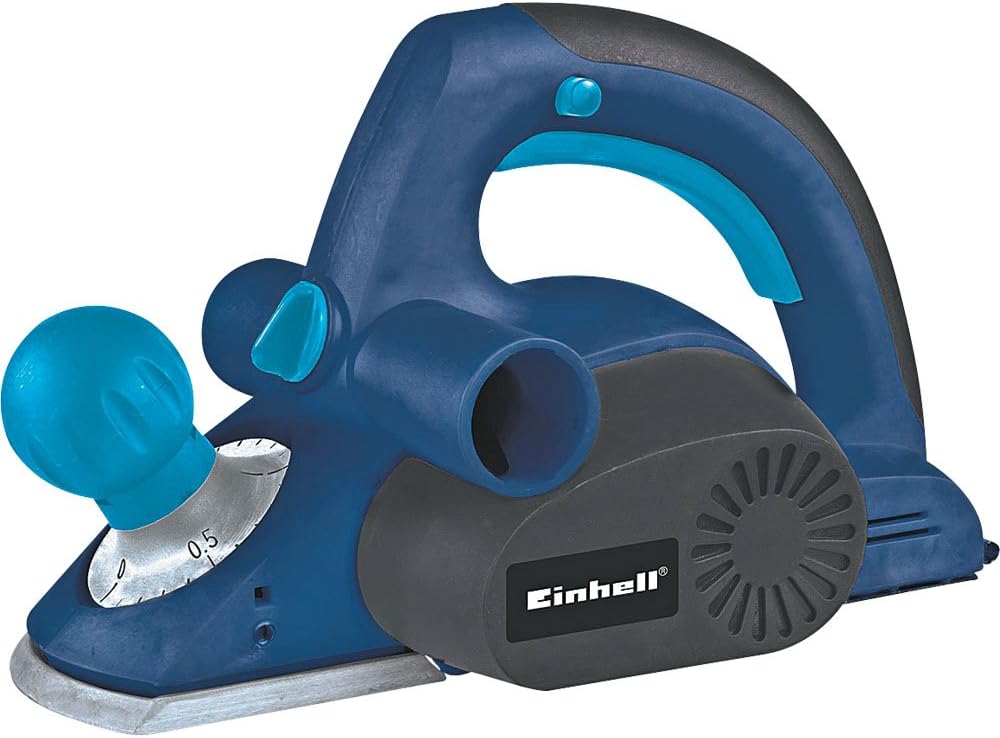
Rajah 2.1: Secara keseluruhan view of the Einhell BT-PL 750 Electric Planer. This image shows the main body, handles, and base plate of the tool.
- Front Handle/Depth Adjustment Knob: Used for guiding the tool and setting the planing depth.
- Rear Handle/Switch: Main grip for operation, contains the power switch.
- Plat asas: The flat surface that rests on the workpiece.
- Cutter Drum: Houses the planing blades.
- Chip Ejection Port: Where wood chips are expelled.
- Dust Bag/Vacuum Connection: Untuk menyambungkan sistem pengumpulan habuk.

Figure 2.2: Detail of the front handle and depth adjustment knob, showing the scale for setting planing depth.

Rajah 2.3: Jarak dekat view of the chip ejection port and the Einhell brand logo on the motor housing.
3. Persediaan
3.1 Membongkar
Carefully remove the planer and all accessories from the packaging. Inspect the tool for any damage that may have occurred during transit. Do not operate a damaged tool.
3.2 Blade Installation/Adjustment (if applicable)
The planer blades are factory-installed. If replacement is necessary, refer to the Maintenance section. Ensure blades are sharp and correctly seated before use.
3.3 Pengumpulan Habuk
For a cleaner work environment and improved visibility, connect a dust bag or a suitable vacuum cleaner to the chip ejection port. Ensure the connection is secure to prevent dust leakage.
3.4 Sambungan Kuasa
Ensure the power switch is in the "OFF" position before plugging the tool into a 127V power outlet. Verify that the voltage of your power supply matches the tool's requirements.
4. Arahan Operasi
4.1 Setting Planing Depth
Rotate the front handle/depth adjustment knob to select the desired planing depth. Start with a shallow depth for initial passes and increase gradually if needed. Refer to Figure 2.2 for knob location.
4.2 Mengamankan Bahan Kerja
Sentiasa ketatkan benda kerja dengan kuat menggunakan clamps or a vise to prevent movement during planing. Unsecured workpieces can lead to injury or damage to the tool and material.
4.3 Teknik Perancangan
- Place the front part of the planer's base plate flat on the workpiece, ensuring the blades are not touching the surface.
- Start the motor by pressing the power switch. Allow the motor to reach full speed before engaging the blades with the wood.
- Apply even pressure and move the planer smoothly and consistently across the workpiece. Maintain a steady feed rate.
- At the end of the pass, ensure the entire base plate is supported by the workpiece before lifting the tool.
- For best results, plane with the grain of the wood.
4.4 Keselamatan Semasa Operasi
Never attempt to clear chips from the ejection port while the tool is running. Always disconnect the power before clearing any blockages or making adjustments.
5. Penyelenggaraan
Regular maintenance ensures the longevity and safe operation of your Einhell BT-PL 750 Electric Planer. Always disconnect the tool from the power supply before performing any maintenance.
5.1 Pembersihan
After each use, clean the tool thoroughly. Remove wood chips and dust from the base plate, chip ejection port, and motor vents using a brush or compressed air. Do not use solvents or abrasive cleaners.
5.2 Blade Replacement/Sharpening
Dull or damaged blades will affect planing quality and can strain the motor. Replace blades when they become dull. Refer to your tool's specific instructions for blade replacement procedures. Always use genuine Einhell replacement blades.
5.3 Carbon Brush Inspection
Periodically inspect the carbon brushes for wear. Worn carbon brushes can lead to reduced performance or motor failure. Replace both brushes simultaneously if one is worn down to its limit mark. This procedure should ideally be performed by a qualified technician.
5.4 Penyimpanan
Store the planer in a dry, secure location, out of reach of children. Protect the blades from damage during storage.
6. Penyelesaian masalah
This section addresses common issues you might encounter with your electric planer. For problems not listed here, contact customer support.
| Masalah | Kemungkinan Punca | Penyelesaian |
|---|---|---|
| Planer does not start. | Tiada bekalan kuasa; suis rosak; berus karbon yang dipakai. | Check power connection and outlet. Ensure switch is fully engaged. Inspect and replace carbon brushes if necessary. |
| Poor planing finish (rough surface, chatter marks). | Dull or damaged blades; incorrect planing depth; uneven feed rate. | Replace or sharpen blades. Reduce planing depth. Maintain a consistent, smooth feed rate. |
| Getaran atau bunyi yang berlebihan. | Unbalanced blades; loose components; worn bearings. | Check blades for damage or improper installation. Tighten any loose screws. If problem persists, seek professional service. |
| Chips not ejecting properly. | Clogged chip ejection port; full dust bag. | Disconnect power, then clear the chip ejection port. Empty the dust bag or vacuum container. |
7. Spesifikasi
Technical data for the Einhell BT-PL 750 Electric Planer.
| Ciri | Nilai |
|---|---|
| Nombor Model | BT-PL 750 |
| Jenama | Einhell |
| Input Kuasa | 750 Watt |
| Voltage | 127V |
| Berat Produk | 2430 Gram (lebih kurang 5.36 paun) |
| Pengeluar | Einhell Germany |
8. Waranti dan Sokongan
Einhell products are manufactured to high-quality standards and undergo strict quality controls. This product is covered by a manufacturer's warranty in accordance with country-specific regulations.
Please retain your proof of purchase for warranty claims. For service, repairs, or technical support, please contact your local Einhell service center or authorized dealer. Do not attempt to repair the tool yourself, as this may void the warranty and pose safety risks.

Figure 8.1: Einhell Germany quality seal, indicating tested and inspected quality.