
AUNA AV2-CD509
Manual Pengguna Pemain CD HiFi AUNA AV2-CD509
Model: AV2-CD509 | Brand: AUNA
pengenalan
Thank you for choosing the AUNA AV2-CD509 HiFi CD Player. This high-performance audio device is designed to provide exceptional sound quality and versatile playback options for your home audio system. It supports various formats including CD, CD-R, CD-RW, and MP3, and features multiple connectivity options such as USB, optical, coaxial, and RCA outputs. This manual provides essential information for setting up, operating, and maintaining your new CD player. Please read it thoroughly before use to ensure proper functionality and longevity of the device.
Arahan Keselamatan
Untuk memastikan operasi yang selamat dan mengelakkan kerosakan, sila patuhi langkah berjaga-jaga keselamatan berikut:
- Jangan dedahkan peranti kepada hujan atau lembapan.
- Jangan buka casing. Tiada bahagian yang boleh diservis pengguna di dalamnya. Rujuk semua servis kepada kakitangan perkhidmatan yang berkelayakan.
- Pastikan pengudaraan yang betul di sekeliling unit untuk mengelakkan terlalu panas.
- Disconnect the power plug from the wall outlet if the unit will not be used for a long period.
- Jangan letakkan objek berat di atas unit.
- Elakkan meletakkan unit berhampiran sumber haba atau di bawah cahaya matahari langsung.
- Bersihkan unit hanya dengan kain kering dan lembut. Jangan gunakan pembersih cecair.
Produk Selesaiview
Panel Depan
The front panel of the AUNA AV2-CD509 features essential controls and indicators for easy operation.

Rajah 1: Depan view of the AUNA AV2-CD509 HiFi CD Player. This image displays the sleek black brushed stainless steel finish, the central disc loading tray, the digital display, and the various control buttons for playback and source selection. A USB port is visible on the right side of the front panel.
- Butang Sedia: Menghidupkan atau mematikan unit.
- Dulang Cakera: Untuk memasukkan dan mengeluarkan CD.
- paparan: Shows track information, playback status, and other operational details.
- Butang Kawalan: Include Open/Close, Play/Pause, Stop, Next, Previous, and Source selection.
- Input USB: For connecting USB storage devices to play MP3 files.
Panel Belakang
The rear panel provides all the necessary audio output connections for integrating the CD player into your existing audio system.
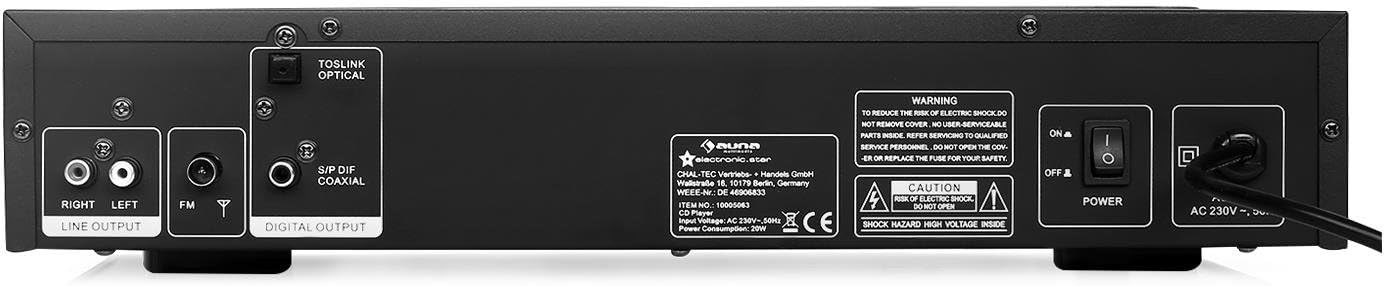
Rajah 2: belakang view of the AUNA AV2-CD509 HiFi CD Player. This image highlights the connectivity options, including RCA stereo line outputs (Right/Left), an FM antenna input, a TOSLINK optical digital output, and a S/PDIF coaxial digital output. The main power switch and AC power input are also visible.
- RCA Line Output (L/R): Standard analog audio output for connecting to an amppenguat atau penerima.
- Optical Audio Output (TOSLINK): Digital audio output for high-quality connection to compatible audio equipment.
- Coaxial Audio Output (S/PDIF): Digital audio output, an alternative to optical for digital connections.
- Input Antena FM: For connecting an FM antenna.
- Suis kuasa: Suis hidup/mati kuasa utama.
- Input Kuasa AC: Untuk menyambungkan kord kuasa.
Alat Kawalan Jauh
The included remote control provides convenient access to all functions of the CD player from a distance.

Rajah 3: Remote control for the AUNA AV2-CD509 HiFi CD Player. The remote features buttons for power (Standby), source selection, disc tray open/close, playback controls (Play/Pause, Stop, Next, Previous), repeat function, numeric keypad for track selection, USB mode, volume control, and mute.
- STANDBY: Hidupkan / matikan.
- SUMBER: Selects input source (e.g., CD, USB).
- BUKA TUTUP: Membuka dan menutup dulang cakera.
- MAIN/JEDA: Memulakan atau menjeda main balik.
- BERHENTI: Menghentikan main balik.
- PREV / SETERUSNYA: Melangkau ke trek sebelumnya atau seterusnya.
- ULANGAN: Mengulang trek semasa atau semua trek.
- USB: Switches to USB playback mode.
- VOL + / VOL-: Adjusts volume of compatible connected AUNA amppengangkat atau penerima.
- MATI: Membisukan output audio.
- Numeric Keypad (0-9, 10+): Direct track selection.
- AB: Repeats a specific section of a track.
Persediaan
Follow these steps to set up your AUNA AV2-CD509 CD Player:
- penempatan: Place the CD player on a stable, flat surface away from direct sunlight, heat sources, and excessive dust or moisture. Ensure adequate ventilation around the unit.
- Sambungan Audio:
- Sambungan Analog (RCA): Connect the RCA Line Output (L/R) on the rear panel of the CD player to the corresponding analog audio input (e.g., "CD IN" or "AUX IN") on your amplampu atau penerima menggunakan kabel RCA.
- Digital Connection (Optical or Coaxial): For higher fidelity, connect either the Optical Audio Output or the Coaxial Audio Output from the CD player to a compatible digital audio input on your amplifier, AV receiver, or DAC. Use a high-quality optical (TOSLINK) or coaxial cable.
- Sambungan Kuasa: Ensure the main power switch on the rear panel is in the "OFF" position. Connect the supplied power cord to the AC Power Input on the rear panel and then plug the other end into a suitable wall outlet (230V, 50Hz).
- Kuasa Awal Hidup: Flip the main power switch on the rear panel to the "ON" position. The unit will enter standby mode. Press the "STANDBY" button on the front panel or remote control to turn the unit on.
Arahan Operasi
Memainkan CD
- Turn on the CD player and your amppenguat/penerima.
- Press the "OPEN/CLOSE" button on the front panel or remote control to open the disc tray.
- Place a CD (CD, CD-R, or CD-RW) gently into the disc tray with the label side facing up.
- Press "OPEN/CLOSE" again to close the disc tray. The player will read the disc, and the display will show the total number of tracks and total playing time.
- Press the "PLAY/PAUSE" button to start playback.
- Use the "PREV" and "NEXT" buttons to skip between tracks.
- To pause playback, press "PLAY/PAUSE". Press again to resume.
- To stop playback, press the "STOP" button.
- To repeat a track or the entire disc, press the "REPEAT" button.
- For direct track selection, use the numeric keypad on the remote control.
Memainkan MP3 Files melalui USB
- Masukkan peranti storan USB (cth., pemacu kilat USB) yang mengandungi MP3 files into the USB input port on the front panel.
- Press the "SOURCE" button on the front panel or the "USB" button on the remote control to switch to USB mode.
- The player will automatically scan and begin playing MP3 files.
- Use the "PREV" and "NEXT" buttons to navigate through the MP3 files.
- Playback controls (PLAY/PAUSE, STOP, REPEAT) function similarly to CD playback.
- Nota: The player supports MP3 files. Ensure your USB device is formatted to FAT32 for optimal compatibility.
Menggunakan Alat Kawalan Jauh
Point the remote control directly at the front panel of the CD player. Ensure there are no obstructions between the remote and the unit. Insert 2 x AAA batteries (not included) into the remote control, observing correct polarity.
Penyelenggaraan
Proper care and maintenance will ensure the longevity of your AUNA AV2-CD509 CD Player.
- Membersihkan Unit: Lap bahagian luar unit dengan kain lembut dan kering. Jangan gunakan pembersih, lilin atau pelarut yang melelas kerana ia boleh merosakkan kemasan.
- Membersihkan Dulang Cakera: Keep the disc tray clean and free of dust. Avoid touching the laser lens inside the disc tray.
- Pengendalian Cakera: Sentiasa kendalikan CD pada bahagian tepinya. Elakkan menyentuh permukaan permainan. Simpan cakera di dalam bekasnya apabila tidak digunakan untuk mengelakkan calar dan pengumpulan habuk.
- Pengudaraan: Ensure the ventilation openings on the unit are not blocked.
Menyelesaikan masalah
If you encounter any issues with your CD player, refer to the following table for common problems and solutions.
| Masalah | Kemungkinan Punca | Penyelesaian |
|---|---|---|
| Tiada kuasa | Power cord not connected; Main power switch off; Wall outlet not active. | Ensure power cord is securely connected. Turn main power switch ON. Check wall outlet with another device. |
| Tiada bunyi | Incorrect audio cable connection; Wrong input selected on amplebih hidup; Amplifier volume too low or muted. | Check all audio cable connections. Select the correct input source on your amplifier/receiver. Increase volume or unmute amplebih hidup. |
| Cakera tidak dimainkan / ralat "TIADA CAKERA" | Cakera dimasukkan dengan salah; Cakera kotor atau tercalar; Format cakera tidak disokong. | Insert disc with label side up. Clean disc with a soft, lint-free cloth. Try a different disc. Ensure disc is CD, CD-R, CD-RW, or MP3 CD. |
| Main balik USB tidak berfungsi | USB device not inserted correctly; USB device not formatted to FAT32; Files not MP3; USB device corrupted. | Ensure USB device is fully inserted. Format USB device to FAT32. Check if files are MP3. Try a different USB device. |
| Alat kawalan jauh tidak berfungsi | Bateri mati atau tidak dimasukkan dengan betul; Halangan antara alat kawalan jauh dan unit; Penderia jauh disekat. | Replace batteries, ensuring correct polarity. Remove any obstructions. Clean the remote sensor on the unit. |
Spesifikasi
| Ciri | Perincian |
|---|---|
| Model | AV2-CD509 |
| Format yang Disokong | CD, CD-R, CD-RW, MP3 |
| Ketersambungan | 1 x USB input, 1 x Optical audio output, 1 x Coaxial audio output, 1 x RCA audio line output (L/R) |
| Bekalan Kuasa | 230V, 50Hz |
| Penggunaan Kuasa | 80 Watt |
| Dimensi (W x H x D) | 42.5 x 8.5 x 22.5 cm |
| Berat badan | 4.3 kg |
| bahan | Keluli Tahan Karat Berus |
| Komponen yang Disertakan | 1 x Device, 1 x Remote control with button batteries |
Waranti dan Sokongan
For warranty information and technical support, please refer to the documentation provided with your purchase or visit the official AUNA webtapak. Simpan bukti pembelian anda untuk sebarang tuntutan waranti.
You can also visit the AUNA brand store for more information: AUNA Brand Store.
Ask a question about this manual
Ask about setup, troubleshooting, compatibility, parts, safety, or missing instructions. Manuals+ will review the question and use this page’s manual context to help answer it.