
1. Pengenalan
Terima kasih kerana membeliasing the auna TT-Classic Turntable. This manual provides important information regarding the setup, operation, and maintenance of your device. Please read it thoroughly before use to ensure proper functionality and to prevent damage.
The auna TT-Classic is a stylish belt-drive turntable designed to play your favorite vinyl records at 33, 45, and 78 RPM. It features an integrated AudioTechnica MM pickup system for high-quality sound reproduction, built-in stereo speakers, and a USB port for digitizing your vinyl collection to MP3 files.
2. Arahan Keselamatan
- Baca semua arahan dengan teliti sebelum mengendalikan unit ini.
- Simpan manual ini untuk rujukan masa hadapan.
- Jangan dedahkan unit kepada hujan, lembapan atau cahaya matahari langsung.
- Pastikan unit diletakkan pada permukaan yang stabil dan rata.
- Jangan sekat sebarang bukaan pengudaraan.
- Gunakan hanya penyesuai kuasa yang dibekalkan dengan unit.
- Cabut palam unit semasa ribut petir atau apabila tidak digunakan untuk tempoh yang lama.
- Rujuk semua servis kepada kakitangan perkhidmatan yang berkelayakan.
3. Kandungan Pakej
Buang semua barang dengan berhati-hati dan pastikan anda telah menerima yang berikut:
- 1 x auna TT-Classic Turntable Unit
- 1 x Tikar Felt
- 1 x Dust Cover (removable)
- 1 x Penyesuai Kuasa (DC 12V)
- 1 x User Manual (German and English)
- 1 x Removable Stylus Lift
Note: This unit may include a pre-installed EU-UK power converter for your convenience.
4. Produk Lebihview
Familiarize yourself with the components of your auna TT-Classic turntable:

Rajah 4.1: Atas view of the auna TT-Classic turntable with the dust cover open, revealing the platter, tonearm, and volume control knob.

Rajah 4.2: Bersudut hadapan view of the auna TT-Classic turntable with the transparent dust cover closed, highlighting its elegant design.

Rajah 4.3: Detail of the volume control knob located on the front right side of the turntable.

Rajah 4.4: Close-up of the tonearm assembly, featuring the AudioTechnica MM pickup system.
Komponen Utama:
- Pinggan: The rotating platform where records are placed.
- Tonearm: Holds the cartridge and stylus, which reads the record grooves.
- Stilus (Jarum): The tip of the cartridge that makes contact with the record.
- Penutup habuk: Melindungi meja putar daripada habuk apabila tidak digunakan.
- Pemilih Kelajuan: Allows selection of 33, 45, or 78 RPM.
- Kawalan Kelantangan: Adjusts the output level of the integrated speakers.
- Port USB: For connecting to a computer for digitization.
- Keluaran RCA: Untuk menyambung ke luaran amppenghidup atau pembesar suara.
- Input Kuasa: For connecting the DC 12V power adapter.
- Suis ON / OFF: Menghidupkan atau mematikan unit.
5. Persediaan
Ikuti langkah ini untuk menyediakan meja putar anda:
5.1 Membongkar dan Meletakkan
- Keluarkan meja putar dari bungkusannya dengan berhati-hati.
- Place the turntable on a stable, level surface away from direct heat sources, dust, and vibrations.
- Keluarkan sebarang bahan pembungkus pelindung dari pinggan dan tonearm.
- Place the felt mat onto the platter.
- Install the dust cover by aligning its hinges with the slots on the back of the turntable.
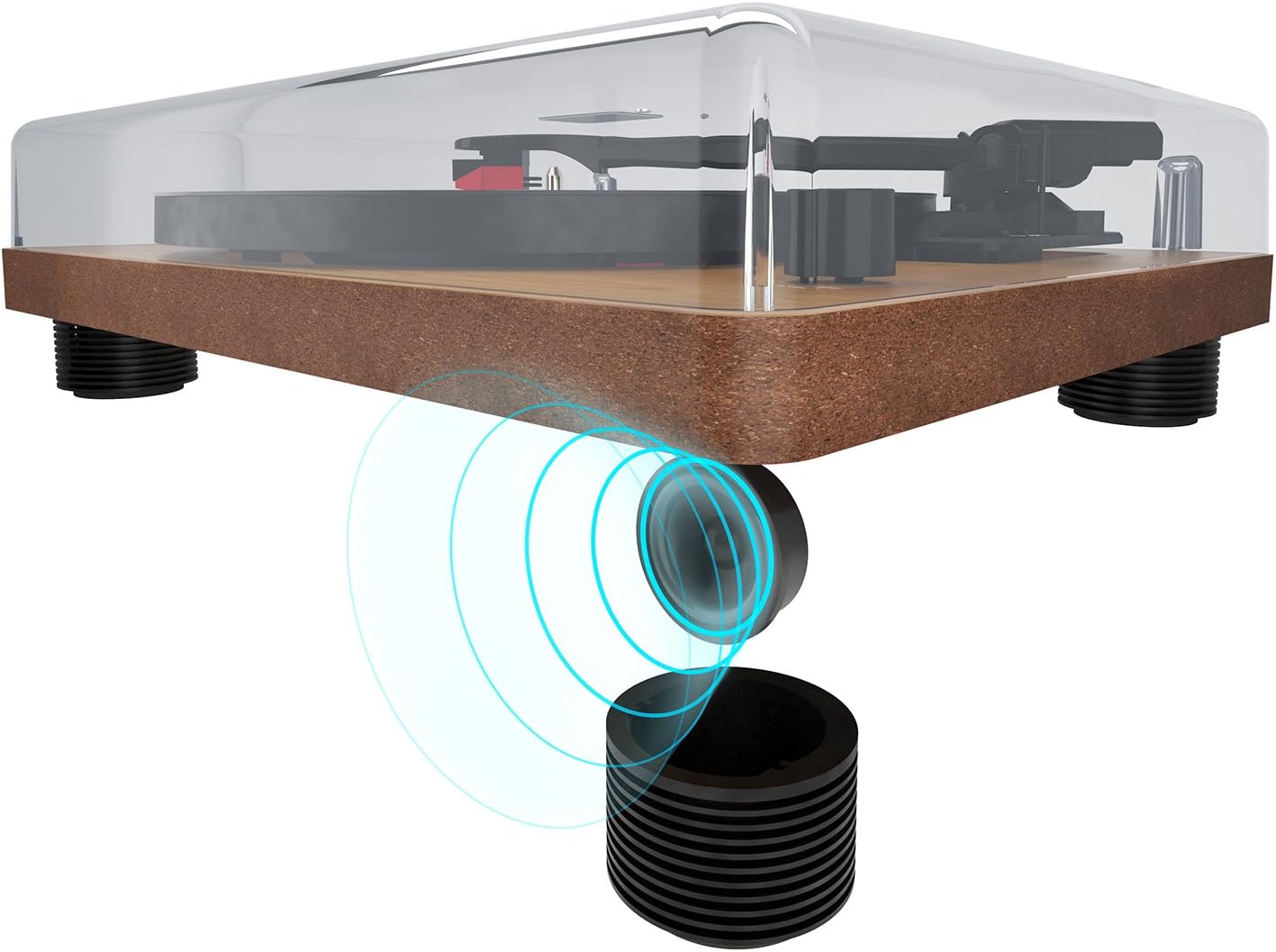
Rajah 5.1: The turntable's feet are designed to minimize vibrations for optimal sound.
5.2 Sambungan Kuasa
- Ensure the ON/OFF switch on the rear panel is in the OFF position.
- Connect the DC 12V power adapter to the 'DC 12V' input port on the rear of the turntable.
- Palamkan penyesuai kuasa ke salur keluar dinding yang sesuai.
5.3 Audio Connections (Optional)
If you wish to connect the turntable to an external amplifier or powered speakers, use the RCA output ports:
- Connect an RCA cable (not included) to the 'AUDIO' RCA output ports (red for right, white for left) on the rear of the turntable.
- Connect the other end of the RCA cable to the corresponding input on your amppembesar atau pembesar suara berkuasa.

Rajah 5.2: Rear panel connections: AUDIO (RCA), USB, DC 12V power input, and ON/OFF switch.

Rajah 5.3: Detail of the RCA stereo audio output ports.
6. Arahan Operasi
6.1 Memainkan Rakaman
- Turn on the turntable using the ON/OFF switch on the rear panel.
- Place a record on the platter, ensuring it is centered on the spindle.
- Pilih kelajuan yang sesuai (33, 45 atau 78 RPM) menggunakan suis pemilih kelajuan.
- Angkat lengan atas perlahan-lahan menggunakan tuil isyarat.
- Letakkan lengan nada di atas alur permulaan rekod yang diingini.
- Perlahan-lahan turunkan lengan nada menggunakan tuil isyarat. Stilus akan bersentuhan dengan rekod dan main balik akan bermula.
- Adjust the volume using the volume control knob on the front of the unit.
- Untuk menghentikan main balik, angkat lengan nada menggunakan tuil isyarat dan kembalikannya ke tempat letak lengan nada.

Rajah 6.1: The speed selector switch allows you to choose between 33, 45, and 78 RPM.
6.2 Digitizing Records to MP3 (USB Function)
The auna TT-Classic allows you to convert your vinyl records into MP3 digital files menggunakan komputer.
- Connect the turntable to your computer using a USB cable (not included) via the 'USB' port on the rear panel.
- Download and install suitable audio recording software on your computer (e.g., Audacity, available for free online).
- Follow the instructions of your chosen software to configure it for recording from the turntable (it will typically appear as a USB audio device).
- Start recording in the software, then begin playing your record on the turntable as described in section 6.1.
- Once the record has finished playing, stop the recording in your software and save the audio file dalam format MP3.

Rajah 6.2: The USB port for connecting to a computer for digitization.
7. Penyelenggaraan
7.1 Membersihkan Meja Putar
- Sentiasa cabut plag meja putar dari salur keluar kuasa sebelum membersihkan.
- Use a soft, dry cloth to wipe the dust cover and cabinet. Do not use abrasive cleaners or solvents.
- The platter and tonearm should be handled with extreme care. Use a soft brush or lint-free cloth for delicate areas.
7.2 Penjagaan Stilus
- A dirty or worn stylus can damage your records and degrade sound quality.
- Clean the stylus regularly using a soft stylus brush, brushing gently from back to front.
- The stylus should be replaced after approximately 300-500 hours of playback, or if you notice a significant drop in sound quality or increased record wear.
7.3 Belt Drive Maintenance
The auna TT-Classic uses a belt drive system. The drive belt is typically located under the platter. If the platter stops spinning or spins inconsistently, the belt may need to be inspected or replaced. Refer to a qualified technician if you suspect an issue with the belt drive.

Rajah 7.1: Illustration of the belt drive system, responsible for rotating the platter.
8. Penyelesaian masalah
If you encounter any issues with your turntable, consult the following table before seeking professional service:
| Masalah | Kemungkinan Punca | Penyelesaian |
|---|---|---|
| Tiada kuasa | Power adapter not connected; ON/OFF switch is off; power outlet malfunction. | Ensure power adapter is securely connected and plugged into a working outlet. Turn ON/OFF switch to ON. |
| Tiada suara dari pembesar suara | Volume too low; external amplifier/speakers not connected or off; stylus not making contact. | Increase volume. Check external audio connections and ensure external devices are powered on. Ensure tonearm is lowered correctly. |
| Bunyi herot atau melangkau | Record is dirty or damaged; stylus is dirty or worn; turntable not level; excessive vibration. | Clean the record. Clean or replace the stylus. Ensure turntable is on a stable, level surface. Reduce external vibrations. |
| Pinggan tidak berputar | Belt dislodged or broken; motor issue. | Inspect the drive belt (under the platter). If dislodged, carefully re-seat it. If broken, replace it. If problem persists, contact support. |
| Rakaman USB tidak berfungsi | USB cable not connected; software not configured correctly; driver issues. | Ensure USB cable is connected. Check software settings to ensure the turntable is selected as the input device. Try restarting your computer. |
9. Spesifikasi
| Ciri | Spesifikasi |
|---|---|
| Jenama | auna |
| Nama Model | TT-Classic |
| Jenis Drive | Pemacu Belt |
| Kelajuan yang Disokong | 33 1/3, 45, 78 RPM |
| Sistem Pickup | AudioTechnica MM (Moving Magnet) |
| Sambungan | 1 x USB Port, RCA Stereo Output |
| Ciri Khas | Automatic Start Function (can be deactivated), Removable Dust Cover, Integrated Stereo Speakers, Pitch Control |
| Bekalan Kuasa | DC 12V (Power Adapter Included) |
| bahan | Plastic, Wood Veneer Finish |
| Dimensi (W x D x H) | 41 x 33 x 12 cm (16.1 x 13 x 4.7 inci) |
| Berat badan | 3.2 kg (7.05 lbs) |
| Peranti Serasi | Penceramah, Amppenghidup |
10. Waranti dan Sokongan
auna products are designed and manufactured to the highest quality standards. For warranty information and technical support, please refer to the documentation provided with your purchase or visit the official auna webtapak. Simpan bukti pembelian anda untuk sebarang tuntutan waranti.
For further assistance, please contact auna customer service.