
1. Pengenalan
The KEESON Babycare TENS Elle TENS 2 is a Transcutaneous Electrical Nerve Stimulation (TENS) device designed to provide drug-free pain relief during labor and post-natal recovery. It features dual-channel operation, a contraction timer, and Opti-Max Technology to enhance pain management. This manual provides essential information for safe and effective use of your device.
2. Maklumat dan Amaran Keselamatan
Please read all instructions carefully before using the device. Failure to do so may result in injury or improper operation.
- Do not use if you have a pacemaker or any other implanted electronic device.
- Do not use if you have a heart condition or epilepsy.
- Do not use on broken skin, open wounds, or areas of infection.
- Do not use near or over the eyes, mouth, front of the neck, or across the chest.
- Consult your doctor or midwife before use if you have any medical concerns.
- Jauhkan daripada kanak-kanak.
- This device is intended for external use only.
- Hentikan penggunaan jika anda mengalami sebarang ketidakselesaan atau reaksi buruk.
3. Kandungan Pakej
Upon opening the box, please ensure all the following items are present:
- 1 x Elle TENS 2 unit
- 4 x Self-adhesive electrode pads (50x100mm)
- 2 x Lead wires
- 2 x bateri AA (1.5V)
- 1 x Tali leher
- 1 x Manual arahan (dokumen ini)

Image 3.1: Contents of the Elle TENS 2 package, including the main unit, electrode pads, lead wires, and batteries.
4. Peranti Lebihview
Familiarize yourself with the various parts and controls of your Elle TENS 2 unit:

Imej 4.1: Depan view of the Elle TENS 2 device, showing the display screen, control buttons, and branding.
- Paparan LCD: Shows program mode, intensity levels, contraction timer, and battery status.
- Butang Kuasa (Ⓘ): Menghidupkan/mematikan peranti.
- Contraction Timer Button: Starts and stops the contraction timer.
- Opti-Max Button: Activates the Opti-Max function for enhanced pain relief.
- CH1 Intensity Buttons (+/-): Adjusts intensity for Channel 1.
- CH2 Intensity Buttons (+/-): Adjusts intensity for Channel 2.
- Butang Mod: Cycles through available TENS programs.
- Butang Boost: Provides an immediate surge of intensity for acute pain during contractions.
- CT History Button: Displays the history of recorded contractions.
- Lead Wire Ports: Located at the top of the device for connecting electrode lead wires.

Imej 4.2: Belakang view of the Elle TENS 2, illustrating the battery compartment and the attachment point for the neck cord.
5. Persediaan
Follow these steps to prepare your Elle TENS 2 for use:
- Masukkan Bateri: Buka petak bateri di bahagian belakang unit. Masukkan dua bateri AA, pastikan kekutuban (+/-) betul. Tutup petak dengan selamat.
- Connect Lead Wires: Plug the lead wires into the ports at the top of the Elle TENS 2 unit. Each lead wire has two pins that connect to two electrode pads.

Image 5.1: The Elle TENS 2 device with lead wires properly inserted into the top connection ports.
- Attach Electrode Pads: Connect the electrode pads to the pins on the lead wires. Ensure a secure connection.
- Sediakan Kulit: Ensure the skin where electrodes will be placed is clean, dry, and free from oils or lotions.
- Electrode Placement for Labor: For labor pain relief, place the four electrode pads on your back as shown in the diagram below. Two pads should be placed on either side of the spine, just below the bra line, and the other two pads on either side of the spine, just above the sacrum (lower back). Ensure pads are not touching each other.
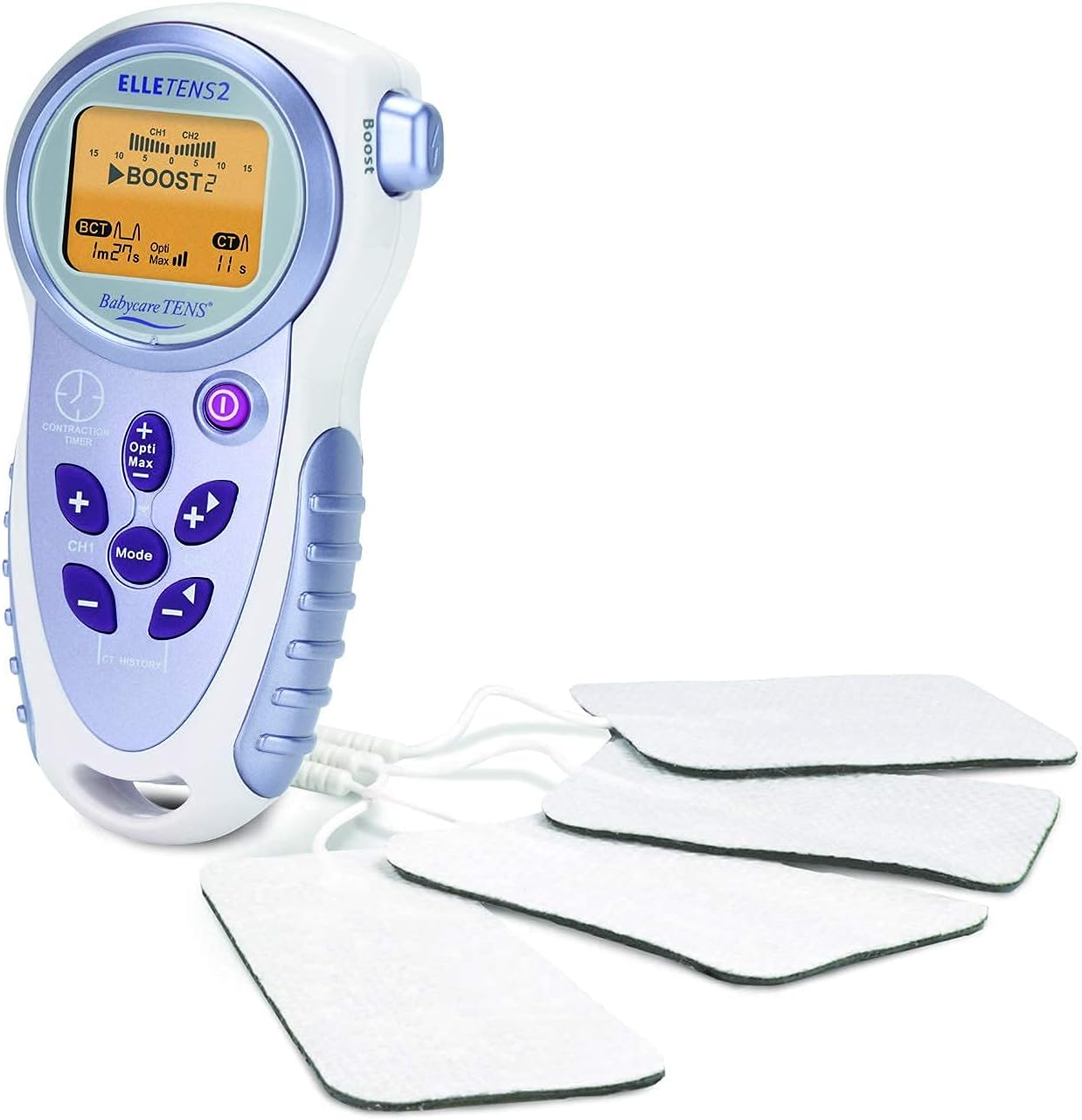
Image 5.2: The Elle TENS 2 unit with all four electrode pads connected via lead wires, ready for application.
For post-natal pain relief, consult your healthcare professional for appropriate electrode placement.
6. Arahan Operasi
Using your Elle TENS 2 device:
- Hidupkan: Press and hold the Power button (Ⓘ) until the display illuminates. The device will start in a default program mode.
- Laraskan Intensiti: Use the CH1 (+/-) buttons to increase or decrease the intensity for Channel 1 (upper pads) and CH2 (+/-) buttons for Channel 2 (lower pads). Start with a low intensity and gradually increase until you feel a strong, comfortable tingling sensation. Avoid setting the intensity too high, which can cause discomfort.
- Pilih Mod: Press the 'Mode' button to cycle through the available programs. The Elle TENS 2 typically offers different modes (e.g., Burst, Continuous) suitable for various stages of labor. Refer to your midwife's advice on which mode to use.
- Contraction Timer: Press the 'Contraction Timer' button at the start of a contraction. Press it again when the contraction ends. The display will show the duration of the contraction and the interval between contractions. Press 'CT History' to view a summary of recent contractions.
- Fungsi Boost: During a contraction, press the 'Boost' button for an immediate, stronger burst of stimulation to help manage acute pain. Release the button to return to the previous intensity.
- Opti-Max Technology: Press the 'Opti-Max' button to activate this feature, which provides an additional level of pain relief by automatically adjusting stimulation parameters.
- Matikan: Press and hold the Power button (Ⓘ) until the display turns off. Always turn off the device before removing electrodes.

Image 6.1: The Elle TENS 2 unit comfortably held in a hand, demonstrating its ergonomic design and portability.
7. Penyelenggaraan
Proper care will extend the life of your Elle TENS 2 device:
- Pembersihan: Lap peranti dengan iklanamp cloth and mild soap. Do not immerse the unit in water or use abrasive cleaners.
- Pad Elektrod: After each use, re-apply the protective film to the electrode pads and store them in a sealed bag to maintain their adhesive quality. Replace pads when they lose their stickiness or become damaged.
- Penggantian Bateri: When the battery indicator on the display shows low power, replace both AA batteries with new ones. Remove batteries if the device will not be used for an extended period.
- Storan: Simpan peranti dan aksesori di tempat yang sejuk dan kering, jauh daripada cahaya matahari langsung dan suhu yang melampau.
8. Penyelesaian masalah
If you encounter issues with your Elle TENS 2, refer to the following table:
| Masalah | Kemungkinan Punca | Penyelesaian |
|---|---|---|
| Tiada sensasi atau sensasi lemah |
|
|
| Paparan tidak berfungsi |
|
|
| Pad tidak melekat |
|
|
Jika masalah berterusan selepas mencuba penyelesaian ini, sila hubungi sokongan pelanggan.
9. Spesifikasi
- Nombor Model: ETA23
- Sumber Kuasa: 2 x bateri AA (termasuk)
- Saluran: Dwi Saluran
- Dimensi: Approximately 1 x 1 x 1 cm (device only)
- Berat: Approximately 497 g (device only)
- Pengeluar: Body Clock Healthcare Ltd.
- ciri-ciri: Contraction Timer, Opti-Max Technology, Boost button
10. Waranti dan Sokongan
Your KEESON Babycare TENS Elle TENS 2 device is covered by a manufacturer's warranty against defects in materials and workmanship. Please refer to the warranty card included in your package for specific terms and conditions.
For technical support, troubleshooting assistance, or to purchase replacement parts, please contact your retailer or the manufacturer directly. Contact information can typically be found on the product packaging or the manufacturer's official webtapak.