
ARGOM TECH A00251
Manual Pengguna Tetikus Permainan Tempur ARGOM TECH
Model: A00251
Produk Selesaiview
The ARGOM TECH Combat Gaming Mouse is designed for an enhanced gaming experience, featuring a robust structure, ergonomic design, and dynamic lighting. It offers precise control and comfort for extended use.
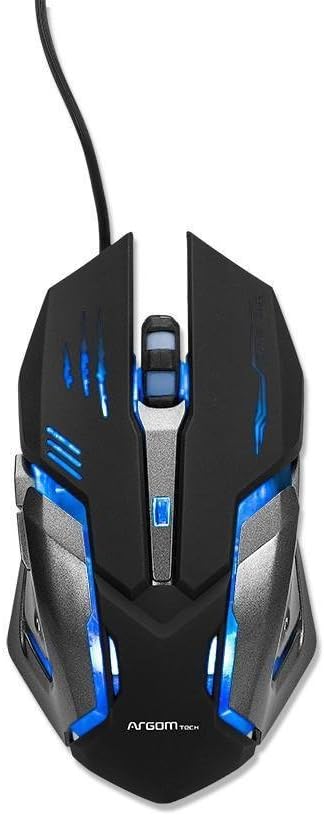
Rajah 1: Atas view of the Combat Gaming Mouse, highlighting its illuminated design and USB connection.
Ciri-ciri Utama:
- Robust structure and ergonomic design for gamers. Background rainbow changing light.
- Plug & Play compatible with most Operating Systems.
- DPI switch (1000/1200/1600/2400 DPI) for adjustable sensitivity.
- Built-in weighted Iron Plate for enhanced stability.
- 1.5m extra long and durable braided USB cable.
Panduan Persediaan
- Buka bungkusan Tetikus: Carefully remove the Combat Gaming Mouse from its packaging.
- Sambung ke Komputer: Locate an available USB port on your computer. Insert the USB connector of the mouse firmly into the USB port.
- Pemasangan Pemacu (Pasang & Main): The mouse is designed for Plug & Play functionality. Your operating system (Windows, macOS, Linux, etc.) should automatically detect and install the necessary drivers. This process typically takes a few seconds.
- Sahkan Fungsi: Once connected, the mouse's rainbow lights should illuminate, indicating it is powered on. Move the mouse to confirm cursor movement on your screen.
No additional software installation is required for basic functionality.
Arahan Operasi
Pelarasan DPI:
The Combat Gaming Mouse features a dedicated DPI switch button, usually located behind the scroll wheel. Pressing this button allows you to cycle through different sensitivity settings:
- 1000 DPI (Lalai)
- 1200 DPI
- 1600 DPI
- 2400 DPI
Adjusting the DPI allows you to change the cursor speed to suit your preference for different tasks, from precise aiming in games to fast navigation on the desktop.
Kesan Pencahayaan:
The mouse features a background rainbow changing light effect, which activates automatically upon connection. This provides an aesthetic enhancement to your gaming setup.
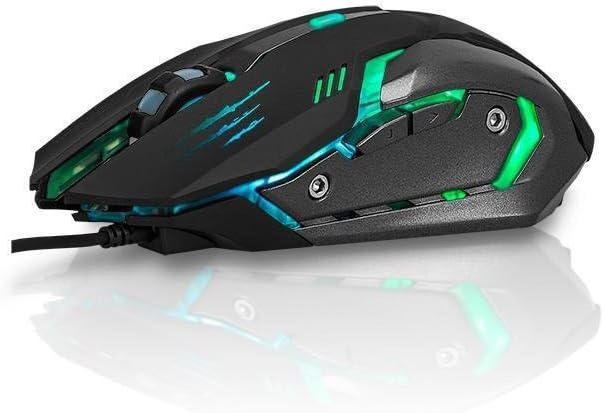
Rajah 2: Sisi view of the Combat Gaming Mouse, illustrating its ergonomic design and dynamic lighting.
Penyelenggaraan
To ensure the longevity and optimal performance of your Combat Gaming Mouse, follow these simple maintenance guidelines:
- Pembersihan: Gunakan kain lembut, kering dan tidak berbulu untuk mengelap permukaan tetikus. Untuk kotoran degil, lap sedikitampen the cloth with water or a mild cleaning solution, then wipe dry immediately. Avoid using harsh chemicals or abrasive materials.
- Penjagaan Sensor: Keep the optical sensor on the underside of the mouse clean and free from dust or debris. A cotton swab can be used gently if needed.
- Pengurusan Kabel: Elakkan selekoh tajam atau tarikan berlebihan pada kabel USB untuk mengelakkan kerosakan.
- Storan: Apabila tidak digunakan untuk tempoh yang lama, simpan tetikus dalam persekitaran yang bersih dan kering jauh dari suhu yang melampau.
Menyelesaikan masalah
| Masalah | Kemungkinan Punca | Penyelesaian |
|---|---|---|
| Mouse not responding / Cursor not moving. |
|
|
| Lampu dimatikan. |
|
|
| Cursor movement is erratic. |
|
|
Spesifikasi
| Ciri | Perincian |
|---|---|
| Nombor Model | A00251 |
| Jenama | ARGOM TECH |
| Teknologi Ketersambungan | USB (Berwayar) |
| Teknologi Pengesanan Pergerakan | Optik |
| Tetapan DPI | 1000 / 1200 / 1600 / 2400 DPI |
| Panjang Kabel | 1.5 meter (jalinan) |
| warna | Hitam |
| Dimensi Produk (L x W x H) | 7.48 x 2.36 x 5.51 inci |
| Berat Barang | 0.011 ounces (approx. 0.34 lbs as per feature bullets) |
| Ciri Khas | Ergonomic Design, Built-in Weighted Iron Plate, Rainbow Changing Light |
| Keserasian | Most Operating Systems (Plug & Play) |
Waranti dan Sokongan
Maklumat Waranti:
Specific warranty terms and conditions for the ARGOM TECH Combat Gaming Mouse are typically provided with your purchase documentation or can be found on the official ARGOM TECH webtapak. Sila simpan bukti pembelian anda untuk tuntutan waranti.
Sokongan Pelanggan:
For further assistance, technical support, or inquiries regarding your ARGOM TECH Combat Gaming Mouse, please visit the official ARGOM TECH website or contact their customer service department through the channels provided on their site. Always refer to the manufacturer's official resources for the most accurate and up-to-date support information.
Video Produk Rasmi
No official product videos from the seller were found for this product in the provided data.
Ask a question about this manual
Ask about setup, troubleshooting, compatibility, parts, safety, or missing instructions. Manuals+ will review the question and use this page’s manual context to help answer it.