
Yamaha Audio NPS303 B
Manual Pengguna Pemain Audio Rangkaian Yamaha NPS303 B
Model: NPS303 B
pengenalan
This manual provides detailed instructions for the setup, operation, and maintenance of your Yamaha NPS303 B Network Audio Player. The NPS303 B is a sophisticated digital music system designed to stream music from various sources, including PCs, smartphones, and streaming services, with Yamaha's renowned Hi-Fi audio quality. It features MusicCast compatibility, built-in Wi-Fi, Bluetooth, AirPlay, and a front-panel USB terminal for versatile audio playback.
Apa yang ada dalam Kotak
- Yamaha NPS303 B Network Audio Player
- Alat kawalan jauh
- Bateri AAA (x2) untuk alat kawalan jauh
- Kord kuasa
- Kabel audio RCA
- Manual pemilik (dokumen ini)
Produk Selesaiview
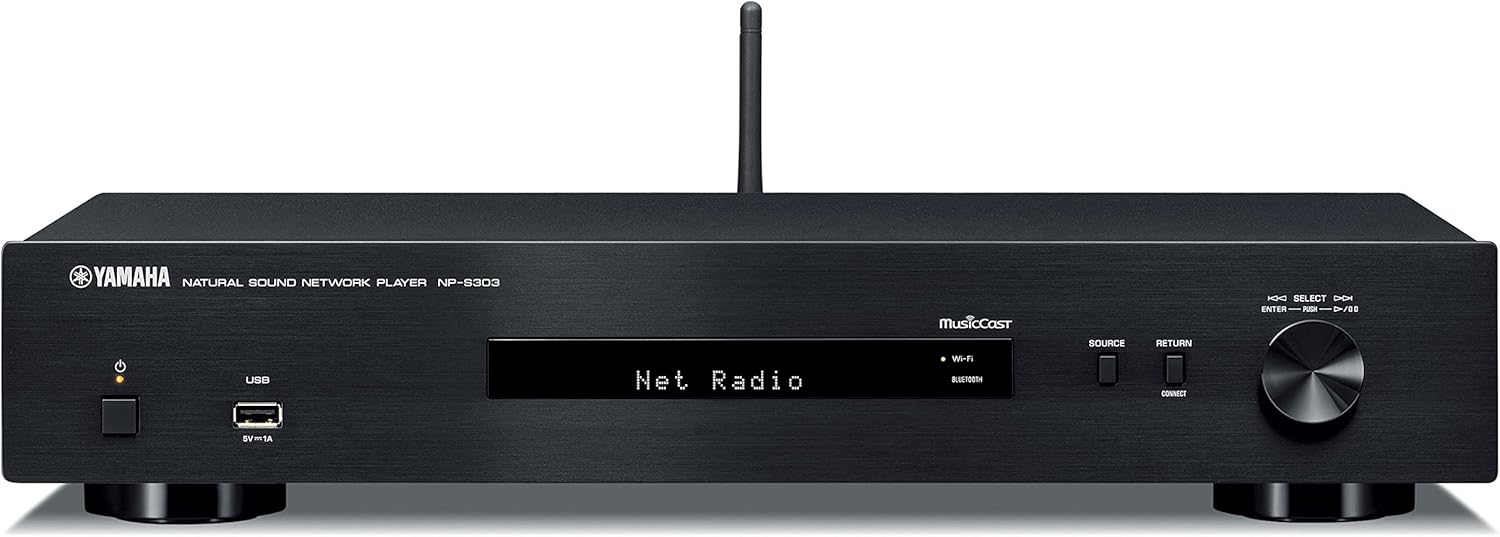
Rajah 1: Panel Hadapan. Shows the power button, USB port, display, source selection buttons, and rotary encoder.

Rajah 2: Panel Belakang. Displays analog audio outputs (RCA), digital audio outputs (coaxial and optical), network port, and AC power input.

Figure 3: Remote Control. Features buttons for power, mute, dimmer, presets, navigation, playback controls, and input selection.
Persediaan
1. Membongkar dan Meletakkan
- Keluarkan semua komponen dari pembungkusan dengan berhati-hati.
- Place the NPS303 B on a stable, flat surface, away from direct sunlight, heat sources, and excessive dust or vibration. Ensure adequate ventilation around the unit.
2. Menyambung ke an Amplebih hidup
Connect the NPS303 B to your amplifier using either the analog or digital audio outputs.
- Sambungan Analog (RCA): Use the supplied RCA audio cable to connect the ANALOG OUT (L/R) jacks on the NPS303 B to the corresponding analog input jacks on your amplebih hidup.
- Digital Connection (Coaxial/Optical): For higher fidelity, connect either the COAXIAL or OPTICAL digital output on the NPS303 B to a compatible digital input on your amppengalir atau DAC luaran.
3. Sambungan Rangkaian
The NPS303 B supports both wired and wireless network connections.
- Berwayar (Ethernet): Connect an Ethernet cable from the NETWORK port on the rear panel of the NPS303 B to your router or network hub.
- Tanpa Wayar (Wi-Fi): The unit has built-in Wi-Fi. For initial setup, it is recommended to use the MusicCast Controller app on your smartphone or tablet.
4. Sambungan Kuasa
Connect the supplied power cord to the AC IN terminal on the rear panel of the NPS303 B, then plug the other end into a wall outlet.
5. Bateri Alat Kawalan Jauh
Masukkan dua bateri AAA yang dibekalkan ke dalam alat kawalan jauh, pastikan kekutuban yang betul.
Arahan Operasi
1. Menghidupkan/Mematikan
Tekan ke KUASA butang pada panel hadapan atau alat kawalan jauh untuk menghidupkan atau mematikan unit.
2. Initial Network Setup (Wi-Fi)
For wireless network setup, download the "MusicCast Controller" app from your device's app store (iOS or Android). Follow the on-screen instructions within the app to connect your NPS303 B to your Wi-Fi network.
3. Main balik Muzik
- Perkhidmatan Penstriman: Access popular music streaming services (e.g., Spotify) through the MusicCast Controller app.
- Main balik USB: Connect a USB storage device to the front-panel USB terminal. Use the remote control or MusicCast app to navigate and play audio files. The NPS303 B supports FLAC and MP3 files from external USB drives.
- Bluetooth: Pair your smartphone or other Bluetooth-enabled device with the NPS303 B to stream audio wirelessly. Select "Bluetooth" as the source.
- AirPlay: For Apple devices, use AirPlay to stream audio directly to the NPS303 B.
- Audio Rangkaian: Stream music from your PC or NAS (Network Attached Storage) server connected to the same network.
4. Menggunakan Alat Kawalan Jauh
The remote control provides access to various functions:
- Pemilihan Sumber: Buttons like NET, USB, BLUETOOTH allow direct selection of input sources.
- Navigasi: Use the arrow keys and ENTER button to navigate menus on the unit's display.
- Kawalan Main Semula: Play, Pause, Stop, Skip Forward/Backward buttons control audio playback.
- Lebih malap: Adjusts the brightness of the front panel display.
Penyelenggaraan
- Pembersihan: Lap unit dengan kain lembut dan kering. Jangan gunakan pembersih yang melelas, lilin atau pelarut.
- Pengudaraan: Pastikan bukaan pengudaraan tidak disekat.
- Kord Kuasa: Periksa kord kuasa secara kerap untuk sebarang kerosakan.
- Kemas kini Firmware: Yamaha may release firmware updates to improve performance or add features. Check the Yamaha website or the MusicCast app for available updates.
Menyelesaikan masalah
| Masalah | Kemungkinan Punca | Penyelesaian |
|---|---|---|
| Tiada kuasa | Kord kuasa tidak disambungkan dengan selamat. | Pastikan kord kuasa dipasang dengan kukuh ke dalam unit dan alur keluar dinding. |
| Tiada bunyi | Input yang salah dipilih pada amplifier; cables not connected properly; volume too low. | Pilih input yang betul pada amplifier. Check all audio cable connections. Increase volume on both the NPS303 B and amplebih hidup. |
| Tidak dapat menyambung ke Wi-Fi | Kata laluan Wi-Fi salah; unit terlalu jauh dari penghala; gangguan rangkaian. | Verify Wi-Fi password. Move unit closer to router. Try restarting router. Use the MusicCast app for guided setup. |
| Alat kawalan jauh tidak berfungsi | Bateri mati atau tidak dimasukkan dengan betul; halangan antara jarak jauh dan unit. | Replace batteries, ensuring correct polarity. Remove any obstacles. Ensure you are within range and pointing the remote at the unit's sensor. |
| Isu main balik USB | Tidak disokong file format; Peranti USB tidak dikenali. | pastikan files are in supported formats (FLAC, MP3). Try a different USB device or reformat the current one (FAT32 recommended). |
Spesifikasi
| Model | NPS303 B |
| Jenama | Audio Yamaha |
| Dimensi (W x H x D) | 43.5 x 8.57 x 28.89 cm (17.13 x 3.37 x 11.37 inci) |
| Berat badan | 2.72 kg (6 lbs) |
| Ketersambungan | Wi-Fi, Bluetooth, USB, Ethernet |
| Mod Keluaran Audio | Stereo, Surround (5.1 channel configuration) |
| Peranti Serasi | telefon pintar, Amplifier, External DAC |
| Ciri Khas | Wireless, Built-In Bluetooth, MusicCast compatibility |
| Sumber Kuasa | Elektrik Bertali |
| Termasuk Aksesori | Remote control, Batteries (AAA x2), Power cord, RCA audio cable |
Waranti dan Sokongan
Maklumat Waranti
Untuk maklumat jaminan terperinci, sila rujuk kad jaminan yang disertakan dengan produk anda atau lawati Yamaha Audio rasmi webtapak. Terma dan syarat waranti mungkin berbeza mengikut wilayah.
Sokongan Pelanggan
If you encounter any issues or have questions not covered in this manual, please contact Yamaha customer support. You can find contact information on the official Yamaha Audio webtapak atau melalui pengedar tempatan anda.
Sumber Dalam Talian:
Ask a question about this manual
Ask about setup, troubleshooting, compatibility, parts, safety, or missing instructions. Manuals+ will review the question and use this page’s manual context to help answer it.