
1. Pengenalan
This manual provides essential information for the safe and effective operation, maintenance, and troubleshooting of the INSIZE ISH-PHB Portable Leeb Hardness Tester. Please read this manual thoroughly before using the device to ensure proper functionality and to prevent damage or injury. Keep this manual for future reference.
2. Arahan Keselamatan
Observe the following safety precautions to prevent personal injury and damage to the instrument:
- Always operate the device in a stable and dry environment.
- Jangan dedahkan peranti kepada suhu yang melampau, kelembapan atau bahan menghakis.
- Elakkan daripada menjatuhkan atau meletakkan peranti kepada kesan yang kuat.
- Jangan cuba membuka atau membaiki peranti sendiri. Rujuk kepada kakitangan perkhidmatan yang berkelayakan.
- Ensure the test surface is clean, smooth, and free from oil, rust, or scale for accurate readings.
- Wear appropriate personal protective equipment (PPE) if required by your work environment.
3. Kandungan Pakej
Buka bungkusan kotak dengan berhati-hati dan sahkan bahawa semua barang ada dan tidak rosak. Jika terdapat barang yang hilang atau rosak, hubungi pembekal anda dengan segera.
- INSIZE ISH-PHB Portable Leeb Hardness Tester main unit
- Impact device (Type D)
- Standard test block
- Berus pembersih
- Kabel USB
- Manual pengendalian
- Kes pembawa
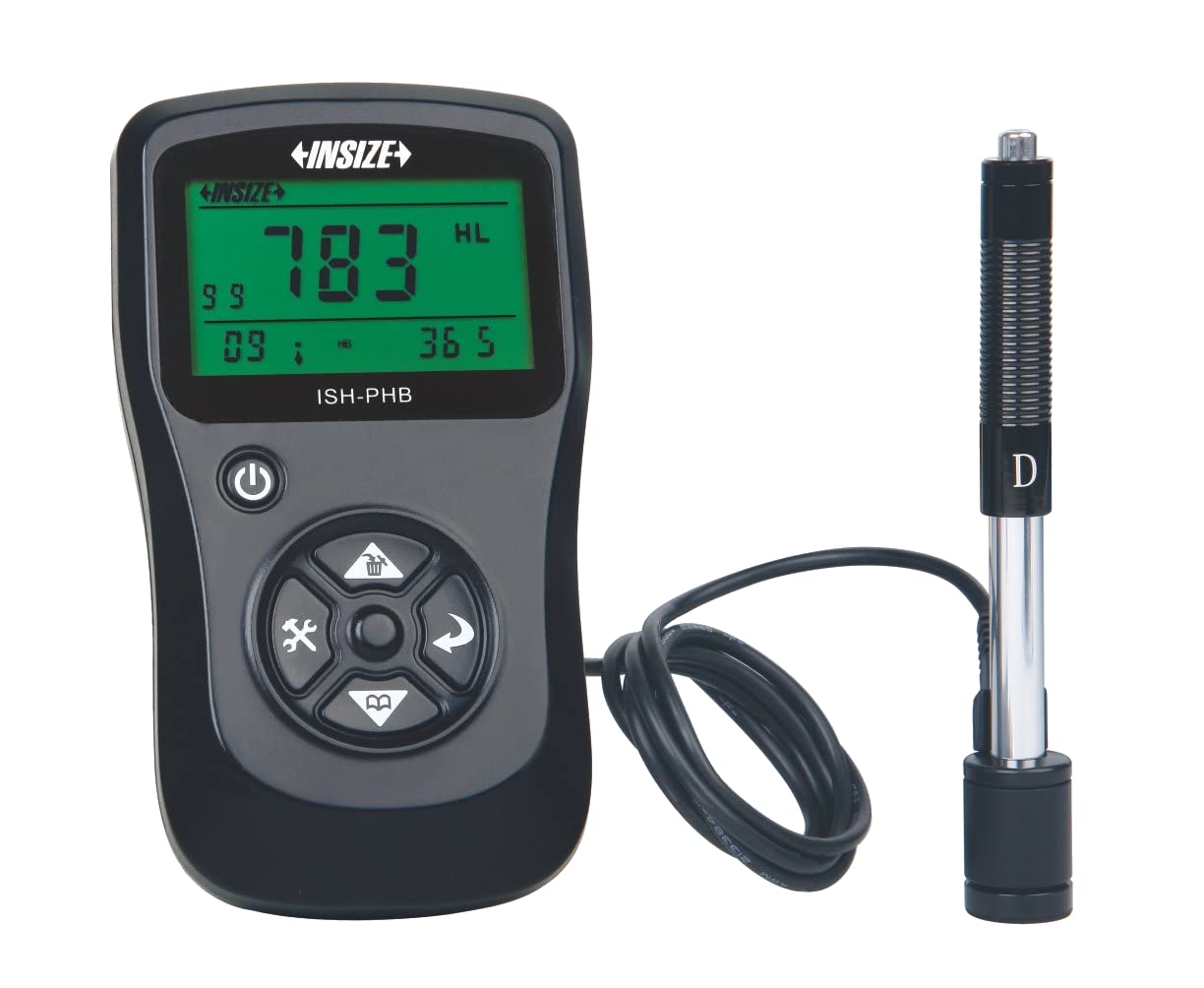
Image showing the main unit of the INSIZE ISH-PHB Portable Leeb Hardness Tester, displaying its screen and control buttons.
4. Persediaan
Follow these steps to prepare your INSIZE ISH-PHB for use:
- Cas Bateri: Connect the device to a power source using the provided USB cable. Allow the battery to fully charge before first use. The charging indicator will show the status.
- Attach Impact Device: Carefully connect the impact device (Type D) to the main unit. Ensure it is securely fastened.
- Hidupkan kuasa: Tekan dan tahan butang kuasa sehingga paparan menyala.
- Select Material and Hardness Scale: Navigate through the menu using the arrow keys to select the appropriate material (e.g., Steel, Cast Iron) and hardness scale (e.g., HRC, HV, HB) for your test specimen.
- Penentukuran (Pilihan): For critical measurements, perform a calibration using the standard test block provided. Refer to the 'Calibration' section in the full manual for detailed steps.
5. Arahan Operasi
To perform a hardness test:
- Prepare the Test Surface: Ensure the surface of the material to be tested is clean, smooth, and flat. Remove any paint, rust, or scale. The minimum thickness of the test piece should be sufficient to prevent deformation during impact.
- Load the Impact Device: Push the impact body down into the guide tube until it locks into place.
- Letakkan Peranti: Place the impact device firmly and perpendicularly onto the test surface. Ensure there is no relative movement between the device and the test piece.
- Mulakan Ujian: Press the release button on the impact device. The impact body will strike the surface, and the hardness value will be displayed on the main unit's screen.
- Record Reading: Note down the displayed hardness value. For best accuracy, take multiple readings (e.g., 3-5) at different points on the test surface and calculate the average.
- Matikan: After use, press and hold the power button to turn off the device.
6. Penyelenggaraan
Regular maintenance ensures the longevity and accuracy of your hardness tester:
- Pembersihan: Use the provided cleaning brush to remove any debris from the impact device's guide tube after each use. Wipe the main unit with a soft, dry cloth. Do not use abrasive cleaners or solvents.
- Storan: Store the device and its accessories in the carrying case in a dry, dust-free environment when not in use. Avoid extreme temperatures.
- Penjagaan Bateri: Recharge the battery regularly, even if the device is not in frequent use, to maintain battery health. Do not allow the battery to fully discharge for extended periods.
- Penentukuran: Periodically check the calibration of the device using the standard test block. If readings deviate significantly, recalibration or service may be required.
7. Penyelesaian masalah
Rujuk jadual di bawah untuk isu biasa dan penyelesaiannya:
| Masalah | Kemungkinan Punca | Penyelesaian |
|---|---|---|
| Peranti tidak dihidupkan | Bateri rendah atau habis | Cas bateri menggunakan kabel USB. |
| Bacaan tidak tepat |
|
|
| Impact device not loading | Debris in guide tube | Clean the guide tube with the provided brush. |
| Paparan menunjukkan mesej ralat | Kerosakan dalaman | Power off the device, wait a few seconds, then power on again. If the error persists, contact customer support. |
8. Spesifikasi
Key technical specifications for the INSIZE ISH-PHB Portable Leeb Hardness Tester:
| Ciri | Perincian |
|---|---|
| Jenama | Insize |
| Model | ISH-PHB |
| Skala Kekerasan | HL, HB, HRB, HRC, HRA, HV, HS |
| Peranti Kesan | Type D (standard) |
| Julat Pengukuran | Varies by material and scale (refer to full technical datasheet) |
| Ketepatan | ±6 HLD (when HL=800) |
| Paparan | LCD dengan lampu latar |
| Bekalan Kuasa | Bateri Li-ion boleh dicas semula |
| Suhu Operasi | 0°C hingga 40°C (32°F hingga 104°F) |
| Dimensi | Compact and portable (specific dimensions not provided in source) |
9. Waranti dan Sokongan
INSIZE products are manufactured to high-quality standards and are warranted against defects in materials and workmanship for a period typically specified at the point of purchase. Please retain your proof of purchase for warranty claims.
For technical support, service, or warranty inquiries, please contact your authorized INSIZE distributor or visit the official INSIZE website for contact information. Do not attempt to repair the device yourself, as this may void the warranty.