
pengenalan
This manual provides essential instructions for the safe and efficient use of your Lepro Industrial LED Desk Lamp. l serba boleh iniamp features an adjustable arm and a sturdy clamp, making it suitable for various environments such as study desks, office workstations, or bedside tables. It is designed to accommodate an E27 bulb (not included), allowing you to choose the light source that best fits your needs.
Please read this manual thoroughly before installation and operation, and retain it for future reference.

Image: The Lepro Industrial LED Desk Lamp providing illumination on a modern desk setup.
Arahan Keselamatan
- Baca semua arahan dengan teliti sebelum menggunakan lamp.
- Ensure the power supply is disconnected before installing, cleaning, or replacing the bulb.
- Gunakan hanya mentol asas E27 dengan kuasa maksimumtage daripada 40W.
- Jangan gunakan lamp dengan kord kuasa atau palam yang rosak.
- Produk ini bertujuan untuk kegunaan dalaman sahaja. Jangan dedahkan kepada air atau kelembapan yang tinggi.
- Simpan lamp jauh dari bahan mudah terbakar.
- Jangan cuba membuka atau membaiki lamp yourself. Contact qualified personnel for service.
Kandungan Pakej
Sila semak pakej untuk item berikut:
- Lepro Industrial LED Desk Lamp (main unit with clamp)
- Manual Pengguna
Note: The E27 bulb is not included and must be purchased separately.
Persediaan dan Pemasangan
Follow these steps to assemble and install your desk lamp:
- Lampirkan Clamp: Kencangkan cl dengan selamatamp to a desk or shelf edge. The clamp can accommodate surfaces up to 5.4 cm thick. Tighten the screw until the clamp is firmly in place, ensuring stability for both vertical and horizontal mounting.
- Pasang Lamp Ketua: Pasang lamp cover onto the upper part of the main unit. Twist the cover in the direction indicated (usually clockwise) to tighten it securely.
- Insert the Arm: Berhati-hati masukkan lamp arm into the designated joint on the clamp base. Ensure it clicks or locks into place for stable positioning.
- Pasang Mentol: Pastikan lamp is unplugged from the power outlet. Screw an E27 base bulb (not included) into the lamp socket. Do not overtighten.
- Sambung ke Kuasa: Palamkan lamp's power cord into a suitable electrical outlet.

Image: The bidirectional clamp allows for both vertical and horizontal mounting on surfaces up to 5.4 cm thick.

Imej: Lamp requires an E27 bulb, which is not included. Various E27 bulb types can be used.
Arahan Operasi
Hidupkan/Mati Kuasa: Locate the rocker switch on the power cord. Press the switch to turn the lamp hidup atau mati.
Melaraskan Sudut Cahaya: Lamp features a highly flexible and adjustable arm with multiple joints. You can rotate the lamp head up to 300 degrees and adjust the arm at various angles (e.g., 120 degrees at the main joints, 360 degrees at the base clamp) to direct light precisely where needed. The spring-balanced arm ensures the lamp stays in your desired position.
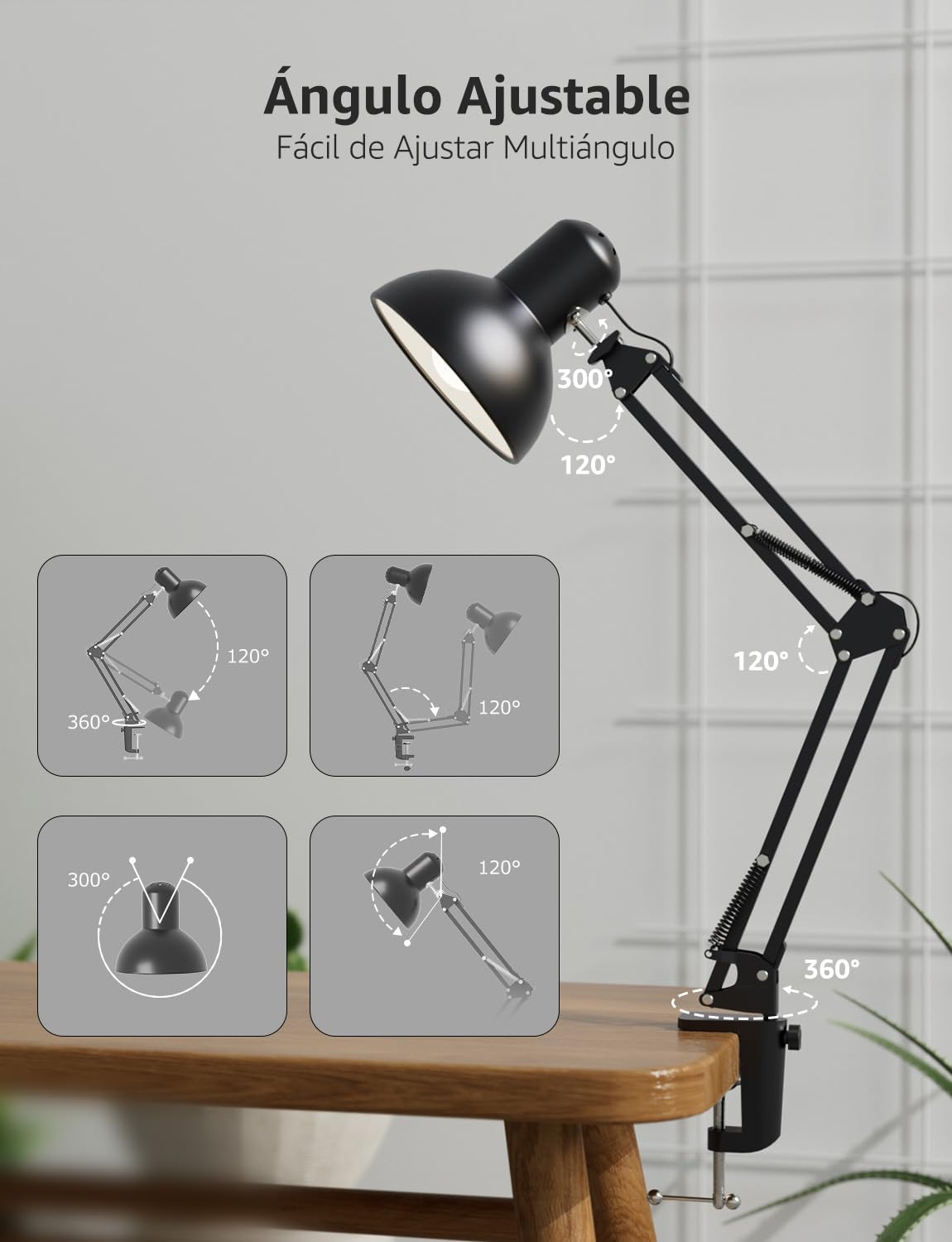
Imej: Lamp's flexible arm and head allow for multi-angle adjustment to optimize lighting.
Penyelenggaraan
Pembersihan: Untuk membersihkan lamp, ensure it is unplugged and cool. Wipe the surfaces with a soft, dry cloth. Do not use abrasive cleaners, solvents, or liquids, as these may damage the finish or electrical components.
Penggantian mentol: Before replacing the bulb, ensure the lamp is unplugged and the old bulb has cooled down completely. Carefully unscrew the old E27 bulb and screw in a new E27 bulb (maximum 40W). Ensure the new bulb is securely seated before plugging the lamp masuk semula.
Menyelesaikan masalah
- Lamp tidak dihidupkan:
- Periksa sama ada kord kuasa dipasang dengan selamat ke dalam salur keluar.
- Ensure the rocker switch on the cord is in the 'ON' position.
- Verify that the E27 bulb is correctly installed and not faulty. Try testing with a known working bulb.
- Check the power outlet by plugging in another device.
- Cahaya berkelip:
- Pastikan mentol diskrukan dengan ketat.
- The bulb may be faulty or incompatible. Replace it with a new E27 bulb.
- Check for loose connections in the power cord or outlet.
- Lamp is unstable:
- Pastikan clamp is tightened securely to the desk or surface.
- Verify that the surface thickness is within the maximum 5.4 cm limit for the clamp.
- Semak bahawa lamp arm is properly inserted into the clamp sendi.
Spesifikasi
| Ciri | Spesifikasi |
|---|---|
| Nombor Model | 3100027-DW-EU |
| Dimensi (L x W x H) | 38 x 15 x 27 cm |
| Berat badan | 900 g |
| Pangkalan Mentol | E27 |
| Max Wattage | 40 Watt |
| Sumber Kuasa | Elektrik Bertali |
| bahan | logam |
| Jenis Suis | Suis Rocker |
| Voltage | 240 Volt |
| Maks Clamp Ketebalan | 5.4 sm |
| Panjang Kabel Kuasa | lebih kurang 1.6 meter |

Image: Product dimensions and key features like E27 bulb base and power cord length.
Waranti dan Sokongan
Waranti: This Lepro Industrial LED Desk Lamp comes with a 1-year warranty for replacement parts in the EU, covering manufacturing defects from the date of purchase. This warranty does not cover damage caused by misuse, accidents, unauthorized modifications, or normal wear and tear.
Sokongan Pelanggan: For technical assistance, troubleshooting, or warranty claims, please contact Lepro customer support through the retailer where the product was purchased or visit the official Lepro website for contact information. Please have your model number (3100027-DW-EU) and proof of purchase ready when contacting support.