
pengenalan
Terima kasih kerana memilih Meja LED Lepro Lamp. l iniamp is designed to provide versatile and comfortable lighting for various tasks, featuring adjustable brightness, multiple color temperatures, a flexible design, and convenient additional functions.

Meja LED Lepro Lamp provides versatile illumination for your workspace.
- Pencahayaan boleh laras: Choose from 3 color temperatures (3000K Warm White, 4700K Natural White, 6000K Cool White) and stepless dimming from 5% to 100% brightness.
- Reka Bentuk Fleksibel: Lamp features a multi-angle adjustable arm and head, allowing for precise light positioning. The base rotates 90 degrees, and the lamp head adjusts 180 degrees.
- Port USB Bersepadu: A 5V/1A USB output port is located on the back of the base for convenient charging of your electronic devices.
- Fungsi Pintar: Includes a memory function to recall your last lighting setting and a 30-second timer for automatic shut-off.
- Pembinaan Tahan Lama: Made with a brushed aluminum alloy stand and shade, ensuring excellent heat dissipation and longevity, with ABS plastic articulations for flexibility.
Arahan Persediaan
- Buka Pembungkusan Kandungan: Keluarkan l dengan berhati-hatiamp, power adapter, and cleaning cloth from the packaging.
- Letakkan Lamp: Letakkan lamp di atas permukaan yang stabil dan rata seperti meja atau meja makan.
- Sambungkan Kuasa: Insert the power adapter's DC plug into the power input port on the back of the lamp base. Then, plug the power adapter into a standard electrical outlet.
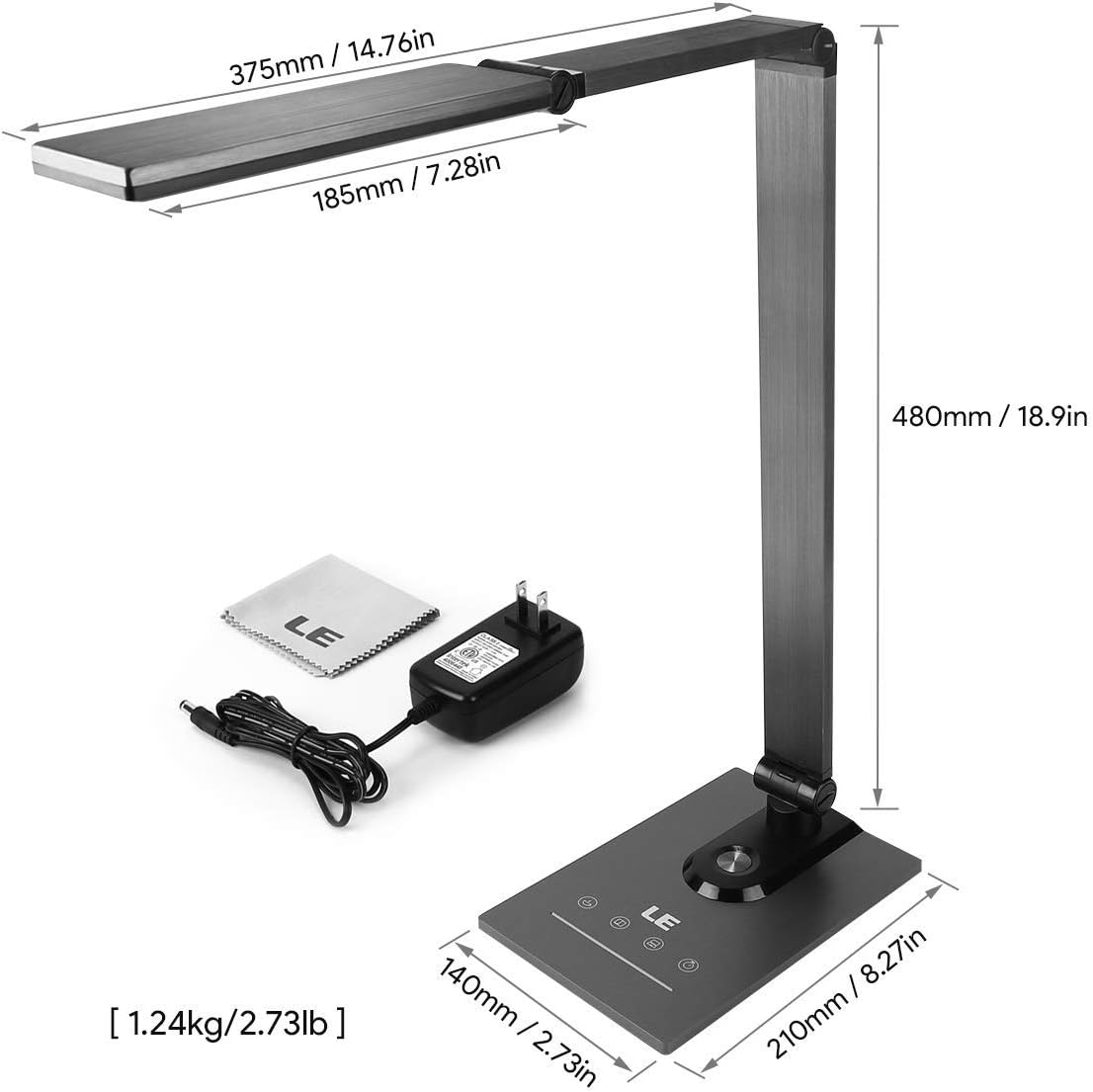
Ensure all components, including the power adapter and cleaning cloth, are present.
Arahan Operasi
1. Hidupkan/Mati Kuasa
Gently touch the power symbol (O) pada lamp asas untuk memutar lamp hidup atau mati.
2. Melaraskan Kecerahan
Slide your finger along the touch panel (indicated by a horizontal line with sun icons) on the lamp base to adjust the brightness level from 5% to 100%. The lamp offers stepless dimming for precise control.
3. Menukar Suhu Warna
Touch the mode symbol (icons resembling a coffee cup, book, and computer) on the lamp base to cycle through the three available color temperature modes:
- 3000K (Warm White): Ideal for relaxation or a cozy atmosphere.
- 4700K (Putih Semula Jadi): Suitable for general reading and daily tasks.
- 6000K (Putih Sejuk): Best for focused work and concentration.

Easily switch between three color temperatures and adjust brightness with the touch controls.
4. Port Pengecasan USB
Connect your smartphone, tablet, or other USB-powered devices to the 5V/1A USB output port located on the rear of the lamp asas untuk pengecasan yang mudah.

Charge your devices efficiently using the integrated 5V/1A USB port.
5. Fungsi Memori
Lamp automatically remembers your last used brightness and color temperature settings. When you turn the lamp on again, it will resume with these previous settings.
6. 30-Second Timer
Touch the clock symbol (JAM) pada lamp base to activate the 30-second timer. The lamp will dim to a low light level and automatically turn off after 30 seconds, providing a convenient delay for leaving a room or falling asleep.

Utilize the timer and memory functions for enhanced convenience.
7. Adjusting Lamp kedudukan
Lamp's design allows for extensive adjustment to direct light precisely where needed:
- Putaran Asas: Lamp base can be rotated up to 90 degrees horizontally.
- Pelarasan Lengan: The main arm of the lamp can be adjusted to various angles.
- Pelarasan Kepala: Lamp head can be tilted and rotated up to 180 degrees vertically.

Laraskan lamp's arm and head to achieve optimal lighting angles.

The flexible design allows for precise light direction, suitable for various scenarios.
Penyelenggaraan
- Pembersihan: Use the provided cleaning cloth or a soft, dry cloth to wipe the lampJangan gunakan pembersih yang kasar, pelarut atau bahan kimia yang keras, kerana ini boleh merosakkan kemasan atau komponen elektronik.
- Storan: Jika menyimpan lamp Untuk tempoh yang lama, pastikan ia bersih dan kering. Simpan di tempat yang sejuk dan kering, jauh daripada cahaya matahari langsung dan suhu yang melampau.
- LED: Sumber cahaya LED disepadukan dan tidak boleh diganti oleh pengguna. Jangan cuba membukanyaamp kepala.
Menyelesaikan masalah
| Masalah | Kemungkinan Punca | Penyelesaian |
|---|---|---|
| Lamp tidak menyala. | Tiada bekalan kuasa atau sambungan longgar. | Pastikan penyesuai kuasa dipasang dengan selamat pada kedua-dua lamp dan soket elektrik yang berfungsi. |
| Light flickers or brightness is inconsistent. | Unstable power supply or dirty touch panel. | Check the power source. Clean the touch control panel with a dry cloth. |
| Port pengecasan USB tidak berfungsi. | Device incompatibility or faulty cable. | Ensure your device is compatible with 5V/1A USB charging. Try a different USB cable. |
| Lamp does not hold its adjusted position. | Joints may be loose or over-extended. | Gently readjust the lamp to a stable position. Avoid forcing joints beyond their intended range of motion. |
Spesifikasi
| Ciri | Perincian |
|---|---|
| Nombor Model | 3100030-EU |
| Dimensi (L x W x H) | 14P x 21l x 48H cm (5.5 x 8.3 x 18.9 inches) |
| Berat badan | 1450 Gram (3.2 lbs) |
| Kuasa LED | 9 Watt |
| Output USB | 5V/1A (10 Watts) |
| Input Voltage | 240 Volt |
| Suhu Warna | 3000K, 4700K, 6000K |
| Pelarasan Kecerahan | Stepless Dimming (5%-100%) |
| Kaedah Kawalan | Kawalan Sentuh |
| Bahan | Brushed Metal (Base, Shade), ABS Plastic (Articulations) |
| Komponen yang Disertakan | Meja Lamp, Power Adapter, Cleaning Cloth |
Waranti dan Sokongan
This product comes with a 1-year availability of spare parts, indicating a commitment to product support.
For any questions, technical assistance, or warranty claims, please contact the retailer where you purchased the product or visit the official Lepro weblaman web untuk maklumat sokongan pelanggan.
Sila simpan bukti pembelian anda untuk tujuan waranti.