
Eurom Alutherm 2000 Wi-Fi
Eurom Alutherm 2000 Wi-Fi Convection Heater User Manual
Model: Alutherm 2000 Wi-Fi (EUM360776)
1. Pengenalan
Thank you for choosing the Eurom Alutherm 2000 Wi-Fi convection heater. This manual provides essential information for the safe and efficient operation, installation, and maintenance of your new heater. Please read these instructions carefully before use and keep them for future reference.
The Eurom Alutherm 2000 Wi-Fi is an elegant convection heater designed to integrate seamlessly into any interior. With a power output of 2000 W, it is capable of heating spaces between 49-65 m³, making it suitable for living rooms, bedrooms, or offices. This heater can be wall-mounted for continuous heating and features a built-in thermostat to maintain your desired temperature. Control is made convenient through the free Eurom Smart app, which also allows for connecting multiple heaters.
2. Arahan Keselamatan
Sentiasa patuhi langkah keselamatan berikut untuk mengurangkan risiko kebakaran, kejutan elektrik atau kecederaan:
- Baca semua arahan sebelum menggunakan pemanas ini.
- Jangan gunakan pemanas ini di sekitar kawasan mandian, pancuran mandian atau kolam renang.
- Jangan tutup pemanas. Menutup pemanas boleh menyebabkan terlalu panas dan kebakaran.
- Jauhkan bahan mudah terbakar seperti perabot, langsir dan barang mudah terbakar lain sekurang-kurangnya 1 meter (3 kaki) dari bahagian hadapan dan sisi pemanas.
- Pastikan voltage yang ditunjukkan pada label penilaian sepadan dengan vol utama andatage.
- Jangan kendalikan sebarang pemanas dengan kord atau palam yang rosak, atau selepas pemanas tidak berfungsi atau telah terjatuh atau rosak dalam apa jua cara.
- Perkakas ini tidak dimaksudkan untuk digunakan oleh orang (termasuk kanak-kanak) yang kurang keupayaan fizikal, deria atau mental, atau kurang pengalaman dan pengetahuan, melainkan mereka telah diberi pengawasan atau arahan mengenai penggunaan perkakas oleh orang yang bertanggungjawab untuk keselamatan mereka.
- Kanak-kanak harus diawasi untuk memastikan bahawa mereka tidak bermain dengan perkakas.
3. Produk Lebihview
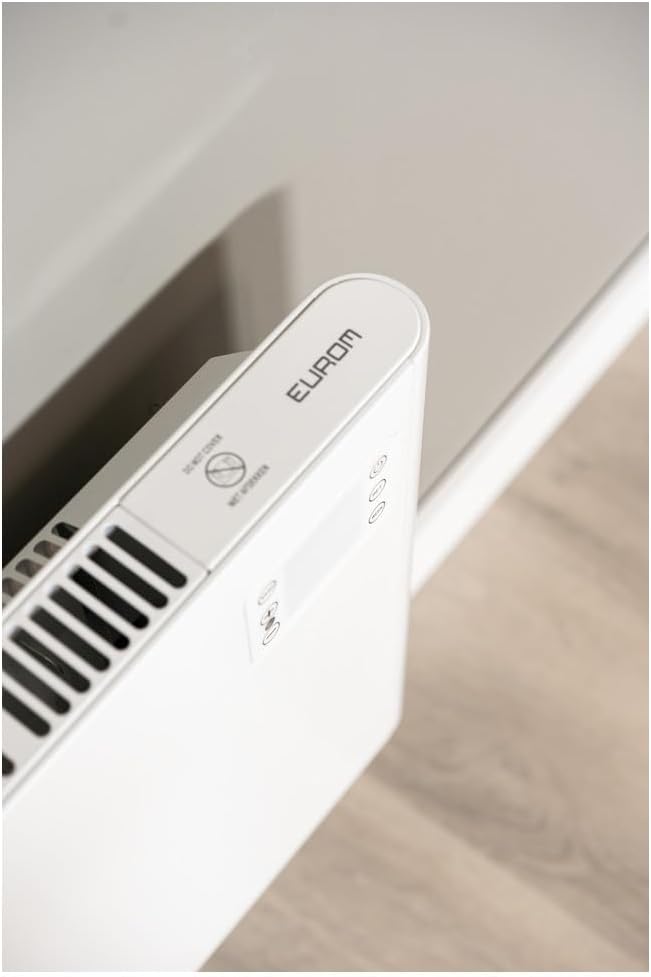
The Eurom Alutherm 2000 Wi-Fi heater features a sleek design and intuitive controls. Below are key components and their descriptions.



4. Persediaan dan Pemasangan
The Eurom Alutherm 2000 Wi-Fi heater offers flexible installation options: wall-mounted or freestanding.
4.1 Pemasangan Dinding
For permanent heating, the unit can be securely mounted to a wall. Refer to the included mounting template and hardware for precise installation. Ensure the heater is installed at a safe distance from flammable materials and that there is adequate clearance for air circulation.

4.2 Penempatan Berdiri Bebas
If you prefer a portable solution, attach the provided feet to the base of the heater. Place the heater on a stable, level surface, ensuring it is not obstructed and has sufficient space around it for proper operation.

4.3 Sambungan Kuasa
Once installed, plug the heater into a suitable electrical outlet. Ensure the main power switch (Figure 3.4) is in the 'OFF' position before plugging in. After plugging in, switch the main power switch to 'ON'.
5. Arahan Operasi
The Alutherm 2000 Wi-Fi can be operated via its integrated control panel, the remote control, or the Eurom Smart app.
5.1 Operasi Panel Kawalan
The control panel (Figure 3.6) allows direct adjustment of settings:
- Butang Kuasa: Menghidupkan atau mematikan pemanas.
- Butang Mod: Cycles through different operating modes (e.g., Comfort, ECO, Anti-frost).
- Butang SET: Confirms selections or enters settings menus.
- Pelarasan Suhu (+/-): Menambah atau menurunkan suhu yang dikehendaki.
- Butang MINGGU: Accesses weekly programming settings.
5.2 Operasi Kawalan Jauh
The remote control (Figure 3.5) provides convenient access to all heater functions from a distance. Its buttons mirror the functions available on the control panel.
5.3 Eurom Smart App Control (Wi-Fi)
For advanced control and scheduling, download the free Eurom Smart app. This app allows you to:
- Turn the heater on/off remotely.
- Set and adjust the desired temperature.
- Program weekly heating schedules.
- Connect and manage multiple Eurom Wi-Fi heaters.
Follow the in-app instructions for pairing your heater with the app and connecting to your home Wi-Fi network.
6. Penyelenggaraan
Penyelenggaraan tetap memastikan prestasi optimum dan jangka hayat pemanas anda.
- Pembersihan: Sentiasa cabut plag pemanas dan biarkan ia sejuk sepenuhnya sebelum dibersihkan. Gunakan yang lembut, damp kain untuk mengelap permukaan luar. Jangan gunakan pembersih atau pelarut yang melelas.
- Storan: Jika menyimpan pemanas untuk tempoh yang lama, pastikan ia bersih dan kering. Simpan di tempat yang sejuk dan kering, sebaik-baiknya dalam bungkusan asalnya.
- Pemeriksaan: Periodically check the power cord and plug for any signs of damage. If damage is found, do not use the heater and contact qualified service personnel.
7. Penyelesaian masalah
If you encounter issues with your Eurom Alutherm 2000 Wi-Fi heater, refer to the following common problems and solutions:
| Masalah | Kemungkinan Punca | Penyelesaian |
|---|---|---|
| Pemanas tidak dihidupkan. | No power supply; Main power switch off; Overheat protection activated. | Check power outlet and plug; Ensure main power switch (Figure 3.4) is ON; Unplug, allow to cool for 30 minutes, then restart. |
| Heater not heating to desired temperature. | Temperature setting too low; Room size exceeds heater capacity; Obstruction of air vents. | Increase temperature setting; Ensure heater is appropriate for room size; Clear any obstructions from air vents. |
| Isu sambungan Wi-Fi. | Weak Wi-Fi signal; Incorrect app pairing; Router issues. | Ensure heater is within Wi-Fi range; Re-pair the heater with the Eurom Smart app; Restart your Wi-Fi router. |
| Heater overheats or runs continuously. | Thermostat malfunction; Air vents blocked; Software glitch. | Ensure vents are clear and heater is not covered; If issue persists, unplug and contact support. (Note: A user review mentioned potential overheating issues if the management module gets stuck. Always monitor the heater.) |
| Heater does not restart automatically after power outage. | Had reka bentuk. | This model may require manual restart after a power interruption. |
Jika masalah berterusan selepas mencuba penyelesaian ini, sila hubungi khidmat pelanggan Eurom.
8. Spesifikasi
| Ciri | Spesifikasi |
|---|---|
| Jenama | Eurom |
| Nombor Model | EUM360776 |
| warna | putih |
| Dimensi Produk (L x W x H) | 101 x 46 x 12 cm |
| Berat badan | 6 Kilogram |
| Kelas Kecekapan Tenaga | B |
| Ciri Khas | Wi-Fi Compatible, Electronic Thermostat |
| Faktor Bentuk | Menara |
| Penggunaan Dalaman/Luar | Dalaman |
| Sumber Kuasa | Elektrik Bertali |
| Kaedah Pemanasan | Konvensyen |
| Jenis Pemasangan | Lekap di dinding |
9. Waranti dan Sokongan
For warranty information, please refer to the documentation provided with your purchase or visit the official Eurom website. If you require technical assistance, spare parts, or have any questions regarding your Eurom Alutherm 2000 Wi-Fi heater, please contact Eurom customer support directly. Contact details can typically be found on the product packaging or the manufacturer's webtapak.
Ask a question about this manual
Ask about setup, troubleshooting, compatibility, parts, safety, or missing instructions. Manuals+ will review the question and use this page’s manual context to help answer it.