
pengenalan
This manual provides detailed instructions for the installation, configuration, and operation of your Multilaser RE085 Dual Band Wireless Router. Please read this guide carefully to ensure proper setup and optimal performance of your device. The RE085 router offers dual-band connectivity (2.4GHz and 5GHz) with speeds up to 750 Mbps, featuring three external antennas and four LAN ports for reliable network access.
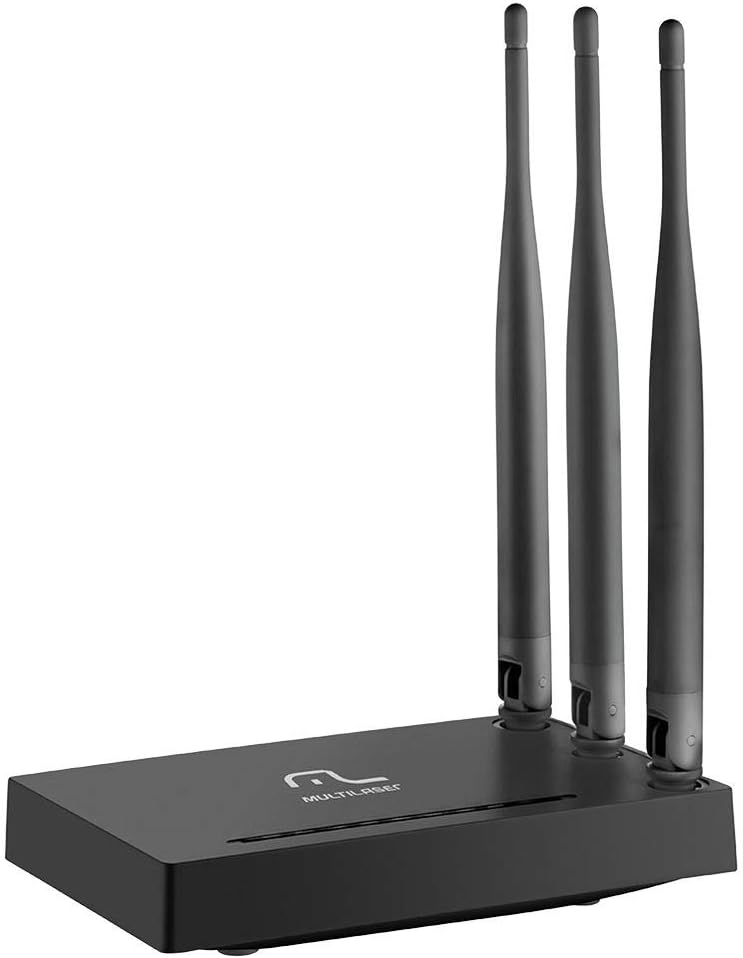
Imej: Depan view of the Multilaser RE085 router with its three external antennas in an upright position, showcasing reka bentuknya yang padat.
Kandungan Pakej
Sebelum meneruskan pemasangan, sila sahkan bahawa pakej anda mengandungi item berikut:
- Multilaser RE085 Dual Band Wireless Router
- Penyesuai Kuasa
- Kabel Ethernet
- Panduan Pemasangan Ringkas (dokumen ini berfungsi sebagai panduan komprehensif)
Persediaan dan Pemasangan
Follow these steps to set up your Multilaser RE085 router:
1. Sambungan Fizikal
- Kedudukan: Letakkan penghala di lokasi pusat di rumah atau pejabat anda, jauh daripada halangan dan peranti yang boleh menyebabkan gangguan (cth., telefon tanpa wayar, ketuhar gelombang mikro).
- Sambungkan Antena: Ensure the three external antennas are securely attached and oriented for optimal signal coverage.
- Sambung ke Kuasa: Plug the power adapter into the router's power port and then into a wall outlet. The power indicator LED on the router should light up.
- Sambungkan ke Modem: Connect one end of the provided Ethernet cable to the WAN port (often colored differently, e.g., blue) on the Multilaser RE085 router. Connect the other end to the LAN port on your modem or existing internet source.
- Sambungkan Peranti (Pilihan): For wired connections, connect one end of an Ethernet cable to any of the four LAN ports (usually yellow) on the router and the other end to your computer or other network device.

Imej: Belakang view of the Multilaser RE085 router, highlighting the WAN port (typically blue) and four yellow LAN ports for wired connections.
2. Konfigurasi Awal (Web Antara muka)
- Sambung ke Penghala: Connect your computer to the router either via an Ethernet cable (to a LAN port) or wirelessly using the default Wi-Fi network name (SSID) printed on the router's label.
- Akses Web pelayar: Buka a web pelayar (cth., Chrome, Firefox, Edge) dan taip alamat IP lalai penghala ke dalam bar alamat. Ini biasanya
192.168.0.1or192.168.1.1. Refer to the label on your router for the exact address. - log masuk: Enter the default username and password. Common defaults are
adminfor both username and password. If these do not work, check the router's label or the quick installation guide. - Jalankan Wizard Persediaan: Upon successful login, you will likely be prompted to run a Quick Setup Wizard. Follow the on-screen instructions to configure your internet connection type (e.g., PPPoE, Dynamic IP, Static IP). Your Internet Service Provider (ISP) can provide this information if you are unsure.
- Konfigurasikan Tetapan Tanpa Wayar:
- SSID (Nama Rangkaian): Change the default Wi-Fi network names for both 2.4GHz and 5GHz bands to something unique and easily identifiable.
- Password (Security Key): Set a strong, secure password for each Wi-Fi network. Use a combination of uppercase and lowercase letters, numbers, and symbols.
- Jenis Keselamatan: WPA2-PSK (AES) is recommended for optimal security.
- Simpan Tetapan: After configuring, save your settings. The router may restart to apply the changes.
Arahan Operasi
Once your Multilaser RE085 router is set up, you can connect your devices and manage your network.
Menyambung Peranti
- Peranti Wayarles: On your smartphone, tablet, laptop, or smart TV, search for available Wi-Fi networks. Select the SSID you configured (e.g., "MyHomeNetwork_2.4GHz" or "MyHomeNetwork_5GHz") and enter the password.
- Peranti Berwayar: Connect devices like desktop computers, gaming consoles, or smart TVs directly to the router's LAN ports using Ethernet cables for a stable and fast connection.
Dual Band Functionality
The RE085 supports both 2.4GHz and 5GHz wireless bands:
- Jalur 2.4GHz: Offers wider coverage and better penetration through walls, suitable for general internet use, browsing, and devices further away from the router.
- Jalur 5GHz: Provides faster speeds and lower latency, ideal for bandwidth-intensive activities like online gaming, 4K video streaming, and devices closer to the router.
You can connect different devices to the band that best suits their needs and location.
Rangkaian Tetamu
The router allows you to create up to 6 additional guest networks. This feature provides internet access to guests while isolating them from your main network, enhancing security. Access the router's web interface to configure guest networks.
Fungsi Pengulang
The Multilaser RE085 can also function as a wireless repeater, extending the range of an existing Wi-Fi network. Refer to the advanced settings in the router's web interface for repeater mode configuration.
Penyelenggaraan
Penyelenggaraan tetap membantu memastikan jangka hayat dan prestasi optimum penghala anda.
- Mula Semula Biasa: Periodically restart your router (unplug from power for 10 seconds, then plug back in) to clear its memory and refresh network connections. This can resolve minor performance issues.
- Kemas kini Firmware: Check the Multilaser official website for firmware updates. Keeping your router's firmware up-to-date can improve performance, add new features, and enhance security. Follow the instructions provided by Multilaser carefully when performing updates.
- Pembersihan Fizikal: Keep the router free from dust. Use a soft, dry cloth to gently clean the exterior. Ensure ventilation holes are not blocked.
- Pengurusan Kata Laluan: Change your Wi-Fi and router login passwords periodically for enhanced security.
Menyelesaikan masalah
If you encounter issues with your Multilaser RE085 router, try the following troubleshooting steps:
Tiada Sambungan Internet
- Semak Kabel: Ensure all Ethernet cables (WAN, LAN) are securely connected to both the router and your modem/devices.
- Semak Modem: Sahkan bahawa modem anda berfungsi dengan betul dan mempunyai sambungan internet yang aktif. Cuba mulakan semula modem anda.
- Lampu Status Penghala: Check the LED indicators on the front of the router. The internet/WAN light should be solid or blinking, indicating an active connection.
- Mulakan semula Penghala: Power cycle the router (unplug, wait 10 seconds, plug back in).
- Tetapan ISP: Confirm your internet connection type and settings (PPPoE, Dynamic IP, Static IP) in the router's web interface match those provided by your ISP.
Weak or Unstable Wi-Fi Signal
- Peletakan Penghala: Alihkan penghala ke lokasi yang lebih berpusat, jauh dari dinding, objek logam besar dan peranti elektronik lain yang boleh menyebabkan gangguan.
- Orientasi Antena: Laraskan antena untuk arah isyarat yang lebih baik.
- Pemilihan Band: For devices closer to the router, try connecting to the 5GHz band for faster speeds. For devices further away, the 2.4GHz band might offer better range.
- Gangguan: Identify and minimize sources of interference (e.g., microwaves, cordless phones, Bluetooth devices).
- Pemilihan Saluran: Dalam penghala web antara muka, cuba tukar saluran Wi-Fi untuk kedua-dua jalur 2.4GHz dan 5GHz kepada yang kurang sesak.
Forgotten Wi-Fi Password or Router Login Password
- Check Router Label: The default Wi-Fi password and router login credentials are often printed on a label on the bottom or back of the router.
- Tetapkan semula kepada Lalai Kilang: If you cannot access the router's web interface or have forgotten your Wi-Fi password and cannot retrieve it, you may need to perform a factory reset. Locate the small reset button (often recessed) on the router. With the router powered on, use a paperclip or pin to press and hold the reset button for about 10-15 seconds until the lights flash. The router will restart with its factory default settings, including default Wi-Fi names and passwords. You will then need to reconfigure it from scratch.
Spesifikasi
Key technical specifications for the Multilaser RE085 Dual Band Wireless Router:
| Ciri | Spesifikasi |
|---|---|
| Jenama | Multilaser |
| Nombor Model | RE085 |
| Standard Komunikasi Tanpa Wayar | 802.11ac |
| Kelas Band Kekerapan | Dwi-Jalur (2.4GHz & 5GHz) |
| Kadar Pemindahan Data | Sehingga 750 Megabit Sesaat |
| Bilangan Pelabuhan | 4 (LAN) |
| Teknologi Ketersambungan | Wi-Fi |
| Peranti Serasi | Gaming Consoles, Tablets, Smart Televisions |
| Penggunaan yang Disyorkan | Rumah |
Waranti dan Sokongan
For warranty information, technical support, or further assistance, please refer to the official Multilaser webtapak atau hubungi perkhidmatan pelanggan mereka secara langsung. Simpan resit pembelian anda sebagai bukti pembelian untuk tuntutan waranti.
Multilaser Official Webtapak: www.multilaser.com.br