
Arahan Keselamatan Penting
Sila baca dan fahami semua arahan keselamatan sebelum menggunakan produk ini. Simpan arahan ini untuk rujukan masa hadapan.
- Jangan gunakan radas ini berhampiran air atau lembapan.
- Bersihkan hanya dengan kain kering.
- Jangan sekat sebarang bukaan pengudaraan. Pasang mengikut arahan pengilang.
- Jangan pasang berhampiran mana-mana sumber haba seperti radiator, daftar haba, dapur, atau radas lain (termasuk amppenghidup) yang menghasilkan haba.
- Lindungi kord kuasa daripada berjalan atau tersepit, terutamanya pada palam, bekas kemudahan dan tempat keluar dari radas.
- Hanya gunakan lampiran/aksesori yang ditentukan oleh pengilang.
- Cabut plag radas ini semasa ribut petir atau apabila tidak digunakan untuk jangka masa yang lama.
- Rujuk semua servis kepada kakitangan perkhidmatan yang berkelayakan. Servis diperlukan apabila radas telah rosak dalam apa jua cara, seperti kord bekalan kuasa atau palam rosak, cecair telah tertumpah atau objek jatuh ke dalam radas, radas telah terdedah kepada hujan atau lembapan, tidak beroperasi seperti biasa. , atau telah digugurkan.
Produk Selesaiview
The AUNA Roadie KIDS Boombox is a versatile audio system featuring a top-loading CD player, Bluetooth connectivity, USB playback, AUX input, and AM/FM radio. It is designed for portable use with both AC power and battery options, and includes integrated LED lights.

Rajah 1: Depan view of the AUNA Roadie KIDS Boombox with active red LED lights.

Rajah 2: Bahagian hadapan terperinci view showing the display, USB port, and control panel.
Kawalan dan Komponen
- Ruang CD: Top-loading tray for audio CDs.
- paparan: LED screen showing track number, mode, and radio frequency.
- Butang Kawalan: Play/Pause, Stop, Skip Forward/Backward, Program, Album.
- Penceramah: Integrated stereo speakers with LED illumination.
- Port USB: For playing MP3/WMA files dari pemacu denyar USB.
- AUX IN Jack: Input 3.5mm untuk menyambungkan peranti audio luaran.
- Jack fon kepala: Output 3.5mm untuk pendengaran peribadi.
- AM/FM Antenna: Antena boleh dipanjangkan untuk penerimaan radio.
- Tombol Kelantangan: Melaraskan tahap output audio.
- Suis Pemilih Mod: Toggles between CD, USB, Bluetooth, AUX, AM, and FM modes.
- Suis Lampu: Turns the LED speaker lights on or off.
- AC DALAM Jack: Untuk menyambungkan penyesuai kuasa AC.
- Petak Bateri: Located on the bottom for C-type batteries.
- Membawa pemegang: Untuk mudah dibawa.
Persediaan
Bekalan Kuasa
The AUNA Roadie KIDS Boombox can be powered by either the included AC power adapter or by batteries.
Sambungan Kuasa AC
- Ensure the boombox is switched off.
- Connect the small end of the AC power adapter to the AC DALAM jack on the back of the boombox.
- Plug the other end of the AC power adapter into a standard wall outlet (110-120V ~ / 50-60 Hz).

Rajah 3: Belakang view with AC power input and antenna.
Pemasangan Bateri
For portable use, the boombox requires 6 x C-type batteries (not included).
- Ensure the boombox is switched off and disconnected from AC power.
- Cari petak bateri di bahagian bawah unit.
- Buka penutup petak bateri.
- Insert 6 C-type batteries, ensuring correct polarity (+/-) as indicated inside the compartment.
- Tutup penutup petak bateri dengan selamat.
Arahan Operasi
Operasi Am
- Hidupkan/Mati Kuasa: Use the main power switch located on the side of the unit.
- Kawalan Kelantangan: Putar JILID knob on the side of the unit to adjust the sound level.
- Pemilihan Mod: Gunakan MODE selector switch on the side to choose between CD/USB/BT/AUX and AM/FM radio functions.

Rajah 4: Sisi view showing Volume and Mode controls.
Operasi Pemain CD
The boombox supports Audio CD, CD-R, CD-RW, and MP3-CDs.
- Tukar MODE pemilih kepada CD.
- Gently press the 'OPEN' area on the CD compartment lid to open it.
- Letakkan CD pada gelendong dengan bahagian label menghadap ke atas.
- Close the CD compartment lid firmly until it clicks. The display will show 'CD' and then the total number of tracks.
- Tekan ke MAIN/JEDA butang untuk memulakan main balik.
- Tekan MAIN/JEDA again to pause, and press BERHENTI untuk menamatkan main balik.
- Gunakan Langkau ke Hadapan (>> |) atau SKIP KE BELAKANG (|<) butang untuk menavigasi antara trek.
- Main Semula Diprogram: Dalam mod berhenti, tekan PROGRAM button. The display will show '01'. Use SKIP FORWARD/BACKWARD untuk memilih trek, kemudian tekan PROGRAM again to confirm. Repeat for up to 20 tracks (CD) or 99 tracks (MP3). Press BERMAIN untuk memulakan main balik yang diprogramkan.
- Repeat Functions: Semasa main semula, tekan butang ULIKAN button to cycle through repeat modes (e.g., repeat one track, repeat all tracks, repeat folder for MP3 CDs).
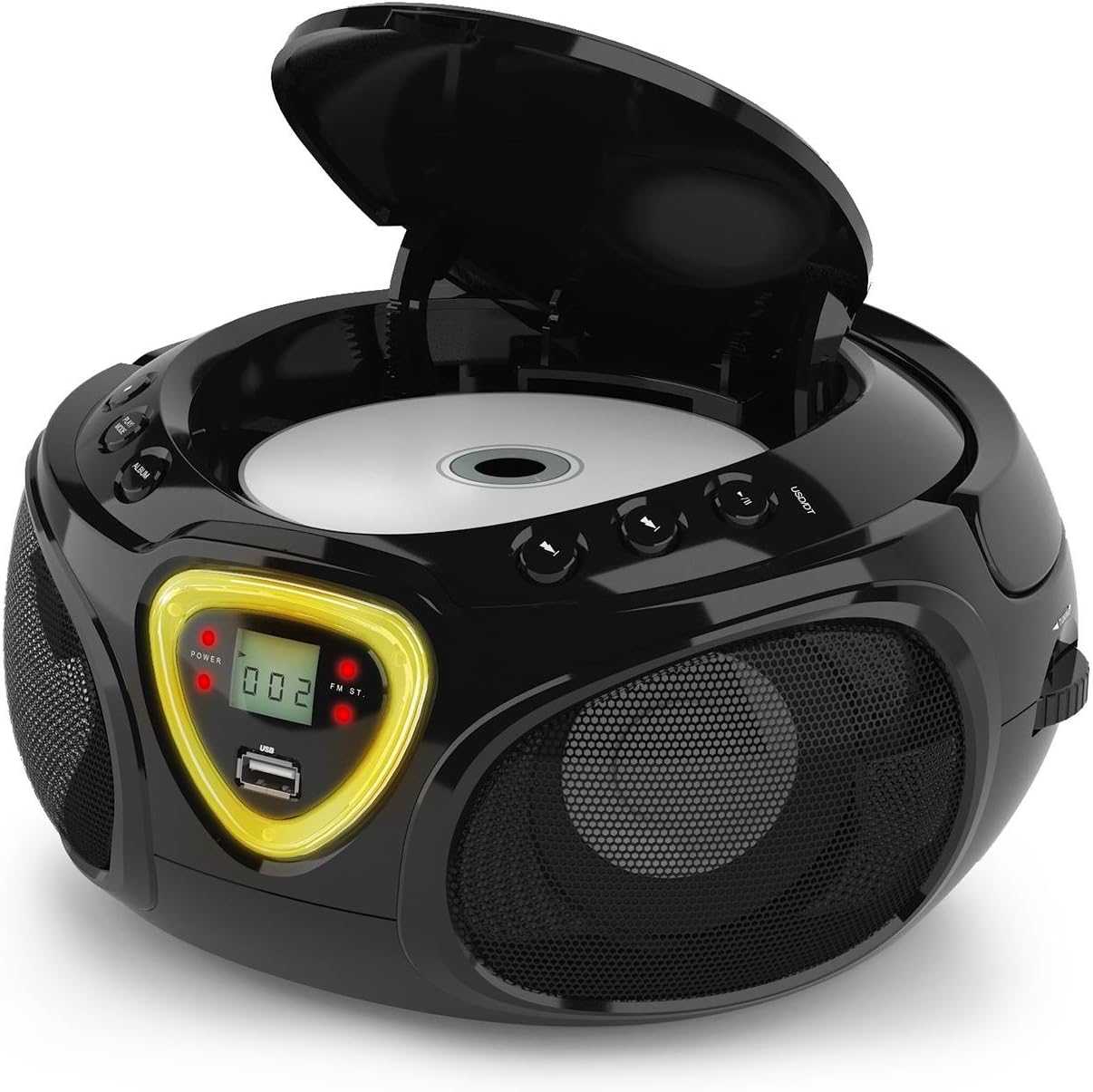
Figure 5: CD compartment open for disc insertion.
Operasi Bluetooth
- Tukar MODE pemilih kepada BT (Bluetooth). The display will show 'BT' and flash, indicating pairing mode.
- Dayakan Bluetooth pada telefon pintar, tablet anda atau peranti lain yang didayakan Bluetooth.
- Cari untuk available devices and select 'AUNA Roadie' from the list.
- Once successfully paired, the 'BT' indicator on the boombox display will stop flashing and remain solid.
- You can now play audio from your connected device through the boombox. Use the controls on your device or the boombox's Play/Pause and Skip buttons to manage playback.
Main Balik USB
The boombox supports MP3 and WMA file formats from USB flash drives.
- Masukkan pemacu kilat USB ke dalam USB port on the front of the boombox.
- Tukar MODE pemilih kepada USB. The unit will automatically detect and begin playing compatible audio files.
- Gunakan MAIN/JEDA, BERHENTI, dan SKIP FORWARD/BACKWARD butang untuk mengawal main balik.
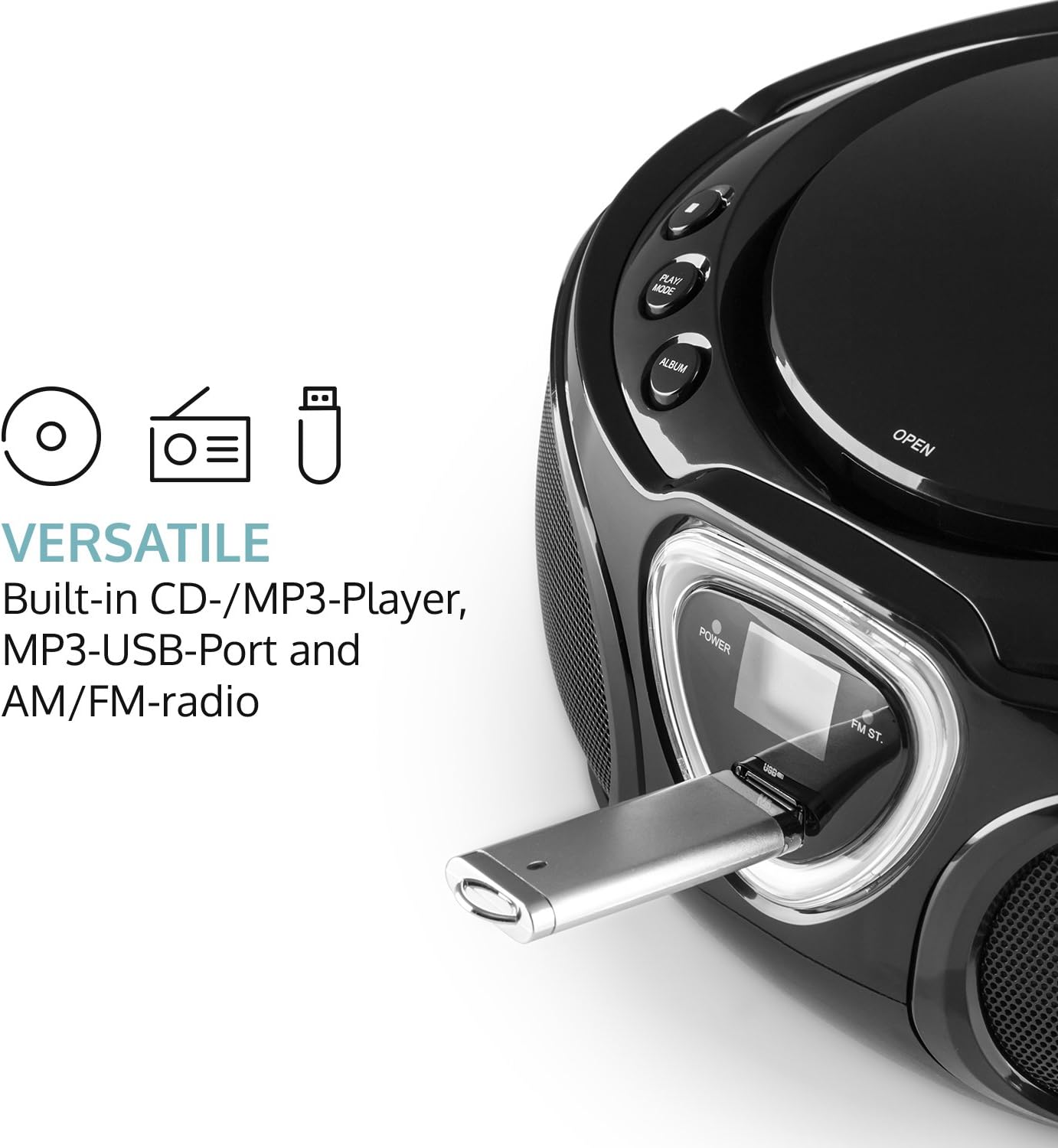
Figure 6: USB port with a flash drive inserted.
Input AUX
- Sambungkan satu hujung kabel audio 3.5mm (tidak disertakan) ke AUX IN bicu pada boombox.
- Connect the other end of the audio cable to the headphone jack or audio output of your external audio device (e.g., MP3 player, smartphone).
- Tukar MODE pemilih kepada AUX.
- Control playback and volume directly from your external audio device.
Operasi Radio (AM/FM)
- Tukar MODE selector to either AM or FM.
- Panjangkan antena teleskopik untuk penerimaan FM yang optimum. Untuk AM, putar unit untuk penerimaan terbaik.
- Putar MENALA dial on the side of the unit to scan for radio stations.

Rajah 7: Sisi view with Tuning dial and Light switch.
Fungsi Lampu LED
The boombox features multi-color LED lights that illuminate the speakers.
- Gunakan LIGHT ON/OFF switch on the side of the unit to turn the LED lights on or off.
- The lights will typically pulse and change color with the rhythm of the music when active.

Figure 8: Boombox with active LED lights.
Penggunaan Fon Kepala
For private listening, connect any standard 3.5mm headphones (not included) to the Fon kepala jack. The main speakers will automatically mute when headphones are connected.
Penyelenggaraan
Membersihkan Unit
- Wipe the exterior of the boombox with a soft, dry cloth.
- Jangan gunakan pembersih, lilin atau pelarut yang melelas kerana ia boleh merosakkan kemasan.
- For the CD lens, use a specialized CD lens cleaning kit if necessary. Avoid touching the lens directly.
Penyimpanan
- Simpan boombox di tempat yang sejuk dan kering, jauh daripada cahaya matahari langsung dan suhu yang melampau.
- Jika menyimpan untuk tempoh yang lama, tanggalkan bateri untuk mengelakkan kebocoran dan kerosakan pada unit.
Menyelesaikan masalah
If you encounter any issues with your AUNA Roadie KIDS Boombox, please refer to the following common problems and solutions:
| Masalah | Kemungkinan Punca | Penyelesaian |
|---|---|---|
| Tiada kuasa | AC adapter not connected, batteries depleted or incorrectly inserted. | Check AC adapter connection. Replace or correctly insert batteries. |
| Tiada bunyi | Volume too low, incorrect mode selected, headphones connected. | Increase volume. Select correct mode (CD, BT, USB, AUX, AM/FM). Disconnect headphones if using speakers. |
| CD tidak dimainkan | CD inserted incorrectly, CD dirty/scratched, incompatible CD format. | Ensure CD is label-side up. Clean CD. Use compatible CD format. |
| Bluetooth tidak bersambung | Boombox not in BT mode, device too far, already paired to another device. | Switch to BT mode. Ensure device is within 10 meters. Disconnect from other devices. |
| Penerimaan radio yang lemah | Antenna not extended/adjusted, weak signal. | Extend and adjust FM antenna. Rotate unit for AM. Try a different location. |
Spesifikasi
| Ciri | Perincian |
|---|---|
| Jenama | AUNA |
| Teknologi Ketersambungan | Tambahan, Bluetooth, USB |
| warna | Hitam |
| Jenis Pembesar Suara | Stereo |
| Dimensi Item (L x W x H) | 7.9 x 9.5 x 5.2 inci |
| Sumber Kuasa | AC (110-120V ~ / 50-60 Hz) or 6 x C-type batteries (9V DC) |
| Peranti Serasi | Komputer riba, Telefon Pintar, Tablet |
| Wattage | 3 watts (2 x 1.5W speakers) |
| Mod Keluaran Audio | Stereo |
| Format Audio yang Disokong | CD, MP3, WMA |
| Versi Bluetooth | 2.1 + EDR (Profiles: A2DP, AVRCP) |
| Compatible CD Formats | Audio CD, CD-R, CD-RW, MP3-CDs |
| Programmable Playback | 20 tracks (CD), 99 tracks (MP3) |
| Berat Barang | 3.4 paun |
Waranti dan Sokongan
This product comes with a manufacturer's warranty. For detailed warranty information, please refer to the documentation included with your purchase or visit the official AUNA website. If you require technical assistance, troubleshooting beyond this manual, or have questions regarding your product, please contact AUNA customer support.