
Radioddity Raddy RF23 AM FM Portable Pocket Radio MP3 Player User Manual
Model: RF23
pengenalan
This manual provides detailed instructions for the Radioddity Raddy RF23, a compact and versatile portable radio and MP3 player. It features AM/FM radio reception, MP3 playback from Micro TF cards and USB disks, and an integrated flashlight. Please read this manual thoroughly before using the device to ensure proper operation and longevity.
Kandungan Pakej
- 1 x Radioddity Raddy RF23 AM/FM Radio
- 1 x Kabel Pengecas USB
- 1 x Rechargeable Lithium-Ion Battery (BL-5C type)
- 1 x Tali pergelangan tangan
Produk Selesaiview
Familiarize yourself with the various parts and controls of your Raddy RF23 radio.

Rajah 1: Depan View of Raddy RF23 - Displays the speaker grille, digital display, and numeric keypad with function buttons.

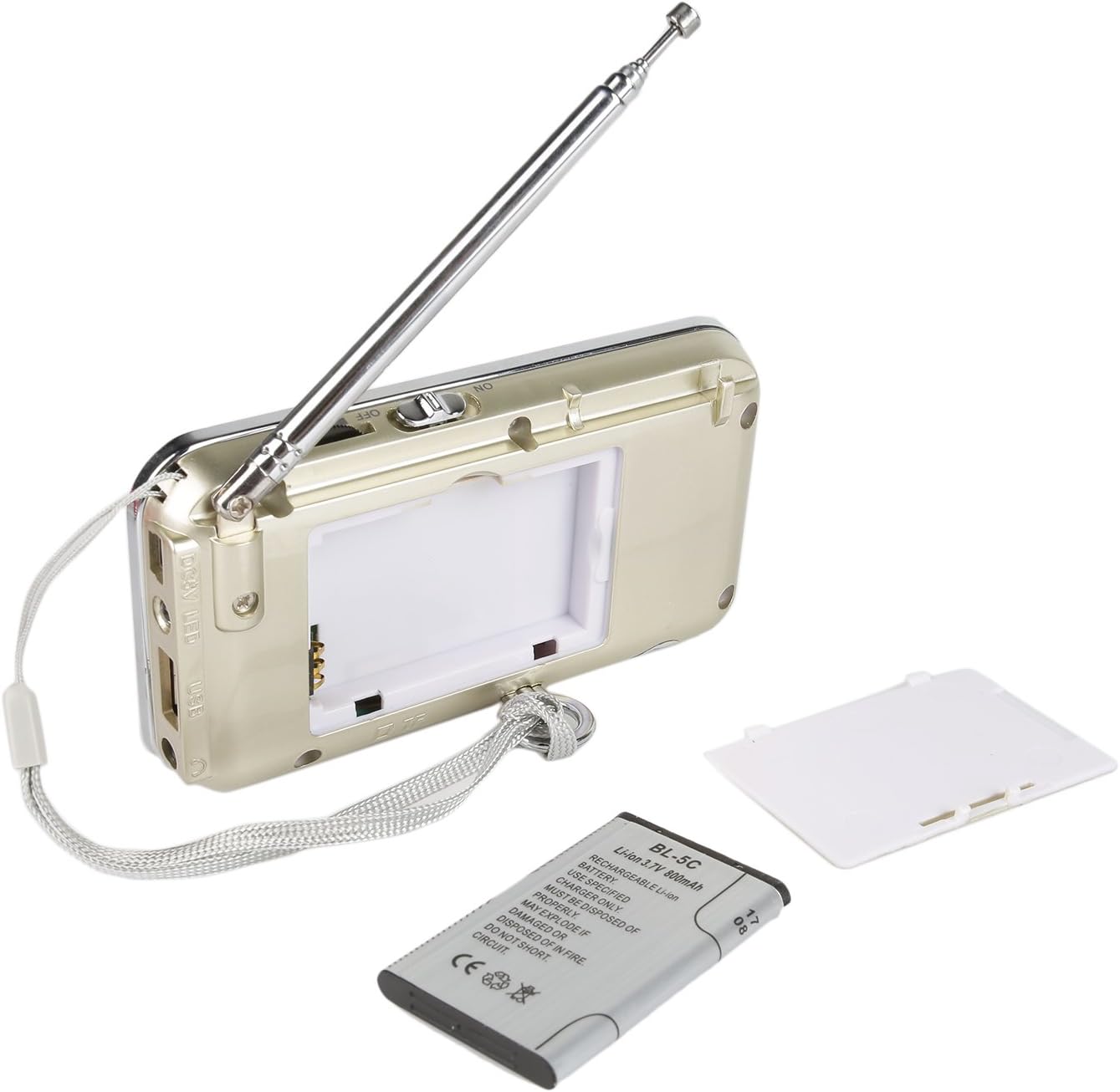
Rajah 2: Belakang View of Raddy RF23 - Shows the battery cover, USB port, DC 5V charging port, and the wrist strap with its stand attachment.
Kawalan dan Pelabuhan
- Suis kuasa: Slide switch on the side to turn the device ON or OFF.
- Antena: Antena teleskopik boleh dipanjangkan untuk penerimaan radio yang lebih baik.
- Paparan Digital: Menunjukkan maklumat frekuensi, mod dan trek.
- Penceramah: Pembesar suara bersepadu untuk output audio.
- Pad Kekunci Berangka (0-9): Used for direct frequency input or track selection.
- Butang MOD: Switches between AM, FM, and MP3 playback modes.
- Play/Pause Button (▶⏸): Plays or pauses MP3 tracks.
- Previous/Rewind Button (◀◀): Skips to the previous track or rewinds during MP3 playback. In radio mode, short press for previous station, long press for auto-scan down.
- Next/Fast Forward Button (▶▶): Skips to the next track or fast forwards during MP3 playback. In radio mode, short press for next station, long press for auto-scan up.
- Butang LED: Activates or deactivates the built-in flashlight.
- Input DC 5V: Port mikro USB untuk mengecas peranti.
- Port USB: For connecting a USB flash drive for MP3 playback.
- Slot Kad TF: For inserting a Micro TF (Micro SD) card for MP3 playback.
- Bicu Fon Kepala (3.5mm): Untuk menyambungkan fon kepala untuk mendengar peribadi.
Persediaan
1. Pemasangan Bateri
- Cari penutup petak bateri di belakang radio.
- Luncurkan penutup terbuka.
- Insert the provided BL-5C Lithium-Ion battery, ensuring the contacts align correctly.
- Tutup penutup petak bateri dengan selamat.

Rajah 3: Pemasangan Bateri - Open the battery compartment and insert the BL-5C battery.
2. Mengecas Bateri
- Connect the small end of the included USB charging cable to the DC 5V input port on the side of the radio.
- Sambungkan hujung kabel USB yang lebih besar ke penyesuai kuasa USB (tidak disertakan) atau port USB komputer.
- The charging indicator light will illuminate. The light typically turns off or changes color when charging is complete.
- Pengecasan penuh mengambil masa kira-kira 2-3 jam.
Rajah 4: Pengecasan USB - Connect the radio to a USB power source using the provided cable.
3. Inserting a Micro TF Card or USB Disk (for MP3 Playback)
- Pastikan radio dimatikan.
- For a Micro TF card: Gently insert the card into the TF card slot until it clicks into place.
- For a USB disk: Insert the USB disk into the USB port.
- The radio will automatically detect the storage device when powered on and switched to MP3 mode.

Rajah 5: Penyisipan Kad TF - Insert a Micro TF card into the designated slot.
Arahan Operasi
1. Hidupkan/Mati Kuasa
Slide the power switch located on the side of the radio to the "ON" position to power on. Slide it to "OFF" to power off.
2. Pemilihan Mod
Tekan ke MODE button repeatedly to cycle through the available modes: FM Radio, AM Radio, and MP3 Player (if a TF card or USB disk is inserted).
3. FM/AM Radio Operation
- Pilih Mod Radio: Tekan ke MODE butang sehingga "FM" atau "AM" muncul pada paparan.
- Panjangkan Antena: Untuk penerimaan optimum, panjangkan sepenuhnya antena teleskopik.
- Imbasan Stesen Automatik: Tekan lama Sebelumnya (◀◀) or Next (▶▶) button to automatically scan for and stop at the next available station.
- Penalaan Manual: Use the numeric keypad to directly enter a frequency (e.g., for 106.7 FM, press 1-0-6-7).
- Pelarasan Kelantangan: Adjust the volume using the dedicated volume controls, typically located on the side of the device or integrated with other function buttons.
4. MP3 Playback Operation
- Pilih Mod MP3: Tekan ke MODE button until "MP3" or a track number appears on the display.
- Main/Jeda: Tekan ke Main/Jeda (▶⏸) butang untuk memulakan atau menjeda main semula.
- Trek Seterusnya / Sebelumnya: Tekan ke Next (▶▶) butang untuk melangkau ke trek seterusnya. Tekan ke Sebelumnya (◀◀) button to go to the beginning of the current track, or press it again to go to the previous track.
- Pelarasan Kelantangan: Adjust the volume using the dedicated volume controls, typically located on the side of the device or integrated with other function buttons.
- Pemilihan Trek Langsung: Use the numeric keypad to enter the track number directly.
5. Fungsi Lampu Suluh
Tekan ke LED button to turn the built-in flashlight ON. Press it again to turn the flashlight OFF.
Penyelenggaraan
- Pembersihan: Wipe the radio with a soft, dry cloth. Do not use liquid cleaners or solvents.
- Storan: Apabila tidak digunakan untuk tempoh yang lama, simpan radio di tempat yang sejuk dan kering.
- Penjagaan Bateri: If the radio will not be used for a long time, remove the battery to prevent leakage. Recharge the battery periodically to maintain its lifespan.
- Penjagaan Antena: Kendalikan antena teleskopik dengan lembut untuk mengelakkan bengkok atau pecah.
Menyelesaikan masalah
| Masalah | Kemungkinan Punca | Penyelesaian |
|---|---|---|
| Radio tidak dihidupkan. | Bateri mati atau tidak dipasang dengan betul. | Charge the battery or ensure it is inserted with correct polarity. |
| Penerimaan radio yang lemah. | Antena tidak dilanjutkan, isyarat lemah, atau gangguan. | Fully extend the antenna. Try repositioning the radio. Move away from electronic devices that may cause interference. |
| No sound from MP3 player. | Volume too low, incorrect mode, or no valid media. | Increase volume. Ensure MP3 mode is selected. Verify TF card/USB disk contains MP3 files dan dimasukkan dengan betul. |
| Flashlight does not work. | Battery low or flashlight not activated. | Charge the battery. Press the LED button to turn on the flashlight. |
| Peranti dimatikan secara tidak dijangka. | Bateri lemah. | Isi semula bateri sepenuhnya. |
Spesifikasi
- Jenama: Radiodditi
- model: RF23
- Dimensi Produk: 4.61 x 0.79 x 2.5 inci
- Berat Barang: 6.7 auns
- Sumber Kuasa: Dikuasakan Bateri (1 Bateri Lithium Ion diperlukan)
- Jenis Bateri: BL-5C (Rechargeable)
- Teknologi Ketersambungan: USB
- Teknologi Penala: AM, FM
- Pancaragam Radio Disokong: AM, FM
- Julat Kekerapan: FM (87.5-108 MHz), AM (520-1710 KHz)
- Ciri Khas: Built-In Flashlight, Portable
- Peranti Serasi: Earphone, Micro TF Card, USB Disk
- Pengeluar: Radiodditi
Waranti dan Sokongan
For warranty information or technical support, please refer to the documentation provided with your purchase or visit the official Radioddity webtapak. Simpan resit pembelian anda sebagai bukti pembelian untuk tuntutan waranti.
Radioddity Official Webtapak: www.radioddity.com