
1. Produk Lebihview
The Ergotron LX Vertical Stacking Dual Monitor Arm is designed to enhance your workspace by providing flexible and ergonomic positioning for two monitors. This VESA desk mount system supports two screens up to 40 inches and weighing between 7 to 22 pounds each. It features a tall pole and is finished in polished aluminum.
Ciri-ciri Utama:
- Keserasian Luas: Supports two screens up to 40 inches and 7 to 22 pounds each, compatible with VESA patterns 75x75mm and 100x100mm.
- Pakej Lengkap: Includes two LX arms and extensions, a 23-inch pole, a heavy-duty two-piece desk clamp for surfaces 0.63 to 2.6 inches thick, a grommet mount plate, and all necessary hardware.
- Ruang Kerja yang Selesa: Offers 13 inches of lift, rising 31.7 inches from the desktop. Customize your view with 360 degrees of rotation and 75 degrees of tilt.
- Flexible Working: Easily stack screens one over the other or position them side-by-side. Expand to three or four displays with an optional LX Arm, Extension, and Collar Kit accessory (97-940-026).
- Organized Desk: Features thoughtful cable management to keep your workspace tidy.
- Pembinaan Tahan Lama: Built to last with extensive quality testing and backed by a 10-year warranty.
2. Kandungan Pakej
Before beginning installation, verify that all components are present and undamaged. The package includes:
- 2 x LX Arms and Extensions
- 1 x 23-inch Pole
- 1 x Heavy-duty Two-piece Desk Clamp (for surfaces 0.63 to 2.6 inches thick)
- 1 x Grommet Mount Plate and Hardware
- 2 x Pole Collars
- 2 x Cap
- Mounting Hardware (screws, washers, tools)

Image: All components included in the Ergotron LX Vertical Stacking Dual Monitor Arm package.
3. Persediaan dan Pemasangan
The Ergotron LX Dual Monitor Arm offers two primary mounting options: desk clamp and grommet mount. Choose the method best suited for your desk.
3.1 Meja Clamp Pemasangan
The heavy-duty two-piece desk clamp is suitable for desk surfaces between 0.63 inches (1.5 cm) and 2.6 inches (6.6 cm) thick.
- Lampirkan meja clamp base to the edge of your desk.
- Selamatkan clamp using the provided screws and tightening mechanism. Ensure it is firmly attached to prevent movement.
- Insert the 23-inch pole into the clamp base and secure it.

Image: Illustration of desk clamp dan pilihan pemasangan grommet.

Image: Close-up of the desk clamp pemasangan.
3.2 Pemasangan Grommet
For desks with a pre-drilled hole, the grommet mount provides a secure and flush installation. This method is suitable for desk surfaces between 0.3 inches (0.8 cm) and 2 inches (5 cm) thick, with a minimum hole diameter of 3 inches (7.6 cm).
- Insert the grommet mount plate and bolt through the desk hole.
- Secure the plate from underneath the desk using the provided hardware.
- Attach the 23-inch pole to the grommet mount and tighten.
3.3 Attaching Monitor Arms
- Slide the LX arms onto the 23-inch pole at your desired heights. Secure them with the pole collars.
- Attach the VESA plates to the back of your monitors using the appropriate screws.
- Carefully slide the monitors (with VESA plates attached) onto the ends of the LX arms. Ensure they click securely into place.

Image: The Ergotron LX Dual Stacking Monitor Arm with two monitors in a vertical configuration.
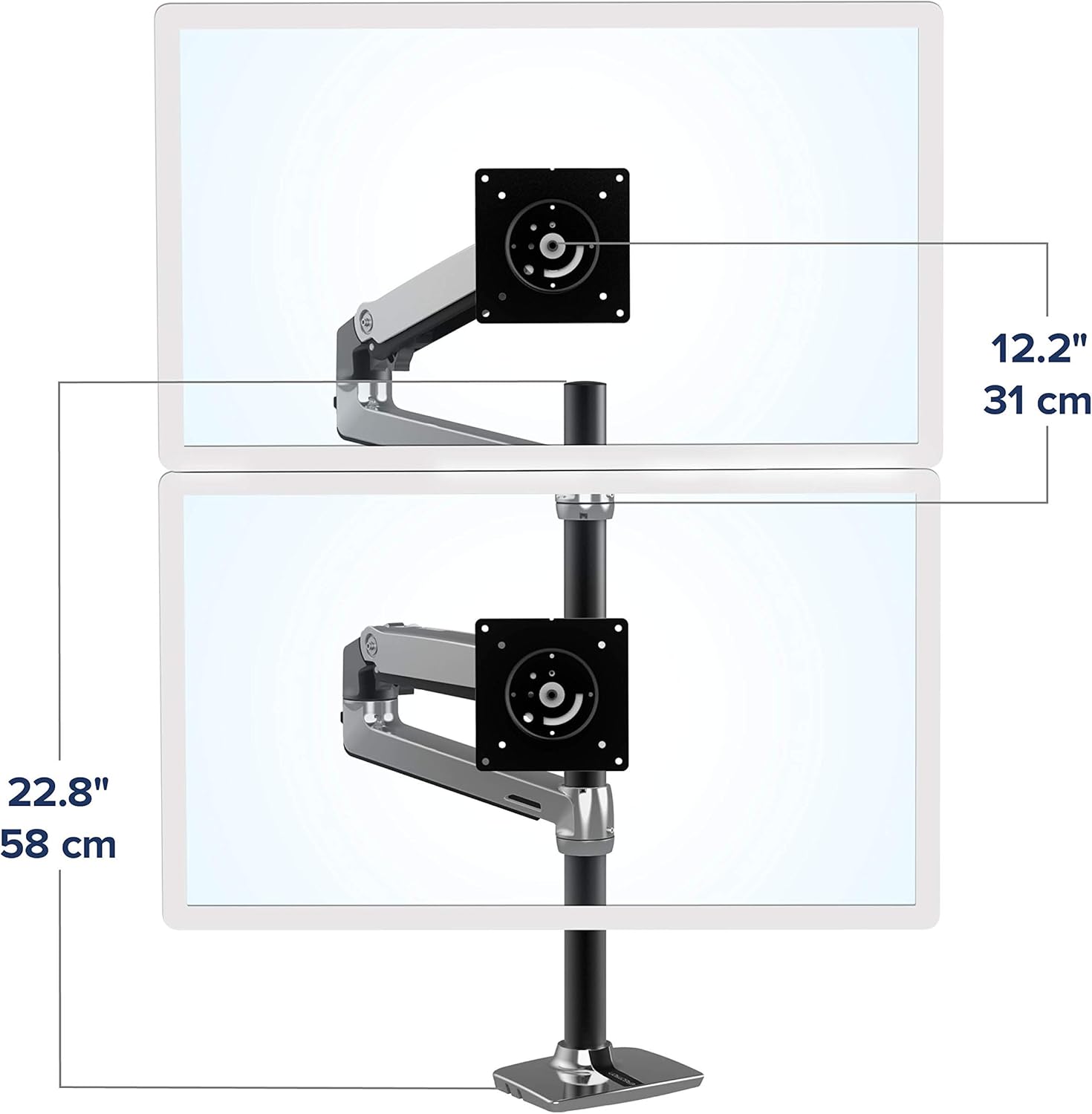
Image: The Ergotron LX Dual Stacking Monitor Arm with two monitors in a horizontal side-by-side configuration.
4. Pengendalian dan Pelarasan
The LX Dual Monitor Arm allows for extensive adjustments to achieve an ergonomic and comfortable viewpengalaman dalam.
4.1 Pelarasan Ketinggian
The arms can be moved up and down the 23-inch pole to set the initial height. Fine-tune the monitor height by adjusting the tension in the arm joints. The system provides 13 inches (33 cm) of vertical lift.

Image: The monitor arm's vertical lift range of 13 inches (33 cm).
4.2 Kecondongan dan Putaran
Each monitor can be tilted up to 75 degrees and rotated 360 degrees. This allows for easy switching between landscape and portrait orientations, or adjusting the viewsudut ing untuk mengurangkan silau.

Image: Detailed illustration of the arm's articulation, tilt, and rotation capabilities.
4.3 Pelarasan Ketegangan
If monitors sag or are difficult to move, adjust the tension screws on the arm joints using the provided hex key. Turn clockwise to increase tension for heavier monitors, and counter-clockwise to decrease tension for lighter monitors. Ensure monitors remain stable at your desired position.
5. Pengurusan Kabel
The LX Dual Monitor Arm includes integrated cable management features to keep your workspace organized and clutter-free. Route monitor cables through the designated channels along the underside of the arms and down the pole.

Image: Illustration of proper cable routing through the arm's integrated channels.
6. Spesifikasi
| Ciri | Perincian |
|---|---|
| Nombor Model | 45-549-026 |
| Jenis Pemasangan | Pemasangan Meja (Meja Clamp atau Grommet) |
| Jenis Pergerakan | Artikulasi |
| bahan | logam |
| warna | Polished Aluminum |
| Peranti Serasi | Pemantau |
| Minimum Supported Screen Size | 1 inch (for compatibility, actual usage typically larger) |
| Maximum Supported Screen Size | 40 inches per monitor |
| Kapasiti Berat | 7 to 22 lbs (3.2 to 10 kg) per monitor |
| Angkat Menegak | 13 inci (33 cm) |
| Ketinggian Tiang | 23 inci (58.4 cm) |
| Sudut Kecondongan | 75 Darjah |
| Putaran | 360 Darjah |
| Meja Clamp Ketebalan | 0.63 hingga 2.6 inci (1.5 hingga 6.6 cm) |
| Grommet Mount Thickness | 0.3 hingga 2 inci (0.8 hingga 5 cm) |
| Berat Barang | 19 paun (8.6 kg) |
7. Penyelenggaraan
To ensure the longevity and optimal performance of your Ergotron LX Dual Monitor Arm, follow these maintenance guidelines:
- Pembersihan tetap: Wipe down the arm and pole surfaces with a soft, damp kain. Elakkan pembersih yang melelas yang boleh merosakkan kemasan.
- Semak Sambungan: Periodically inspect all screws and connections to ensure they remain tight. Re-tighten if necessary, especially after making significant adjustments to monitor positions.
- Pelinciran: The articulating joints are designed for smooth movement and generally do not require lubrication. If you notice stiffness or squeaking, consult Ergotron support before applying any lubricants.
- Pemeriksaan Kabel: Ensure cables routed through the management channels are not pinched or excessively bent, which could lead to damage.
8. Penyelesaian masalah
If you encounter issues with your monitor arm, refer to the following common troubleshooting tips:
- Monitor Sagging or Drifting: This is typically due to insufficient tension for the monitor's weight. Use the provided hex key to increase the tension in the arm joints (clockwise rotation). Refer to the "Tension Adjustment" section for guidance.
- Difficulty Moving Monitor: If the arm is too stiff, the tension might be too high. Decrease the tension in the arm joints (counter-clockwise rotation) using the hex key.
- Unstable Mount: Pastikan meja clamp or grommet mount is securely fastened to the desk. Check for any wobbling at the base and tighten all connections. If using a desk clamp, verify your desk thickness is within the supported range.
- Cables Not Fitting: Double-check that cables are routed correctly through the designated channels. Avoid forcing cables, and ensure they have enough slack for full arm movement.
If these steps do not resolve the issue, please contact Ergotron customer support for further assistance.
9. Waranti dan Sokongan
The Ergotron LX Vertical Stacking Dual Monitor Arm comes with a Waranti 10 tahun, mencerminkan komitmen pengeluar terhadap kualiti dan ketahanan. Waranti ini meliputi kecacatan bahan dan mutu kerja di bawah penggunaan biasa.
For warranty claims, technical support, or any questions regarding your product, please visit the official Ergotron webtapak atau hubungi bahagian perkhidmatan pelanggan mereka. Simpan resit pembelian anda sebagai bukti pembelian.
Video: An official Ergotron video highlighting the features and benefits of the LX Dual Stacking Arm, demonstrating its ergonomic advantages for a home office setup.
Video: An official Ergotron video showcasing the top features and benefits of the LX Stacking Monitor Arm with a tall pole, emphasizing its versatility and design.