
1. Pengenalan
The RAAYOO L001 is a versatile 12V car camera designed for use as a reverse, front, or side view camera. It features a high-definition color CMOS sensor, starlight level night vision, and an IP68 waterproof rating, ensuring clear and reliable imaging in various conditions. The camera lens can be manually rotated 360 degrees for optimal angle adjustment. This manual provides detailed instructions for installation, operation, and maintenance of your RAAYOO L001 camera.
Ciri-ciri utama termasuk:
- Clear, wide viewing field to eliminate blind spots.
- 360-degree rotatable lens for convenient angle adjustment.
- Multi-functionality: can be used as a reverse, side, or front view kamera.
- Easy installation with strong double-sided adhesive, no drilling required.
- IP68 waterproof level for reliable performance.
- HD high clear image with no distortion.
- Starlight level night vision.
2. Persediaan dan Pemasangan
The RAAYOO L001 camera is designed for easy installation. It connects via an RCA video input connector and requires a 12V power supply. The camera comes with a 26-foot extension cable for video signal transmission and a 4.5-foot power cord.
2.1 Kandungan Pakej
- RAAYOO L001 Camera Unit
- 6m/18ft Video Cord (RCA)
- 1.5m/4.5ft Power Cord
- 2 Skru Pemasangan
2.2 Memasang Kamera
The camera can be mounted using the strong double-sided adhesive tape on any desired flat surface. No drilling is required for mounting the camera unit itself, though routing cables may require some vehicle modification.

Figure 2.1: RAAYOO L001 Camera Unit. This image shows the compact design of the camera with its integrated adhesive base and cable.
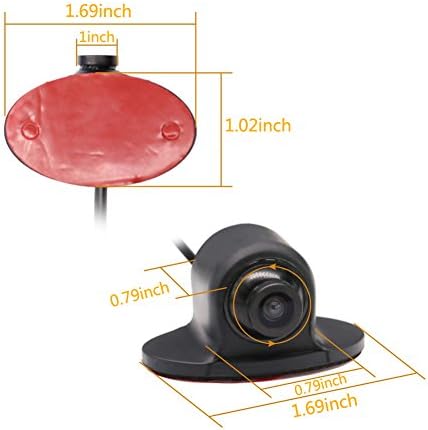
Figure 2.2: Camera Dimensions. This image provides the physical dimensions of the camera unit, including its length, width, and height, along with the adhesive pad size.
2.3 Gambarajah Pendawaian
Follow the diagram below for proper wiring. Ensure all connections are secure to prevent signal loss or power issues.

Figure 2.3: Wiring Diagram. This diagram illustrates how to connect the camera's power cord to the vehicle's 12V power source (e.g., backup light) and the video cord to the monitor's RCA input. It also shows the included screws.
- Connect the red wire of the camera's power cord to a 12V power source (e.g., vehicle's backup light positive for reverse camera functionality).
- Connect the black wire of the camera's power cord to a ground point (e.g., vehicle chassis).
- Connect the yellow RCA video connector from the camera's video cord to the video input of your monitor.
- Ensure the monitor is also powered correctly.
3. Arahan Operasi
3.1 Adjusting the Camera Lens
The RAAYOO L001 features a lens that can be manually rotated 360 degrees. This allows you to fine-tune the viewing angle to best suit your vehicle and desired perspective (e.g., higher for a wider view, lower for bumper visibility).

Figure 3.1: Rotatable Lens. This image highlights the 360-degree rotation capability of the camera lens, allowing for manual adjustment of the viewsudut ing.
3.2 Image Mode and Guideline Control
The camera includes two small wires (white and green) near the camera unit that control the parking guidelines and image mirroring. These wires allow you to customize the camera's behavior for different applications (rear, front, or side view).

Figure 3.2: Guideline and Mirror Image Adjustment Wires. This image shows the white and green wires that can be cut to modify the camera's output, along with a pair of scissors indicating the action.
- Gelung Putih: Controls the parking guidelines.
- Kepada batalkan the guidelines: Cut the white loop.
- Kepada simpan the guidelines (default for rear view): Leave the white loop intact.
- Green Loop: Controls image mirroring.
- To change from mirror image (default for rear view) kepada non-mirror image (for front/side view): Cut the green loop.
- Kepada simpan the mirror image (default for rear view): Leave the green loop intact.
Nota Penting:
- After cutting either the green or white wire, you need to ground one side of the cut wire for the camera to convert the setting.
- If a wire is cut, it cannot be reconnected to restore the original function. Make sure of your desired configuration before cutting.
- Always power off the vehicle and then power it on again after cutting the loops for the changes to take effect.
4. Penyelenggaraan
The RAAYOO L001 camera is designed for durability and requires minimal maintenance. However, regular checks can ensure optimal performance:
- Pembersihan: Bersihkan kanta kamera secara berkala dengan kain lembutamp kain untuk menanggalkan kotoran, habuk atau tompokan air yang boleh menghalang view. Elakkan pembersih yang kasar.
- Pemeriksaan Kabel: Occasionally inspect the power and video cables for any signs of wear, fraying, or damage. Ensure connections remain secure.
- Keselamatan Pemasangan: Verify that the camera remains securely attached to its mounting surface. Re-apply adhesive if necessary.
- Kalis air: While the camera is IP68 rated, avoid directing high-pressure water jets directly at the camera for extended periods.
5. Penyelesaian masalah
If you encounter issues with your RAAYOO L001 camera, refer to the following common problems and solutions:
| Masalah | Kemungkinan Punca | Penyelesaian |
|---|---|---|
| Tiada imej pada monitor | No power to camera or monitor; Loose video connection; Incorrect video input selected on monitor. | Check all power connections (12V and ground). Ensure the monitor is powered on and set to the correct video input. Verify RCA cable is securely connected. |
| Imej kabur atau herot | Dirty lens; Damaged video cable; Incorrect lens focus (unlikely for fixed focus). | Clean the camera lens. Inspect the video cable for damage. Ensure the lens is rotated to a clear view. |
| Image is mirrored when it shouldn't be (or vice-versa) | Green loop not cut/cut incorrectly. | Refer to Section 3.2 for instructions on cutting the green loop. Remember to power cycle the vehicle after making changes. |
| Parking guidelines are present/absent unexpectedly | White loop not cut/cut incorrectly. | Refer to Section 3.2 for instructions on cutting the white loop. Remember to power cycle the vehicle after making changes. |
| Penglihatan malam yang lemah | Insufficient ambient light; Dirty lens. | Ensure the lens is clean. The camera has starlight level night vision but still benefits from some ambient light. |
If the problem persists after attempting these solutions, please contact RAAYOO customer service for further assistance.
6. Spesifikasi
| Nombor Model | RYL001 |
| Jenama | RAAYOO |
| Teknologi Penderia Optik | CMOS |
| Resolusi Tangkapan Video | 720p |
| Voltage | 12 Volt |
| Penilaian Lux | 0.1 Lux |
| Sudut Sebenar daripada View | 360 Degrees (Rotatable Lens) |
| Jenis Pemasangan | Lekapan Permukaan |
| Jenis Penyambung | RCA |
| Berat Barang | 7.2 auns |
| Dimensi Pakej | 6 x 3.3 x 2.2 inci |
7. Waranti dan Sokongan
RAAYOO is committed to providing high-quality products and excellent customer service.
- Jaminan Wang Dikembalikan 30 Hari: Jika anda tidak berpuas hati dengan pembelian anda, anda boleh mengembalikannya dalam masa 30 hari untuk bayaran balik penuh.
- Waranti Penggantian 1 Tahun: The RAAYOO L001 camera is covered by a 1-year replacement warranty from the date of purchase against manufacturing defects.
- Jaminan Sokongan Seumur Hidup: RAAYOO offers lifetime technical support for this product.
- Perkhidmatan Pelanggan: Our reliable and friendly customer service team is ready to respond within a 24-hour timeframe.
For support, please visit the official RAAYOO store on Amazon or contact us directly through the platform.