
1. Pengenalan
This manual provides comprehensive instructions for the installation, operation, maintenance, and troubleshooting of your JideTech HD 1080P PTZ Outdoor POE Security IP Dome Camera, model Hi2162-PTZ3X. This camera is designed for outdoor surveillance, offering 1080p video resolution, 4X optical zoom, and Pan/Tilt/Zoom capabilities. Please read this manual thoroughly before using the product to ensure proper setup and functionality.
2. Apa yang ada di dalam Kotak
Sahkan bahawa semua komponen terdapat dalam pakej:
- 1 x JideTech HD 1080P PTZ Outdoor POE Security IP Dome Camera
- 1 x Pek Skru untuk pemasangan
- 1 x Power Supply (12V)
- 1 x Cat5 Cable
- 1 x Manual Pengguna

Figure 2.1: Contents of the JideTech PTZ Dome Camera package.
3. Ciri-ciri Utama
- 2.5" Metal Pan-Tilt-Zoom IP Camera: Offers a Pan Range of 0°~355° (120°/s speed) and Tilt Range of 0°~90° (45°/s speed). Features 128 presets for customized viewsudut-sudut.
- Zum Optik 4X: Remotely control 4x optical zoom from PC or phone for detailed surveillance.
- HD 1080p Video Resolution: Captures video at 1920(H)×1080(V) at 15 frames per second with a 2.8-12mm lens.
- H.264/H.265 Video Compression: Efficient video encoding for storage and streaming.
- Penglihatan Malam IR: Provides clear night vision up to 65 feet (20 meters).
- Makluman Gerakan Pintar: Real-time email alerts and snapshots upon motion detection.
- Keserasian Luas: Supports IE and Chrome (with plugin), iSpy, Milestone, VLC, Blue Iris, Hikvision, XM, Amcrest NVRs, and RTSP protocol.
- Kuasa Ethernet (PoE): Simplifies installation by delivering power and data through a single Cat5/6 cable (requires a separate PoE injector or switch, not included).
Video 3.1: Selesaiview of the JideTech HD 1080P PTZ Outdoor POE Security IP Dome Camera features.
4. Persediaan
4.1 Pemasangan Fizikal
The camera is designed for ceiling or wall mounting. Follow these steps for secure installation:
- Langkah 1: Rotate the camera base to align with the arrow and remove it from the main body.
- Langkah 2: Place the base on your desired mounting surface (ceiling or wall) and mark the locations for drilling.
- Langkah 3: Drill holes at the marked positions and insert the expansion screws.
- Langkah 4: Insert the camera's tail line through the base, then secure the base to the expansion screws.
- Langkah 5: Align the three rounds on the bottom of the PTZ camera with the corresponding slots on the base, then turn left to lock it securely.

Figure 4.1: Physical installation steps for the dome camera.
4.2 Kuasa dan Sambungan Rangkaian
This camera supports Power over Ethernet (PoE) for simplified installation. A single Cat5/6 Ethernet cable can provide both power and data connectivity.
- Connect one end of a Cat5/6 Ethernet cable to the camera's Ethernet port.
- Connect the other end of the Ethernet cable to a PoE switch or a PoE injector (802.3af standard recommended). Ensure your PoE device provides sufficient power.
- Alternatively, if PoE is not used, connect the provided 12V power adapter to the camera's power input and plug it into a power outlet. Then connect the Ethernet cable to a standard router or network switch.
Upon initial power-up, the camera will perform a self-test, including pan and tilt movements.
4.3 Software Setup and Initial Access
To access and configure your camera, you will typically use a web pelayar web atau aplikasi mudah alih khusus.
- Discover Camera IP: Use the IP Search tool to confirm the camera's current IP address.
- Web Akses Pelayar: Buka a web browser (Internet Explorer is often recommended for full functionality due to ActiveX plugins; for Chrome/Firefox, an IE Tab plugin may be required). Enter the camera's IP address into the address bar. Log in using the default credentials (usually found in the manual or on the camera sticker). It is highly recommended to change the default password immediately for security.
- Mobile App Access: Download the recommended mobile application (e.g., 'Hisee SE' or other specified app in your manual) from the App Store or Google Play. Follow the in-app instructions to add your camera, typically by scanning a QR code or manually entering the camera's ID/IP address.
- Perisian Pihak Ketiga: The camera is compatible with various third-party software and NVRs such as iSpy, Milestone, VLC, Blue Iris, Hikvision, XM, and Amcrest. Refer to the documentation of your chosen software/NVR for integration instructions. The camera supports ONVIF and RTSP protocols.
5. Mengendalikan Kamera
5.1 Kawalan Sorot, Condong dan Zum (PTZ)
The camera offers extensive Pan, Tilt, and Zoom capabilities, controllable via the web antara muka atau aplikasi mudah alih.
- Roti: Rotate the camera horizontally across a 355° range.
- Condong: Adjust the camera vertically across a 90° range.
- Zum: Utilize the 4X optical zoom to magnify distant objects without losing image clarity. The camera features auto-focus to maintain sharpness during zoom operations.
- Pratetap: Configure up to 128 preset positions for quick navigation to frequently monitored areas.
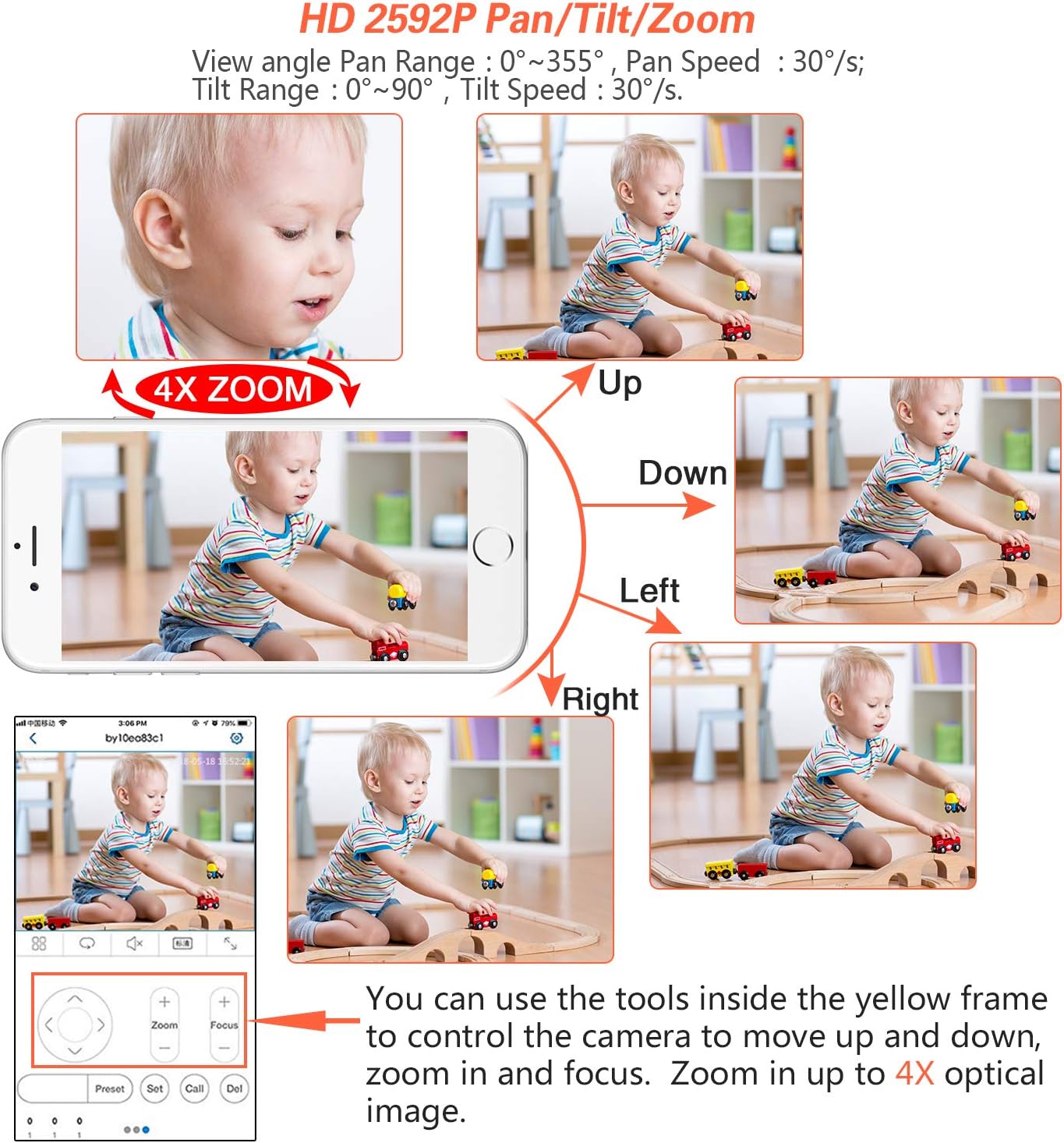
Figure 5.1: Controlling Pan, Tilt, and Zoom functions via a mobile device.
5.2 Pengesanan Gerakan dan Makluman
The camera can detect motion within its field of view and trigger alerts.
- Konfigurasi: Akses kamera web interface or mobile app to configure motion detection zones and sensitivity.
- Makluman: Set up email alerts with snapshots or push notifications to your mobile device when motion is detected.

Figure 5.2: Motion detection and alert system.
5.3 Rakaman Video
This camera does not include an SD card slot for onboard storage. Video recording can be managed through compatible Network Video Recorders (NVRs) or PC/smartphone applications.
- NVR Integration: Connect the camera to a compatible NVR (e.g., Hikvision, XM, Amcrest) using its ONVIF or RTSP capabilities for continuous or event-based recording.
- Software Recording: Use third-party software like Blue Iris or iSpy on a dedicated computer to record video streams from the camera.
5.4 Penglihatan Malam
The camera is equipped with infrared (IR) LEDs to provide clear surveillance in low-light or complete darkness, with a range of up to 65 feet.
- The camera automatically switches between day (color) and night (black and white IR) modes based on ambient light conditions.
- Ensure there are no obstructions directly in front of the camera's dome that could cause IR reflection, which might degrade night vision image quality.

Figure 5.3: Day and Night Vision comparison.
6. Penyelenggaraan
Penyelenggaraan berkala memastikan prestasi optimum dan jangka hayat kamera keselamatan anda.
- Pembersihan: Periodically clean the camera's dome with a soft, damp kain untuk menanggalkan habuk, kotoran atau bintik air yang boleh menghalang view. Elakkan pembersih yang kasar.
- Pemeriksaan Kabel: Check all cable connections (Ethernet, power) for wear, damage, or loose connections, especially in outdoor environments.
- Kemas kini Firmware: Check the JideTech support website or contact customer service for available firmware updates. Updates can improve performance, add features, or fix bugs.
- Pemeriksaan Alam Sekitar: Ensure the camera's mounting remains secure and that no new obstructions (e.g., growing foliage) block its field of view.
7. Penyelesaian masalah
This section addresses common issues you might encounter with your JideTech PTZ Dome Camera.
| Masalah | Penyelesaian yang Mungkin |
|---|---|
| Camera not powering on or connecting via PoE. |
|
| Tidak dapat mengakses kamera melalui web pelayar. |
|
| Imej kabur atau tidak fokus. |
|
| Poor night vision quality or IR reflection. |
|
| Mobile app not connecting or showing video. |
|
8. Spesifikasi
| Ciri | Perincian |
|---|---|
| Nombor Model | Hi2162-PTZ3X |
| Resolusi Video | 1080p (1920x1080) pada 15 fps |
| Zum Optik | 4x |
| Pan Range | 0°~355° |
| Julat Kecondongan | 0°~90° |
| Julat Penglihatan Malam | 65 feet (IR) |
| Ketersambungan | Wired Ethernet, PoE (802.3af) |
| Pemampatan Video | H.264/H.265 |
| Penilaian Kalis Air | IP66 |
| Sumber Kuasa | PoE atau 12V DC |
| bahan | aluminium |
| Dimensi | 4.33 x 4.33 x 3.91 inci |
| Berat badan | 1.2 paun |
| Peranti Serasi | Windows PC, iOS/Android devices |
| Protokol Disokong | RTSP, ONVIF |
9. Waranti dan Sokongan
- Waranti: JideTech provides a 1-year warranty service for this product.
- Sokongan Teknikal: Lifetime technical support is available. If you require assistance with setup, operation, or encounter any issues, please contact JideTech customer service.
- Menghubungi Sokongan: You can reach JideTech support via Amazon email or find contact information within the product manual. When contacting support, please include your order number to facilitate assistance.
- Note on Apps: Some cameras may use the 'Hisee SE' app. Please refer to your specific manual for the correct application.