
pengenalan
This manual provides detailed instructions for the safe and effective use of your Unbranded XM-L T6 10000 Lumens Zoomable Tactical LED Flashlight, Model S2. Designed for durability and high performance, this flashlight features a powerful LED, zoomable optics, and multiple lighting modes. Please read this manual thoroughly before operating the device.

Image: Two XM-L T6 flashlights, highlighting their robust design and zoom feature.
Ciri-ciri Produk
- Pembinaan Tahan Lama: Built with top-grade aluminum casing, offering impact resistance and lightweight design.
- LED Kecerahan Tinggi: Features an ultra-strong LED light with up to 10000 lumens, providing a transmission distance of up to 500 meters.
- Zoomable Optic System: An outstanding focusing optic system allows for seamless transition from a spot beam to a flood beam, enhancing versatility.
- Pelbagai Mod Pencahayaan: Equipped with a quick-click switch to cycle through 5 distinct lighting modes.
- mudah alih: Compact size and includes a convenient carrying strap for easy transport.
- Penggunaan Kuasa yang Cekap: Designed for low power consumption, ensuring a long running time.

Image: The flashlight's powerful beam illuminating distant objects and wide areas.
Spesifikasi
| Jenama | unbranded |
| Model | S2 |
| warna | Hitam |
| Emitter BIN | T6 |
| Keluaran Lumen | 10000 Lumen |
| bahan | Aloi aluminium |
| Color BIN | putih |
| kuasa | 10W |
| Konfigurasi Bateri | 1 x 18650 Battery (Not Included) or 3 x AAA Batteries (Not Included) |
| Jarak Pencahayaan | 500m |
| Jenis Suis | klik |
| Tukar Lokasi | Bawah |
| Mod | 5 |
| Memori Mod | Tidak |
| Lensa | Coated Glass Lens |
| Membawa Tali | Strap Included |
| Dimensions (L x Dia.) | (5.31 x 1.38)" / (13.5 x 3.5)cm |
| Berat badan | 5.29oz / 150g |
| Tahap Ketahanan Air | Bukan Tahan Air |
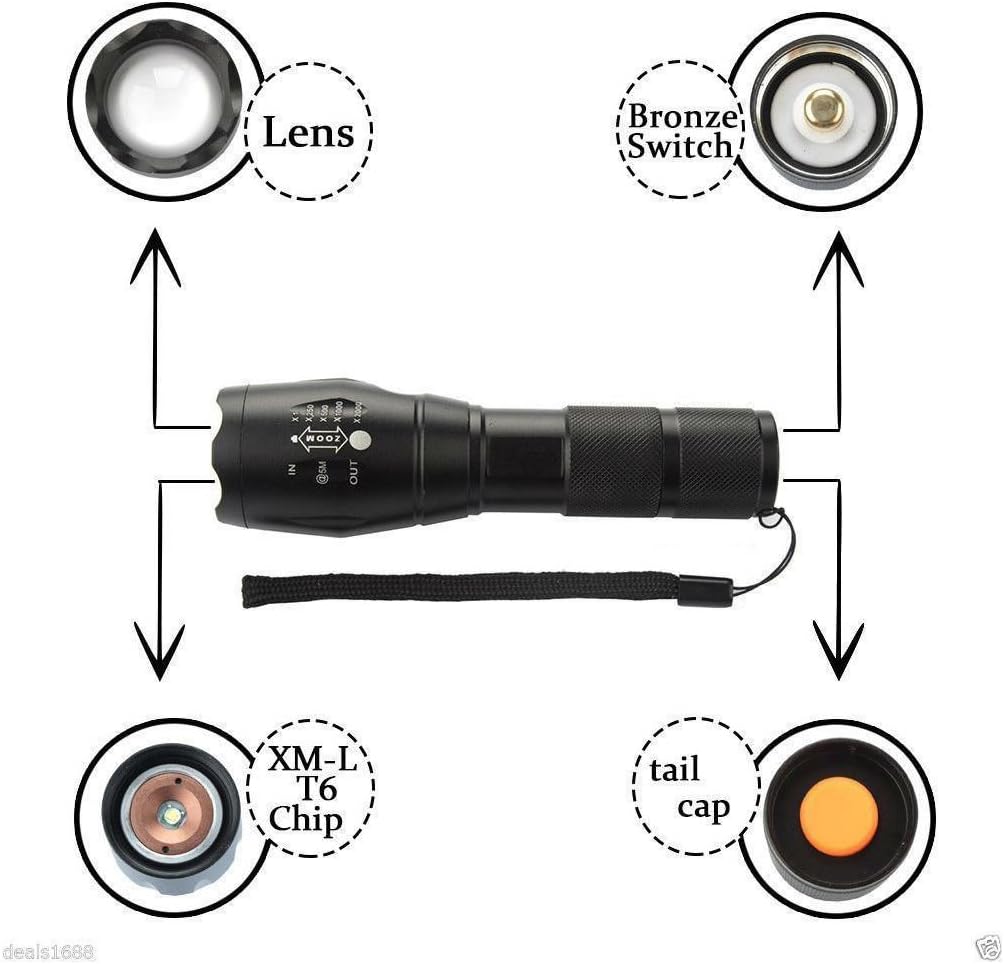
Imej: Meletup view of the flashlight components, including the lens, switch, LED chip, and tail cap.
Persediaan
- Pemasangan Bateri:
- Tanggalkan penutup ekor lampu suluh.
- Insert one 18650 battery or three AAA batteries (using an adapter, not included) into the battery compartment with the positive (+) end facing towards the head of the flashlight.
- Skru penutup ekor kembali dengan selamat.

Image: Illustration of battery insertion, showing compatibility with both 18650 and AAA batteries.
Arahan Operasi
- Hidupkan/Mati Kuasa: Press the quick-click switch located on the bottom (tail cap) of the flashlight to turn the light on or off.
- Mod Kitaran: With the flashlight on, lightly press the quick-click switch (without fully clicking) to cycle through the 5 available lighting modes. The modes typically include High, Medium, Low, Strobe, and SOS.
- Fungsi Zum: To adjust the beam focus, slide the head of the flashlight forward or backward.
- Slide the head forward (IN) for a narrower, more focused beam (spotlight).
- Slide the head backward (OUT) for a wider, less focused beam (floodlight).

Image: Visual representation of the flashlight's zoom function, from narrow spot to wide flood.
Penyelenggaraan
- Pembersihan: Lap badan lampu suluh dengan lembut, damp kain. Jangan gunakan pembersih atau pelarut yang melelas.
- Penjagaan Lensa: Keep the lens clean to ensure optimal light output. Use a lens cleaning cloth and solution if necessary.
- Penjagaan Bateri: Tanggalkan bateri jika lampu suluh tidak akan digunakan untuk tempoh yang lama bagi mengelakkan kebocoran. Simpan bateri di tempat yang sejuk dan kering.
- Pelinciran: Sapukan gris silikon pada O-ring dan ulir secara berkala untuk mengekalkan kalis air dan operasi yang lancar.
Menyelesaikan masalah
| Masalah | Kemungkinan Punca & Penyelesaian |
|---|---|
| Lampu suluh tidak menyala. |
|
| Cahaya malap atau berkelip. |
|
| Fungsi zum adalah kaku. |
|
Waranti dan Sokongan
This product is subject to a 30-day return policy from the date of purchase. For any issues, questions, or support inquiries beyond this period, please contact the seller directly through your purchase platform. Keep your proof of purchase for any warranty claims.