pengenalan
Thank you for choosing the JOWAY H21 Bluetooth Earphone. This manual provides detailed instructions on how to set up, operate, and maintain your earphone to ensure optimal performance and longevity. Please read this manual carefully before using the product.
Kandungan Pakej
- 1 x JOWAY H21 Bluetooth Earphone
- 1 x Kabel Pengecas USB
- 1 x Manual Pengguna
Produk Selesaiview
The JOWAY H21 is a compact and lightweight Bluetooth earphone designed for convenience and clear audio. It features advanced noise reduction technology and the ability to connect to two devices simultaneously.

Imej: Depan dan belakang view of the JOWAY H21 Bluetooth Earphone, showing the JOWAY logo on the front and "Bluetooth Model: H-21" on the back.
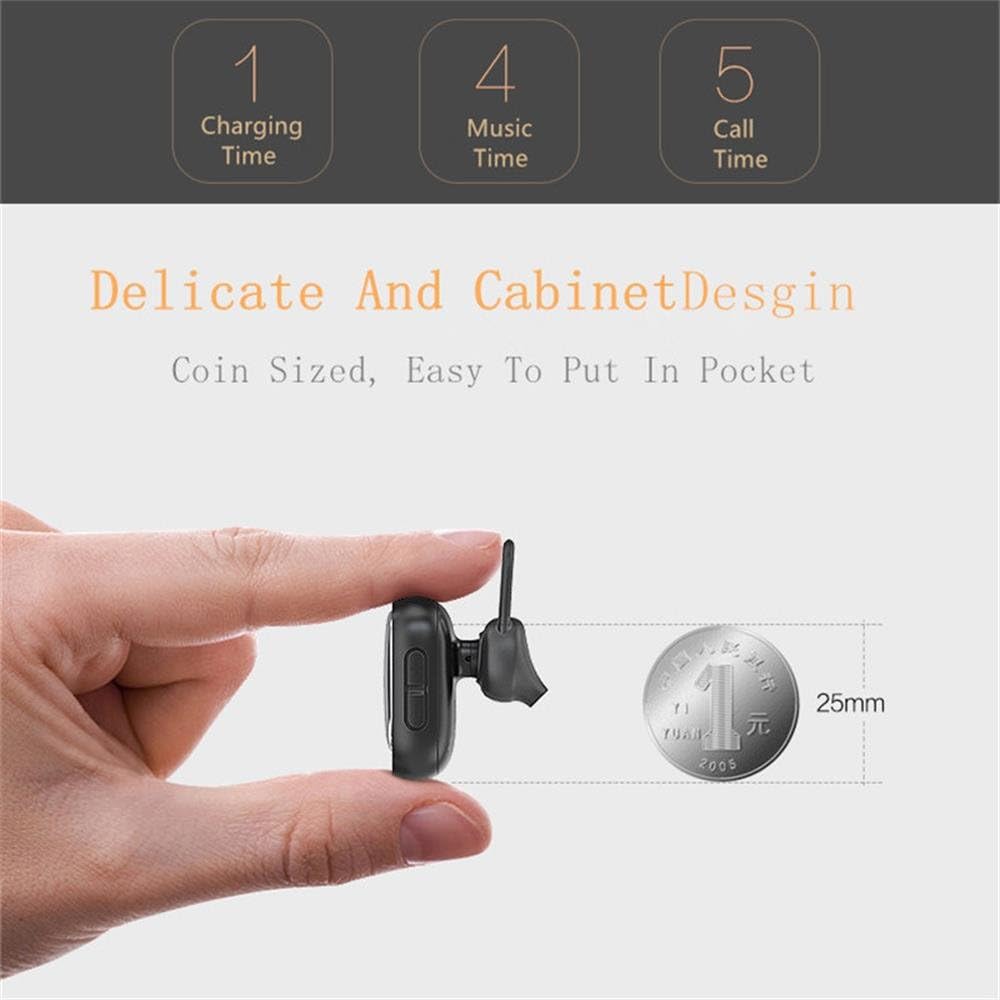
Image: The JOWAY H21 Bluetooth Earphone held between fingers, demonstrating its compact, coin-sized design next to a 25mm coin for scale.

Image: An exploded diagram showing the internal components of the JOWAY H21 earphone, including the casing, mainboard, voice coil, diaphragm, aluminum alloy clamp ring, and silicone ear cap.
Ciri-ciri
- Kesambungan Bluetooth V4.1: Memastikan sambungan tanpa wayar yang stabil dan cekap.
- CVC6.0 Noise Reduction: Advanced technology for clear audio and call quality.
- Sambungan berbilang titik: Menyambung kepada dua peranti Bluetooth secara serentak.
- Reka bentuk padat dan ringan: Mini size for comfortable wear and portability.
- Gesaan Suara: English and Chinese voice announcements for status updates.
- Kawalan Intuitif: Easy management of music playback, calls, and volume.
- Comfortable Silicone Ear Cap: Direka untuk pemakaian lanjutan.

Image: Diagram illustrating the CVC6.0 Noise Reduction technology of the JOWAY H21 earphone, showing how it rejects distortion and voice changes for clearer sound.
Spesifikasi
| Versi Bluetooth | V4.1 |
| Kapasiti Bateri | 50 mAh |
| Masa Mengecas | Lebih kurang 1 jam |
| Masa Berbual | Kira-kira 5 jam (pada volum 90%) |
| Masa Main semula Muzik | Kira-kira 4 jam (pada volum 80%) |
| Kekerapan Operasi | 2.402 GHz - 2.480 GHz |
| Protokol yang Disokong | A2DP, AVRCP, HSP, HFP |
| Standard Pengecasan | USB mikro |
| Dimensi Produk | 11.99 x 8.99 x 3 cm |
| Berat Produk | 99.79 g |
| bahan | silikon |
Persediaan
1. Mengecas Fon Telinga
- Connect the provided USB charging cable to the Micro USB port on the earphone.
- Connect the other end of the USB cable to a USB power source (e.g., computer USB port, wall adapter).
- The indicator light will show the charging status. Once fully charged (approximately 1 hour), the light will change or turn off.
- Disconnect the earphone from the charging cable.
2. Berpasangan Bluetooth
- Hidupkan kuasa: Press and hold the Multi-function button (usually the main button) on the earphone until you hear a voice prompt indicating "Power On" and the indicator light starts flashing (often blue and red alternately), signifying pairing mode.
- Aktifkan Bluetooth: On your mobile device (smartphone, tablet, etc.), go to the Bluetooth settings and ensure Bluetooth is turned on.
- Cari untuk Peranti: Your device will scan for available Bluetooth devices. Look for "JOWAY H21" or a similar name in the list.
- Sambung: Select "JOWAY H21" from the list to initiate pairing. If prompted for a password, enter "0000" (four zeros).
- Pengesahan: Once successfully paired, you will hear a voice prompt like "Connected" and the indicator light will typically flash blue slowly.
Note: The earphone will automatically attempt to reconnect to the last paired device when powered on, if that device's Bluetooth is active and within range.
Arahan Operasi
Hidupkan/Mati Kuasa
- Hidupkan kuasa: Press and hold the Multi-function button for approximately 3 seconds until the indicator light flashes and you hear "Power On".
- Matikan: Press and hold the Multi-function button for approximately 5 seconds until the indicator light turns off and you hear "Power Off".
Kawalan Main balik Muzik
- Main/Jeda: Tekan sebentar butang Pelbagai fungsi.
- Lagu Seterusnya: Tekan lama butang Naikkan Kelantangan (+).
- Lagu Sebelumnya: Tekan lama butang Kelantangan Turun (-).
- Kelantangan: Tekan pendek butang Kelantangan Naik (+).
- Perlahankan suara: Tekan pendek butang Kelantangan Turun (-).
Pengurusan Panggilan
- Jawab Panggilan: Short press the Multi-function button when an incoming call rings.
- Tamatkan Panggilan: Short press the Multi-function button during a call.
- Tolak Panggilan: Long press the Multi-function button when an incoming call rings.
- Dail Semula Nombor Terakhir: Tekan dua kali butang Pelbagai fungsi apabila tidak sedang membuat panggilan.
Connecting Two Devices Simultaneously (Multi-point)
- Pair the earphone with the first device as described in the "Bluetooth Pairing" section.
- Once connected to the first device, turn off the earphone.
- Turn on the earphone again and enter pairing mode (indicator light flashes blue and red).
- Pair the earphone with the second device.
- After successfully pairing with the second device, go back to the Bluetooth settings of the first device and manually connect to "JOWAY H21" if it doesn't reconnect automatically.
- The earphone is now connected to both devices. You can switch between them for calls or music.

Image: A person wearing the JOWAY H21 Bluetooth Earphone in their right ear, demonstrating its discreet and comfortable fit.
Penyelenggaraan
- Pembersihan: Use a soft, dry cloth to clean the earphone. Do not use abrasive cleaners or solvents.
- Storan: Simpan fon telinga di tempat yang sejuk dan kering, jauh daripada cahaya matahari langsung dan suhu yang melampau.
- Pendedahan Air: This earphone is not waterproof. Avoid exposure to water, moisture, or rain.
- mengecas: Use only the provided charging cable or a certified equivalent. Do not overcharge the battery.
Menyelesaikan masalah
| Masalah | Penyelesaian |
|---|---|
| Fon telinga tidak boleh dihidupkan. | Ensure the earphone is fully charged. Connect it to a power source and charge for at least 1 hour. |
| Tidak boleh berpasangan dengan peranti. |
|
| Tiada bunyi atau kualiti bunyi yang buruk. |
|
| Calls are unclear. |
|
Waranti dan Sokongan
Untuk maklumat waranti dan sokongan pelanggan, sila rujuk dokumentasi yang diberikan semasa pembelian atau hubungi peruncit anda. Simpan bukti pembelian anda untuk sebarang tuntutan waranti.