
Realspace Winsley
Realspace Modern Comfort Series Winsley Mid-Back Chair User Manual
Model: Winsley | Brand: Realspace
1. Produk Lebihview
The Realspace Modern Comfort Series Winsley Mid-Back Chair is designed for comfort and style in any workspace. Featuring a sleek gray bonded leather upholstery and chic silver framing, this chair offers a modern aesthetic combined with ergonomic support.
Ciri-ciri Utama:
- Bonded Leather Upholstery: Durable and easy-to-clean gray bonded leather.
- Built-in Lumbar Support: Designed to improve posture and provide comfort during extended use.
- Pneumatic Seat-Height Adjustment: Customize your seating position with ease.
- Mekanisme Kecondongan Boleh Laras: Allows for adjustment of tilt angle, lock, and tension.
- Bingkai Logam Teguh: Memastikan ketahanan dan kestabilan.
- Kastor Penggulung Licin: For effortless mobility across various floor surfaces.
- ANSI/BIFMA Compliant: Tested and verified for rigorous performance and safety standards.
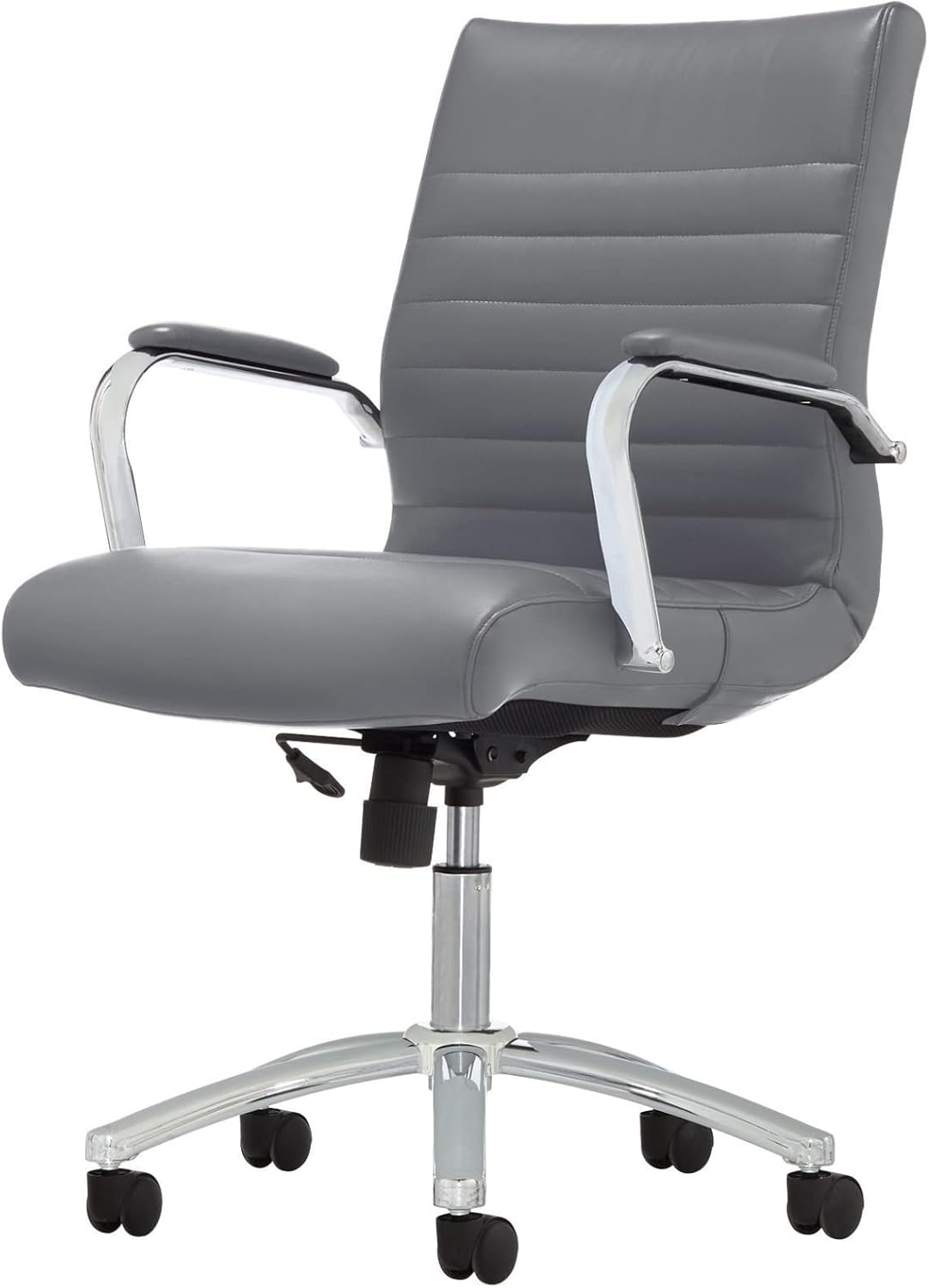
Figure 1: Realspace Winsley Mid-Back Chair, showcasing its sleek design and gray bonded leather.
2. Persediaan dan Pemasangan
This chair is designed for DIY assembly. Please follow these steps carefully to ensure proper setup and stability. It is recommended to assemble the chair on a soft, clean surface to prevent damage.
Langkah Perhimpunan:
- Pasang Kastor ke Pangkalan: Insert each caster into the holes at the end of each leg of the chair base until securely fitted.
- Insert Gas Lift Cylinder: Place the large end of the gas lift cylinder into the center hole of the assembled base.
- Mekanisme Pemasangan Tempat Duduk: Pasangkan mekanisme tempat duduk pada bahagian bawah kusyen tempat duduk menggunakan skru yang disediakan. Pastikan bahagian hadapan mekanisme sejajar dengan bahagian hadapan tempat duduk.
- Attach Arms: Fasten the armrests to both the seat cushion and the backrest using the appropriate screws. Do not overtighten initially.
- Connect Seat Assembly to Cylinder: Carefully place the assembled seat and backrest onto the top of the gas lift cylinder. Apply downward pressure to secure.
- Pengetatan Akhir: Once all components are in place, tighten all screws firmly.

Rajah 2: View of the chair's base and adjustment lever, crucial for assembly and operation.
3. Arahan Operasi
Familiarize yourself with the chair's adjustment features to optimize your comfort and ergonomic support.
Pelarasan:
- Pelarasan Ketinggian Tempat Duduk: To raise the seat, lift the lever located under the right side of the seat while taking your weight off the chair. To lower the seat, lift the lever while seated. Release the lever at your desired height.
- Mekanisme kecondongan: The chair features an adjustable tilt.
- Kunci Condong: Push the lever inwards to lock the chair in an upright position. Pull the lever outwards to allow the chair to recline.
- Ketegangan Condongkan: Rotate the round knob located under the front-center of the seat to adjust the resistance of the tilt. Turn clockwise to increase tension (stiffer tilt) and counter-clockwise to decrease tension (looser tilt).
- Pusing dan Mobiliti: The chair offers 360-degree swivel and smooth-rolling casters for easy movement around your workspace.

Figure 3: Detail of the chair's adjustable tilt mechanism and height adjustment lever.
4. Penjagaan dan Penyelenggaraan
Proper care will extend the life and appearance of your Realspace Winsley chair.
- Membersihkan Upholsteri: For general cleaning, spot clean the bonded leather with a damp cloth and a mild soap solution. Avoid harsh chemicals or abrasive cleaners, as these can damage the material.
- Bingkai dan Pangkalan: Wipe metal parts with a soft, dry cloth. For stubborn marks, a slightly damp kain boleh digunakan, diikuti dengan pengeringan segera.
- Kastor: Periodically check casters for accumulated dust, hair, or debris. Clean them to ensure smooth rolling and prevent floor damage.
- Pengikat: Regularly inspect all screws and bolts to ensure they are tight. Retighten as necessary to maintain stability and safety.
5. Penyelesaian masalah
Jika anda menghadapi sebarang masalah dengan kerusi anda, rujuk kepada masalah dan penyelesaian biasa berikut:
| Masalah | Kemungkinan Punca | Penyelesaian |
|---|---|---|
| Kerusi tidak boleh melaraskan ketinggian. | Kepincangan fungsi silinder pengangkat gas atau tuil tidak terpasang. | Ensure the height adjustment lever is fully engaged. If the issue persists, the gas lift cylinder may need replacement. |
| Kerusi goyah atau terasa tidak stabil. | Skru longgar atau pemasangan yang tidak betul. | Check and tighten all assembly screws, especially those connecting the seat, back, and arms to the mechanism and base. |
| Roda tidak bergolek dengan lancar. | Serpihan terperangkap dalam kastor atau kastor yang rosak. | Turn the chair over and remove any hair, dust, or debris from the casters. If damaged, casters may need replacement. |
| Kerusi berdecit apabila bergerak. | Geseran antara bahagian yang bergerak atau sambungan yang longgar. | Apply a small amount of silicone lubricant to moving parts, especially where metal components meet. Check and tighten all screws. |
6. Spesifikasi
| Ciri | Perincian |
|---|---|
| Jenama | Realspace |
| Nama Model | Winsley |
| Dimensi Produk | 27.76"D x 23.82"W x 39.37"H |
| Cadangan Berat Maksimum | 250 paun |
| bahan | Bonded Leather (Upholstery), Metal (Frame) |
| warna | Kelabu |
| Ciri Khas | Built-in Lumbar Support, Pneumatic Seat-Height Adjustment, Adjustable Tilt Mechanism, Swivel, Casters |
| Pematuhan | ANSI/BIFMA Compliant |

Figure 4: Product dimensions for the Realspace Winsley Mid-Back Chair.
7. Maklumat Waranti
For detailed warranty information regarding your Realspace Modern Comfort Series Winsley Mid-Back Chair, please refer to the documentation included with your purchase or contact Realspace customer support directly. Warranty terms and conditions may vary.
8. Sokongan Pelanggan
If you require further assistance, have questions about assembly, operation, or maintenance, please contact Realspace customer support. Contact details can typically be found on the manufacturer's webtapak atau pada resit pembelian anda.
Anda juga boleh melawat Realspace Store on Amazon untuk maklumat lanjut produk.
Ask a question about this manual
Ask about setup, troubleshooting, compatibility, parts, safety, or missing instructions. Manuals+ will review the question and use this page’s manual context to help answer it.