

1. Produk Lebihview
The SASWELL T21HTW-0 is a 24VAC low-voltage, non-programmable thermostat designed for room use. It is compatible with heat pump systems, including those with auxiliary heat (2 Heat/1 Cool configuration). This thermostat features a backlit digital display for easy readability and includes essential indicators such as an air filter change reminder and a low battery warning.
Nota Penting:
- This thermostat does not support millivolt systems.
- A C-wire is required for proper installation and serves as the primary power source. While optional AA batteries can provide continuous temperature display during power loss, the C-wire is essential for the thermostat to power up and function correctly.
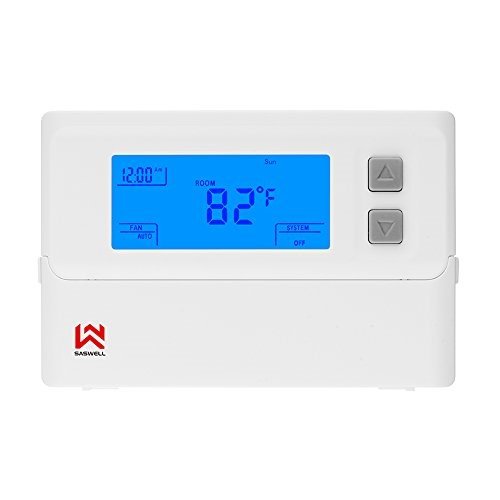
Figure 1: SASWELL T21HTW-0 Non-programmable Heat Pump Thermostat
2. Apa yang ada di dalam Kotak
Selepas membuka pembungkusan produk, sahkan bahawa semua komponen ada:
- SASWELL T21HTW-0 Thermostat Unit
- Manual Arahan Operasi
- Thermostat Wire Labels
- Skru dan Penambat Pemasangan
Video 1: Membuka kotak dan seterusnyaview of the SASWELL T21HTW-0 thermostat and its included accessories.
3. Panduan Pemasangan
3.1 Langkah Keselamatan
- Sentiasa matikan kuasa pada sistem pemanasan/penyejukan pada pemutus litar utama sebelum memasang atau menservis termostat.
- Pastikan semua pendawaian mematuhi kod dan ordinan elektrik tempatan.
- Jika anda tidak pasti tentang mana-mana bahagian proses pemasangan, sila rujuk juruteknik HVAC yang berkelayakan.
3.2 Memasang Termostat
- Carefully separate the front display panel from the backplate of the thermostat. This is typically done by gently prying the two halves apart.
- Position the backplate on the wall where the thermostat will be installed. Ensure it is level and mark the drilling locations for the mounting screws.
- Drill pilot holes at the marked locations and insert the wall anchors if necessary.
- Feed the thermostat wires through the opening in the backplate.
- Lekatkan plat belakang ke dinding menggunakan skru yang disediakan.
3.3 Arahan Pendawaian
The SASWELL T21HTW-0 thermostat features 8 terminals for connecting to your HVAC system. It is crucial to correctly identify and connect each wire. Use the provided wire labels to mark your existing thermostat wires before disconnecting them. This will simplify the installation of your new thermostat.
- C (24VAC Primary Power): Common wire, provides continuous 24VAC power to the thermostat. Essential for operation.
- RC (Power Supply): Cooling power. Connect to the 24VAC power from your cooling transformer.
- RH (Power Supply): Heating power. Connect to the 24VAC power from your heating transformer. Note: If you have a single transformer system, a jumper wire should connect RC and RH. The thermostat may come with this jumper pre-installed.
- W (Heat Relay): Pertama stage panas.
- Y (Cool Relay): Pertama stage sejuk.
- O (Changeover Valve): Reversing valve for cooling (energized in cool mode).
- B (Changeover Valve): Reversing valve for heating (energized in heat mode).
- G (Fan Relay): Activates the fan.
Refer to the wiring diagram below and your existing system's wiring for correct connections. If your old thermostat used different terminal designations, consult the provided wire labels for conversion.
Video 2: Demonstration of opening the thermostat panel and connecting wires to the terminals.
After connecting all wires, carefully reattach the front display panel to the backplate. Restore power to your HVAC system at the circuit breaker.
4. Arahan Operasi
The SASWELL T21HTW-0 is a non-programmable thermostat, meaning it maintains the set temperature until manually changed. Its large LCD display and simple push-button controls make operation straightforward.
4.1 Menetapkan Suhu
- Gunakan Atas (▲) dan Bawah (▼) arrow buttons to adjust the desired temperature. The display will show the set temperature.
- The thermostat will automatically activate your heating or cooling system to reach and maintain this set temperature.
4.2 Mod Sistem
The thermostat typically has a 'System' button or switch to select the operating mode:
- HABA: Mengaktifkan sistem pemanasan apabila suhu bilik jatuh di bawah suhu yang ditetapkan.
- KEREN: Mengaktifkan sistem penyejukan apabila suhu bilik meningkat melebihi suhu yang ditetapkan.
- MATI: Turns off both heating and cooling systems. The fan can still be operated manually.
4.3 Mod Kipas
The thermostat typically has a 'Fan' button or switch to select the fan operation mode:
- AUTO: Kipas hanya berfungsi apabila sistem pemanasan atau penyejukan beroperasi secara aktif.
- ON: Kipas berfungsi secara berterusan, tidak kira sama ada sistem pemanasan atau penyejukan aktif.
4.4 Operasi Lampu Latar
The large LCD display features a backlight for improved visibility in various lighting conditions. The backlight typically activates when any button is pressed and may remain on for a set duration or can be configured to stay on continuously (refer to the full instruction manual for advanced settings).
5. Penyelenggaraan
5.1 Penggantian Bateri
The thermostat uses 2 AA batteries (optional) to provide continuous temperature display during power outages. A low battery indicator will appear on the display when the batteries need replacement. To replace batteries:
- Remove the front display panel from the backplate.
- Cari petak bateri.
- Tanggalkan bateri lama dan masukkan bateri alkali AA yang baharu, pastikan kekutuban yang betul.
- Reattach the front display panel.
5.2 Air Filter Change Reminder
The thermostat includes an air filter change reminder. When activated, a notification will appear on the display, prompting you to check or replace your system's air filter. Regularly changing your air filter helps maintain system efficiency and indoor air quality. Consult your HVAC system's manual for recommended filter replacement intervals and procedures.
6. Penyelesaian masalah
If you encounter issues with your SASWELL T21HTW-0 thermostat, refer to the following common problems and solutions:
- Thermostat Not Powering Up: Ensure the C-wire is correctly connected and receiving 24VAC power. Check the circuit breaker for your HVAC system. If using optional batteries, ensure they are new and correctly installed.
- System Not Responding (No Heat/Cool/Fan): Verify that the system mode (HEAT/COOL/OFF) and fan mode (AUTO/ON) are correctly selected. Check all wiring connections at the thermostat and HVAC unit. Ensure the set temperature is appropriate for activating the system (e.g., set below room temperature for heating, above for cooling).
- "COMP DLY" Error Message: This message indicates a compressor delay, which is a normal protective feature to prevent short cycling of the compressor. The system will resume operation after a brief delay (typically 3-5 minutes). If this message persists or appears excessively, consult an HVAC technician.
- Bacaan Suhu Tidak Tepat: Pastikan termostat tidak terdedah kepada cahaya matahari langsung, draf atau sumber haba (cth, lamps, appliances) that could affect its temperature sensor.
- Thermostat Cycles On/Off Frequently: This could be due to rapid cycling settings. Refer to the full instruction manual for advanced settings to adjust the cycle rate (e.g., from fast to slow cycles).
For persistent issues, contact SASWELL customer support or a qualified HVAC professional.
7. Spesifikasi
| Jenama | SASWELL |
| Nombor Model | T21HTW-0 |
| Voltage | 24 Voltan AC |
| Keserasian Sistem | Heat Pump (with Aux), 2 Heat/1 Cool |
| Jenis Kawalan | Push Button, Manual Temperature Control |
| Jenis Paparan | Digital dengan Lampu Latar |
| Ciri Khas | Low Battery Indicator, Air Filter Change Reminder |
| Sumber Kuasa | C-wire (24VAC), Optional 2 AA Batteries |
| Dimensi Produk | 6 x 4.7 x 1.17 inci |
| Berat Barang | 8.8 auns |
8. Waranti dan Sokongan
SASWELL products are manufactured to high-quality standards. For specific warranty information, please refer to the warranty card included with your product or visit the official SASWELL website. If you require technical assistance or have questions not covered in this manual, please contact SASWELL customer support through their official channels.
For further information and to explore other products, visit the SASWELL Store on Amazon.