
Cambridge Soundworks SWOA3UBLK
OontZ Angle 3 Ultra Portable Bluetooth Speaker User Manual
Model: SWOA3UBLK
pengenalan
Terima kasih kerana membeliasing the OontZ Angle 3 Ultra Portable Bluetooth Speaker by Cambridge Soundworks. This manual provides essential information for setting up, operating, maintaining, and troubleshooting your speaker. Designed for superior sound quality and durability, the OontZ Angle 3 Ultra features a 14-watt output, rich bass, IPX7 waterproofing, and an impressive 30-meter Bluetooth range. Enjoy up to 20 hours of playtime on a single charge.

Image: The OontZ Angle 3 Ultra Portable Bluetooth Speaker, showcasing its sleek black, triangular design with control buttons on one end.
Persediaan
1. Item Termasuk
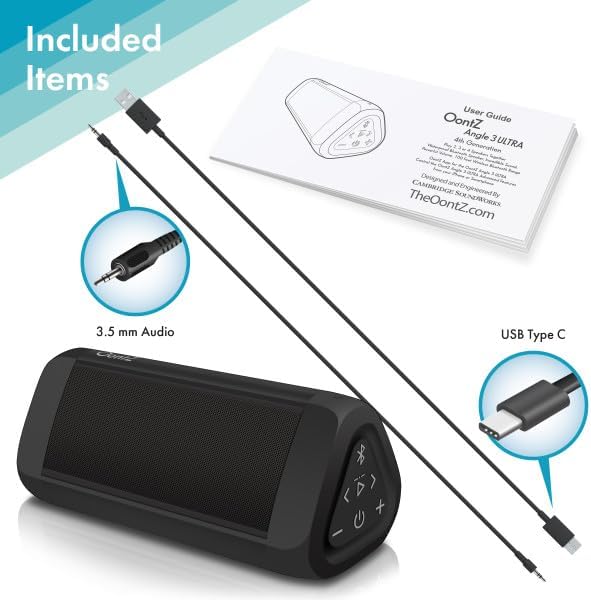
Image: The OontZ Angle 3 Ultra speaker along with its accessories: a Quick Start Guide, a 3.5mm audio cable, and a USB Type-C charging cable.
Before first use, ensure all components are present:
- OontZ Angle 3 Ultra Bluetooth Speaker
- Quick Start Guide (Full manual available online)
- Kabel Audio 3.5mm
- Kabel Pengecasan USB Jenis-C
2. Mengisi Speaker
The speaker comes with a built-in rechargeable Lithium-ion battery. For optimal performance, fully charge the speaker before first use.
- Locate the charging port on the side of the speaker, protected by a rubber flap.
- Connect the supplied USB Type-C charging cable to the speaker's charging port.
- Connect the other end of the USB cable to a USB wall charger (not included) or a computer USB port.
- The charging indicator light will illuminate. A full charge takes approximately 20 hours for the first charge, and subsequent charges will be faster.

Imej: Dari dekat view of the speaker's side, showing the 3.5mm AUX input and the USB-C charging port, typically protected by a waterproof flap.
3. Berpasangan Bluetooth
Pair your OontZ Angle 3 Ultra with your Bluetooth-enabled device (smartphone, tablet, laptop).
- Hidupkan pembesar suara dengan menekan dan menahan butang Kuasa (⏻) until the indicator light flashes blue.
- Pada peranti anda, pergi ke tetapan Bluetooth dan pastikan Bluetooth diaktifkan.
- Look for "OontZ Angle 3 Ultra" in the list of available devices and select it.
- Once paired, the speaker will emit a confirmation tone, and the indicator light will turn solid blue.
4. Connecting via AUX Input
You can connect non-Bluetooth devices using the 3.5mm audio cable.
- Connect one end of the 3.5mm audio cable to the AUX IN port on the speaker.
- Sambungkan hujung yang satu lagi ke bicu fon kepala atau output audio peranti anda.
- Pembesar suara secara automatik akan bertukar kepada mod AUX.
5. Pairing Two Speakers for Stereo Sound (OontZ Dual Wireless Stereo)
Enhance your audio experience by wirelessly connecting two OontZ Angle 3 Ultra speakers for impressive stereo separation.

Image: Two OontZ Angle 3 Ultra speakers positioned to provide stereo sound, with two individuals enjoying music in an outdoor setting.
- Ensure both OontZ Angle 3 Ultra speakers are charged and powered on.
- Disconnect both speakers from any previously paired Bluetooth devices.
- On one speaker (this will be the Left Channel), press and hold the Bluetooth button (Ⓑ) for 3 seconds until you hear a tone.
- On the second speaker (this will be the Right Channel), press and hold the Bluetooth button (Ⓑ) for 3 seconds until you hear a tone.
- The speakers will automatically connect to each other. Once connected, you will hear a confirmation tone, and the indicator lights on both speakers will turn solid blue.
- Now, connect your audio device to the Left Channel speaker via Bluetooth as described in "Bluetooth Pairing" above.
- For video audio, connect your device or TV to the Left Channel speaker using the 3.5mm audio cable.
Arahan Operasi
1. Kawalan Ke Atasview
| Butang / Petunjuk | Fungsi |
|---|---|
| ⏻ (Kuasa) | Tekan dan tahan untuk Menghidupkan/Mematikan. |
| + (Kelantangan Naik) | Tekan untuk menambah kelantangan. |
| - (Perlahankan suara) | Tekan untuk mengurangkan kelantangan. |
| ▷ (Main/Jeda) | Tekan untuk Main/Jeda muzik. |
| < (Previous Track) | Tekan untuk pergi ke trek sebelumnya. |
| > (Next Track) | Tekan untuk pergi ke trek seterusnya. |
| Ⓑ (Bluetooth) | Press to disconnect current Bluetooth device and enter pairing mode. Press and hold for 3 seconds to initiate OontZ Dual Wireless Stereo pairing. |
| Lampu Penunjuk | Flashes blue for pairing, solid blue for connected, red for charging. |
2. Panggilan Bebas Tangan
The OontZ Angle 3 Ultra has a built-in microphone for hands-free calls.
- Apabila panggilan masuk, muzik akan berhenti seketika. Tekan butang ▷ butang untuk menjawab panggilan.
- Untuk menamatkan panggilan, tekan butang ▷ butang lagi.
- Untuk menolak panggilan, tekan dan tahan ▷ butang selama 2 saat.
- Untuk mengaktifkan Siri atau Google Assistant, tekan dan tahan butang ▷ button for 2 seconds when not on a call.
3. Waterproof Features (IPX7)
The OontZ Angle 3 Ultra is IPX7 certified, meaning it is fully waterproof and can be immersed in water up to 1 meter (3.3 feet) for up to 30 minutes.
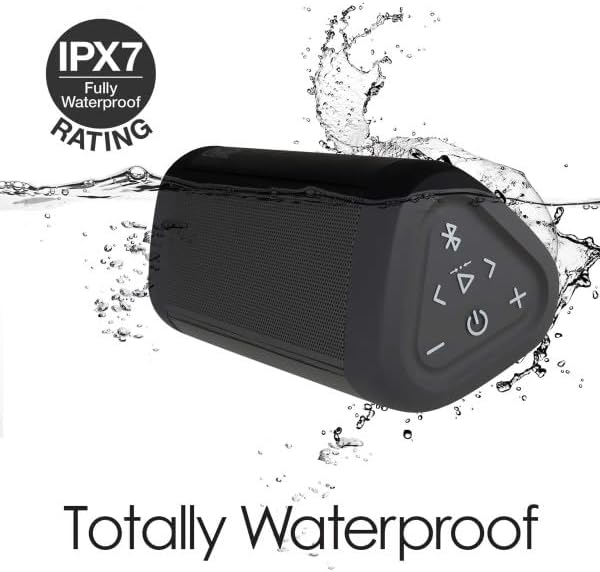
Image: The OontZ Angle 3 Ultra speaker shown partially submerged in water, illustrating its IPX7 waterproof capability.
- Ensure the rubber flap covering the charging and AUX ports is securely closed before exposing the speaker to water.
- Ideal for use by the pool, at the beach, or in the shower.
- Do not expose to salt water or chemicals. Rinse with fresh water after exposure to chlorinated water.
Penyelenggaraan
1. Pembersihan
Untuk membersihkan pembesar suara anda, gunakan pembersih lembutamp kain. Jangan gunakan pembersih atau pelarut yang melelas.
2. Penyimpanan
Simpan pembesar suara di tempat yang sejuk dan kering jauh dari cahaya matahari langsung dan suhu yang melampau.
3. Penjagaan Bateri
Untuk memanjangkan hayat bateri:
- Elakkan menyahcas sepenuhnya bateri dengan kerap.
- Cas pembesar suara secara berkala, walaupun tidak digunakan, untuk mengekalkan kesihatan bateri.
- Jangan dedahkan pembesar suara kepada suhu melebihi 60°C (140°F).
Menyelesaikan masalah
| Masalah | Penyelesaian |
|---|---|
| Speaker tidak akan dihidupkan. | Pastikan bateri dicas. Sambungkan pembesar suara ke sumber kuasa menggunakan kabel USB-C. |
| Tiada bunyi atau kelantangan rendah. | Check the volume level on both the speaker and your connected device. Ensure the speaker is properly paired via Bluetooth or connected via AUX. |
| Tidak boleh berpasangan melalui Bluetooth. | Ensure the speaker is in pairing mode (flashing blue light). Turn off and on Bluetooth on your device. Move the speaker closer to your device. Disconnect from other Bluetooth devices. |
| Herotan bunyi pada kelantangan tinggi. | Reduce the volume on the speaker or your connected device. Ensure the audio source is not distorted. |
| OontZ Dual Wireless Stereo not connecting. | Ensure both speakers are disconnected from other Bluetooth devices. Follow the pairing steps carefully, ensuring both speakers are in pairing mode for stereo connection. |
Spesifikasi
Key technical specifications for the OontZ Angle 3 Ultra Portable Bluetooth Speaker:
- Nombor Model: SWOA3UBLK
- Dimensi (L x W x H): 16.26 x 7.11 x 7.11 cm (6.4 x 2.8 x 2.8 inci)
- Berat: 480 gram (1.06 lbs)
- Kuasa Keluaran Pembesar Suara: 14 Watt
- Versi Bluetooth: 4.2
- Julat Tanpa Wayar: Up to 30 meters (100 feet) unobstructed
- Hayat Bateri: Up to 20 hours (at 2/3 volume)
- Penilaian Kalis Air: IPX7 (Boleh tenggelam sehingga 1 meter selama 30 minit)
- Ketersambungan: Bluetooth, 3.5mm AUX Input, USB-C Charging
- Komponen Termasuk: Speaker, 3.5mm Audio Cable, USB-C Charging Cable, Quick Start Guide

Image: Diagram showing the dimensions of the OontZ Angle 3 Ultra speaker: 6.5 inches in length, 3 inches in width, and 2.75 inches in height.
Waranti dan Sokongan
For detailed warranty information and customer support, please visit the official OontZ website. The full localized manual is also available there.
rasmi Webtapak: www.theoontz.com
Cambridge Soundworks is committed to providing high-quality audio products and customer satisfaction.
Ask a question about this manual
Ask about setup, troubleshooting, compatibility, parts, safety, or missing instructions. Manuals+ will review the question and use this page’s manual context to help answer it.