
Sigma 576955
Sigma 24-70mm f/2.8 DG OS HSM Art Lens for Nikon F - Instruction Manual
pengenalan
This manual provides essential information for the safe and effective use of your Sigma 24-70mm f/2.8 DG OS HSM Art Lens for Nikon F. This large-diameter standard zoom lens is designed for high-megapixel digital cameras, featuring three SLD (Special Low Dispersion) glass elements and four aspherical lens elements to minimize optical aberrations and deliver high-quality images.
Apa yang ada dalam Kotak
Upon opening your Sigma 24-70mm f/2.8 DG OS HSM Art Lens package, you should find the following items:
- Sigma 24-70mm f/2.8 DG OS HSM Art Lens
- Tudung Lensa
- Cap Lensa Depan
- Cap Lensa Belakang
- Sarung Lensa
Produk Selesaiview
The Sigma 24-70mm f/2.8 DG OS HSM Art Lens is engineered for robust performance and functionality. Key features include:
- Optical Stabilizer (OS) Functionality: Helps reduce camera shake for sharper images.
- Hyper Sonic Motor (HSM): Provides fast, quiet, and accurate autofocus.
- Durable Lens Barrel: Designed for high rigidity and longevity.
- Constant f/2.8 Aperture: Maintains a bright aperture throughout the zoom range for consistent low-light performance and depth of field control.

Rajah 1: Depan view of the Sigma 24-70mm f/2.8 DG OS HSM Art Lens. This image shows the lens from the front, highlighting the large front element and the zoom ring.

Rajah 2: Bersudut view of the Sigma 24-70mm f/2.8 DG OS HSM Art Lens with its included lens hood attached. The lens hood helps to prevent flare and protect the front element.
Persediaan
Memasang Lensa pada Kamera Anda
- Pastikan kamera anda dimatikan.
- Tanggalkan penutup kanta belakang daripada kanta dan penutup badan daripada kamera anda.
- Align the mounting index on the lens with the mounting index on the camera body.
- Insert the lens into the camera mount and turn it clockwise until it clicks into place. Do not force the lens.
- Attach the lens hood by aligning its mark with the mark on the front of the lens, then twist until it locks.

Rajah 3: Sisi view of the Sigma 24-70mm f/2.8 DG OS HSM Art Lens securely mounted on a camera body. This view shows the lens controls and the camera's grip.
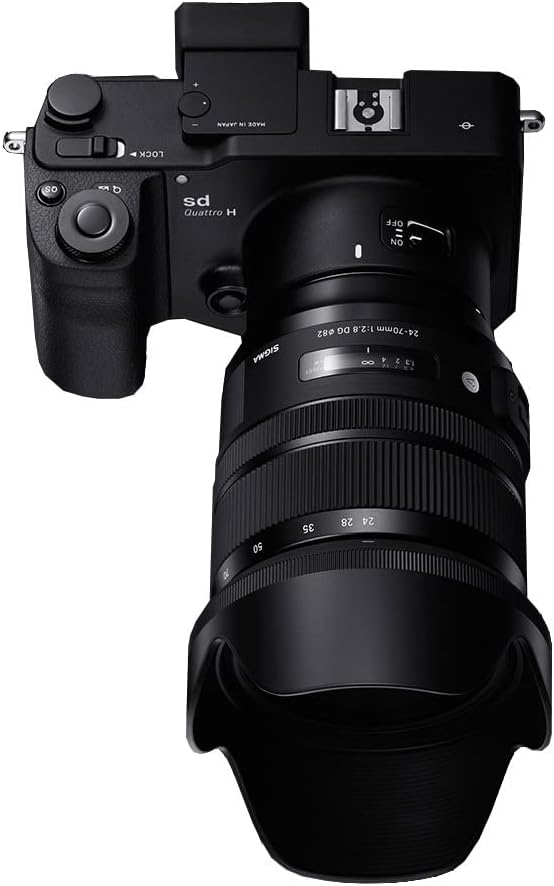
Rajah 4: Atas view of the Sigma 24-70mm f/2.8 DG OS HSM Art Lens mounted on a camera body. This perspective highlights the lens's profile and how it integrates with the camera.
Arahan Operasi
Suis Mod Fokus (AF/MF)
The lens features a switch to select between Autofocus (AF) and Manual Focus (MF). For automatic focusing, set the switch to AF. For manual focusing, set the switch to MF and rotate the focusing ring to adjust focus. The autofocus performance is highly effective, even with older camera bodies.
Optical Stabilizer (OS) Switch
The Optical Stabilizer (OS) function helps to compensate for camera shake, allowing for sharper images, especially in low light or at slower shutter speeds. Use the OS ON/OFF switch on the lens barrel to activate or deactivate this feature as needed. This feature is beneficial for handheld shooting.
Zum Cincin
Rotate the zoom ring to change the focal length between 24mm and 70mm. The constant f/2.8 aperture ensures consistent exposure and depth of field characteristics across the entire zoom range. The zoom ring operates smoothly, providing precise control over your composition.
Penyelenggaraan
- Membersihkan Lensa: Gunakan kain lembut dan tidak berbulu serta larutan pembersih kanta khusus untuk mengelap elemen kanta dengan lembut. Elakkan menyentuh kaca dengan jari anda.
- Penyingkiran habuk: Gunakan berus peniup untuk menghilangkan habuk dari permukaan kanta.
- Storan: When not in use, store the lens with both front and rear caps attached, preferably in its lens case, in a cool, dry place away from direct sunlight and extreme temperatures.
- Elakkan Kelembapan: Do not expose the lens to rain, water, or high humidity. If it gets wet, wipe it immediately with a dry cloth.
Menyelesaikan masalah
| Masalah | Kemungkinan Punca | Penyelesaian |
|---|---|---|
| Lens not focusing | Focus mode set to MF; dirty lens contacts; insufficient light. | Set focus mode to AF. Clean lens and camera contacts. Use adequate lighting or a flash. |
| Imej adalah kabur | Camera shake; incorrect focus; dirty lens elements. | Ensure OS is ON (if applicable). Re-focus. Clean lens elements. Use a faster shutter speed or tripod. |
| Kanta tidak dikenali oleh kamera | Kanta tidak dipasang dengan betul; kenalan elektrik kotor. | Re-mount the lens securely. Clean the electrical contacts on both the lens and camera body. |
Spesifikasi
- Jenama: Sigma
- Nombor Model: 576955
- Panjang Fokus: 24-70mm
- Bukaan Maksimum: f/2.8
- Jenis Kanta: Zum
- Pemasangan yang Serasi: Nikon F
- Optical Stabilization (OS): ya
- Hyper Sonic Motor (HSM): ya
- Dimensi Produk: 3.5 x 4.2 x 4.2 inci
- Berat Barang: 2 paun
- Bateri: 1 Nonstandard Battery (required for some functions, typically for OS)
Waranti dan Sokongan
For warranty information, product registration, and technical support, please refer to the official Sigma website or contact your local authorized Sigma dealer. Keep your proof of purchase for warranty claims.
Pengeluar: Sigma Corporation of America
Ask a question about this manual
Ask about setup, troubleshooting, compatibility, parts, safety, or missing instructions. Manuals+ will review the question and use this page’s manual context to help answer it.