
AudioCodes UC405HDEG
Manual Pengguna Telefon IP Kod Audio 405HD
Model: UC405HDEG
pengenalan
This manual provides comprehensive instructions for the setup, operation, maintenance, and troubleshooting of your AudioCodes 405HD IP Phone. Please read this manual carefully before using the device to ensure proper functionality and to avoid potential issues.
The AudioCodes 405HD is a cost-effective IP phone designed for Voice over IP (VoIP) communication, offering essential features for business and office environments.
Kandungan Pakej
Before proceeding with the setup, verify that all components are present in the package. The standard package for the AudioCodes 405HD IP Phone typically includes:
- AudioCodes 405HD IP Phone Base Unit
- Telefon bimbit
- Kabel Telefon bimbit
- Kabel Ethernet
- Stand Meja
Note: A power adapter is typically not included with this model. The phone is designed to be powered via Power over Ethernet (PoE) or a compatible external power supply (sold separately).
Persediaan
1. Sambungan Fizikal
Follow these steps to connect your AudioCodes 405HD IP Phone:
- Pasangkan Penyangga Meja: Align the tabs on the desk stand with the slots on the back of the phone base unit and slide it into place until it clicks securely.
- Sambungkan Handset: Plug one end of the coiled handset cord into the handset and the other end into the port labeled with a handset icon on the side of the phone base unit.
- Sambung ke Rangkaian (PoE): If using Power over Ethernet, connect one end of the Ethernet cable to the LAN port on the back of the phone and the other end to a PoE-enabled network switch or router. The phone will power on automatically.
- Connect to Network (Non-PoE with Power Adapter): If not using PoE, connect one end of the Ethernet cable to the LAN port on the back of the phone and the other end to your network switch or router. Then, connect a compatible external power adapter (not included) to the power port on the back of the phone and plug it into a power outlet.
- Sambung ke PC (Pilihan): If you wish to connect a computer through the phone, connect an Ethernet cable from your PC to the PC port on the back of the phone.
2. But Awal
Once connected to power and network, the phone will begin its boot-up sequence. This process may take a few minutes as the phone obtains an IP address and registers with your VoIP service provider. The display will show progress messages. Upon successful boot-up, the display will show the current date, time, and line status.
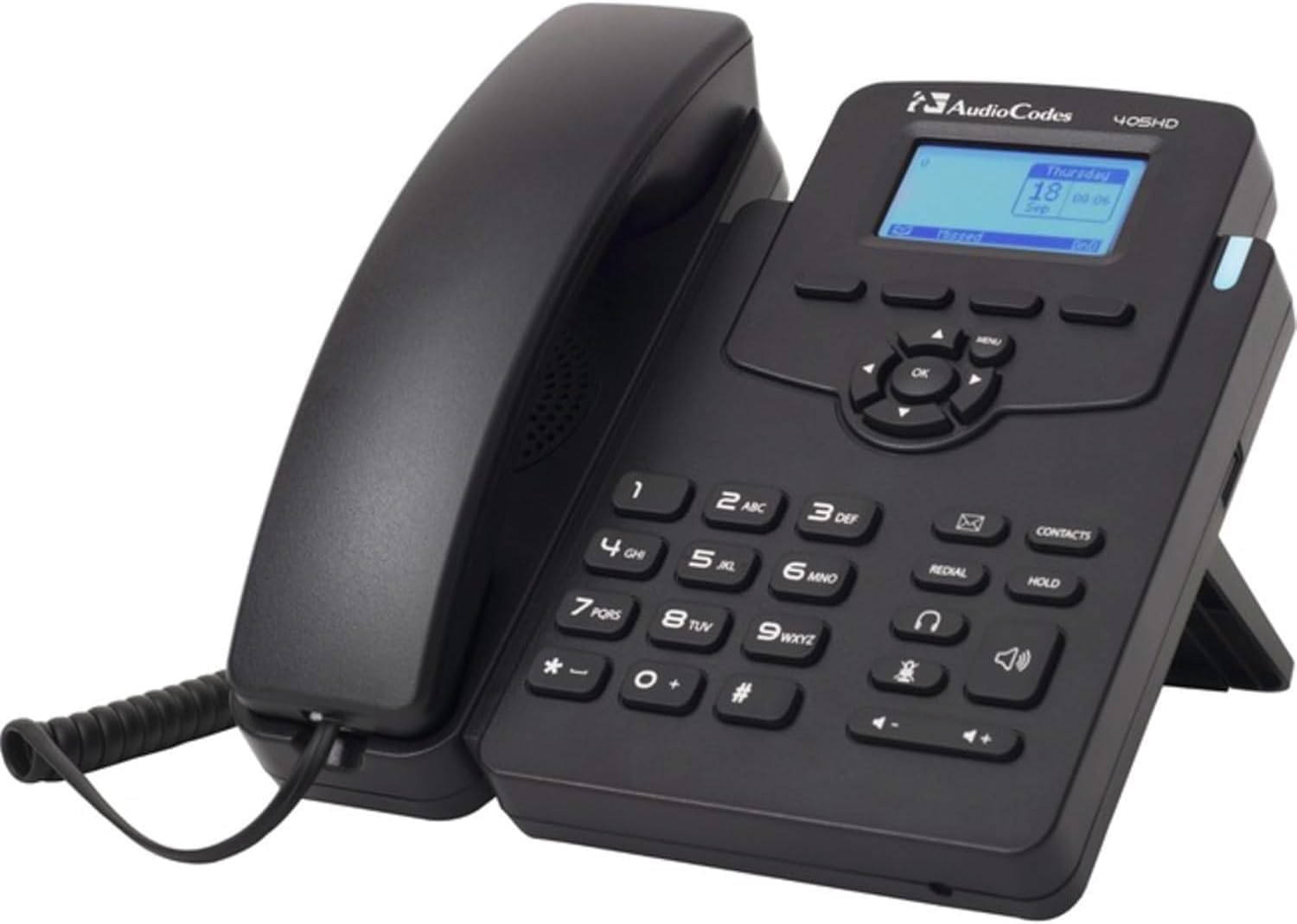
This image displays the AudioCodes 405HD IP Phone, a black corded VoIP phone. The handset is cradled on the left side of the base unit. The base features a numeric keypad, function buttons for redial, hold, contacts, speakerphone, and headset, and a central navigation cluster with an 'OK' button. A small blue-backlit LCD screen shows 'Thursday 18 Sep 00:06'. The phone is designed to stand upright with a built-in kickstand.
Arahan Operasi
Fungsi Panggilan Asas
- Membuat Panggilan:
- Angkat telefon bimbit atau tekan Telefon pembesar suara butang.
- Dail nombor telefon yang dikehendaki menggunakan pad kekunci.
- Tekan ke dail soft key (if displayed) or wait for the call to connect automatically.
- Menjawab Panggilan:
- Apabila telefon berdering, angkat telefon bimbit atau tekan butang Telefon pembesar suara butang.
- Sebagai alternatif, tekan butang Jawab soft key (if displayed).
- Menamatkan Panggilan:
- Place the handset back in the cradle.
- If using speakerphone or headset, press the Tamatkan Panggilan kekunci lembut atau Telefon pembesar suara butang lagi.
Papan Kekunci dan Navigasi
- Pad Kekunci Berangka (0-9, *, #): Used for dialing numbers and entering text.
- Navigation Cluster (Up, Down, Left, Right, OK): Used to navigate menus and confirm selections on the display.
- Butang Menu: Accesses the phone's main menu for settings and features.
- Butang Dail Semula: Mendail nombor terakhir yang dipanggil.
- Butang Tahan: Menangguhkan panggilan aktif.
- Contacts Button: Accesses the phone's contact directory.
- Butang Pembesar Suara: Menghidupkan/mematikan mod pembesar suara telefon.
- Headset Button: Toggles headset mode on/off (if a headset is connected).
- Butang Kelantangan (+/-): Adjusts handset, speakerphone, or ringer volume.
Penyelenggaraan
Proper maintenance ensures the longevity and optimal performance of your AudioCodes 405HD IP Phone.
- Pembersihan:
- Putuskan sambungan telefon daripada kuasa sebelum membersihkannya.
- Gunakan yang lembut, sedikit damp, kain bebas lin untuk mengelap permukaan telefon.
- Jangan gunakan bahan kimia yang keras, pembersih yang kasar atau semburan aerosol terus pada telefon.
- Elakkan mendapatkan kelembapan ke dalam mana-mana bukaan.
- Penjagaan Am:
- Jauhkan telefon daripada cahaya matahari langsung, sumber haba dan kelembapan berlebihan.
- Avoid dropping the phone or subjecting it to strong vibrations.
- Pastikan pengudaraan yang betul di sekeliling peranti.
Menyelesaikan masalah
This section addresses common issues you might encounter with your AudioCodes 405HD IP Phone.
| Masalah | Kemungkinan Punca | Penyelesaian |
|---|---|---|
| Telefon tidak dihidupkan. | No power from PoE switch or power adapter. Defective power adapter or phone unit. |
|
| Tiada nada dail. | Phone not registered with VoIP service. Network connectivity issue. |
|
| Tidak boleh membuat atau menerima panggilan. | No dial tone (see above). Incorrect dialing procedure. Service provider issue. |
|
| Paparan kosong atau tidak boleh dibaca. | No power. Display settings. |
|
Spesifikasi
| Ciri | Perincian |
|---|---|
| Jenama | Kod Audio |
| Nombor Model | UC405HDEG |
| Berat Barang | 2.08 paun |
| warna | Hitam |
| Jenis Telefon | Corded |
| Sumber Kuasa | Corded Electric (requires external adapter or PoE) |
| Jenis Pendail | Papan kekunci tunggal |
| Jenis Sistem Menjawab | digital |
| Peranti Serasi | VoIP services, multi-line systems |
| Keupayaan Panggilan Persidangan | asas |
| Operasi Berbilang Baris | Operasi Berbilang Talian |
Waranti dan Sokongan
Information regarding product warranty and technical support for the AudioCodes 405HD IP Phone is typically provided by the original reseller or your VoIP service provider. Please refer to your purchase documentation or contact your vendor for specific details on warranty coverage and support options.
Ask a question about this manual
Ask about setup, troubleshooting, compatibility, parts, safety, or missing instructions. Manuals+ will review the question and use this page’s manual context to help answer it.