1. Pengenalan
Thank you for choosing the PatrolEyes PE-DV5-2 Body Camera. This device is designed for professional use, offering high-definition video recording, advanced night vision capabilities, and integrated GPS for reliable evidence collection. This manual will guide you through the setup, operation, and maintenance of your new body camera to ensure optimal performance and longevity.
2. Kandungan Pakej
Sila sahkan bahawa semua item terdapat dalam pakej anda:
- PatrolEyes PE-DV5-2 Body Camera
- Battery (Included Components)
- Kabel Pengecas USB/Data
- Pengecas Dinding
- Klip Pemasangan
- Manual Pengguna (dokumen ini)
3. Bahagian dan Kawalan
Familiarize yourself with the various parts and controls of your PatrolEyes PE-DV5-2 body camera.

Rajah 3.1: Depan view of the PatrolEyes PE-DV5-2 body camera, highlighting the central camera lens, surrounding infrared (IR) lights for night vision, and the PatrolEyes logo at the bottom. The device has a rugged, black casing.

Rajah 3.2: Front-side perspective of the PatrolEyes PE-DV5-2 body camera, providing a clearer view of the camera lens and the array of control buttons located on the side panel, including the yellow button at the top.

Rajah 3.3: sebelah view of the PatrolEyes PE-DV5-2 body camera, prominently featuring the red record button and the covered USB port for charging and data transfer.
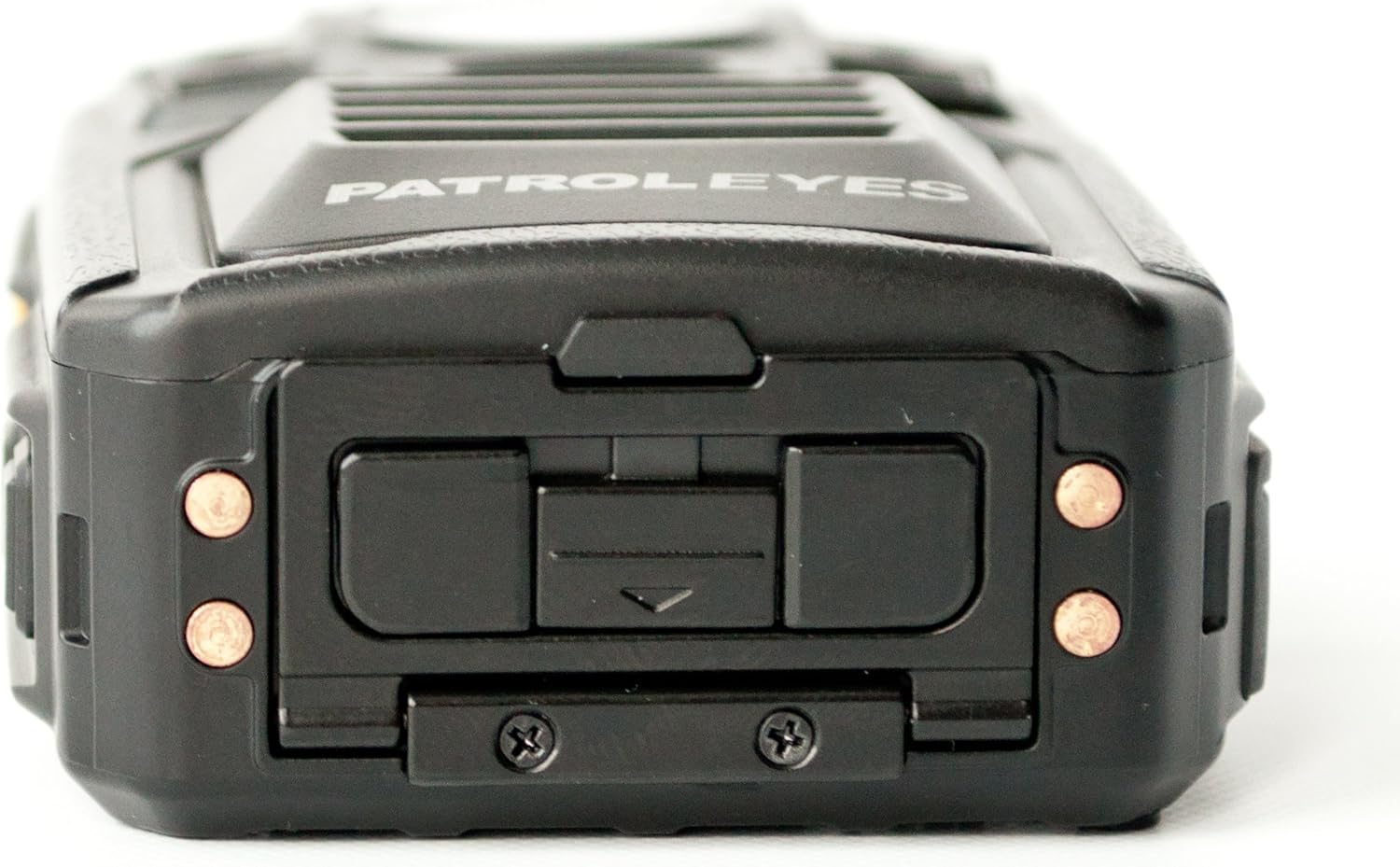
Rajah 3.4: Atas view of the PatrolEyes PE-DV5-2 body camera, displaying the GPS indicator light and other top-mounted features.

Rajah 3.5: Bawah view of the PatrolEyes PE-DV5-2 body camera, revealing the charging contacts designed for use with a docking station.
4. Bermula
4.1. Mengecas Bateri
Before first use, fully charge the camera's battery. The camera comes with a rechargeable battery.
- Connect the USB charging cable to the camera's USB port.
- Plug the other end of the USB cable into the wall charger and then into a power outlet.
- The charging indicator light will illuminate. It will change color or turn off once charging is complete.
Alternatively, use a compatible docking station (sold separately) for charging.
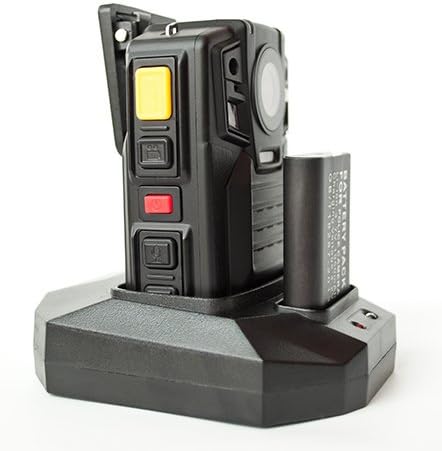
Rajah 4.1: The PatrolEyes body camera securely placed in its docking station, which also features a dedicated slot for charging an additional battery pack.

Rajah 4.2: belakang view of the PatrolEyes docking station, clearly showing the power input port and the USB data port for connecting to a computer.
4.2. Menghidupkan/Mematikan
- Untuk Menghidupkan: Press and hold the Power button for a few seconds until the device vibrates and the indicator lights turn on.
- Untuk Mematikan: Press and hold the Power button until the device vibrates and the indicator lights turn off.
4.3. Attaching the Mounting Clip
Attach the provided mounting clip to the back of the camera. This allows you to securely fasten the camera to your uniform or gear.
5. Mengendalikan Kamera
5.1. Rakaman Video
The camera supports video capture resolutions of 1080p, 480p, and 720p.
- Pastikan kamera dihidupkan.
- Tekan berdedikasi Butang Rekod (often red) once to start video recording. The recording indicator light will flash.
- Tekan ke Butang Rekod again to stop recording. The indicator light will stop flashing.
5.2. Mengambil Foto
The camera has an effective still resolution of 33 MP.
- While in standby mode or during video recording, press the Butang Foto once to capture a still image.
5.3. Night Vision (IR)
The camera features auto IR night vision with a range of 30 feet, utilizing infrared light sources.
- The camera is equipped with automatic infrared (IR) activation. In low-light conditions, the IR lights will automatically turn on to provide clear night vision footage.
5.4. Kefungsian GPS
The integrated GPS module automatically records location data with your video footage. Ensure the camera has a clear view langit untuk pemerolehan isyarat GPS yang optimum.
5.5. Main balik
Anda boleh semulaview recorded videos and photos directly on the camera's screen.
- Enter Playback mode via the menu or a dedicated button (refer to on-screen prompts).
- Navigasi melalui files using the directional buttons.
- Press the OK/Select button to play a video or view gambar.
5.6. Menyambung ke Komputer
Untuk memindahkan files, connect the camera to a computer using the provided USB cable.
- Hidupkan kamera.
- Sambungkan kamera ke komputer anda menggunakan kabel USB.
- Kamera akan muncul sebagai pemacu cakera boleh tanggal pada komputer anda.
- You can now access and transfer video and photo files.
6. Penyelenggaraan dan Penjagaan
6.1. Pembersihan
- Lap badan kamera dengan kain lembut,amp kain. Jangan gunakan bahan kimia yang keras atau pembersih yang kasar.
- Untuk kanta, gunakan kain dan larutan pembersih kanta khusus untuk mengelakkan calar.
6.2. Penyimpanan
- Simpan kamera di tempat yang sejuk dan kering jauh dari cahaya matahari langsung dan suhu yang melampau.
- Ensure the battery is partially charged (around 50%) if storing for extended periods to preserve battery life.
6.3. Penjagaan Bateri
- Elakkan menyahcas sepenuhnya bateri dengan kerap.
- Gunakan hanya aksesori pengecasan asal atau yang diluluskan.
7. Penyelesaian masalah
| Masalah | Kemungkinan Punca | Penyelesaian |
|---|---|---|
| Kamera tidak dihidupkan. | Caj bateri rendah atau tiada. | Cas bateri sepenuhnya. |
| Tidak boleh merakam video/mengambil gambar. | Storage full. | Pemindahan files to a computer and delete them from the camera. |
| Poor video/image quality. | Kanta kotor; keadaan cahaya malap. | Clean the lens; ensure IR is active in low light. |
| GPS tidak memperoleh isyarat. | terhalang view of sky; indoor use. | Beralih ke kawasan luar terbuka. |
| Kamera tidak dikenali oleh komputer. | Faulty USB cable; driver issue. | Try a different USB port/cable; ensure camera is powered on. |
8. Spesifikasi
| Ciri | Perincian |
|---|---|
| Nombor Model | PE-DV5-2 |
| Resolusi Tangkapan Video | 1080p, 480p, 720p |
| Resolusi Pegun Berkesan | 33 MP |
| Kadar Bingkai | 30 fps |
| Julat Penglihatan Malam | 30 Kaki |
| Teknologi Ketersambungan | Wayarles (Wi-Fi) |
| Sumber Kuasa | Dikuasakan Bateri |
| Komponen yang Disertakan | Bateri |
| Penilaian Perlindungan Antarabangsa | IP54 |
| Ciri Khas | Sensor Gerakan, Penglihatan Malam |
| Penggunaan Dalaman/Luar | Dalaman, Luaran |
| Pengeluar | Rondaan Mata |
| Tarikh Tersedia Pertama | 14 Mei 2017 |
9. Maklumat Waranti
PatrolEyes products typically come with a limited manufacturer's warranty. Please refer to the warranty card included with your purchase or visit the official PatrolEyes webtapak untuk terma dan syarat jaminan terperinci. Simpan bukti pembelian anda untuk tuntutan waranti.
10. Sokongan Pelanggan
For technical assistance, troubleshooting beyond this manual, or inquiries about your PatrolEyes PE-DV5-2 body camera, please contact PatrolEyes customer support. Contact information can typically be found on the manufacturer's webtapak atau pada pembungkusan produk.
Sumber Dalam Talian: Visit the official PatrolEyes webtapak untuk Soalan Lazim, kemas kini perisian dan bahan sokongan tambahan.