
1. Pengenalan
Terima kasih kerana membeliasing the Kaiser MSA-5708GY Professional 8-inch Amplified Wireless Speaker. This device is designed to provide high-quality audio with versatile connectivity options, including Bluetooth, USB, SD card, and AUX input. It also features a microphone input for public address or karaoke, and dynamic multicolor LED lights. Please read this manual thoroughly before operating the speaker to ensure proper use and to maximize its performance and longevity.
2. Maklumat Keselamatan
- Sumber Kuasa: Use only the provided charging cable and adapter. Ensure the power supply matches the speaker's requirements.
- Air dan Kelembapan: Do not expose the speaker to water, rain, or excessive moisture. Avoid placing liquid-filled objects on or near the speaker.
- haba: Keep the speaker away from heat sources such as radiators, heat registers, stoves, or other heat-producing appliances.
- Pengudaraan: Do not block any ventilation openings. Ensure adequate airflow around the speaker.
- Pembersihan: Disconnect the power before cleaning. Use a dry, soft cloth. Do not use liquid cleaners or aerosol cleaners.
- Servis: Jangan cuba servis produk ini sendiri. Rujuk semua perkhidmatan kepada pegawai perkhidmatan yang berkelayakan.
- Bateri: The speaker contains a rechargeable battery. Do not expose the battery to excessive heat or direct sunlight. Dispose of batteries according to local regulations.
3. Kandungan Pakej
Sahkan bahawa semua item terdapat dalam pakej:
- Kaiser MSA-5708GY AmpPembesar Suara Wayarles dihidupkan
- Mikrofon Berwayar
- Alat Kawalan Jauh
- Charging Cable / Power Adapter
4. Produk Lebihview
Familiarize yourself with the main components and controls of your speaker.
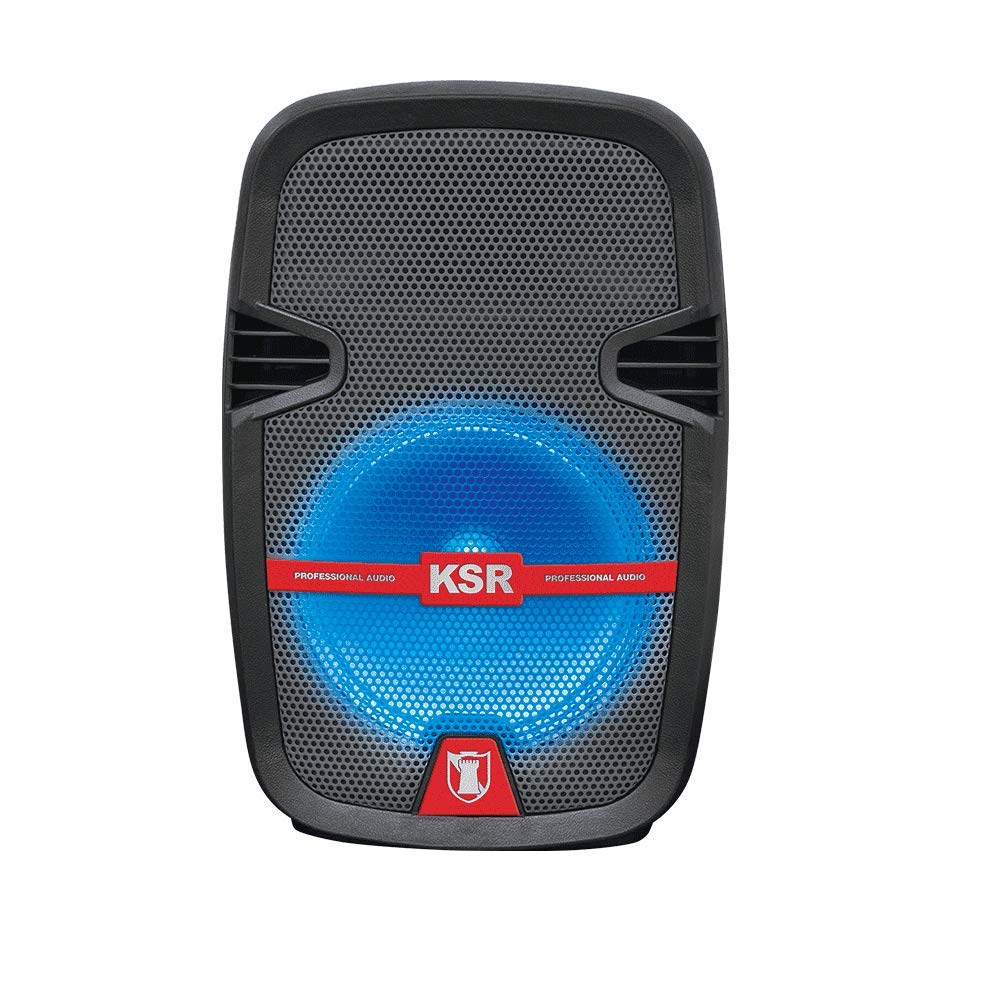
Rajah 1: Depan view of the Kaiser MSA-5708GY speaker, showing the 8-inch woofer with multicolor LED lights and the control panel.
Ciri Panel Kawalan:
- paparan: Shows current mode, track number, or FM frequency.
- Butang Mod: Switches between Bluetooth, USB, SD, AUX, and FM Radio modes.
- Butang Main/Jeda: Memulakan atau menjeda main balik.
- Butang Sebelumnya/Seterusnya: Menavigasi trek atau stesen FM.
- Tombol Kelantangan: Melaraskan kelantangan induk.
- Tombol Kelantangan Mikrofon: Melaraskan kelantangan input mikrofon.
- Microphone Bass/Treble Knobs: Adjusts bass and treble for the microphone input.
- Suis Lampu LED: Toggles the multicolor LED lights on/off.
Rear Panel / Side Connections:
- Port USB: Untuk pemacu kilat USB.
- Slot Kad SD: For SD memory cards.
- Input AUX (3.5mm): Untuk peranti audio luaran.
- Microphone Input (6.3mm): Untuk menyambungkan mikrofon berwayar.
- Port Pengecasan: Untuk menyambungkan penyesuai kuasa.
- Suis kuasa: Menghidupkan atau mematikan pembesar suara.
- Stand Mount Socket: For mounting the speaker on a compatible stand.
5. Persediaan
5.1 Mengecas Bateri
- Sambungkan kabel pengecasan yang disediakan ke port pengecasan pembesar suara.
- Plug the other end of the cable into a suitable power outlet.
- The charging indicator light (if present) will illuminate, indicating that the battery is charging.
- Allow approximately 3-4 hours for a full charge. The indicator light may change or turn off when fully charged.
- Putuskan sambungan pengecas setelah dicas sepenuhnya untuk menjimatkan hayat bateri.
Nota: For optimal battery performance, fully charge the speaker before first use.
5.2 Menghidupkan/Mematikan
- To power on, locate the Power Switch on the speaker and toggle it to the "ON" position.
- To power off, toggle the Power Switch to the "OFF" position.
5.3 Mounting on a Stand
The speaker features a rear knob and a socket for mounting on a compatible speaker stand.
- Ensure the speaker stand is stable and rated for the speaker's weight (4 kg).
- Carefully place the speaker onto the stand's pole, aligning it with the stand mount socket.
- Tighten the rear knob on the speaker to secure it firmly to the stand.
6. Arahan Operasi
6.1 Kesambungan Bluetooth
- Power on the speaker. The speaker will typically enter Bluetooth pairing mode automatically, indicated by a flashing Bluetooth icon or a voice prompt. If not, press the "Mode" button until "Bluetooth" is selected.
- Pada peranti mudah alih anda (telefon pintar, tablet, dll.), dayakan Bluetooth dan cari peranti yang tersedia.
- Select "MSA-5708GY" from the list of devices.
- Once paired, the speaker will confirm the connection, and the Bluetooth indicator will stop flashing.
- You can now play audio from your device through the speaker. Control playback and volume from your device or the speaker's controls.
Nota: The Bluetooth range is up to 10 meters (33 feet) in open areas.
6.2 Main Semula USB/Kad SD
- Insert a USB flash drive or an SD card (pre-loaded with MP3 audio files) into the respective port/slot on the speaker.
- The speaker should automatically switch to USB or SD mode and begin playing audio. If not, press the "Mode" button to select "USB" or "SD".
- Use the Play/Pause, Previous, and Next buttons on the speaker or remote control to manage playback.
6.3 Radio FM
- Power on the speaker and press the "Mode" button until "FM" mode is selected.
- Press and hold the Play/Pause button to initiate an automatic scan for FM stations. The speaker will scan and save available stations.
- Use the Previous and Next buttons to navigate through the saved FM stations.
6.4 Input AUX
- Sambungkan satu hujung kabel audio 3.5mm (tidak disertakan) ke port input AUX pada pembesar suara.
- Connect the other end of the cable to the headphone jack or audio output of your external audio device (e.g., MP3 player, laptop).
- Press the "Mode" button until "AUX" mode is selected.
- Play audio from your external device. Adjust volume from both the external device and the speaker.
6.5 Penggunaan Mikrofon
- Connect the wired microphone to the 6.3mm microphone input jack on the speaker.
- Adjust the "MIC VOL" knob to control the microphone's volume.
- Use the "MIC BASS" and "MIC TREBLE" knobs to fine-tune the microphone's sound.
6.6 Lampu LED Pelbagai Warna
The speaker features integrated multicolor LED lights that illuminate the woofer.
- To activate or deactivate the LED lights, use the dedicated LED Light Switch on the control panel.
6.7 Operasi Kawalan Jauh
The included remote control allows for convenient operation from a distance. Ensure the remote control has working batteries and is pointed towards the speaker's IR receiver.
- Butang Kuasa: Turns the speaker on/off (standby).
- Butang Mod: Switches input modes.
- Jilid +/-: Melaraskan kelantangan induk.
- Main/Jeda: Mulakan/jeda main balik.
- Sebelumnya/Seterusnya: Skips tracks or FM stations.
- EQ: (If available) Cycles through equalizer presets.
- Butang Nombor: (If available) Direct track selection in USB/SD mode or FM station input.
7. Penyelenggaraan
7.1 Pembersihan
- Sentiasa putuskan sambungan pembesar suara daripada sumber kuasa sebelum membersihkan.
- Use a soft, dry, lint-free cloth to wipe the exterior surfaces of the speaker.
- Jangan gunakan pembersih, lilin atau pelarut yang melelas kerana ia boleh merosakkan kemasan.
- Elakkan mendapatkan kelembapan ke dalam mana-mana bukaan.
7.2 Penjagaan Bateri
- Untuk memanjangkan hayat bateri, elakkan daripada kerap menghabiskan bateri sepenuhnya.
- If the speaker will not be used for an extended period, charge it to about 50% and store it in a cool, dry place. Recharge every 3-6 months to prevent deep discharge.
- Jangan dedahkan bateri kepada suhu yang melampau.
8. Penyelesaian masalah
| Masalah | Kemungkinan Punca | Penyelesaian |
|---|---|---|
| Tiada kuasa | Battery is drained; Power switch is off; Charging cable not connected properly. | Charge the battery; Ensure power switch is ON; Check charging cable connection. |
| Tiada bunyi | Volume is too low; Incorrect input mode selected; Device not connected properly (Bluetooth, AUX, USB/SD). | Increase master volume; Select correct input mode; Reconnect device or re-pair Bluetooth. |
| Bluetooth tidak bersambung | Speaker not in pairing mode; Device Bluetooth is off; Speaker is too far from device; Interference. | Ensure speaker is in Bluetooth mode; Enable Bluetooth on device; Move device closer to speaker (within 10m); Avoid obstacles. |
| USB/SD playback not working | tak betul file format; USB/SD card corrupted; Incorrect mode selected. | pastikan files are MP3 format; Try a different USB/SD card; Select USB/SD mode. |
| Mikrofon tidak berfungsi | Microphone not connected; MIC VOL knob is low; Microphone is faulty. | Ensure microphone is securely connected; Increase MIC VOL; Test with another microphone if available. |
9. Spesifikasi
| model: | MSA-5708GY |
| Jenama: | Kaiser |
| Kuasa Audio: | 2,500W PMPO / 8W RMS |
| Saiz Woofer: | 8 inci (20.32 cm) |
| Ketersambungan: | Bluetooth, USB, SD, AUX (3.5mm), Microphone (6.3mm) |
| Julat Bluetooth: | Sehingga 10 meter |
| Bateri: | Rechargeable, up to 4 hours continuous music playback |
| Radio: | Radio FM |
| Impedans: | 4 ohm |
| Dimensi (L x W x H): | 30 x 44 x 25 cm |
| Berat: | 4 kg |
| Peranti Serasi: | Komputer riba, telefon pintar |
10. Maklumat Waranti
This Kaiser MSA-5708GY speaker comes with a Waranti 3 bulan dari tarikh pembelian. Waranti ini meliputi kecacatan pembuatan di bawah penggunaan biasa. Ia tidak meliputi kerosakan yang disebabkan oleh salah guna, kemalangan, pengubahsuaian tanpa kebenaran atau haus dan lusuh biasa. Sila simpan bukti pembelian anda untuk tuntutan waranti.
11. Sokongan Pelanggan
If you encounter any issues or have questions regarding your Kaiser MSA-5708GY speaker that are not addressed in this manual, please contact Kaiser customer support. Refer to the product packaging or the official Kaiser webtapak untuk maklumat hubungan yang paling terkini.
When contacting support, please have your product model number (MSA-5708GY) and proof of purchase readily available.