
Maklumat Keselamatan Penting
AMARAN: Do not aim at eyes or face. To avoid injury: Use only darts designed for this product. Do not modify darts or dart blaster.
- Always wear eyewear when using this blaster (eyewear not included).
- Ensure all users understand and follow safety guidelines.
- Pastikan jari-jari bersih daripada bahagian yang bergerak semasa operasi.
- Do not use modified darts or darts from other manufacturers, as they may not meet safety standards or could damage the blaster.
- Pengawasan dewasa disyorkan untuk pengguna yang lebih muda.
Apa yang ada dalam Kotak
Your NERF Modulus Mediator Blaster package includes the following components:
- 1x NERF Modulus Mediator Blaster
- 1x 6-Dart Clip
- 6x Dart Elit Nerf Rasmi
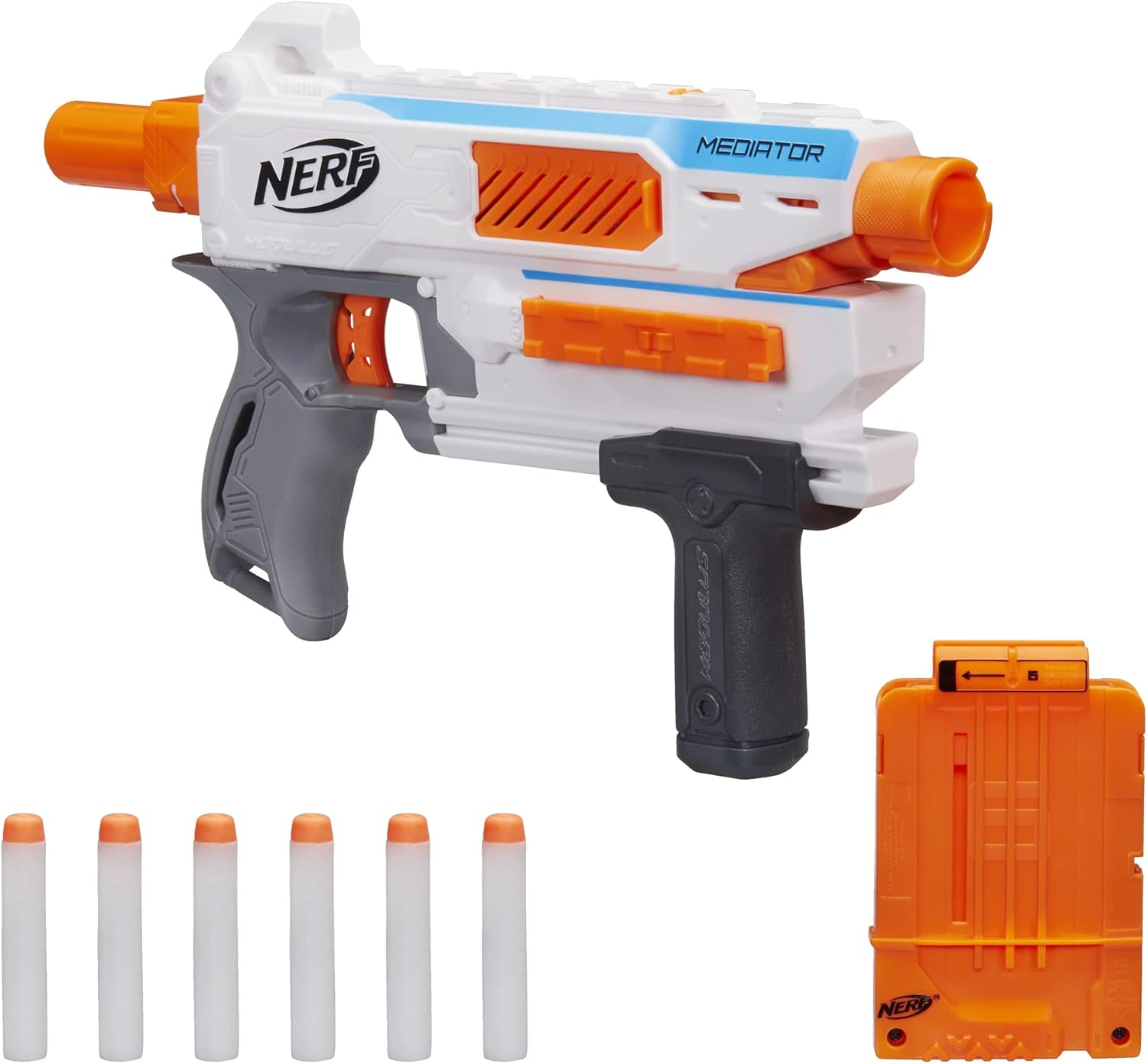
Image: Contents of the NERF Modulus Mediator Blaster package, showing the blaster, clip, and darts.
Arahan Persediaan
1. Loading the 6-Dart Clip
- Take the 6-dart clip.
- Insert one Official Nerf Elite Dart into each slot of the clip until it is fully seated. Ensure darts are not bent or damaged.
2. Inserting the Clip into the Blaster
- Locate the clip well on the side of the blaster.
- Slide the loaded 6-dart clip into the clip well until it clicks securely into place. The clip is designed for side-loading.

Image: Demonstrates the process of inserting the 6-dart clip into the side-loading mechanism of the blaster.
Arahan Operasi
1. Priming the Blaster (Pump-Action)
- Grip the pump-action handle located at the front of the blaster.
- Pull the handle all the way back towards the stock until it locks into place.
- Push the handle all the way forward to complete the priming cycle. The blaster is now ready to fire one dart.
2. Firing a Single Dart
- Ensure the blaster is primed (as per step 1).
- Aim the blaster at your target, ensuring no eyes or faces are in the line of fire.
- Pull the trigger to launch a single dart.
3. Slam-Fire Action (Rapid Firing)
The Mediator blaster features a slam-fire mechanism for rapid dart blasting.
- Hold down the trigger continuously.
- Rapidly pump the front handle back and forth. Each full pump cycle will launch a dart as long as the trigger is held down and darts are available in the clip.

Image: Illustrates the slam-fire feature, where darts are rapidly launched by continuously pumping the handle while holding the trigger.
Customization with Nerf Modulus System
The NERF Modulus Mediator Blaster is part of the Nerf Modulus system, allowing for extensive customization. It features tactical rails and attachment points for various Nerf Modulus accessories (sold separately).
- Tactical Rails: Attach scopes, grips, lights, or other rail-compatible accessories to enhance your blaster.
- Mata Lampiran: The blaster has specific attachment points for the Nerf Modulus Mediator Series Barrel and Stock, which can be used to build the Mediator XL blaster.
Explore the full range of Nerf Modulus accessories to create over 1000 different blaster combinations.

Image: A fully customized Nerf Modulus Mediator XL blaster, demonstrating the potential for expansion with additional Modulus accessories.
Penyelenggaraan
Proper care will ensure the longevity and optimal performance of your NERF Modulus Mediator Blaster.
- Penjagaan Dart: Keep your Official Nerf Elite Darts clean and dry. Avoid bending or crushing darts, as this can affect performance and lead to jams. Replace worn or damaged darts.
- Pembersihan: Lap blaster dengan kain kering atau sedikitamp cloth to remove dust and debris. Do not submerge the blaster in water or use harsh chemicals.
- Storan: Store the blaster in a cool, dry place away from direct sunlight and extreme temperatures.
- Elakkan Pelincir: Do not apply any lubricants or oils to the internal mechanisms of the blaster, as this can attract dirt and cause malfunction.
Menyelesaikan masalah
| Masalah | Kemungkinan Punca | Penyelesaian |
|---|---|---|
| Darts not firing or firing weakly |
|
|
| Darts jamming in the blaster |
|
|
| Clip not inserting or removing easily |
|
|
Spesifikasi
- Nombor Model: E0016
- Dimensi Produk: 2.63 x 17.25 x 11 inci (6.68 x 43.82 x 27.94 cm)
- Berat Barang: 1.37 paun (0.62 kg)
- Umur Disyorkan: 8 tahun dan ke atas
- Dart Type: Official Nerf Elite Darts
- kapasiti: 6-dart clip
- Mekanisme Penembakan: Pump-action, Slam-fire
- Pengeluar: Hasbro
Waranti dan Sokongan
For specific warranty information and customer support regarding your NERF Modulus Mediator Blaster, please refer to the documentation included with your purchase or visit the official Hasbro/Nerf webtapak.
Sumber Dalam Talian:
- Official Nerf Webtapak: nerf.hasbro.com
- Hasbro Customer Service: Refer to the contact information provided on the Hasbro webtapak untuk wilayah anda.