
1. Pengenalan
The ABKO Hacker K600 Hades RGB Mechanical Keyboard is designed to provide a responsive and customizable typing and gaming experience. Featuring durable blue mechanical switches and vibrant RGB backlighting, this keyboard offers both performance and aesthetic appeal. This manual provides essential information for setting up, operating, maintaining, and troubleshooting your K600 Hades keyboard to ensure optimal performance and longevity.
2. Kandungan Pakej
Sila sahkan bahawa semua item terdapat dalam pakej anda:
- ABKO Hacker K600 Hades RGB Mechanical Keyboard
- Manual Pengguna
3. Produk Lebihview
The ABKO Hacker K600 Hades keyboard features a full-size layout with dedicated function keys and a numeric keypad. It utilizes blue mechanical switches known for their tactile feedback and audible click. The keyboard is equipped with customizable RGB backlighting, offering various lighting effects and colors.
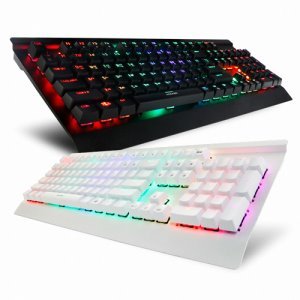
Imej 1: Bersudut view of the ABKO Hacker K600 Hades RGB Mechanical Keyboard, showcasing its full layout and RGB lighting.

Imej 2: Depan view of the ABKO Hacker K600 Hades RGB Mechanical Keyboard, highlighting the vibrant RGB backlighting across all keys.
4. Persediaan
Follow these steps to set up your ABKO Hacker K600 Hades keyboard:
- Unpack the keyboard and ensure all package contents are present.
- Cari port USB-A yang tersedia pada komputer anda.
- Plug the USB-A connector of the keyboard cable into the USB-A port on your computer.
- Your operating system should automatically detect and install the necessary drivers. The keyboard is plug-and-play, requiring no additional software for basic functionality.
- Once installed, the keyboard's default RGB lighting will illuminate, indicating it is ready for use.
5. Arahan Operasi
5.1 Fungsi Papan Kekunci Asas
The ABKO Hacker K600 Hades functions as a standard QWERTY keyboard for typing and general computer use.
5.2 Kawalan Pencahayaan RGB
The keyboard features various RGB lighting modes and customization options. Use the following key combinations to adjust the lighting:
- Fn + Ins/Laman Utama/PgUp/Padam/Tamat/PgDn: Cycle through different RGB lighting effects and modes.
- Fn + Arrow Up/Down: Adjust the brightness level of the backlighting.
- Fn + Anak Panah Kiri/Kanan: Laraskan kelajuan kesan pencahayaan dinamik.
- Fn + PrtSc: Toggle between various static color presets.
5.3 Kekunci Multimedia dan Fungsi
Gabungkan Fn key with the F1-F12 keys to access multimedia controls and other functions:
- Fn + F1-F12: Specific functions may vary, but commonly include media playback controls (play/pause, stop, previous/next track), volume control (mute, volume up/down), and launching applications. Refer to the keycap legends for exact functions.
6. Penyelenggaraan
Penyelenggaraan yang betul memastikan jangka hayat dan prestasi papan kekunci anda:
- Pembersihan: Use a soft, dry cloth to wipe the surface of the keyboard. For dust and debris between keycaps, use compressed air. For stubborn dirt, a slightly damp Kain dengan larutan sabun lembut boleh digunakan, memastikan tiada cecair memasuki papan kekunci.
- Pembuangan Papan Kekunci: If necessary, keycaps can be carefully removed using a keycap puller (not included) for deeper cleaning. Exercise caution to avoid damaging the switches.
- Storan: Apabila tidak digunakan untuk tempoh yang lama, simpan papan kekunci di persekitaran yang bersih dan kering, jauh daripada cahaya matahari langsung dan suhu yang melampau.
7. Penyelesaian masalah
If you encounter issues with your ABKO Hacker K600 Hades keyboard, refer to the following common solutions:
- Papan Kekunci Tidak Membalas:
- Pastikan kabel USB disambungkan dengan selamat ke kedua-dua papan kekunci dan komputer.
- Cuba palamkan papan kekunci ke port USB lain pada komputer anda.
- Mulakan semula komputer anda.
- Uji papan kekunci pada komputer lain untuk menentukan sama ada masalahnya adalah dengan papan kekunci atau port/pemacu komputer.
- Kunci Tidak Mendaftar:
- Periksa sebarang serpihan atau objek asing yang tersimpan di bawah penutup kekunci.
- If a specific key is not working, it might indicate a faulty switch.
- Isu Pencahayaan RGB:
- Pastikan papan kekunci disambungkan dengan betul.
- Cycle through lighting modes and brightness levels using the Fn key combinations (refer to Section 5.2).
- If the lighting is completely off, check if it has been accidentally turned off.
8. Spesifikasi
| Ciri | Penerangan |
|---|---|
| Jenama | ABKO |
| Model | K600 Hades |
| Teknologi Ketersambungan | USB-A (Berwayar) |
| Penerangan Papan Kekunci | Permainan, Mekanikal |
| Jenis Suis | Suis Biru |
| Backlighting papan kekunci | RGB |
| warna | Hitam |
| bahan | Akrilonitril Butadiena Stirena |
| Ciri Khas | Ergonomik |
| Peranti Serasi | Konsol Permainan, Komputer Riba, PC, Telefon Pintar, Tablet |
| Tarikh Mula-mula Tersedia | 11 Jun 2017 |
9. Waranti dan Sokongan
This product is covered by a standard manufacturer's warranty. For detailed information regarding warranty terms, conditions, and duration, please refer to the warranty card included with your purchase or visit the official ABKO website. For technical support, troubleshooting assistance, or any product-related inquiries, please contact ABKO customer service through their official channels.