
MillSO 2T1-20H
MillSO 3.5mm Headphone Mic Splitter (Model 2T1-20H) Instruction Manual
Brand: MillSO | Model: 2T1-20H
pengenalan
This manual provides detailed instructions for the MillSO 3.5mm Headphone Mic Splitter, designed to connect dual-plug gaming headsets to devices with a single 3.5mm TRRS port. Please read this manual carefully to ensure proper setup and optimal performance of your adapter.
Produk Selesaiview
Ciri-ciri Utama
- 3.5mm Headset Splitter: Connects a dual-plug gaming headset (separate headphone and microphone jacks) to a single 3.5mm TRRS port.
- CTIA Standard: Features one 3.5mm TRRS male plug and two 3.5mm TRS female jacks (green for headphones, pink for microphone).
- Bahan Premium: Equipped with a braided sheath, plastic metal sleeve, gold-plated contacts, 99.99% OFC copper, and double shielding for optimum sound quality and durability.
- Reka bentuk padat: Robust design for maximum portability.

Imej: Dari dekat view of the MillSO 3.5mm Headphone Mic Splitter, showcasing its premium design elements including young color design, strain relief, soft braided cable, and 24K gold-plated connector.
Keserasian
This adapter is compatible with most audio devices featuring a 3.5mm TRRS port (audio+mic), including:
- PS4, PS5, Xbox One controllers (with 3.5mm jack)
- PCs, Laptops, Notebooks with a combo-jack
- Telefon Pintar, Tablet

Image: MillSO 3.5mm Headphone Mic Splitter illustrating universal compatibility with various devices like PS4, Xbox controllers, smartphones, and laptops.
Video: An official MillSO video demonstrating the features and usage of the 2T1 headset adapter. This video provides a visual guide to connecting your headset.
Video: An official MillSO video showcasing the headphone splitter adapter, highlighting its design and connection capabilities.
Arahan Persediaan
Follow these steps to connect your dual-plug headset using the MillSO 3.5mm Headphone Mic Splitter:
- Identify Headset Plugs: Locate the two 3.5mm plugs on your gaming headset. Typically, one is for audio (often green) and the other for the microphone (often pink).
- Connect Headset to Splitter:
- Insert the headset's audio plug into the green female jack of the MillSO splitter.
- Insert the headset's microphone plug into the pink female jack of the MillSO splitter.
- Connect Splitter to Device: Insert the single 3.5mm TRRS male plug of the MillSO splitter into the combo-jack port of your target device (e.g., laptop, PS4 controller, Xbox controller, smartphone).
- Sahkan Sambungan: Ensure all connections are secure. Your device should now recognize both the headphone and microphone functions of your headset.
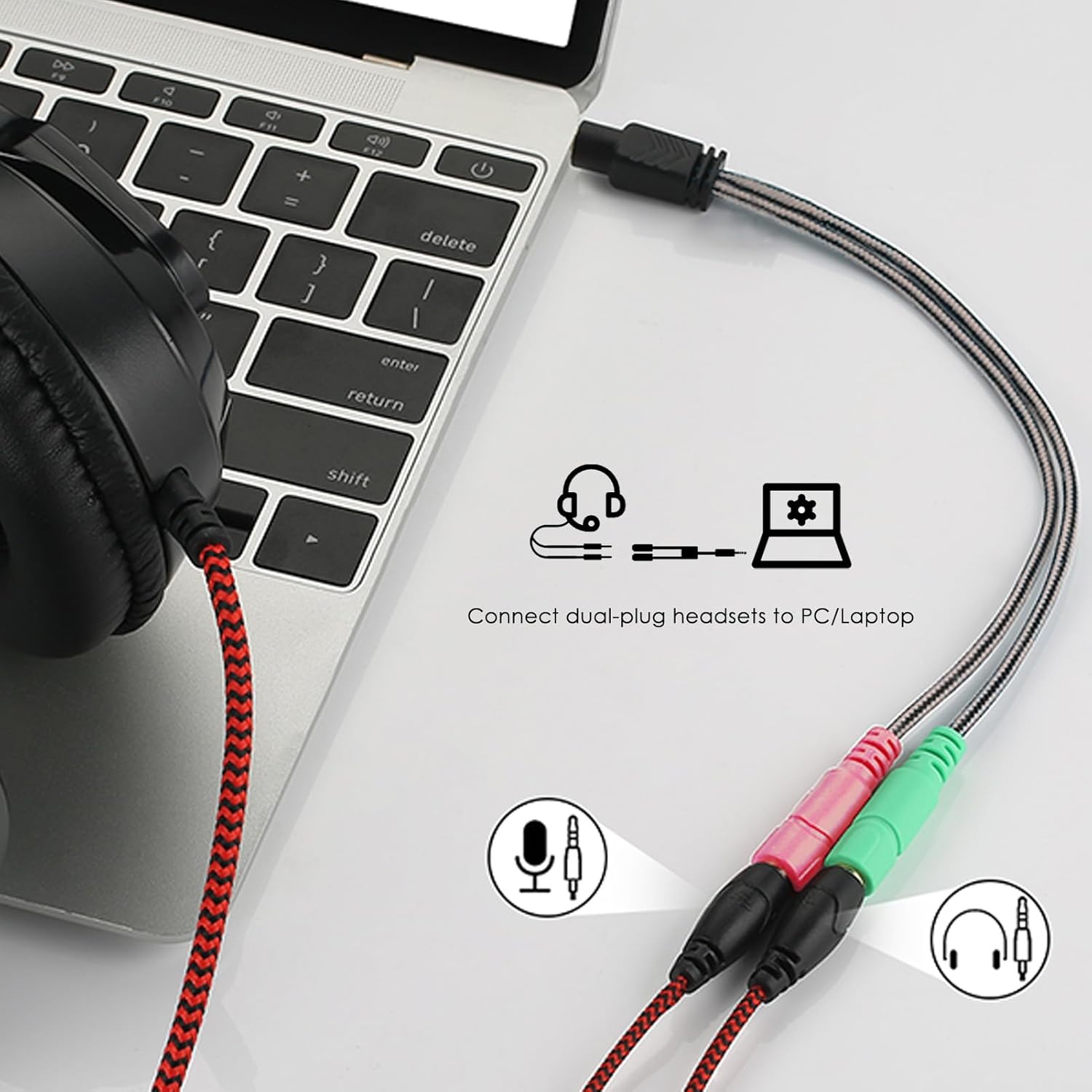
Image: A dual-plug headset connected to a laptop via the MillSO 3.5mm Headphone Mic Splitter. The splitter's green jack is for headphones, and the pink jack is for the microphone.

Image: A user connecting a dual-plug headset to a PlayStation 4 controller using the MillSO 3.5mm Headphone Mic Splitter.
Arahan Operasi
Once connected, the MillSO 3.5mm Headphone Mic Splitter operates automatically. No additional drivers or software are required.
- Output Audio: Sound from your device will be routed to your headset's headphones.
- Input Mikrofon: Your headset's microphone will be active for voice input on your device.
- Tetapan peranti: In some cases, you may need to adjust audio input/output settings within your device's operating system or application preferences to select the connected headset as the primary audio and microphone device.
Nota dan Amaran Penting
- This adapter is designed for headsets with separate 3-pole (TRS) headphone and 3-pole (TRS) microphone plugs.
- The male plug of this splitter adheres to the CTIA standard. Compatibility issues may arise with devices or headsets using the OMTP standard.
- For optimal performance, ensure the 3.5mm jacks on your headset and device are clean and free of debris.
- Adakah bukan support iPhone, iPad, iMac, or Mac devices.
- Adakah bukan work for 3-pole TRS condenser microphones or 4-pole TRRS external microphones. Ensure your external mic plug is 3-pole (TRS) standard if using its mic function.
- Adakah bukan support 2 sets of separate headphones.

Image: A visual guide indicating the pink jack for TRS microphone plugs and the green jack for TRS audio plugs. It also highlights that TS (2-pole) and TRRS (4-pole) plugs are not compatible for the individual mic/audio inputs.

Image: Diagram illustrating the wiring differences between CTIA and OMTP 3.5mm plugs. The MillSO splitter uses the CTIA standard, which is crucial for proper function.
Menyelesaikan masalah
- No audio or microphone input:
- Ensure all plugs are fully inserted into their respective jacks. A loose connection can prevent proper function.
- Verify that your headset has separate audio and microphone plugs (TRS type) and is not a single TRRS plug headset.
- Check your device's audio settings. Make sure the correct input/output device is selected (e.g., "Headset Microphone" or "External Microphone" for input, and "Headphones" or "External Speakers" for output).
- Confirm your microphone is a 3-pole (TRS) standard. This adapter does not support 4-pole (TRRS) external microphones or 3-pole (TRS) condenser microphones.
- Test the headset directly with a compatible device if possible, to rule out an issue with the headset itself.
- Poor sound quality or static:
- Ensure connections are clean and free of dust or debris.
- Elakkan meletakkan kabel berhampiran sumber gangguan elektromagnet.
- Test with another headset or device to isolate the problem.
Spesifikasi
| Ciri | Perincian |
|---|---|
| Jenama | MillSO |
| Nombor Model | 2T1-20H |
| Jenis Penyambung | 3.5mm Stereo Audio (TRRS Male to 2x TRS Female) |
| warna | Hitam |
| Dimensi Item (L x W x H) | 4.02 x 0.39 x 19.69 inci |
| Berat Barang | 10 Gram |
| Kuantiti Pakej | 1 |
| UPC | 759974980718 |
Waranti dan Sokongan
MillSO offers a 12-month Unconditional Warranty for all products to guard against any quality trouble. This warranty is extended to 18 months. For any quality or compatibility issues, please contact MillSO customer support.
Pengeluar: MillSO
For technical assistance or warranty claims, please refer to the contact information provided with your product packaging or visit the official MillSO webtapak.
Ask a question about this manual
Ask about setup, troubleshooting, compatibility, parts, safety, or missing instructions. Manuals+ will review the question and use this page’s manual context to help answer it.