
Beninca Bull 624C Sliding Gate Operator User Manual
Model: Bull 624 C
1. Pengenalan
Thank you for choosing the Beninca Bull 624C Sliding Gate Operator. This system is designed for intensive use, offering silent, powerful, and reliable operation for your sliding gate. This manual provides essential information for the safe installation, operation, and maintenance of your gate operator system. Please read it thoroughly before proceeding with installation or use.
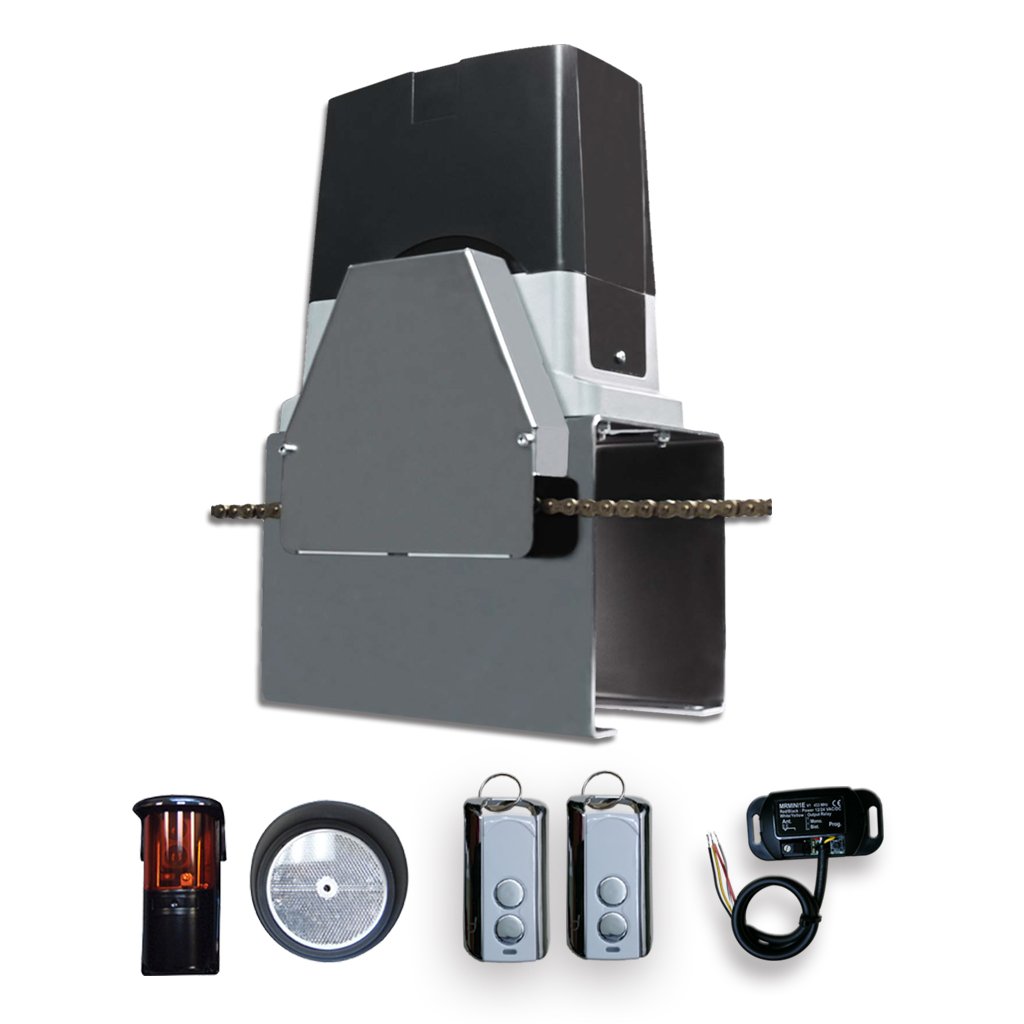
Image 1.1: Beninca Bull 624C Sliding Gate Operator kit components.
2. Maklumat Keselamatan
AMARAN: Improper installation or use can lead to serious injury or property damage. Always follow these safety guidelines.
- Installation must be performed by qualified personnel in accordance with local electrical and safety codes.
- Ensure the gate operates smoothly and freely before installing the operator.
- Do not allow children to play near the gate or operate the remote controls.
- Keep hands and clothing clear of the gate and operator while the gate is in motion.
- Regularly inspect the gate and operator for signs of wear or damage. Disconnect power before performing any maintenance.
- The photocells are crucial safety devices; ensure they are correctly installed and functioning to prevent the gate from closing on obstructions.
- In case of power failure, use the manual release mechanism to operate the gate.
3. Kandungan Pakej
The Beninca Bull 624C kit typically includes the following components:
- Beninca Bull 624C Sliding Gate Operator (24VDC)
- Penerima Bersepadu
- Dua Alat Kawalan Jauh
- Photocell Set (Transmitter and Receiver)
- Perkakasan dan Aksesori Pemasangan
- Manual Arahan (dokumen ini)
Please verify all components are present and undamaged upon unpacking.
4. Persediaan dan Pemasangan
Installation of the Beninca Bull 624C Sliding Gate Operator requires technical expertise. It is highly recommended that installation be carried out by a qualified professional.
4.1. Pemeriksaan Pra-Pemasangan
- Ensure the gate structure is sound and moves freely without obstruction.
- Verify the gate track is clean and level.
- Confirm availability of a suitable 24VDC power supply at the installation site.
4.2. Mounting the Operator
- Securely mount the operator base plate on a stable concrete foundation next to the gate, ensuring it is level and at the correct height for the gate rack.
- Attach the gate rack to the gate, ensuring proper engagement with the operator's pinion gear. Leave a small clearance (approx. 1-2mm) between the rack and the pinion.
4.3. Sambungan Elektrik
- Connect the 24VDC power supply to the control board terminals as indicated in the wiring diagram (refer to the detailed wiring diagram provided with the product packaging).
- Connect the photocells to the designated safety input terminals. Ensure correct polarity.
- Connect any optional accessories such as keypads, loop detectors, or safety edges.
4.4. Initial Programming and Limit Switches
- Power on the operator. The LCD display will guide you through the initial setup.
- Set the internal limit-switches for the gate's open and closed positions. This defines the gate's travel limits.
- Adjust torque and timing settings digitally via the LCD display to optimize gate movement and safety features.
- Perform several test cycles to ensure smooth operation and correct limit switch activation.
5. Arahan Operasi
The Beninca Bull 624C is designed for user-friendly operation.
5.1. Menggunakan Alat Kawalan Jauh
- Press the designated button on your remote control once to open the gate.
- Press the button again while the gate is moving to stop it.
- Press the button a third time to reverse the gate's direction (e.g., if it was opening, it will start closing).
- Ensure you have a clear line of sight to the gate when operating it with the remote control.
5.2. Keluaran Manual
In case of power failure or malfunction, the gate can be operated manually:
- Locate the manual release mechanism on the operator (usually covered by a cap or panel).
- Insert the provided key and turn it to disengage the motor.
- You can now manually slide the gate open or closed.
- To re-engage, reverse the key operation and ensure the gate is fully closed or open before re-engaging.
6. Penyelenggaraan
Regular maintenance ensures the longevity and safe operation of your Beninca Bull 624C gate operator.
- Bulanan: Inspect the gate's movement for any stiffness or obstruction. Clean the gate track. Check the photocells for obstructions or dirt.
- Suku tahunan: Lubricate the gate's moving parts (hinges, rollers, bearings) as recommended by the gate manufacturer. Check the operator's mounting bolts for tightness.
- Setiap tahun: Have a qualified technician inspect the entire system, including electrical connections, motor, gears, and safety devices, for wear and proper function.
- Always disconnect power to the operator before performing any maintenance or cleaning.
7. Penyelesaian masalah
This section addresses common issues you might encounter with your gate operator.
| Masalah | Kemungkinan Punca | Penyelesaian |
|---|---|---|
| Pintu tidak bertindak balas terhadap alat kawalan jauh. | No power to operator; remote battery dead; remote not programmed; safety device activated. | Check power supply; replace remote battery; reprogram remote (refer to programming guide); check photocells for obstruction. |
| Pintu pagar dibuka tetapi tidak ditutup. | Photocells obstructed or misaligned; safety edge activated. | Clear photocell path; realign photocells; check safety edge for activation. |
| Pintu berhenti secara tiba-tiba semasa operasi. | Obstruction detected; motor overheating; limit switch issue. | Remove obstruction; allow motor to cool; check limit switch settings on LCD display. |
| Unusual noises from the operator. | Lack of lubrication; worn gears; foreign object. | Lubricate moving parts; inspect gears for wear; check for foreign objects. If noise persists, contact a technician. |
If you are unable to resolve an issue, please contact a qualified technician or Beninca support.
8. Spesifikasi
| Ciri | Perincian |
|---|---|
| Pengeluar | Beninca |
| Nombor Bahagian | Beninca Bull 624 C |
| Model | Bull 624 C |
| Bekalan Kuasa | 24VDC |
| Penggunaan | Penggunaan Intensif |
| Paparan | LCD for easy programming |
| Suis Had | Dalaman |
| Digital Adjustments | Torque & Timing |
| Bateri Termasuk? | Tidak |
| Bateri Diperlukan? | Tidak |
| ASIN | B0718YGLHY |
| Tarikh Mula-mula Tersedia | 10 Mei 2016 |
9. Waranti dan Sokongan
Specific warranty details for the Beninca Bull 624C Sliding Gate Operator are not provided within this document. Please refer to the warranty card included with your product packaging or visit the official Beninca weblaman web untuk maklumat dan terma jaminan yang komprehensif.
For technical support, spare parts, or service inquiries, please contact your authorized Beninca dealer or the Beninca customer service department. Contact information can typically be found on the manufacturer's webtapak atau dalam pembungkusan produk.