
Lawmate CM-TC10
LawMate CM-TC10 Tie Clip Covert Camera User Manual
Model: CM-TC10
1. Pengenalan
The LawMate CM-TC10 is a highly discreet covert camera designed to be integrated into a standard tie clip. This unit functions as a camera head and requires connection to a compatible LawMate pocket Digital Video Recorder (DVR) for operation and recording. Its lightweight and completely covert design ensures the camera is undetectable to the human eye, making it ideal for discreet video capture in various environments.
This manual provides essential information for the proper setup, operation, maintenance, and troubleshooting of your LawMate CM-TC10 Tie Clip Covert Camera. Please read it thoroughly before using the device to ensure optimal performance and longevity.
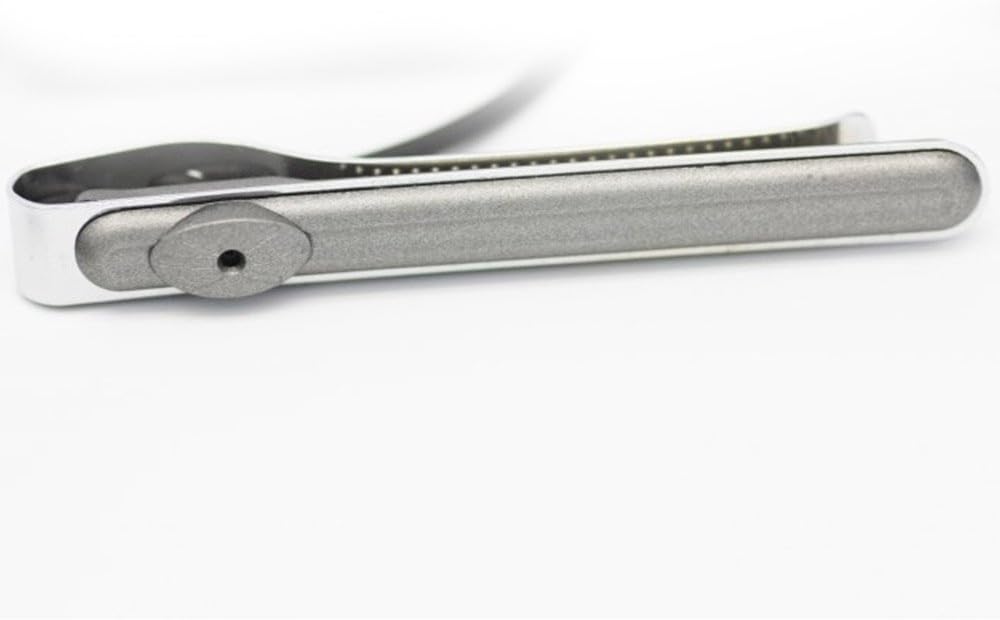
Image: The LawMate CM-TC10 Tie Clip Covert Camera. This image highlights the discreet camera lens, which is integrated into the tie clip's design, making it virtually unnoticeable. The device features a sleek, metallic finish, emphasizing its covert nature.
2. Persediaan
2.1 Kandungan Pakej
Sebelum meneruskan, pastikan semua komponen ada:
- LawMate CM-TC10 Tie Clip Covert Camera
- Connection cable (typically for LawMate DVRs)
- (Refer to your specific product packaging for exact contents)
2.2 Connecting to a LawMate DVR
The CM-TC10 is designed to work exclusively with compatible LawMate pocket DVRs. It does not function as a standalone recording device.
- Identify the Connection Port: Locate the camera input port on your LawMate pocket DVR. This is typically a multi-pin connector.
- Sambungkan Kamera: Carefully align the connector of the CM-TC10's cable with the input port on the DVR. Push firmly until it clicks into place, ensuring a secure connection.
- Hidupkan DVR: Once the camera is securely connected, power on your LawMate DVR according to its instruction manual. The DVR should recognize the connected camera.
- Verify Video Feed: Akses secara langsung view or recording mode on your DVR to confirm that the video feed from the CM-TC10 is displayed correctly.
Nota: For detailed instructions on operating your specific LawMate DVR, please consult the DVR's dedicated user manual.
3. Arahan Operasi
The LawMate CM-TC10 functions as a video input device for a compatible DVR. All recording, playback, and settings adjustments are managed through the connected DVR.
3.1 Discreet Placement
- Attach the tie clip to your tie or clothing in a position that allows the camera lens to have an unobstructed view of your desired recording area.
- Ensure the tie clip is securely fastened to prevent movement during recording.
- Practice wearing the tie clip and positioning the camera to achieve the best angle for your intended use.
3.2 Rakaman
To initiate recording, use the controls on your connected LawMate DVR. The CM-TC10 will transmit the video feed to the DVR for capture.
- Refer to your DVR's manual for specific instructions on starting, stopping, and managing recordings.
- Monitor the DVR's screen (if available) to ensure the camera is capturing the desired footage.
4. Penyelenggaraan
Proper maintenance ensures the longevity and optimal performance of your CM-TC10 camera.
- Membersihkan Lensa: Use a soft, lint-free cloth specifically designed for optics to gently wipe the camera lens. Avoid abrasive materials or harsh chemicals, which can scratch or damage the lens.
- Membersihkan Badan: Wipe the tie clip body with a dry or slightly damp soft cloth. Do not immerse the device in water or expose it to excessive moisture.
- Storan: When not in use, store the camera in a cool, dry place, away from direct sunlight, extreme temperatures, and high humidity. Keep it in its original packaging or a protective case to prevent dust accumulation and physical damage.
- Penjagaan Kabel: Avoid bending or twisting the connection cable excessively, as this can damage internal wires. Always grasp the connector, not the cable, when plugging or unplugging.
5. Penyelesaian masalah
If you encounter issues with your LawMate CM-TC10, refer to the following common problems and solutions. For more complex issues, consult your DVR's manual or contact customer support.
| Masalah | Kemungkinan Punca | Penyelesaian |
|---|---|---|
| No video feed on DVR screen. |
|
|
| Poor video quality (blurry, distorted). |
|
|
| Camera not recognized by DVR. |
|
|
6. Spesifikasi
| Ciri | Perincian |
|---|---|
| Model | CM-TC10 |
| Jenama | Lawmate |
| Jenis Produk | Tie Clip Covert Camera Head |
| Keserasian | Designed for use with LawMate Pocket DVRs |
| Teknologi Penderia Foto | CMOS |
| Format Tangkapan Video | MPEG-4 (output from DVR) |
| Penilaian Perlindungan Antarabangsa | IP54 (Dilindungi habuk, tahan percikan) |
| Sumber Kuasa | Powered by connected DVR |
| Protokol Ketersambungan | Proprietary (to LawMate DVRs) |
| Tarikh Mula-mula Tersedia | 19 Mei 2017 |
| UPC | 703624459123 |
7. Waranti dan Sokongan
For information regarding warranty coverage, technical support, or service for your LawMate CM-TC10 Tie Clip Covert Camera, please refer to the documentation provided with your purchase or contact the retailer or manufacturer directly.
Adalah disyorkan untuk mengekalkan bukti pembelian anda untuk tuntutan waranti.
- Pengeluar: LAWMATE
- Sumber Dalam Talian: Visit the official LawMate webtapak untuk kemas kini produk, Soalan Lazim dan sumber sokongan tambahan.
- Sokongan Peruncit: For purchase-specific inquiries, contact the seller from whom you acquired the product.
Ask a question about this manual
Ask about setup, troubleshooting, compatibility, parts, safety, or missing instructions. Manuals+ will review the question and use this page’s manual context to help answer it.