
ABLEGRID 4-Pin AC/DC Adapter
ABLEGRID 4-Pin AC/DC Adapter User Manual
For Toshiba 17WL46B, 17WLT46B, 17WL56B, 17WLT56B LCD TVs
1. Pengenalan
This manual provides instructions for the safe and effective use of your ABLEGRID 4-Pin AC/DC Adapter. This adapter is designed to provide power to compatible Toshiba LCD TV models, including 17WL46B, 17WLT46B, 17WL56B, and 17WLT56B. Please read this manual thoroughly before use and retain it for future reference.
2. Maklumat Keselamatan
Untuk memastikan operasi yang selamat dan mengelakkan kerosakan, sila patuhi garis panduan keselamatan berikut:
- Baca semua arahan sebelum menggunakan penyesuai.
- Do not expose the adapter to moisture, rain, or extreme temperatures.
- Pastikan pengudaraan yang mencukupi di sekitar penyesuai semasa penggunaan untuk mengelakkan terlalu panas.
- Jangan cuba membuka, mengubah suai atau membaiki penyesuai. Rujuk semua servis kepada kakitangan yang berkelayakan.
- The adapter features built-in safety protections: Lebih Voltage Perlindungan (OVP), Perlindungan Lebih Semasa (OCP), dan Perlindungan Litar Pendek (SCP).
- Amaran Proposisi 65: Produk ini mungkin mengandungi bahan kimia yang diketahui oleh State of California yang menyebabkan barah dan cacat lahir atau bahaya pembiakan yang lain.
3. Kandungan Pakej
Sahkan bahawa pakej anda mengandungi item berikut:
- 1 x ABLEGRID 4-Pin AC/DC Adapter
- 1 x Kuasa Kuasa
4. Persediaan
Follow these steps to connect your ABLEGRID AC/DC Adapter:
- Sambung ke TV: Locate the power input port on your Toshiba LCD TV. Connect the 4-pin connector of the ABLEGRID adapter securely into this port.
- Sambungkan Kord Kuasa: Plug the provided power cord into the input receptacle on the ABLEGRID adapter.
- Sambung ke Outlet: Plug the other end of the power cord into a standard electrical wall outlet. Ensure the outlet provides 100-240VAC, 50/60Hz.
Ensure all connections are firm and secure before proceeding.

Image 1: The ABLEGRID 4-Pin AC/DC Adapter showing the 4-pin output connector and the power input.
5. Arahan Operasi
Once the adapter is correctly set up and connected to your Toshiba LCD TV and a power outlet, it will automatically supply the necessary power. No additional configuration is required for the adapter itself.
- Turn on your Toshiba LCD TV using its power button or remote control as you normally would.
- The adapter is designed for continuous operation within its specified voltagjulat e.
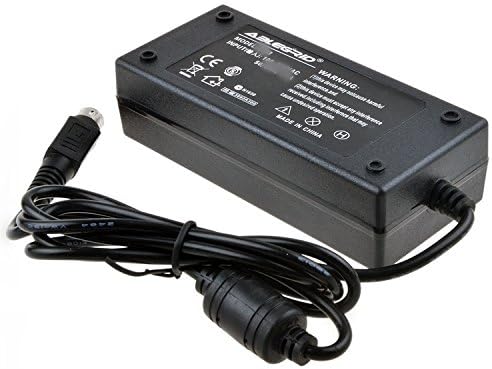
Imej 2: Atas view of the ABLEGRID 4-Pin AC/DC Adapter, displaying product labeling and specifications.
6. Penyelenggaraan
Proper maintenance helps extend the life of your adapter:
- Pembersihan: Disconnect the adapter from the power outlet and the TV before cleaning. Use a dry, soft cloth to wipe the surface. Do not use liquid cleaners or abrasive materials.
- Storan: When not in use for extended periods, store the adapter in a cool, dry place, away from direct sunlight and moisture.
- Pengendalian: Avoid dropping the adapter or subjecting it to strong impacts. Do not pull on the cord to disconnect it from the outlet; always grasp the plug.
7. Penyelesaian masalah
If you encounter issues with your adapter, refer to the following common solutions:
- Tiada Kuasa untuk TV:
- Ensure the adapter's 4-pin connector is fully inserted into the TV's power input.
- Verify that the power cord is securely connected to both the adapter and the wall outlet.
- Uji soket dinding dengan peranti lain untuk mengesahkan ia berfungsi.
- Check if your TV's power button is pressed or if the remote control is working correctly.
- Penyesuai Terlalu Panas:
- Ensure the adapter is placed in an area with adequate ventilation and is not covered by cloths or other objects.
- If the adapter feels excessively hot, disconnect it from power and allow it to cool down.
- If overheating persists after ensuring proper ventilation, discontinue use and contact customer support.
If these steps do not resolve the issue, please contact ABLEGRID customer support.
8. Spesifikasi
| Jenama | ABLEGRID |
| Input Voltage | 100-240 VAC, 50/60Hz |
| Jenis Penyambung Kuasa Utama | 4-pin |
| Ciri-ciri Perlindungan | Lebih Voltage Perlindungan (OVP), Perlindungan Arus Lebih (OCP), Perlindungan Litar Pintas (SCP) |
| Sumber Kuasa | Elektrik Bertali |
9. Waranti dan Sokongan
For detailed warranty information regarding your ABLEGRID 4-Pin AC/DC Adapter, please refer to the documentation provided with your purchase. If you have any questions, require technical assistance, or need to report an issue, please contact ABLEGRID customer support.
You can also visit the official ABLEGRID store for more product information and support resources:
Ask a question about this manual
Ask about setup, troubleshooting, compatibility, parts, safety, or missing instructions. Manuals+ will review the question and use this page’s manual context to help answer it.