
1. Pengenalan
The Focal Shape 50 is a versatile monitoring loudspeaker designed for professional audio environments. It offers extended low-frequency response and precise control, making it suitable for rooms up to 130 sq ft (12 sq m). This manual provides essential information for the proper setup, operation, and maintenance of your Shape 50 studio monitor.

Rajah 1.1: Bahagian hadapan view of the Focal Shape 50 Studio Monitor, showcasing its dark walnut finish and speaker components.
2. Kandungan Pakej
Before proceeding with installation, please verify that all components are present in the packaging:
- Focal Shape 50 Studio Monitor (1 unit)
- Kord Kuasa
- Manual Pengguna (dokumen ini)
3. Persediaan
3.1 Penempatan
The Shape 50 monitor is designed to be placed near a wall due to its port-less design. For optimal listening, position the monitor at a distance of approximately 30 inches (80 cm) from your listening position. Ensure the monitors are placed symmetrically in your room to achieve a balanced stereo image.
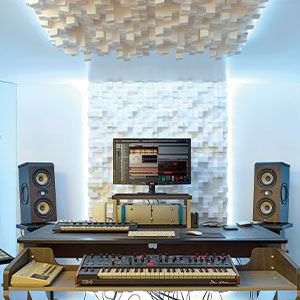
Gambar 3.1: Cthample of a studio setup with two Focal Shape 50 monitors positioned for optimal sound monitoring.
3.2 Sambungan
Connect your audio source to the Shape 50 monitor using an RCA cable. Ensure all connections are secure before powering on the unit.
- Input Audio: Use the RCA input for connecting your audio interface or mixer.
- Kuasa: Connect the provided power cord to the monitor's power inlet and then to a suitable electrical outlet.

Figure 3.2: Rear panel of the Focal Shape 50, showing the RCA input, power connection, and various adjustment controls.
3.3 Pemasangan
The Shape 50 includes threads for ceiling and wall mount fastening. Mounting accessories are not supplied and must be purchased separately. Consult a professional for proper installation of wall or ceiling mounts.
4. Arahan Operasi
4.1 Menghidupkan/Mematikan
To power on the monitor, ensure all audio connections are made, then connect the power cord and flip the power switch located on the rear panel. To power off, reverse this process.
4.2 Melaraskan Tetapan
The Shape 50 features numerous settings on its rear panel for optimal integration into various acoustic environments and for accurate control of sound reproduction. These include adjustments for high-frequency, mid-frequency, and low-frequency response, allowing you to tailor the sound to your specific room and preferences.
4.3 Flexible Listening Position
The monitor's low directivity tweeter design allows for a flexible listening position, providing consistent sound quality even when slightly off-axis from the monitor.
5. Penyelenggaraan
To ensure the longevity and optimal performance of your Focal Shape 50 monitors, follow these maintenance guidelines:
- Pembersihan: Use a soft, dry cloth to clean the exterior surfaces of the monitor. Avoid abrasive cleaners or solvents.
- Pengudaraan: Ensure adequate airflow around the monitor to prevent overheating. Do not block the ventilation openings.
- Persekitaran: Operate the monitor in a stable environment, away from extreme temperatures, humidity, and direct sunlight.
6. Penyelesaian masalah
If you encounter issues with your Focal Shape 50 monitor, refer to the following common troubleshooting steps:
- Tiada Bunyi:
- Check if the monitor is powered on and the power cord is securely connected.
- Verify that the audio source is active and connected correctly to the monitor's input.
- Ensure the volume levels on both the monitor and the audio source are appropriately set.
- Bunyi Herot:
- Reduce the input level from your audio source to prevent clipping.
- Check all cables for damage or loose connections.
- Ensure the monitor's rear panel settings are not causing excessive boosting of certain frequencies.
- Bunyi berdengung atau berdengung:
- Ensure all audio cables are properly shielded.
- Try connecting the monitor to a different power outlet, preferably on a different circuit.
- Periksa peranti elektronik berdekatan yang mungkin menyebabkan gangguan.
If the issue persists after attempting these steps, please contact Focal customer support.
7. Spesifikasi
| Ciri | Spesifikasi |
|---|---|
| Jenama | Fokus |
| Nama Model | Bentuk 50 |
| Nombor Model | 3544059801524DW001 |
| Jenis Pembesar Suara | Pantau |
| Kuasa Output Maksimum Pembesar Suara | 1000 Watt |
| Respons Kekerapan | 35000 Hz |
| Teknologi Ketersambungan | RCA |
| Mod Keluaran Audio | Stereo, Surround |
| Jenis Pemasangan | Wall Mount (accessories not supplied) |
| Bahan Kepungan | kenari |
| Diameter Subwoofer | 5 Inci |
| Diameter Woofer | 5 Inci |
| warna | Walnut Gelap |
| Dimensi Item (D x W x H) | 9.5"D x 12.3"W x 7.5"H |
| Berat Barang | 14.33 paun |
| Sumber Kuasa | Elektrik Bertali |
| Bilangan Saluran Audio | 2.0 |
| Peranti Serasi | Telefon Pintar, Tablet, Pemain MP3, Desktop, Televisyen, Projektor, Komputer Riba |
8. Maklumat Waranti
The Focal Shape 50 Studio Monitor is covered by a Waranti pengilang selama 2 tahun dari tarikh pembelian. Waranti ini meliputi kecacatan bahan dan mutu kerja di bawah penggunaan biasa. Ia tidak meliputi kerosakan yang disebabkan oleh salah guna, kemalangan, pengubahsuaian tanpa kebenaran atau pemasangan yang tidak betul.
Please retain your proof of purchase for warranty claims. For detailed warranty terms and conditions, refer to the official Focal webtapak atau hubungi sokongan pelanggan.
9. Sokongan
For technical assistance, troubleshooting beyond this manual, or warranty inquiries, please contact Focal customer support through their official webtapak atau maklumat hubungan yang diberikan bersama dokumentasi produk anda.
Sumber Dalam Talian: Visit the official Focal webtapak untuk pendaftaran produk, Soalan Lazim dan bahan sokongan tambahan.