
1. Pengenalan
This manual provides detailed instructions for the installation, operation, and maintenance of your Fermax VDS Color Video Intercom Kit Veo, model FER9411. Please read this manual carefully before attempting to install or operate the system to ensure proper function and safety. This kit is designed for a single-line video door entry system, offering enhanced security and convenience for your home or office.
2. Maklumat Keselamatan
Sentiasa patuhi langkah keselamatan berikut untuk mengelakkan kecederaan atau kerosakan pada produk:
- Keselamatan Elektrik: Installation must be performed by a qualified electrician and in compliance with local electrical codes. Disconnect power before installation or maintenance.
- Keadaan Persekitaran: Do not expose the outdoor panel to extreme temperatures, direct sunlight for prolonged periods, or excessive moisture. Ensure proper sealing during installation.
- Komponen Pengendalian: Kendalikan semua komponen dengan berhati-hati. Elakkan daripada menjatuhkan atau tertakluk kepada kesan yang kuat.
- Pembersihan: Gunakan kain lembut dan kering untuk pembersihan. Jangan gunakan pembersih atau pelarut yang melelas.
3. Komponen Produk
The Fermax VDS Color Video Intercom Kit Veo (Model FER9411) typically includes the following components:
- 48505 CITY VDS 1/L Plate: Outdoor panel (S1: 130x128 mm) with integrated box (ref. 8948). Box measurements: 115x114x45 mm.
- 9401 VEO VDS 4.3 Monitor: Indoor monitor unit with a 4.3-inch display.
- 9402 VEO VDS Monitor Connector: Required connector for the indoor monitor.
- 4810 Bekalan Kuasa: 18Vcc/1.5A - 12Vca/1.5A power supply unit (DIN10).

Rajah 3.1: Packaging of the Fermax VDS Color Video Intercom Kit Veo. This image shows the complete kit as it is supplied, including the outdoor panel, indoor monitor, and power supply.
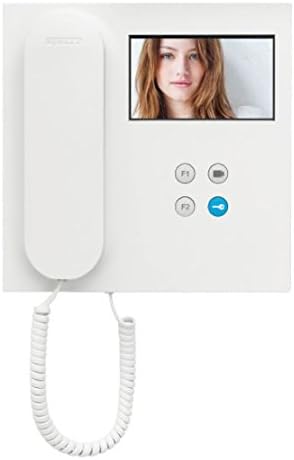
Rajah 3.2: The Fermax VEO VDS 4.3 Monitor. This is the indoor unit featuring a 4.3-inch color display and control buttons for communication and door release.

Rajah 3.3: The Fermax CITY VDS Outdoor Panel. This unit is installed at the entrance, featuring a camera, microphone, speaker, and call button for visitors.

Rajah 3.4: The Fermax 4810 Power Supply. This component provides the necessary power to the entire video intercom system.
4. Persediaan dan Pemasangan
Installation of the Fermax VDS Color Video Intercom Kit requires careful attention to wiring and component placement. It is highly recommended that installation be carried out by a professional electrician.
4.1. Diagram Pendawaian
Refer to the detailed wiring diagram provided in the separate installation guide for specific connections. The VDS system uses a simplified wiring scheme, typically requiring fewer wires compared to conventional systems.
4.2. Outdoor Panel Installation
- Choose a suitable location at your entrance, ensuring clear visibility for the camera and accessibility for visitors.
- Mount the integrated box (ref. 8948) securely into the wall.
- Connect the necessary VDS wires to the terminals on the 48505 CITY VDS plate.
- Secure the 48505 CITY VDS plate to the integrated box.
4.3. Indoor Monitor Installation
- Select a convenient indoor location for the 9401 VEO VDS 4.3 Monitor, typically near the main entrance or in a central area.
- Mount the 9402 VEO VDS Monitor Connector to the wall.
- Connect the VDS wires from the main system to the monitor connector.
- Attach the 9401 VEO VDS 4.3 Monitor to its connector.
4.4. Sambungan Bekalan Kuasa
- Install the 4810 Power Supply in a suitable electrical enclosure, typically on a DIN rail.
- Connect the main power input (230V AC) to the power supply.
- Connect the VDS system's power lines to the output terminals of the power supply.
- Sahkan semua sambungan sebelum memulihkan kuasa.
5. Arahan Operasi
Once installed and powered, the Fermax VDS Color Video Intercom Kit is ready for use.
5.1. Menerima Panggilan
- When a visitor presses the call button on the outdoor panel, the indoor monitor will ring and display the visitor's image.
- To answer the call, lift the handset or press the talk button on the monitor.
- To end the call, replace the handset or press the talk button again.
5.2. Membuka Pintu
During a conversation, press the door release button (often marked with a key icon) on the indoor monitor to unlock the entrance door.
5.3. Fungsi Monitor
- Self-Activation: Some models allow manual activation of the outdoor panel camera to view the entrance area without a call. Refer to your monitor's specific controls.
- Intercommunication: If multiple monitors are installed, intercommunication between them may be possible. Consult the monitor's specific manual for details.
6. Penyelenggaraan
Penyelenggaraan berkala memastikan jangka hayat dan prestasi optimum sistem interkom video anda.
- Pembersihan: Clean the outdoor panel camera lens and the indoor monitor screen periodically with a soft, damp kain. Elakkan bahan kimia yang keras.
- Pemeriksaan: Periodically check all visible wiring and connections for signs of wear or damage.
- Perlindungan Alam Sekitar: Ensure the outdoor panel remains protected from direct water spray and extreme weather conditions.
7. Penyelesaian masalah
If you encounter issues with your Fermax VDS Color Video Intercom Kit, refer to the following common problems and solutions:
| Masalah | Kemungkinan Punca | Penyelesaian |
|---|---|---|
| Tiada imej pada monitor | No power to the system; faulty wiring; camera issue. | Check power supply (4810) and connections. Verify camera wiring. |
| No sound during call | Microphone/speaker faulty; wiring issue. | Check audio connections between outdoor panel and monitor. |
| Pembuka pintu tidak berfungsi | Faulty door lock mechanism; wiring to lock; monitor button issue. | Inspect door lock and its wiring. Test the door release button. |
| Monitor not ringing | Ringer volume off; faulty call button on outdoor panel; wiring issue. | Check monitor settings. Test outdoor call button. Verify wiring. |
If problems persist after attempting these solutions, contact qualified technical support.
8. Spesifikasi
Technical specifications for the Fermax VDS Color Video Intercom Kit Veo (Model FER9411):
- Jenama: FERMAX
- model: FER9411
- Nombor Bahagian: FER9411
- Saiz Paparan: 4.3 Inches (Monitor)
- Bekalan Kuasa: 18Vcc/1.5A - 12Vca/1.5A (Model 4810)
- Outdoor Panel Dimensions (S1): 130x128 mm
- Integrated Box Dimensions: 115x114x45 mm
- Bilangan Unit: 1 (for single-line system)
- Bateri Diperlukan: Tidak
- Berat Pakej: Kira-kira 2.34 kg
- Dimensi Pakej: 24 x 23.6 x 12.8 cm
9. Waranti dan Sokongan
For warranty information and technical support, please refer to the documentation provided with your purchase or visit the official Fermax webtapak. Simpan bukti pembelian anda untuk tuntutan waranti.
Pengeluar: Fermax
Sokongan Pelanggan: Please contact your local distributor or the Fermax customer service for assistance with product issues or technical inquiries.