
Awei A880BL
Awei A880BL Wireless Sports Headset User Manual
Model: A880BL
pengenalan
Thank you for choosing the Awei A880BL Wireless Sports Headset. This manual will guide you through the features, setup, and operation of your new headset. Please read it carefully before use and retain it for future reference.

Image: The Awei A880BL Wireless Sports Headset with a blue connecting cable, designed for in-ear use with ear hooks for secure fit.
Maklumat Keselamatan Penting
- Jangan dedahkan alat dengar kepada suhu atau kelembapan yang melampau.
- Elakkan daripada menjatuhkan atau meletakkan set kepala kepada kesan yang kuat.
- Jangan buka atau ubah suai alat dengar. Ini akan membatalkan jaminan.
- Jauhkan alat dengar daripada kanak-kanak dan haiwan peliharaan.
- Gunakan hanya kabel pengecasan yang disediakan atau setara yang diperakui.
- Mendengar berpanjangan pada tahap kelantangan tinggi boleh menyebabkan kerosakan pendengaran.
Kandungan Pakej
Sila pastikan semua item ada dalam pakej anda:
- Awei A880BL Wireless Sports Headset
- Kabel Pengecas USB
- Pelbagai saiz Hujung Telinga
- Manual Pengguna (dokumen ini)

Image: Contents of the Awei A880BL package, showing the black headset with yellow cable, a white USB charging cable, three pairs of gold-colored ear tips, and a small yellow instruction card, all next to the product box.
Produk Selesaiview
The Awei A880BL headset features a secure over-ear hook design, in-ear earbuds, and an integrated control panel for easy access to functions.
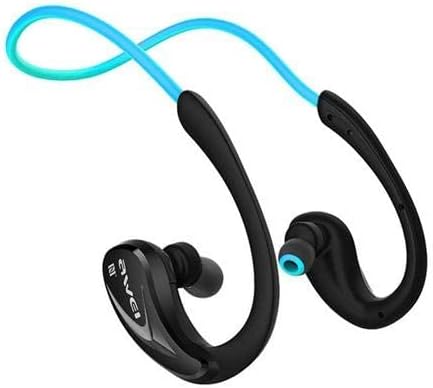
Imej: Dari dekat view of one side of the Awei A880BL headset, highlighting the in-ear earbud and the ergonomic ear hook design.
Persediaan
1. Mengecas Alat Dengar
Before first use, fully charge the headset. Connect the USB charging cable to the headset's charging port and a power source (e.g., computer USB port or USB wall adapter). The indicator light will show charging status and turn off or change color when fully charged.
2. Berpasangan Bluetooth
- Pastikan alat dengar dimatikan.
- Press and hold the Multi-function button (usually the power button) until the indicator light flashes red and blue alternately, indicating pairing mode.
- Pada peranti anda (telefon pintar, tablet, dll.), dayakan Bluetooth dan cari peranti yang tersedia.
- Pilih "Awei A880BL" daripada senarai peranti yang ditemui.
- Once paired, the indicator light will flash blue slowly or turn solid blue.
3. NFC Speed Pairing (if supported by your device)
The Awei A880BL supports NFC for quick pairing with compatible devices.
- Ensure NFC is enabled on your device and the headset is in pairing mode or powered on.
- Tap your NFC-enabled device against the NFC area on the headset (refer to product diagram if available for exact location).
- Confirm the pairing request on your device.
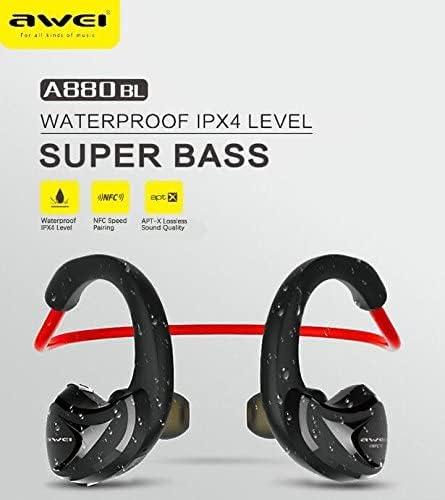
Image: A graphic highlighting key features of the Awei A880BL, including "WATERPROOF IPX4 LEVEL", "NFC Speed Pairing", and "APT-X Lossless Sound Quality".
4. Memakai Alat dengar
For optimal comfort and sound quality, ensure the headset is worn correctly.
- Langkah 1: Hold the headset with both hands, with the earbuds facing inwards.
- Langkah 2: Gently place the earbuds into your ears, guiding the ear hooks over the top of your ears.
- Langkah 3: Adjust the flexible cable behind your neck for a secure and comfortable fit.
- Langkah 4: The headset should sit comfortably and securely, even during physical activity.

Image: A four-panel image demonstrating the steps to correctly wear the Awei A880BL headset, showing how to position the earbuds and adjust the neckband.
Arahan Operasi
Hidupkan/Mati Kuasa
- Hidupkan kuasa: Press and hold the Multi-function button for approximately 3 seconds until you hear a power-on prompt and the indicator light flashes blue.
- Matikan: Press and hold the Multi-function button for approximately 5 seconds until you hear a power-off prompt and the indicator light turns red and then off.
Main balik Muzik
- Main/Jeda: Tekan sebentar butang Pelbagai fungsi.
- Lagu Seterusnya: Tekan lama butang Naikkan Kelantangan (+).
- Trek Sebelumnya: Tekan lama butang Kelantangan Turun (-).
- Kelantangan: Tekan pendek butang Kelantangan Naik (+).
- Perlahankan suara: Tekan pendek butang Kelantangan Turun (-).
Pengurusan Panggilan
- Jawab Panggilan: Short press the Multi-function button when a call comes in.
- Tamatkan Panggilan: Short press the Multi-function button during a call.
- Tolak Panggilan: Long press the Multi-function button when a call comes in.
- Dail Semula Nombor Terakhir: Tekan dua kali butang Berbilang fungsi.
Pembantu Suara
- Aktifkan Pembantu Suara: Triple-press the Multi-function button (functionality depends on your connected device).
Penyelenggaraan dan Penjagaan
- Pembersihan: Lap alat dengar dengan kain lembut dan kering. Jangan gunakan pembersih atau pelarut yang kasar.
- Storan: Simpan alat dengar di tempat yang sejuk dan kering jauh dari cahaya matahari langsung dan suhu yang melampau.
- Penjagaan Bateri: To prolong battery life, charge the headset regularly, even if not in frequent use. Avoid fully discharging the battery for extended periods.
- Tahan Air: The Awei A880BL is rated IPX4 waterproof, meaning it is resistant to splashing water from any direction. It is suitable for sports and light rain but should not be submerged in water.
Menyelesaikan masalah
| Masalah | Penyelesaian |
|---|---|
| Alat dengar tidak dihidupkan. | Pastikan alat dengar dicas sepenuhnya. Sambungkannya ke sumber kuasa dan cuba lagi. |
| Tidak boleh berpasangan dengan peranti. |
|
| Tiada bunyi atau kelantangan rendah. |
|
| Sambungan terputus-putus. |
|
Spesifikasi
| Ciri | Perincian |
|---|---|
| Nombor Model | A880BL |
| Ketersambungan | Wireless (Bluetooth, NFC) |
| Jenis Fon Kepala | In-ear, Sports Headset (with ear hooks) |
| Mikrofon | ya |
| Pembatalan Bunyi | Pembatalan Bising Aktif (ANC) |
| Julat Tindak Balas Kekerapan | 20 - 22000 Hz |
| Sensitiviti | 110 ± 3 dB |
| Impedans | 16 Ohm |
| Tahan Air | IPX4 Level (Splash-proof) |
| Codec Audio yang Disokong | APT-X |
| Jenis Kawalan | Button Control (Volume, Play/Pause, Call, Voice Assistant) |
| Port Pengecasan | USB |
| Panjang Kabel | 0.6 meters (Charging cable) |
| Berat badan | 30 gram |
| bahan | plastik |
| Sistem Bunyi | Pemandu Armature Seimbang |
| Sokongan Apl | ya |
| Sokongan Kad Memori | Tidak |
Waranti dan Sokongan
For warranty information and technical support, please refer to the warranty card included in your package or contact Awei customer service through their official webtapak atau pengedar sah. Simpan resit pembelian anda sebagai bukti pembelian.
Ask a question about this manual
Ask about setup, troubleshooting, compatibility, parts, safety, or missing instructions. Manuals+ will review the question and use this page’s manual context to help answer it.