
1. Pengenalan
Thank you for choosing the Severin KA 4497 Filter Coffee Machine. This manual provides essential information for the safe and efficient operation of your appliance. Please read these instructions carefully before first use and keep them for future reference.
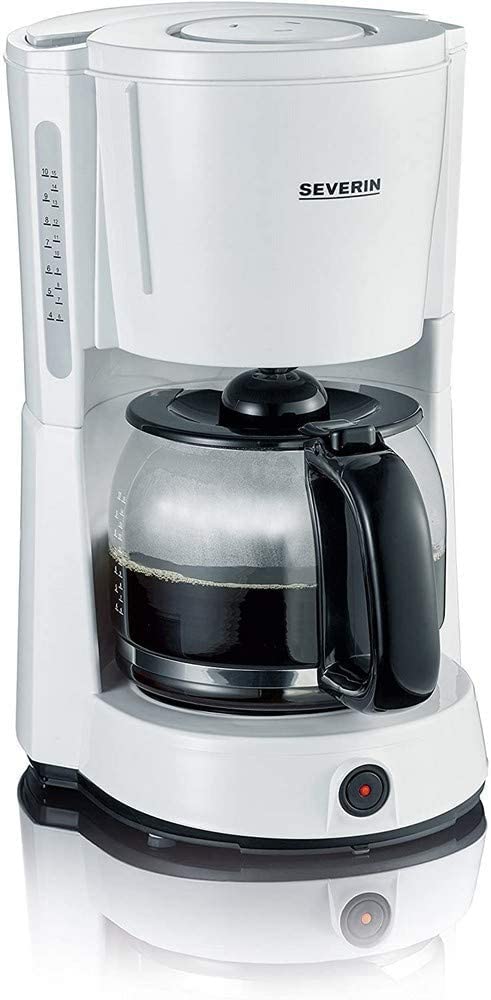
Image 1.1: Severin KA 4497 Filter Coffee Machine overview.
Ciri-ciri Utama:
- Integrated aroma function for enhanced coffee enjoyment.
- Capacity: Up to 10 cups (1.4 Liters).
- Removable swivel filter holder with drip stop (size 1x4).
- Glass carafe with fresh water scale.
- Control switch with indicator light.
- Fungsi penutupan automatik.
- Warming plate to keep coffee hot.
2. Arahan Keselamatan
Sentiasa patuhi arahan keselamatan berikut untuk mengelakkan kemalangan dan kerosakan pada perkakas:
- Perkakas ini bertujuan untuk kegunaan domestik sahaja.
- Jangan rendam perkakas, kord, atau palam ke dalam air atau cecair lain.
- Pastikan voltage indicated on the rating plate matches your mains supply.
- Jauhkan perkakas daripada kanak-kanak.
- Unplug the appliance from the mains socket when not in use, before cleaning, and in case of malfunction.
- Jangan kendalikan perkakas dengan kord atau palam yang rosak.
- Avoid contact with hot surfaces, especially the warming plate and glass carafe during and after operation.
- Only use cold, fresh water for brewing.
3. Persediaan
3.1 Membongkar
- Keluarkan semua bahan pembungkusan dari mesin kopi dengan berhati-hati.
- Check the appliance for any signs of damage. Do not operate if damaged.
3.2 Pembersihan Penggunaan Pertama
Before using for the first time, clean the appliance by running two full cycles with cold water only, without coffee grounds. This removes any manufacturing residues.
3.3 Penempatan
Place the coffee machine on a stable, level, heat-resistant surface, away from water sources and heat-emitting appliances.
4. Arahan Operasi
4.1 Mengisi Air
- Buka penutup tangki air.
- Fill the glass carafe with the desired amount of cold, fresh water. Refer to the cup markings on the carafe and the water level indicator on the side of the machine.
- Pour the water from the carafe into the water tank. Do not exceed the maximum fill level.
- Tutup penutup dengan selamat.
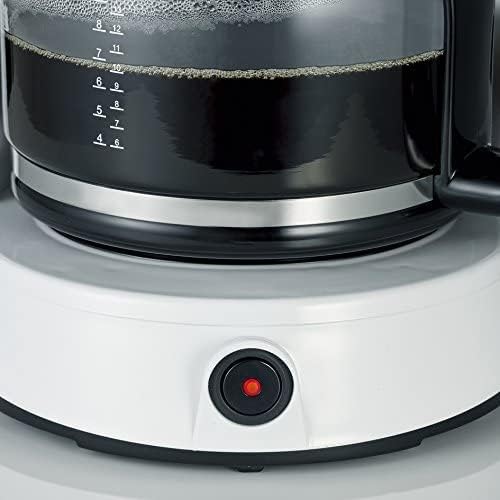
Image 4.1: Water level indicator for precise filling.
4.2 Menambah Serbuk Kopi
- Pusing keluar pemegang penapis.
- Insert a size 1x4 paper filter into the filter holder.
- Add the desired amount of ground coffee into the paper filter. A general guideline is one level tablespoon of coffee per cup. Adjust to personal preference.
- Swivel the filter holder back into position until it clicks.

Image 4.2: Inserting the filter basket with coffee grounds.
4.3 Membancuh Kopi
- Place the glass carafe with its lid on the warming plate. Ensure it is correctly positioned to activate the drip stop.
- Palamkan perkakas ke dalam soket sesalur yang sesuai.
- Press the ON/OFF switch. The indicator light will illuminate, and the brewing process will begin.
- Once all the water has passed through, the brewing process is complete. The warming plate will keep the coffee hot.

Image 4.3: Brewed coffee in the carafe and the illuminated power button.
4.4 Pemadaman Automatik
For safety and energy saving, the coffee machine will automatically switch off approximately 30-40 minutes after the brewing process is complete.
5. Penyelenggaraan dan Pembersihan
Pembersihan tetap memastikan prestasi optimum dan memanjangkan jangka hayat mesin kopi anda.
5.1 Pembersihan Harian
- Sentiasa cabut plag perkakas dan biarkan ia sejuk sepenuhnya sebelum dibersihkan.
- Remove the used paper filter and coffee grounds.
- Wash the glass carafe and its lid, and the swivel filter holder in warm soapy water. Rinse thoroughly and dry. These parts are generally dishwasher safe (top rack), but hand washing is recommended for longevity.
- Lap bahagian luar mesin kopi dengan iklanamp kain. Jangan gunakan agen pembersih yang melelas atau rendam unit utama dalam air.
5.2 Penyahkelasan
Depending on water hardness and frequency of use, limescale deposits may form. Descale your coffee machine regularly (e.g., every 2-4 weeks) to maintain brewing performance and flavor.
- Gunakan agen penyahkerak yang tersedia secara komersial yang sesuai untuk mesin kopi, mengikut arahan pengilang.
- Alternatively, a mixture of white vinegar and water (1:2 ratio) can be used.
- Run the descaling solution through the machine as if brewing coffee, without coffee grounds.
- After descaling, run at least two full cycles with fresh water to rinse out any descaling agent residues.
6. Penyelesaian masalah
| Masalah | Kemungkinan Punca | Penyelesaian |
|---|---|---|
| Kopi tidak dibancuh. | Appliance not plugged in; power switch not activated; water tank empty. | Check power connection; press ON/OFF switch; fill water tank. |
| Kopi terasa lemah atau terlalu kuat. | Incorrect coffee-to-water ratio; coffee too finely/coarsely ground. | Adjust coffee amount; use appropriate grind size. |
| Water overflows from filter holder. | Too much coffee grounds; filter clogged; carafe not correctly placed. | Reduce coffee amount; clean filter holder; ensure carafe is centered. |
| Brewing process is slow. | Pembentukan skala kapur. | Nyah skala mesin kopi. |
7. Spesifikasi
| Ciri | Perincian |
|---|---|
| Jenama | SEVERIN |
| Nombor Model | KA 4497 |
| warna | Putih / Hitam |
| Dimensi Produk | 17 x 24 x 34 cm |
| Berat badan | 2.14 Kilogram |
| Kapasiti | 1.4 Liter (lebih kurang 10 cawan) |
| Kuasa/Wattage | 1000 Watt |
| bahan | Glass (carafe) |
| Ciri Khas | Glass Carafe, Drip Stop, Warming Plate, Automatic Shut-off |

Image 7.1: Product dimensions of the Severin KA 4497.
8. Waranti dan Sokongan
This product is covered by a manufacturer's warranty. For detailed warranty information, please refer to the warranty card included with your purchase or visit the official Severin website. For technical support, spare parts, or service inquiries, please contact Severin customer service.