
pengenalan
This manual provides detailed instructions for the setup, operation, and maintenance of your Intex Wi-Fi HD Camera, model IT-101. Please read this manual thoroughly before using the device to ensure proper functionality and safety.
Produk Selesaiview
The Intex Wi-Fi HD Camera IT-101 is a compact security camera designed for monitoring. It features HD video resolution, night vision capabilities, and Wi-Fi connectivity for remote access.
Ciri-ciri Utama:
- Resolusi Video HD: Captures video at 1280x720 pixels (720p) with a frame rate of 25 frames per second.
- Kanta Lebar View: Features a 77-degree lens view angle for broader coverage.
- Penglihatan Malam: Equipped with Infrared LED illumination for clear night vision up to 10 meters.
- Sokongan Kad SD: Supports up to 64GB SD card for local storage.
- Kesambungan Tanpa Wayar: Connects via Wi-Fi for remote monitoring through mobile or computer applications.
- Keserasian: Supports Android and iOS operating systems.
Kandungan Pakej:
- Intex Wi-Fi HD Camera IT-101
- Penyesuai Kuasa (DC 5V/1A)
- Manual Pengguna (dokumen ini)
- Aksesori Pemasangan (jika disertakan)
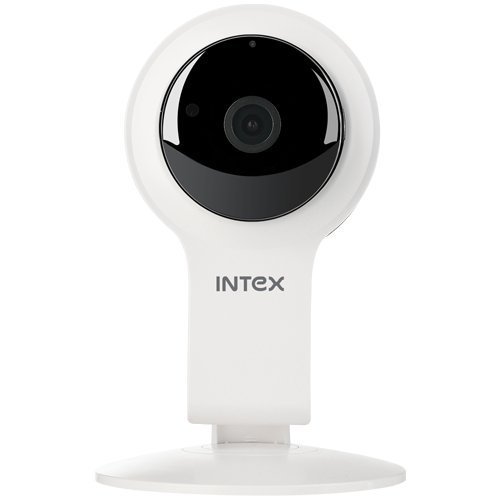
Rajah 1: Depan view of the Intex Wi-Fi HD Camera IT-101. This image shows the camera lens and the main body of the device.
Persediaan
1. Menghidupkan Kamera:
- Connect the provided DC 5V/1A power adapter to the camera's power input port.
- Palamkan penyesuai kuasa ke soket elektrik standard.
- The camera will power on, and an indicator light will illuminate (refer to the camera's physical indicators for specific light behavior).
2. Installing an SD Card (Optional):
To enable local video recording, an SD card (up to 64GB) can be installed.
- Locate the SD card slot on the camera (consult the camera's physical design for exact location).
- Gently insert the SD card into the slot with the contacts facing the correct direction until it clicks into place.
- To remove, press the SD card inward until it springs out.
3. Connecting to Wi-Fi and Mobile App:
The camera requires a mobile application for initial setup and remote viewing. The specific app name is not provided in the product details, please refer to the packaging or a quick start guide for the correct app to download from your device's app store (Android/iOS).
- Download and install the designated mobile application on your smartphone or tablet.
- Open the application and create an account or log in if you already have one.
- Follow the in-app instructions to add a new device. This typically involves scanning a QR code on the camera or manually entering its device ID.
- Connect the camera to your home Wi-Fi network through the app. Ensure your Wi-Fi network is 2.4GHz, as 5GHz networks may not be supported.
- Once connected, the camera's indicator light will change (e.g., solid blue), and you should see the live feed in the app.
Arahan Operasi
Langsung View:
Access the live video feed from your camera through the mobile application. This allows real-time monitoring of the camera's view.
Rakaman:
- Rakaman Manual: Most applications offer a manual record button to start and stop video recording directly to your phone or the installed SD card.
- Rakaman Berjadual: Configure recording schedules within the app to automatically record at specific times.
- Rakaman Pengesanan Gerak: Enable motion detection in the app settings. The camera will automatically record when motion is detected within its field of view.
Main balik:
Dirakam footage stored on the SD card can be accessed and played back through the mobile application. Navigate to the "Playback" or "History" section within the app.
Penglihatan Malam:
The camera automatically switches to night vision mode in low-light conditions. The Infrared LED illuminates the area, allowing for clear black and white video capture up to 10 meters.
tetapan:
The mobile application provides various settings to customize your camera's operation, including:
- Video quality adjustment
- Sensitiviti pengesanan gerakan
- Tetapan pemberitahuan
- Penyegerakan masa dan tarikh
- SD card management (formatting, viewing storage)
Penyelenggaraan
- Pembersihan: Gunakan kain lembut dan kering untuk membersihkan kanta dan badan kamera. Elakkan penggunaan bahan kimia yang keras atau bahan yang melelas.
- Kemas kini Firmware: Periodically check the mobile application for available firmware updates for your camera. Keeping the firmware updated ensures optimal performance and security.
- Pengurusan Kad SD: Regularly back up important recordings from your SD card. Consider formatting the SD card periodically through the app to maintain performance.
- Keadaan Persekitaran: Ensure the camera is operated within its specified temperature and humidity ranges. The camera is not water-resistant, so avoid exposure to moisture.
Menyelesaikan masalah
Kamera Tidak Dihidupkan:
- Ensure the power adapter is securely connected to both the camera and a working electrical outlet.
- Verify that the power adapter is the correct DC 5V/1A model.
Tidak dapat Menyambung ke Wi-Fi:
- Confirm your Wi-Fi network is 2.4GHz. The camera may not support 5GHz networks.
- Pastikan kamera berada dalam julat penghala Wi-Fi anda.
- Pastikan kata laluan Wi-Fi yang dimasukkan dalam aplikasi adalah betul.
- Restart your Wi-Fi router and the camera, then attempt to reconnect.
- If issues persist, try resetting the camera to factory defaults (refer to the camera's physical buttons or app for reset option).
No Video Feed in App:
- Sahkan kamera dihidupkan dan disambungkan ke Wi-Fi.
- Periksa sambungan internet anda pada peranti mudah alih anda.
- Close and reopen the mobile application.
- Ensure the camera's privacy mode (if available) is not activated.
SD Card Not Recording or Recognized:
- Ensure the SD card is correctly inserted.
- Verify the SD card is not full. Format it through the app if necessary (this will erase all data).
- Check if the SD card is damaged. Try a different compatible SD card.
- Confirm that recording settings (manual, scheduled, motion detection) are properly configured in the app.
Spesifikasi
| Ciri | Perincian |
|---|---|
| Nama Model | IT-101 |
| Penderia Imej | H42 1/4 CMOS Sensor |
| Resolusi Tangkapan Video | 1280x720 Pixels (720p HD) |
| Kadar Bingkai | 25 fps |
| Lensa View sudut | 77 Darjah |
| Jenis Kanta | 3.6 mm, Zoom |
| Jenis Fokus | Auto Fokus |
| Jarak Penglihatan Malam | 10 meters (Infrared LED Illumination) |
| Mod Siang/Malam | Yes (Automatic switching) |
| Teknologi Ketersambungan | Wayarles (Wi-Fi) |
| Sokongan Kad SD | Sehingga 64GB |
| Video Supported Format | H.264, MP4 |
| Format Gambar yang Disokong | JPEG |
| Keserasian Sistem Pengendalian | Android, iOS |
| Bekalan Kuasa | DC 5V/1A |
| Berat Kasar | 260g |
| warna | putih |
| Tahap Ketahanan Air | Bukan Tahan Air |
| Penstabilan Imej | Tidak |
Waranti dan Sokongan
For warranty information and technical support, please refer to the documentation included with your purchase or visit the official Intex webtapak. Simpan bukti pembelian anda untuk tuntutan waranti.
Pengeluar: Intex
Jenama: Intex