
Casio CTK-1550
Casio CTK-1550 61-Key Standard Keyboard User Manual
Model: CTK-1550
pengenalan
This manual provides essential instructions for the safe and effective use of your Casio CTK-1550 61-Key Standard Keyboard. Please read this manual thoroughly before using the product and keep it for future reference. The CTK-1550 is a portable electronic keyboard designed for beginners, featuring 61 piano-style keys, a variety of tones and rhythms, and a powerful lesson function.
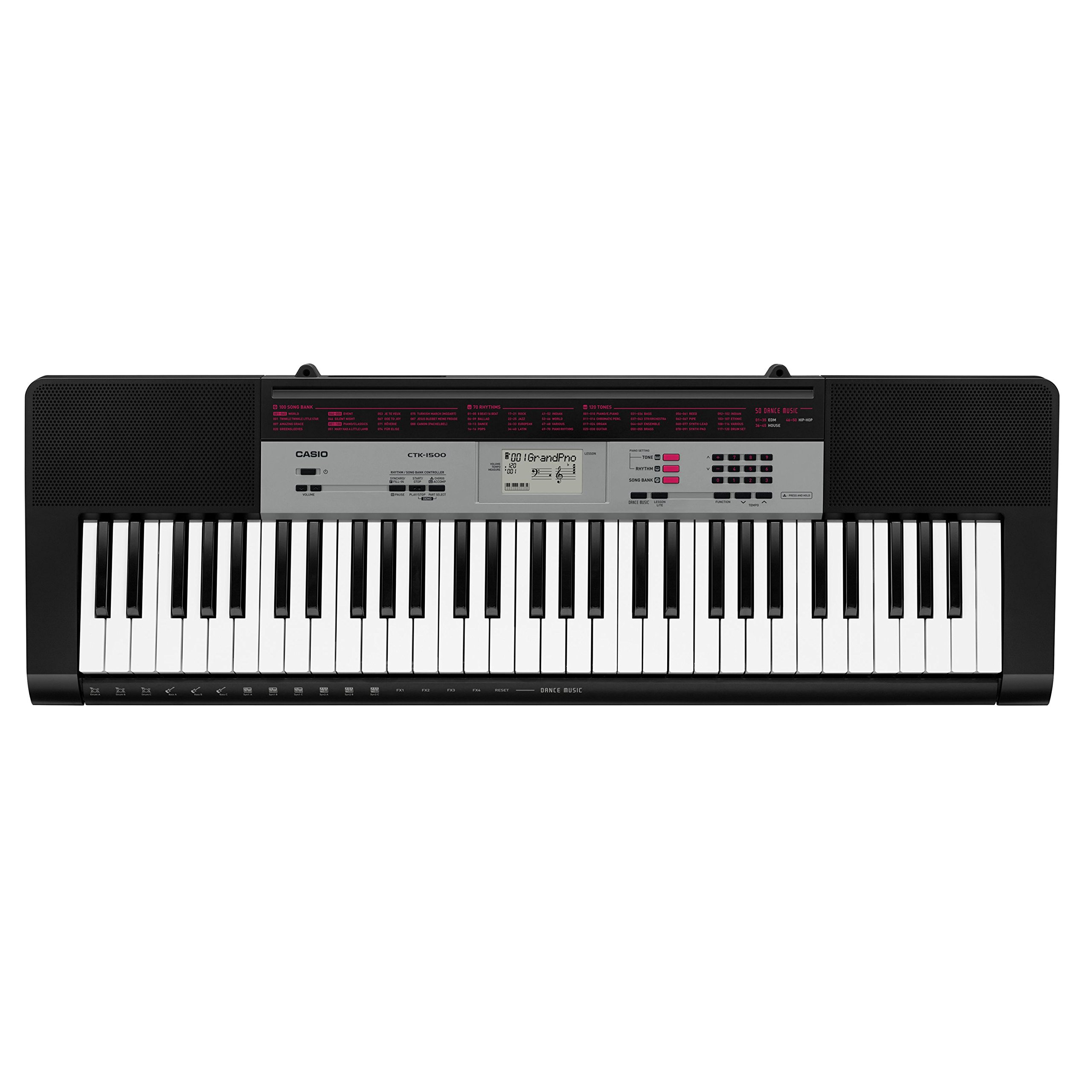
Rajah 1: Depan view of the Casio CTK-1550 keyboard, showing keys, control panel, and display.
Persediaan
1. Bekalan Kuasa
The CTK-1550 can be powered using the included AC adapter or by AA batteries. Ensure the keyboard is turned off before connecting or disconnecting the power source.
- Menggunakan Penyesuai AC: Connect the supplied AC adapter to the DC 9.5V jack on the rear of the keyboard and then plug the adapter into a standard wall outlet.
- Menggunakan Bateri: Open the battery compartment cover on the bottom of the keyboard. Insert six AA-size alkaline batteries, ensuring correct polarity (+/-). Close the cover securely.
2. Menyambung Fon Kepala
To practice privately, connect a pair of stereo headphones with a 3.5mm stereo mini plug to the PHONES/OUTPUT jack located on the rear of the keyboard. This will mute the built-in speakers.
Arahan Operasi
This section covers the basic functions of your Casio CTK-1550 keyboard.

Figure 2: Close-up of the control panel, showing buttons for tones, rhythms, and lesson functions.
1. Hidupkan/Mati Kuasa
Tekan ke KUASA button to turn the keyboard on. Press and hold the KUASA butang sekali lagi untuk mematikannya.
2. Memilih Nada
The keyboard features 120 high-quality tones. Use the TONA button and the numeric keypad or +/- buttons to select different instrument sounds. The selected tone number will appear on the LCD display.
3. Selecting Rhythms and Auto-Accompaniment
Choose from 70 built-in rhythms. Press the RITMA button and use the numeric keypad or +/- buttons to select a rhythm. Press the MULA/BERHENTI button to begin or end the rhythm. The auto-accompaniment feature provides a full band sound that changes with your chords.
4. Lesson Function
The powerful lesson function helps beginners learn built-in songs. It includes a voice fingering guide that assists with correct hand positioning. Follow the instructions on the LCD display to practice songs at your own pace.
5. Metronome Function
To improve your timing and rhythm, activate the metronome. Press the METROME button. You can adjust the tempo using the tempo +/- buttons.
6. Pelarasan Kelantangan
Gunakan JILID knob or buttons to adjust the overall output level of the keyboard.
Penyelenggaraan
1. Pembersihan
Wipe the keyboard's surface with a soft, dry cloth. For stubborn dirt, use a cloth lightly dampened with water and a mild neutral detergent, then wipe dry immediately. Avoid using abrasive cleaners, solvents, or chemical wipes, as these can damage the finish.
2. Penyimpanan
When not in use for extended periods, store the keyboard in a cool, dry place away from direct sunlight, extreme temperatures, and high humidity. If using batteries, remove them to prevent leakage and damage.
3. Pengendalian
Avoid dropping the keyboard or subjecting it to strong impacts. Do not place heavy objects on top of it. Keep liquids away from the instrument to prevent electrical damage.
Menyelesaikan masalah
If you encounter issues with your CTK-1550, refer to the following common problems and solutions:
| Masalah | Kemungkinan Punca / Penyelesaian |
|---|---|
| No power or keyboard does not turn on. |
|
| Tiada bunyi dari pembesar suara. |
|
| Keys do not produce sound or sound is distorted. |
|
Spesifikasi
| Ciri | Perincian |
|---|---|
| Nama Model | CTK-1550 |
| Bilangan Kunci | 61 (Piano-style) |
| Nada | 120 |
| Irama | 70 (with Auto-Accompaniment) |
| Fungsi Pelajaran | Yes (with Voice Fingering Guide) |
| Metronom | ya |
| Paparan | LCD |
| Output Speaker | 2W + 2W |
| Jack Fon Kepala | Bicu Mini Stereo 3.5mm |
| Sumber Kuasa | AC Adapter (included) or 6 x AA Batteries |
| Dimensi (W x D x H) | 94 x 30 x 9 Sentimeter (lebih kurang) |
| Berat badan | 3.5 Kilogram (lebih kurang) |
| Tahap Kemahiran | pemula |
Waranti dan Sokongan
Maklumat Waranti
The Casio CTK-1550 comes with a 3-year All India Manufacturer Warranty. Additionally, you can receive an extra 6 months of warranty by registering your product online. For warranty registration and details, please visit the official Casio India webtapak: https://register.casio.in/
Sokongan Pelanggan
For technical assistance, service, or inquiries regarding your Casio CTK-1550 keyboard, please contact Casio customer support directly. Refer to the contact information provided with your product packaging or visit the official Casio webtapak untuk butiran sokongan.
Ask a question about this manual
Ask about setup, troubleshooting, compatibility, parts, safety, or missing instructions. Manuals+ will review the question and use this page’s manual context to help answer it.