
pengenalan
Terima kasih kerana membeliasing the Ezonetronics 1DIN Car Stereo, Model RM-CW9601. This unit features a 7-inch retractable touchscreen, Bluetooth connectivity, FM radio, and multimedia playback capabilities. This manual provides essential information for installation, operation, and maintenance to ensure optimal performance and user satisfaction. Please read this manual thoroughly before using the product.
Maklumat Keselamatan
- Jangan kendalikan unit dengan cara yang mengalihkan perhatian anda daripada memandu. Sentiasa mengutamakan keselamatan jalan raya.
- Ensure proper installation by a qualified professional to prevent damage to the unit or vehicle.
- Elakkan daripada mendedahkan unit kepada suhu yang melampau, cahaya matahari langsung untuk tempoh yang lama, atau lembapan.
- Do not attempt to disassemble or modify the unit. This may void the warranty and pose safety risks.
- Pastikan kelantangan pada tahap yang membolehkan anda mendengar bunyi trafik luaran.
Kandungan Pakej
Sahkan bahawa semua item terdapat dalam pakej:
- Ezonetronics 1DIN Car Stereo Unit (RM-CW9601)
- Harness Pendawaian Kuasa dan Pembesar Suara
- Alat Kawalan Jauh
- Manual Pengguna (dokumen ini)
- Mounting Accessories (brackets, screws)
- Pilihan: Belakangview Camera (if included in your specific package)
Produk Selesaiview
The Ezonetronics RM-CW9601 features a single DIN chassis with a motorized retractable 7-inch touchscreen display. The front panel includes essential controls and ports for easy access.

Rajah 1: Depan view of the Ezonetronics RM-CW9601 car stereo, illustrating the 7-inch screen in both retracted and extended positions, along with front panel controls and ports.
Kawalan dan Port Panel Hadapan:
- Butang Kuasa / Mod: Press to turn on/off, short press to change mode.
- Tombol Kelantangan: Putar untuk melaraskan kelantangan. Tekan untuk meredam/menyahredam.
- Port USB: Untuk main balik media daripada pemacu USB.
- Slot Kad SD: For media playback from SD cards.
- Input AUX: Bicu 3.5mm untuk peranti audio luaran.
- Butang Tetapkan Semula: Small button to reset the unit (requires a pointed object).
- Screen Retract/Extend Button: Controls the motorized screen movement.
Persediaan
1. Pemasangan
The RM-CW9601 is designed for a standard 1DIN car stereo opening. Professional installation is highly recommended. Ensure the vehicle's battery is disconnected before starting installation.
- Keluarkan stereo kereta sedia ada dari papan pemuka.
- Connect the wiring harness to the vehicle's wiring.
- Secure the unit into the dashboard using the provided mounting brackets and screws.
- Sambungkan semula bateri kenderaan dan uji unit.
2. Wiring Diagram (General)
Refer to the detailed wiring diagram included with your product packaging for specific connections. Below are common connections:
- Kawat kuning: 12V malar (Bateri)
- Kawat Merah: Bertukar 12V (Aksesori/Pencucuhan)
- Kawat Hitam: tanah
- Kawat Jingga: Illumination (Optional)
- Kawat Biru: Antena Kuasa / Amppenyambung Hidupkan Jauh
- Wayar Pembesar suara: Connect to vehicle speakers (e.g., White/White-Black for Front Left, Grey/Grey-Black for Front Right, Green/Green-Black for Rear Left, Purple/Purple-Black for Rear Right).
- Input Kamera Terbalik: Sambung ke belakangview camera video output and reverse trigger wire.
- Steering Wheel Control Input: Connect to vehicle's steering wheel control wires (if applicable).

Rajah 2: Illustration of USB connection points, relevant for media input and smartphone integration.
Arahan Operasi
1. Operasi Asas
- Hidupkan/Mati Kuasa: Tekan butang kuasa pada panel hadapan atau alat kawalan jauh.
- Pelarasan Kelantangan: Rotate the volume knob or use the remote control.
- Pemilihan Mod: Short press the power/mode button to cycle through available modes (Radio, USB, SD, Bluetooth, AUX, CarPlay/Android Auto).
- Kawalan Skrin: Use the dedicated button to retract or extend the 7-inch display.
2. Fungsi Bluetooth
The unit supports Bluetooth for hands-free calling and wireless audio streaming.
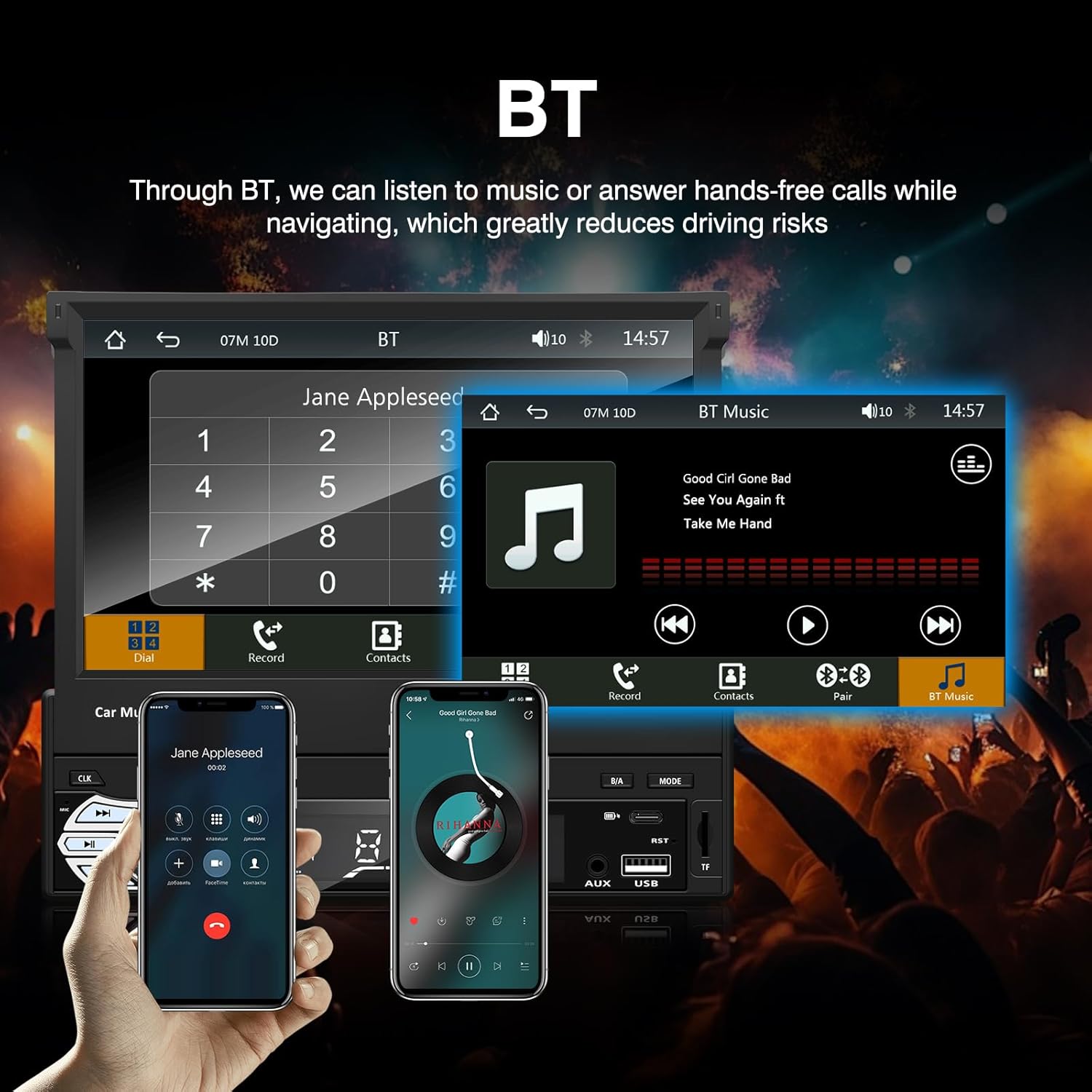
Rajah 3: Bluetooth interface for hands-free calls and music streaming, showing a dial pad and music controls.
- Berpasangan: Dayakan Bluetooth pada peranti mudah alih anda. Cari untuk available devices and select "Ezonetronics" or similar. Enter PIN "0000" if prompted.
- Panggilan Bebas Tangan: Once paired, you can make and receive calls directly through the car stereo. Use the touchscreen or remote to dial, answer, or end calls.
- Penstriman Audio (A2DP): Play music from your paired device wirelessly. Control playback (play/pause, skip) from the car stereo or your device.
3. USB/SD Media Playback
Insert a USB drive or SD card into the respective slot. The unit will automatically switch to USB/SD mode and begin playing compatible media files.

Rajah 4: Icons indicating support for Bluetooth, Auxiliary input, TF (SD) Card, and USB connections for media playback.
- Supported formats include RM, RMVB, ASF, MKV, DIVX, MPEG4, AVI, VOB for video, and MP3/MP4 for audio.
- Navigasi melalui folder dan files using the touchscreen interface.
4. Radio FM
Access the FM radio mode to listen to local broadcasts.

Rajah 5: FM Radio interface with frequency display and equalizer settings for audio customization.
- Imbasan Auto: Automatically search and save strong stations.
- Penalaan Manual: Fine-tune frequencies using the touchscreen.
- Pratetap: Save your favorite stations for quick access (up to 18 preset stations).
5. Apple CarPlay / Android Auto
Connect your compatible smartphone via USB to access Apple CarPlay or Android Auto features directly on the stereo's display.

Rajah 6: Wired Apple CarPlay interface, displaying phone applications like navigation, music, and messages on the car stereo screen.

Rajah 7: Wired Android Auto interface, displaying Android applications like Google Maps, Spotify, and phone calls on the car stereo screen.
- Ensure your phone has CarPlay or Android Auto enabled.
- Use a high-quality USB cable for a stable connection.
- Access navigation, music, messages, and other compatible apps safely while driving.
6. Pautan Cermin
Mirror Link allows you to display your smartphone's screen content directly onto the car stereo's display via a USB data cable.

Rajah 8: Mirror Link function demonstrating a smartphone screen being projected onto the car stereo display.
- Connect your smartphone to the USB port using a data cable.
- Follow the on-screen prompts on both the stereo and your phone to establish the connection.
- Note: Functionality may vary depending on your smartphone model and operating system.
7. Belakangview Input Kamera
Apabila belakangview camera is connected and the vehicle is shifted into reverse, the stereo automatically displays the camera feed.

Rajah 9: Reversing display showing the view dari belakangview camera with parking assistance lines, providing an intuitive aid for parking.
- Pastikan bahagian belakangview camera is properly installed and connected to the dedicated input.
- Paparan akan bertukar kepada kamera secara automatik view when the reverse gear is engaged.
8. Kawalan Roda Stereng
The unit supports connection to your vehicle's existing steering wheel controls for convenient operation. Refer to your vehicle's manual and the stereo's wiring diagram for proper connection and configuration.
Penyelenggaraan
- Membersihkan Skrin: Gunakan kain lembut dan tidak berbulu untuk mengelap skrin sentuh dengan lembut. Jangan gunakan pembersih atau pelarut yang melelas.
- Pembersihan Am: Wipe the unit's exterior with a dry, soft cloth.
- Elakkan Cecair: Jangan sembur cecair terus ke atas unit.
- Suhu: Elakkan pendedahan berpanjangan kepada haba atau sejuk yang melampau, yang boleh menjejaskan jangka hayat unit.
Menyelesaikan masalah
| Masalah | Kemungkinan Punca | Penyelesaian |
|---|---|---|
| Unit tidak dihidupkan. | pendawaian yang salah; Fius yang ditiup; Masalah bateri kenderaan. | Check power connections (Yellow, Red, Black wires). Inspect vehicle fuses. Ensure battery is charged. |
| Tiada bunyi. | Kelantangan terlalu rendah; Redam diaktifkan; Pendawaian pembesar suara tidak betul. | Tingkatkan kelantangan. Periksa sama ada bisu aktif. Sahkan sambungan pembesar suara. |
| Bluetooth tidak bersambung. | Bluetooth not enabled on phone; Incorrect pairing process. | Ensure phone's Bluetooth is on and discoverable. Re-attempt pairing. |
| USB/SD media not playing. | Tidak disokong file format; Corrupted media; Drive/card not inserted correctly. | Semak file formats. Try a different USB drive/SD card. Ensure proper insertion. |
| belakangview kamera tidak dipaparkan. | Kamera tidak disambungkan; Wayar pencetus terbalik tidak disambungkan. | Verify camera video input and reverse trigger wire connection. |
If problems persist, consult a qualified technician or contact customer support.
Spesifikasi
- Jenama: EZoneTronics
- Nombor Model: RM-CW9601
- warna: Hitam
- Skrin: 7-inch Capacitive Touchscreen, Retractable
- Teknologi Ketersambungan: Bluetooth, USB, SD, AUX, RCA
- Bluetooth: Integrated Bluetooth 2.0 with A2DP/Hands-free
- Peranti Serasi: Telefon pintar
- Mod Output Audio: Stereo
- Sokongan Pengekodan Video: RM, RMVB, ASF, MKV, DIVX, MPEG4, AVI, VOB
- Sokongan USB/SD: Up to 32GB max.
- Ciri Khas: Touchscreen, Steering Wheel Control Support, Rear Camera Input, Apple CarPlay, Android Auto, Mirror Link
- Pengeluar: Rhythm Electronics Limited
Waranti dan Sokongan
This product comes with a limited manufacturer's warranty.
- Waranti Unit Utama: 12 months for defective items (excluding damaged or misused items after receipt).
- Jaminan Aksesori: 3 months for accessories.
Untuk tuntutan jaminan atau sokongan teknikal, sila hubungi peruncit atau pengilang anda secara langsung. Simpan resit pembelian anda sebagai bukti pembelian.