
Angrox RM-ED047
Angrox Universal Remote Control User Manual
Model: RM-ED047
1. Pengenalan
This manual provides essential information for the proper use and maintenance of your Angrox Universal Remote Control. Designed for seamless compatibility with a wide range of Sony Bravia TVs, this remote offers a reliable and straightforward replacement for your original or damaged remote.
The Angrox remote control is engineered for ease of use, requiring no complex programming or setup. Simply insert batteries, and it's ready to operate your Sony TV.
2. Produk Lebihview
The Angrox Universal Remote Control is a high-quality, compact, and non-slip device designed for comfortable handling and stable performance. It features a larger transmission range compared to many standard remotes, ensuring reliable operation from a distance.

Imej 2.1: Depan dan belakang view of the Angrox Universal Remote Control, showcasing reka bentuk ergonomik dan susun atur butangnya.

Imej 2.2: Berbilang views of the remote control, highlighting its slim profile and textured back for a secure grip.
Ciri-ciri Utama:
- Keserasian Universal: 100% compatible with all Sony TV and Sony Bravia remotes.
- Tiada Pengaturcaraan Diperlukan: Ready to use right out of the box after battery insertion.
- Reka bentuk ergonomik: Small size and compact, with a non-slip surface for practical handling.
- Prestasi Stabil: Offers a larger transmission range for reliable control.
- Pembinaan Tahan Lama: Made from ABS material for enhanced safety and durability.

Imej 2.3: Jarak dekat view emphasizing the remote's safety features, durable construction, and use of ABS material.
Compatible Sony TV Models:
This remote is compatible with a wide range of Sony TV models, including but not limited to:
- KDL-40BX420, KDL-40BX421, KDL-22BX320, KDL-22BX321, KDL-32R300B, KDL-32BX320, KDL-32BX321, KDL-32BX420, KDL-32BX421, KDL-40BX421, KDL-40BXB, KDL-421, KDL-46BX420, KDL-46BX421, KDL-55BX520
- KDL-65X830B, KDL-70W830B, KDL-70W840B, KDL-70W850B, KDL-70XX70XX, XBR-40B, 9X850B, XBR-55X850B, XBR-55X900B, XBR-65X850B, XBR-65X900B, XBR-65X950B, XBR-70X850B, XBR-79X900B, XBR-800B, 5X950B
- KDL-19MB4000, KDL-19M4000, KDL-22L4000, KDL-32L4000, KDL-37L4000, KDL-40S4100

Image 2.4: The remote control positioned next to a modern Sony TV, visually confirming its compatibility with Sony LED and LCD televisions.
3. Persediaan
The Angrox Universal Remote Control is designed for immediate use with compatible Sony TVs. No complex programming or pairing procedures are required.
Memasukkan Bateri:
- Cari petak bateri di belakang alat kawalan jauh.
- Luncurkan penutup bateri ke bawah atau ke arah yang ditunjukkan oleh anak panah untuk membukanya.
- Masukkan dua (2) bateri AAA (tidak disertakan), pastikan terminal positif (+) dan negatif (-) sejajar dengan tanda di dalam petak.
- Tutup penutup bateri dengan menggesernya kembali ke tempatnya sehingga ia berbunyi klik dengan selamat.
Once batteries are inserted, the remote control is ready to operate your Sony TV. It is recommended to use new, high-quality alkaline batteries for optimal performance and longevity.

Imej 3.1: Terperinci view of the remote's battery compartment, illustrating the correct orientation for inserting two AAA batteries.
4. Arahan Operasi
The Angrox Universal Remote Control functions identically to the original Sony TV remote. All buttons are pre-programmed to perform their standard functions.
Operasi asas:
- Butang Kuasa: Press to turn your TV on or off.
- Butang Nombor (0-9): Use to directly enter channel numbers.
- Saluran Atas/Bawah (CH +/-): Navigasi melalui saluran secara berurutan.
- Kelantangan Naik/Turun (VOL +/-): Laraskan tahap kelantangan TV.
- Butang Bisukan: Mute or unmute the TV's audio.
- Navigation Pad (Arrow Buttons & Enter): Use to navigate menus and select options.
- Butang rumah: Access the TV's main menu or smart TV interface.
- Butang Input/Sumber: Beralih antara sumber input yang berbeza (HDMI, AV, dsb.).
- Kawalan Main Semula: Buttons for Play, Pause, Stop, Fast Forward, Rewind, etc., for media playback.
Ensure there is a clear line of sight between the remote control and your TV's infrared receiver for optimal signal transmission. The remote offers a stable signal and sensitive buttons for a responsive user experience.

Image 4.1: A hand demonstrating the use of the remote control, highlighting its long-distance capability, fine workmanship, signal stabilization, and sensitive buttons.
5. Penyelenggaraan
Proper maintenance will ensure the longevity and optimal performance of your Angrox Universal Remote Control.
Pembersihan:
- Wipe the remote control regularly with a soft, dry cloth.
- Untuk kotoran degil, sedikit dampen kain dengan air atau pembersih yang lembut dan tidak melelas. Jangan sembur pembersih terus ke alat kawalan jauh.
- Elakkan menggunakan bahan kimia, pelarut atau pad pembersih yang kasar, kerana ini boleh merosakkan permukaan atau komponen dalaman alat kawalan jauh.
Penggantian Bateri:
Replace batteries when the remote's responsiveness decreases or it stops functioning. Always replace both batteries at the same time with new ones of the same type (AAA). Refer to Section 3 for battery insertion instructions.
Storan:
Store the remote control in a cool, dry place away from direct sunlight, extreme temperatures, and high humidity. If the remote will not be used for an extended period, it is advisable to remove the batteries to prevent leakage.
6. Penyelesaian masalah
If you encounter issues with your Angrox Universal Remote Control, please refer to the following common problems and solutions:
| Masalah | Kemungkinan Punca | Penyelesaian |
|---|---|---|
| Jauh tidak bertindak balas. | Bateri mati atau salah dimasukkan. | Check battery orientation. Replace with new AAA batteries. |
| Alat kawalan jauh mempunyai julat terhad atau tindak balas sekejap-sekejap. | Weak batteries, obstruction, or remote too far from TV. | Replace batteries. Ensure clear line of sight to TV's IR receiver. Move closer to the TV. |
| Butang tertentu tidak berfungsi. | Dirt or debris under the button, or internal malfunction. | Clean the remote surface. If problem persists, contact support. |
| Alat kawalan jauh tidak mengawal TV. | Model TV yang tidak serasi. | Verify your TV model is listed in the compatible models section (Section 2). |
7. Spesifikasi
| Ciri | Perincian |
|---|---|
| Nama Model | RM-ED047 |
| Jenama | Angrox |
| Peranti Serasi | Sony Televisions (various models, see Section 2) |
| Teknologi Ketersambungan | Inframerah (IR) |
| Julat Maksimum | 10 Meter |
| Bilangan Butang | 50 |
| Jenis Pengawal | Alat Kawalan Jauh |
| Bateri Diperlukan | 2 x AAA (tidak termasuk) |
| Dimensi Produk (L x W x H) | 19.99 x 4.78 x 1.98 cm |
| Berat Barang | 82 g |
| Ciri Khas | Universal, Non-slip design |
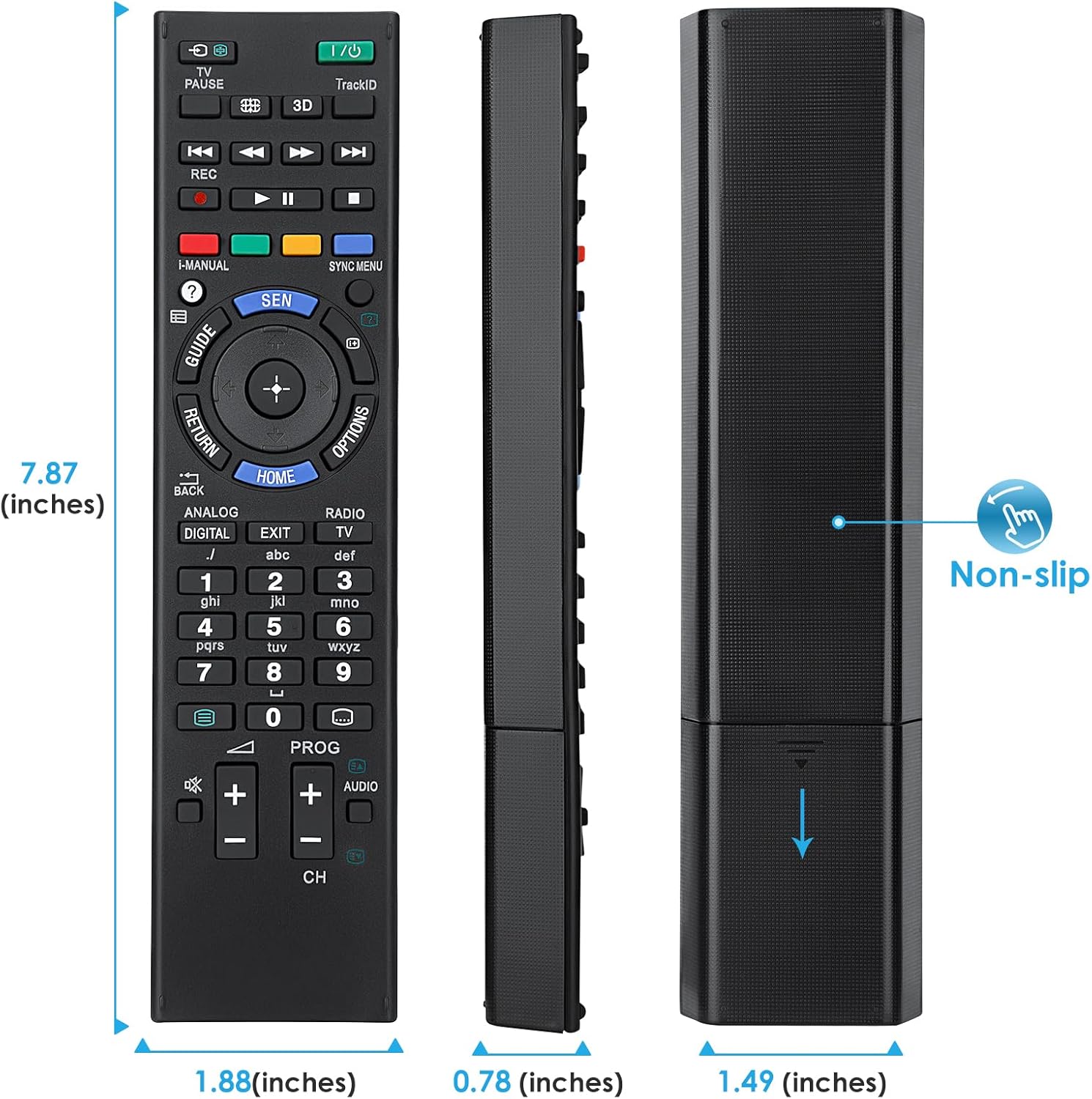
Image 7.1: Visual representation of the remote control's dimensions (length, width, thickness), providing precise measurements for reference.
8. Waranti dan Sokongan
Maklumat Waranti:
This Angrox Universal Remote Control comes with a Waranti 60 hari dari tarikh pembelian. Waranti ini meliputi kecacatan pembuatan dan memastikan produk berfungsi seperti yang diterangkan di bawah penggunaan biasa. Sila simpan bukti pembelian anda untuk tuntutan waranti.
Sokongan Pelanggan:
For any questions, concerns, or technical assistance not covered in this manual, please contact the retailer or the manufacturer's customer support. Provide your product model number (RM-ED047) and a detailed description of the issue to facilitate faster service.
Ask a question about this manual
Ask about setup, troubleshooting, compatibility, parts, safety, or missing instructions. Manuals+ will review the question and use this page’s manual context to help answer it.