
1. Pengenalan
Terima kasih kerana membeliasing the Auna Dr. Bang LED Portable Boombox. This device is designed to provide a versatile audio experience with its 2.1 channel sound, Bluetooth connectivity, multiple playback options (USB, SD, AUX, MP3), integrated LED light effects, and FM radio. It also features two microphone inputs for karaoke functions. Please read this manual carefully to ensure proper use and to maximize the performance of your device.
2. Arahan Keselamatan
Sila patuhi langkah berjaga-jaga keselamatan berikut untuk mengelakkan kerosakan pada peranti atau kecederaan pada diri anda:
- Jangan dedahkan peranti kepada hujan atau lembapan.
- Jangan buka unit ini. Rujuk semua servis kepada kakitangan yang berkelayakan.
- Jauhkan peranti daripada cahaya matahari langsung, sumber haba dan nyalaan api terbuka.
- Pastikan pengudaraan yang betul di sekeliling unit.
- Gunakan hanya penyesuai kuasa yang dinyatakan untuk pengecasan.
- Do not insert objects into the device openings.
- Elakkan mendengar pada tahap kelantangan tinggi untuk tempoh yang lama untuk mengelakkan kerosakan pendengaran.
3. Kandungan Pakej
Carefully unpack your Auna Dr. Bang LED Portable Boombox and ensure all items are present and in good condition. The package should contain:
- Auna Dr. Bang LED Portable Boombox
- Kabel Pengecas USB
- AUX Cable (3.5mm jack)
- Manual Pengguna (dokumen ini)
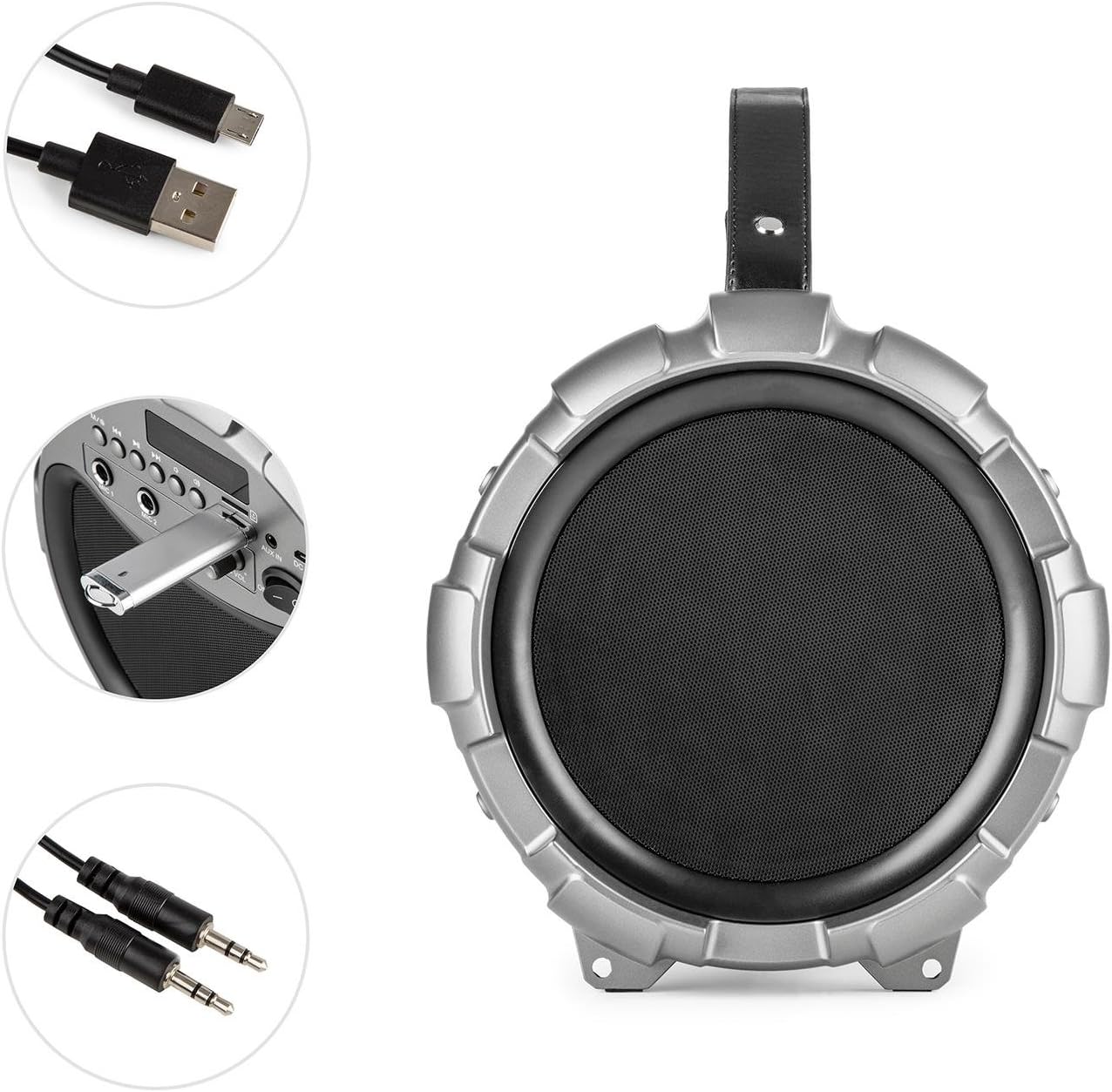
Image: The Auna Dr. Bang LED boombox shown with its included USB charging cable and 3.5mm AUX cable.
4. Produk Lebihview
Biasakan diri anda dengan pelbagai bahagian dan kawalan boombox anda.
4.1 Depan View

Imej: Depan view of the Auna Dr. Bang LED boombox, highlighting the speaker grille and integrated LED lighting effects.
- Panel Lampu LED: Displays dynamic light effects during playback.
- Gril Pembesar Suara: Protects the internal speakers.
4.2 Panel Kawalan

Image: Close-up of the control panel on the Auna Dr. Bang LED boombox, showing various buttons, ports, and the display.
- M/Mode Button: Beralih antara mod input (Bluetooth, USB, SD, AUX, Radio FM).
- Butang Trek/Undur Sebelumnya: Short press for previous track, long press to rewind.
- Butang Main/Jeda: Memainkan atau menjeda audio semasa.
- Butang Trek Seterusnya/Maju Pantas: Short press for next track, long press to fast forward.
- Butang LED: Togol kesan cahaya LED.
- Skrin Paparan: Menunjukkan mod semasa, maklumat trek atau frekuensi FM.
- Port USB: Untuk main balik pemacu kilat USB.
- Slot Kad SD: Untuk main balik kad SD.
- AUX DI: Input audio 3.5mm untuk peranti luaran.
- DC 5V: Input kuasa untuk mengecas.
- Input MIC 1: 6.3mm microphone input 1.
- Input MIC 2: 6.3mm microphone input 2.
- MIC ECHO Knob: Melaraskan kesan gema mikrofon.
- Tombol MIC VOL: Melaraskan kelantangan mikrofon.
- Suis ON / OFF: Menghidupkan atau mematikan unit.
- Tombol Kelantangan: Adjusts the main playback volume.
5. Persediaan
5.1 Mengecas Bateri
The Auna Dr. Bang LED boombox is equipped with a built-in Lithium-Ion battery for portable use. Before first use, it is recommended to fully charge the battery.
- Connect the supplied USB charging cable to the DC 5V port on the boombox.
- Sambungkan hujung kabel USB yang satu lagi ke penyesuai kuasa USB yang serasi (tidak disertakan) atau port USB komputer.
- The charging indicator light (if present, usually near the DC 5V port or on the display) will illuminate to indicate charging.
- Setelah dicas sepenuhnya, lampu penunjuk mungkin berubah warna atau padam. Putuskan sambungan kabel pengecas.
Nota: The boombox can be operated while charging, but charging time may be longer.
5.2 Kuasa Awal Hidup
Untuk menghidupkan peranti, luncurkan Suis HIDUP/MATI to the "ON" position. The display will light up, and the unit will enter the default mode (usually Bluetooth).
6. Arahan Operasi
6.1 Pemilihan Mod
Tekan ke M/Mode Button repeatedly to cycle through the available input modes: Bluetooth, USB, SD, AUX, and FM Radio. The current mode will be shown on the display.
6.2 Berpasangan Bluetooth
- Turn on the boombox and select Bluetooth mode using the M/Mode Button. The display will show "BLUE" and a blinking Bluetooth icon, indicating it's ready for pairing.
- Dayakan Bluetooth pada peranti mudah alih anda (telefon pintar, tablet, dll.) dan cari peranti yang tersedia.
- Select "Auna Dr. Bang LED" from the list of devices.
- Once paired, the boombox will emit a confirmation sound, and the Bluetooth icon on the display will stop blinking.
- You can now play audio from your device through the boombox.
Nota: The boombox will automatically attempt to reconnect to the last paired device when in Bluetooth mode.
6.3 Main Semula USB/SD
- Masukkan pemacu kilat USB ke dalam Port USB atau kad SD ke dalam Slot Kad SD. Ensure the media contains compatible audio files (cth, MP3).
- The boombox should automatically switch to USB or SD mode and begin playback. If not, press the M/Mode Button untuk memilih mod yang betul.
- Gunakan Trek/Putar Balik Sebelumnya, Main/Jeda, dan Trek Seterusnya/Hadapan Pantas butang untuk mengawal main balik.
6.4 Input AUX
- Sambungkan satu hujung kabel AUX 3.5mm ke AUX IN port on the boombox.
- Connect the other end to the headphone jack or audio output of your external audio device.
- Tekan ke M/Mode Button untuk memilih mod AUX.
- Control playback from your external device. The boombox's volume knob will control the output volume.
6.5 Radio FM
- Tekan ke M/Mode Button to select FM Radio mode. The display will show the current frequency.
- Untuk mengimbas secara automatik dan menyimpan stesen yang tersedia, tekan lama butang Butang Main/Jeda. The boombox will scan and store stations automatically.
- To manually tune or select saved stations, use the Trek/Putar Balik Sebelumnya dan Trek Seterusnya/Hadapan Pantas butang.
Petua: For better FM reception, try repositioning the boombox or extending any external antenna if available (not explicitly mentioned but common for boomboxes).
6.6 Penggunaan Mikrofon (Karaoke)
- Connect one or two microphones (not included) to the Input MIC 1 dan/atau Input MIC 2.
- Laraskan kelantangan mikrofon menggunakan Tombol MIC VOL.
- Laraskan kesan gema untuk mikrofon menggunakan Tombol MIC ECHO.
- You can sing along to music playing from any source (Bluetooth, USB, SD, AUX).
6.7 LED Light Effects
Tekan ke Butang LED to toggle the integrated LED light effects on or off. The lights will synchronize with the music playback.

Imej: Bersudut view of the Auna Dr. Bang LED boombox, showcasing its dynamic red and green LED light effects.
7. Penyelenggaraan
7.1 Pembersihan
- Always power off the device and disconnect it from any power source before cleaning.
- Gunakan kain lembut dan kering untuk mengelap permukaan luar.
- Jangan gunakan pembersih, lilin atau pelarut yang melelas kerana ia boleh merosakkan kemasan.
- Keep the ports and openings free of dust and debris.
7.2 Penyimpanan
- When not in use for extended periods, store the boombox in a cool, dry place, away from direct sunlight and extreme temperatures.
- It is recommended to charge the battery periodically (e.g., every 3-6 months) to maintain its lifespan.
8. Penyelesaian masalah
If you encounter any issues with your Auna Dr. Bang LED boombox, please refer to the following common problems and solutions:
| Masalah | Kemungkinan Punca | Penyelesaian |
|---|---|---|
| Tiada kuasa / Unit tidak dihidupkan. | Bateri habis. Suis kuasa dimatikan. | Charge the battery. Ensure the ON/OFF switch is in the "ON" position. |
| Tiada bunyi. | Volume is too low. Incorrect mode selected. Device not properly connected (AUX/Bluetooth). | Increase the volume on the boombox and your source device. Select the correct input mode. Re-pair Bluetooth or re-connect AUX cable. |
| Gandingan Bluetooth gagal. | Boombox not in pairing mode. Device too far. Bluetooth disabled on source. | Ensure boombox is in Bluetooth mode and "BLUE" is blinking. Move source device closer. Enable Bluetooth on your source device. |
| USB/SD playback not working. | Incorrect mode. Incompatible file format. Corrupted media. | Select USB or SD mode. Ensure files are MP3 format. Try a different USB drive or SD card. |
| Penerimaan radio FM yang lemah. | Isyarat lemah. Gangguan. | Reposition the boombox. Try auto-scanning again. Avoid placing near other electronic devices. |
| Mikrofon tidak berfungsi. | Microphone not connected. MIC VOL knob too low. | Ensure microphone is securely plugged into MIC 1 or MIC 2. Increase the MIC VOL knob. |
9. Spesifikasi
| model: | BTS16-Dr. Bang LED |
| Jenama: | AUNA |
| Dimensi (W x H x D): | 22 x 31.5 x 22 cm (kira-kira 8.7 x 12.4 x 8.7 inci) |
| Berat: | 2.8 kg (kira-kira 6.2 lbs) |
| Kuasa Keluaran Pembesar Suara: | 40 Watt (RMS) |
| Konfigurasi Pembesar Suara: | 2.1 Saluran |
| Ketersambungan: | Bluetooth, USB, SD, AUX (3.5mm) |
| Input Mikrofon: | Bicu 2 x 6.3mm |
| Sumber Kuasa: | AC (via adapter, not included) & Battery |
| Jenis Bateri: | Litium-Ion |
| Kapasiti Bateri: | 2600 mAh (nominal) |
| Peranti Serasi: | Personal computer, Smartphone |
| Keserasian Pemasangan: | Atas meja |
10. Waranti dan Sokongan
AUNA products are covered by a manufacturer's warranty. For specific warranty terms and conditions, please refer to the documentation provided at the time of purchase or contact your local retailer. For technical support, troubleshooting assistance beyond this manual, or spare parts, please visit the official AUNA webtapak atau hubungi bahagian perkhidmatan pelanggan mereka.
Anda boleh mendapatkan lebih banyak maklumat dan sokongan di AUNA Brand Store.