
pengenalan
Thank you for choosing the Aqualin Dual Outlet Irrigation Timer Controller. This device is designed to automate your garden watering, providing convenience and efficient water management. With two independently programmable outlets, you can customize watering schedules for different areas of your garden or lawn. Please read this manual carefully to ensure proper installation, operation, and maintenance of your irrigation timer.
Produk Selesaiview
The Aqualin YL21060 features a clear LCD display, intuitive controls, and robust construction for outdoor use. It offers flexible programming options, including a rain delay function to conserve water.

The Aqualin Dual Outlet Irrigation Timer Controller, shown attached to a faucet, featuring a digital display and two independent water outlets.
Ciri-ciri Utama:
- Dual Independent Outlets: Program two separate watering zones with unique schedules.
- Pengaturcaraan Fleksibel: Set desired frequency and duration for each zone.
- Fungsi Kelewatan Hujan: Skip watering sessions during and after rainy days (1-7 days).
- Penyiraman Manual: Initiate immediate watering without interrupting programmed cycles.
- Kalis Air IPX5: Designed for outdoor durability.
- Pemasangan Mudah: Features a swivel joint for quick connection to standard faucets (3/4" or 1").
- Paparan LCD: Clear digital display for easy programming and monitoring.
- Penapis Masuk: Helps prevent debris from entering the system.

Berakhirview of the Aqualin timer's features, including manual watering, IPX5 waterproofing, two independent zones, an inlet filter, an LCD display, and a rain delay function.
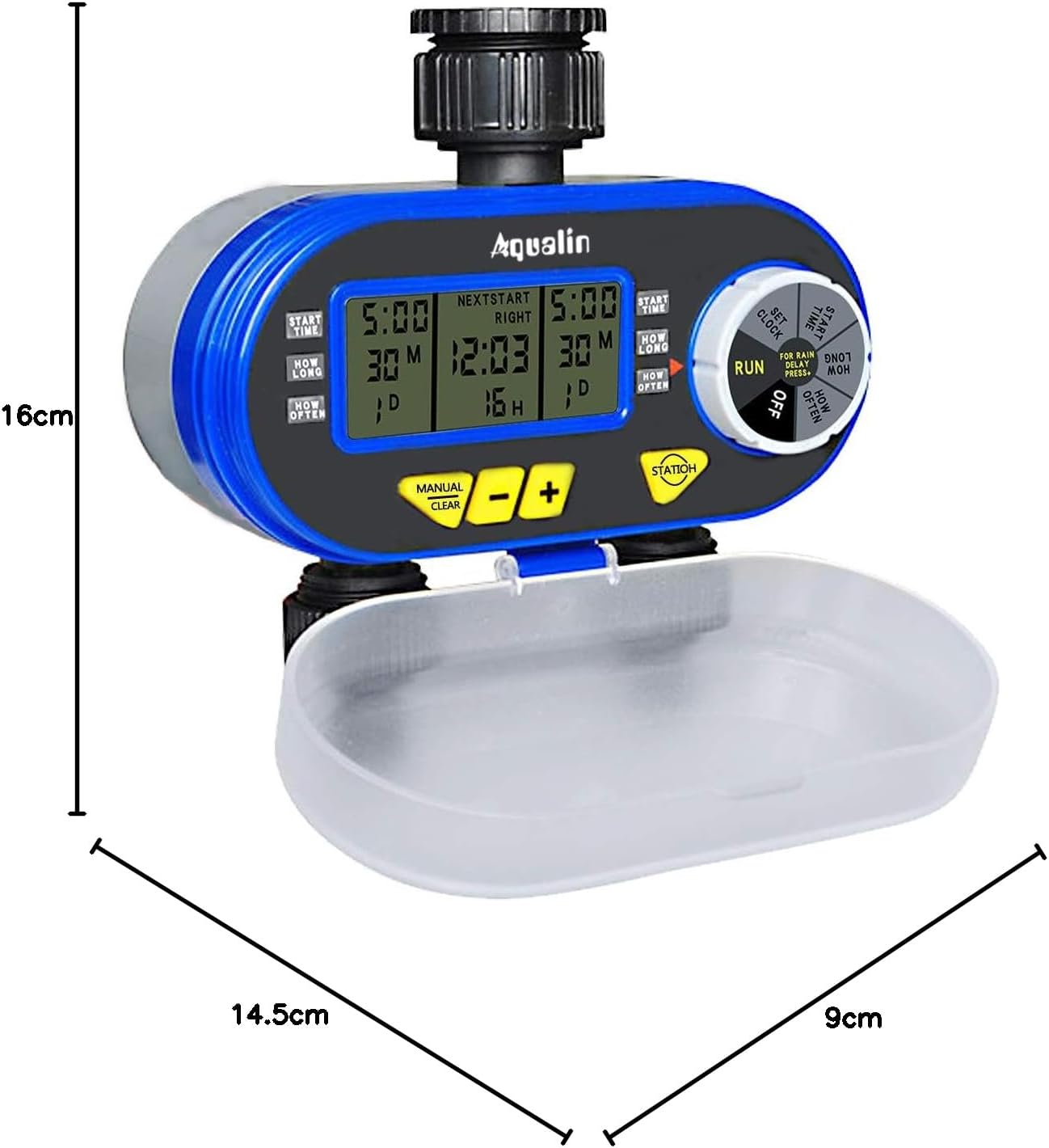
A diagram showing the physical dimensions of the Aqualin timer: 16cm height, 14.5cm length, and 9cm depth.
Persediaan
- Pemasangan Bateri:
- Open the battery compartment cover located at the back of the unit.
- Insert two (2) AA alkaline batteries, ensuring correct polarity.
- Tutup petak bateri dengan selamat.
- Connecting to Faucet:
- Attach the timer to a standard 3/4" (19mm) or 1" (25mm) outdoor faucet. The swivel joint allows for easy, tool-free connection.
- Ensure the connection is tight to prevent leaks. Do not overtighten.
- Sambungkan hos taman anda ke dua saluran bebas di bahagian bawah pemasa.
- Tetapan Masa Awal:
- Rotate the main dial to the 'SET CLOCK' position.
- Use the '+' and '-' buttons to adjust the current time.
- Press 'ENTER' to confirm the setting.
- Sensor Hujan (Pilihan):
- If using an external rain sensor, connect it to the designated rain sensor hole.
- Ensure the internal contacts for the rain sensor are not bent if no sensor is connected, as this can prevent watering.

jarak dekat view highlighting the 360-degree anti-leak design, the rain sensor input hole, and the battery compartment cover of the Aqualin timer.
Arahan Operasi
The Aqualin timer offers both automatic and manual watering modes for maximum flexibility.
Video demonstrating the automatic and manual functions of the Aqualin Dual Outlet Irrigation Timer Controller, showing how to set watering schedules and activate manual irrigation.
1. Automatic Function Programming:
The timer allows independent programming for two zones (Zone 1 and Zone 2).

This image illustrates the independent programming capabilities of the Aqualin timer, with separate settings for start time, duration, and frequency for Zone 1 and Zone 2.
- Tetapkan Masa Mula:
- Rotate the dial to 'START TIME'.
- Use '+' and '-' to set the desired start time for Zone 1. Press 'ENTER'.
- Repeat for Zone 2.
- Set How Long (Duration):
- Rotate the dial to 'HOW LONG'.
- Use '+' and '-' to set the watering duration for Zone 1 (1 minute to 240 minutes). Press 'ENTER'.
- Repeat for Zone 2.
- Set How Often (Frequency):
- Rotate the dial to 'HOW OFTEN'.
- Use '+' and '-' to set the watering frequency for Zone 1 (e.g., every 12 hours, every 3 days). Press 'ENTER'.
- Repeat for Zone 2.
- Jalankan Program:
- Once all settings are configured, rotate the dial to 'RUN'. The timer will now operate according to your programmed schedule.
2. Rain Delay Function:
To prevent overwatering and save water, use the rain delay feature.

The timer's display showing the Rain Delay feature, which allows skipping irrigation for 1 to 7 days to conserve water.
- While in 'RUN' mode, press the 'RAIN DELAY' button.
- Use '+' or '-' to select the desired delay period (e.g., 24, 48, 72 hours, or up to 7 days).
- Press 'ENTER' to activate the rain delay. Watering will resume automatically after the selected period.
3. Penyiraman Manual:
Untuk menyiram dengan segera tanpa menjejaskan jadual program anda:

The Aqualin timer in manual watering mode, allowing for immediate irrigation without altering programmed schedules.
- While in 'RUN' mode, press the 'MANUAL/CLEAR' button.
- Use '+' or '-' to set the desired manual watering duration (1 to 360 minutes).
- Press 'ENTER' to start manual watering.
- To stop manual watering, press 'MANUAL/CLEAR' again.
Penyelenggaraan
- Penggantian Bateri: Replace AA batteries every 1.5 to 3 months, or when the low battery indicator appears on the display, to ensure continuous operation.
- Pembersihan Penapis Masuk: Periodically check and clean the inlet filter to prevent clogging and maintain optimal water flow. Remove the timer from the faucet, unscrew the inlet connection, and rinse the filter under running water.
- Musim sejuk: Before the first frost, disconnect the timer from the faucet and hoses. Drain any remaining water from the unit and store it indoors in a dry, frost-free location.
- Pembersihan Am: Lap pemasa dengan iklanamp kain untuk menghilangkan kotoran dan serpihan. Jangan gunakan pembersih atau pelarut yang melelas.
Menyelesaikan masalah
| Masalah | Kemungkinan Punca | Penyelesaian |
|---|---|---|
| Tiada aliran air |
|
|
| Kebocoran daripada sambungan |
|
|
| Timer not programming correctly |
|
|
| Petak bateri tersekat | Battery compartment inserted incorrectly. | Ensure the battery compartment is inserted in the correct orientation. Forcing it can cause damage. |
Spesifikasi
| Ciri | Perincian |
|---|---|
| Jenama | Aqualin |
| Nombor Model | YL21060 |
| bahan | ABS |
| Dimensi (L x W x H) | 14.5 cm x 9 cm x 16 cm |
| Bilangan Tetapan | 2 (Independent Zones) |
| Sambungan Faucet | 3/4" (19mm) or 1" (25mm) |
| Tempoh Penyiraman | 1 minit hingga 240 minit |
| Sumber Kuasa | 2 x Bateri AA |
| GTIN | 613869410455 |
Waranti dan Sokongan
The Aqualin Dual Outlet Irrigation Timer Controller comes with a standard manufacturer's warranty. For specific warranty details, technical assistance, or to download a detailed PDF instruction manual, please visit the official Aqualin webtapak atau hubungi bahagian perkhidmatan pelanggan mereka. Simpan resit pembelian anda sebagai bukti pembelian untuk tuntutan waranti.
Senario Penggunaan

This image illustrates the versatility of the Aqualin timer, suitable for various watering applications such as gardens, lawns, farms, and potted plants.