pengenalan
Thank you for choosing the SPT SF-16T07 Touch Stop Stand Fan. This 16-inch stand fan is designed to provide efficient air circulation with advanced features for comfort and safety. Key features include a unique touch-stop sensor, 6 fan speeds, 4 distinct wind modes (Normal, Natural, Sleep, and Smart), oscillation, and a convenient timer-off function. This manual provides detailed instructions for assembly, operation, maintenance, and troubleshooting to ensure safe and optimal use of your fan.
Arahan Keselamatan Penting
Sila baca semua arahan dengan teliti sebelum menggunakan perkakas ini dan simpan untuk rujukan pada masa hadapan. Kegagalan mematuhi arahan ini boleh mengakibatkan renjatan elektrik, kebakaran atau kecederaan serius.
- Sentiasa cabut plag kipas dari soket kuasa sebelum membersihkan, menservis atau mengalihkannya.
- Do not operate the fan with a damaged cord or plug. If the cord or plug is damaged, contact qualified service personnel for repair or replacement.
- Keep the fan away from water or other liquids. Do not immerse the fan in water.
- Pastikan kipas diletakkan di atas permukaan yang stabil dan rata untuk mengelakkannya daripada terbalik.
- Do not insert fingers or any objects through the grille when the fan is operating.
- The fan features a Touch-Stop Sensor: If the fan guard is touched while the fan is operating, the fan will automatically stop. This is a safety feature designed to protect users, especially children. The fan will resume operation once the touch is removed and the fan is restarted.
- Close supervision is necessary when the fan is used by or near children or individuals with reduced physical, sensory, or mental capabilities.
- Kipas ini bertujuan untuk kegunaan dalaman sahaja. Jangan gunakan di luar rumah.
Kandungan Pakej
Sila semak kandungan pakej untuk memastikan semua item ada dan tidak rosak:
- Fan Unit (Motor Housing, Fan Blades, Front and Rear Grilles)
- Stand Pole and Base
- Alat Kawalan Jauh
- Manual Pengguna (dokumen ini)
Arahan Perhimpunan
The SPT SF-16T07 fan requires some assembly before use. Follow these steps carefully:
- Pasang Pangkalan: Connect the two halves of the base together, if applicable, and secure them with the provided screws.
- Pasang Tiang Pendirian: Insert the stand pole into the assembled base and tighten the locking nut or screw from underneath the base to secure it.
- Mount the Motor Housing: Place the fan's motor housing onto the top of the stand pole. Ensure it is firmly seated and secure it with the provided screw or locking mechanism.
- Pasang Gril Belakang: Position the rear grille onto the motor housing, aligning the notches. Secure it with the grille nut.
- Pasangkan Bilah Kipas: Slide the fan blade onto the motor shaft, ensuring it clicks into place or is secured with a cap.
- Pasang Gril Depan: Place the front grille over the fan blade and align it with the rear grille. Secure the grilles together using the clips or screws provided around the perimeter.
Ensure all parts are securely fastened before plugging in the fan.
Arahan Operasi
Your SPT SF-16T07 fan can be operated using the control panel on the fan unit or the included remote control. Ensure the fan is plugged into a standard electrical outlet.
Panel Kawalan Terlaluview
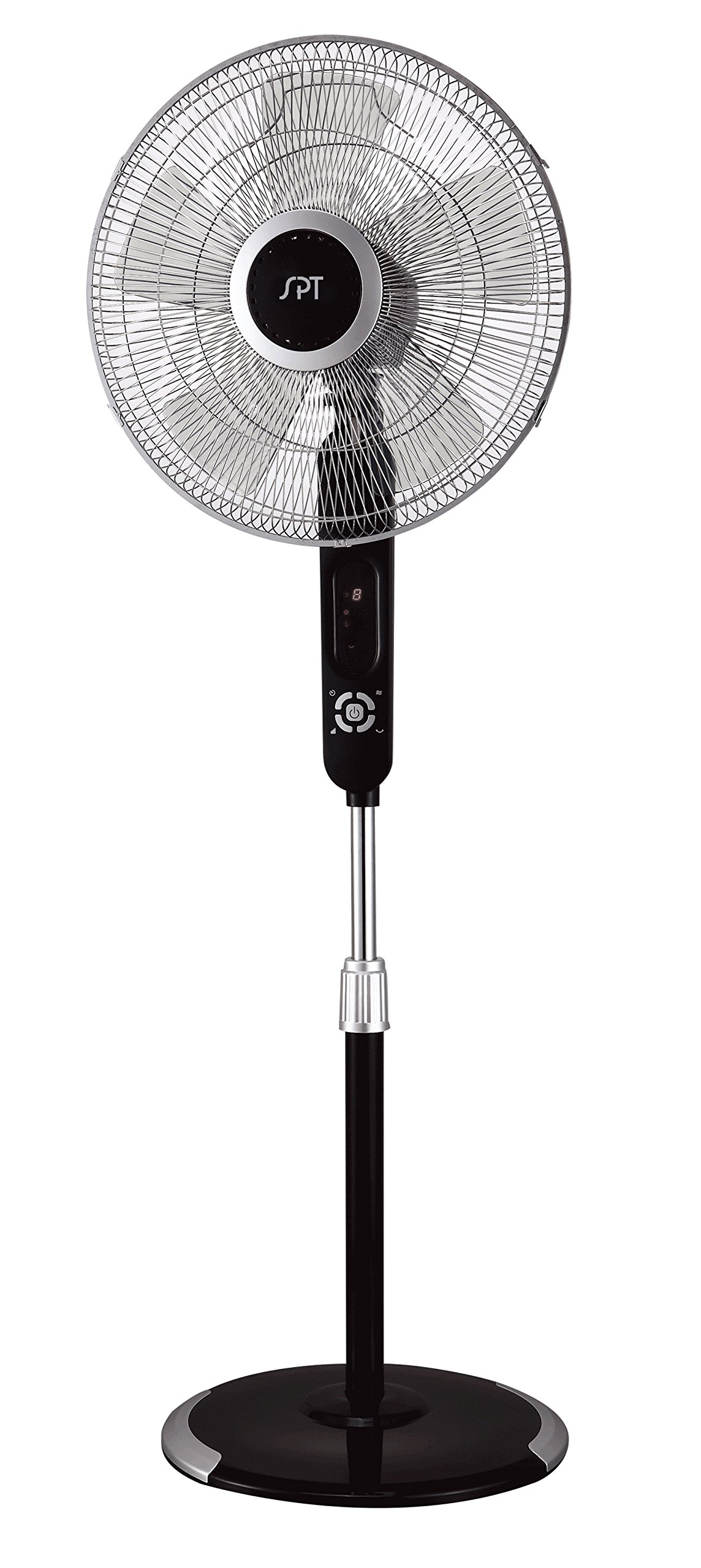
Image: The control panel of the SPT SF-16T07 Stand Fan. It features a digital display at the top showing numbers (e.g., '8') and icons for timer, fan speed, and mode. Below the display are several white buttons arranged in a circular pattern around a central power button. Other buttons include timer, fan speed, oscillation, and mode selection.
- Butang Kuasa (⏻): Tekan untuk menghidupkan atau mematikan kipas.
- Speed Button ( ✴ ): Press repeatedly to cycle through 6 fan speeds. The current speed will be indicated on the digital display.
- Mode Button ( ☻ ): Press to select one of the 4 wind modes: Normal, Natural, Sleep, or Smart.
- Oscillation Button ( 🌀 ): Press to start or stop the fan head oscillation (side-to-side movement).
- Butang Pemasa (⏱): Press to set the auto-off timer. Each press increases the timer by 1 hour, up to a maximum of 8 hours. The set time will be displayed.
Wind Modes Explained
- Mod Biasa: Memberikan aliran udara yang malar pada kelajuan yang dipilih.
- Mod Semula Jadi: Simulates natural breezes by varying the fan speed intermittently.
- Mod tidur: Gradually decreases the fan speed over time to provide a quieter and more comfortable environment for sleeping.
- Mod Pintar: Adjusts the fan speed automatically based on the ambient room temperature.
Alat Kawalan Jauh
The included remote control allows you to operate all fan functions from a distance. The buttons on the remote correspond to the functions on the main control panel. Ensure batteries are correctly installed in the remote control.
Penyelenggaraan
Regular cleaning and proper maintenance will ensure the longevity and efficient operation of your fan.
- Pembersihan: Sentiasa cabut plag kipas sebelum membersihkan. Gunakan pembersih lembutamp cloth to wipe the exterior surfaces. For stubborn dirt, a mild soap solution can be used. Do not use abrasive cleaners or solvents.
- Pembersihan gril: Periodically remove the front grille (refer to assembly instructions in reverse) to clean the fan blades and inside of the grilles. Use a soft brush or vacuum cleaner to remove dust and debris. Ensure all parts are dry before reassembling.
- Storan: Apabila tidak digunakan untuk tempoh yang lama, simpan kipas di tempat yang sejuk dan kering, sebaik-baiknya dalam pembungkusan asalnya, untuk melindunginya daripada habuk dan kerosakan.
Menyelesaikan masalah
Jika anda menghadapi masalah dengan kipas anda, rujuk masalah dan penyelesaian biasa berikut:
| Masalah | Kemungkinan Punca | Penyelesaian |
|---|---|---|
| Kipas tidak dihidupkan. | No power supply; fan unplugged; power button not pressed. | Ensure the fan is securely plugged into a working electrical outlet. Press the power button. Check household circuit breaker. |
| Fan stops unexpectedly during operation. | Touch-stop sensor activated; power interruption; internal fault. | Check if the fan guard was touched, activating the safety sensor. Remove any contact and restart the fan. Verify stable power supply. If the issue persists, contact customer support. |
| Kipas membuat bunyi yang luar biasa. | Loose parts; obstruction in fan blades/grille; fan not on a level surface. | Unplug the fan and check for any loose components or obstructions. Ensure the fan is placed on a flat, stable surface. |
| Alat kawalan jauh tidak berfungsi. | Dead batteries; remote out of range; obstruction between remote and fan. | Replace batteries in the remote control. Ensure there are no obstructions and operate within effective range. |
Spesifikasi
| Ciri | Perincian |
|---|---|
| Jenama | Spt |
| Nama Model | SF-16T07 (Touch-stop) |
| Reka Bentuk Kipas Elektrik | Kipas Lantai / Kipas Alas |
| warna | Black (Matte Black finish) |
| Dimensi Produk | 16"D x 16"W x 57.09"H |
| Berat Barang | 17 paun |
| Sumber Kuasa | Elektrik Bertali |
| Bilangan Bilah | 3 |
| Kapasiti Aliran Udara | 1659.8 Kaki Kubik Seminit |
| Bilangan Tahap Kuasa | 6 Kelajuan Kipas |
| Mod Angin | 4 (Normal, Natural, Sleep, Smart) |
| Fungsi Pemasa | Sehingga 8 jam |
| Ciri Khas | 16" fan blade, Touch-stop sensor, Remote control, Head oscillation, Manual tilting, Adjustable height, ETL certified |
| Kaedah Kawalan | Touch (Control Panel) / Button Control (Remote) |
| Penggunaan Dalaman/Luar | Dalaman |
Maklumat Waranti
The SPT SF-16T07 Touch Stop Stand Fan comes with a Waranti 1 tahun covering both labor and parts from the date of purchase. This warranty covers defects in materials and workmanship under normal use. Please retain your proof of purchase for warranty claims. The warranty does not cover damage resulting from misuse, accident, alteration, or unauthorized repair.
Sokongan Pelanggan
For further assistance, technical support, or warranty inquiries, please contact SPT customer service. Refer to the product packaging or the official SPT webtapak untuk maklumat hubungan terkini.