1. Pengenalan
Terima kasih kerana membeliasing the wster WS-K66 Mini Portable Bluetooth Speaker. This manual provides important information on how to set up, operate, and maintain your device. Please read it carefully before use and retain it for future reference.
2. Maklumat Keselamatan
- Jangan dedahkan pembesar suara kepada suhu yang melampau, cahaya matahari langsung atau kelembapan yang tinggi.
- Elakkan daripada menjatuhkan atau menundukkan pembesar suara kepada impak yang kuat.
- Jangan buka atau cuba membaiki pembesar suara sendiri. Ini akan membatalkan jaminan.
- Jauhkan pembesar suara daripada air dan cecair lain.
- Gunakan hanya kabel pengecasan dan sumber kuasa yang ditentukan.
- Buang bateri dan pembesar suara secara bertanggungjawab mengikut peraturan tempatan.
3. Kandungan Pakej
Sila semak pakej untuk item berikut:
- wster WS-K66 Mini Portable Bluetooth Speaker
- USB Charging / 3.5mm Audio Cable
- Manual Arahan (dokumen ini)
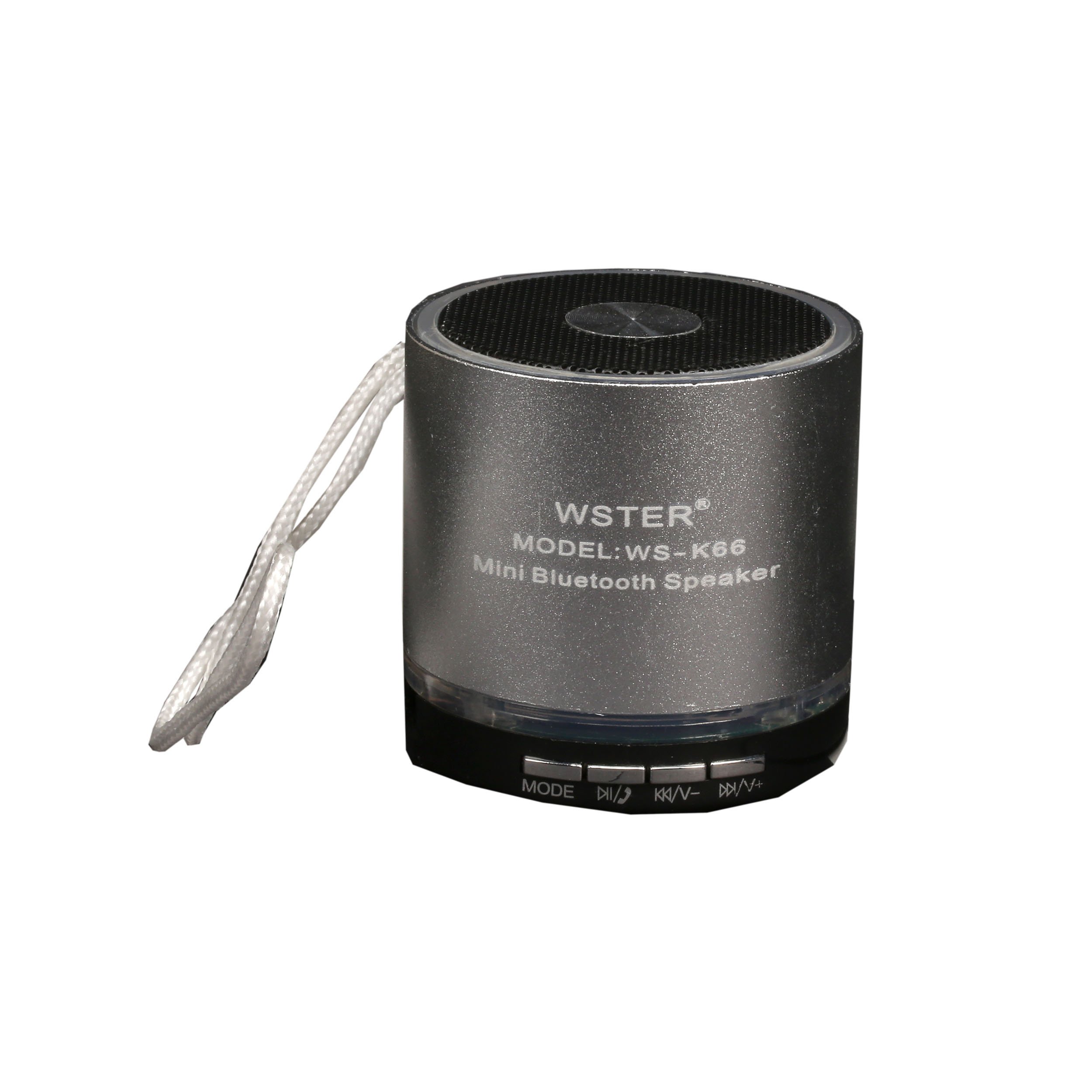
Image: The retail packaging for the wster WS-K66 speaker, showing the speaker and its features.

Image: The included USB charging and 3.5mm audio cable for connecting and powering the speaker.
4. Produk Lebihview
Biasakan diri anda dengan kawalan dan port pembesar suara:

Imej: Atas view of the wster WS-K66 speaker, highlighting the speaker grille and control buttons.

Imej: Sisi view of the wster WS-K66 speaker, illustrating the USB, Micro SD, AUX, and charging ports.
Controls and Ports (Typical Layout):
- Suis kuasa: Hidup/Mati.
- Butang Mod (M): Switches between Bluetooth, FM Radio, USB/Micro SD, and AUX modes.
- Play/Pause Button (►/−−): Play/pause music; Answer/end calls.
- Volume Down / Previous Track (-/◀◀): Short press for previous track; Long press to decrease volume.
- Volume Up / Next Track (+/►►): Short press for next track; Long press to increase volume.
- Port USB: Untuk pemacu kilat USB.
- Slot Kad Mikro SD: For Micro SD memory cards.
- Input AUX: Untuk menyambungkan peranti audio luaran melalui kabel 3.5mm.
- Port Pengecasan: Untuk mengecas pembesar suara.
5. Persediaan
Pengecasan Awal:
- Sebelum penggunaan pertama, cas sepenuhnya pembesar suara.
- Sambungkan hujung kecil kabel pengecas USB ke port pengecasan pembesar suara.
- Connect the larger USB end to a USB power adapter (not included) or a computer's USB port.
- Lampu penunjuk pengecasan akan menyala semasa pengecasan dan padam apabila dicas sepenuhnya.
6. Arahan Operasi
Hidupkan/Mati Kuasa:
- Slide the Power Switch to the 'ON' position to turn on the speaker.
- Slide the Power Switch to the 'OFF' position to turn off the speaker.
Mod Bluetooth:
- Turn on the speaker. It will automatically enter Bluetooth pairing mode (a voice prompt or indicator light will confirm).
- Dayakan Bluetooth pada peranti mudah alih anda (telefon pintar, tablet, dll.).
- Cari untuk available Bluetooth devices and select "WS-K66" from the list.
- Once paired, the speaker will confirm with a voice prompt. You can now play audio from your device through the speaker.
- The Bluetooth range is up to 10 meters (33 feet) in an open area.
Mod Radio FM:
- Turn on the speaker. Press the 'M' (Mode) button repeatedly until you hear the FM radio prompt.
- To auto-scan and save available stations, press and hold the Play/Pause button (►/−−). The speaker will scan and store stations automatically.
- Use the Previous Track (◀◀) and Next Track (►►) buttons to navigate between saved stations.
- For better FM reception, connect the USB charging cable to the speaker's charging port; it acts as an external antenna.
USB / Micro SD Card Mode:
- Insert a USB flash drive or a Micro SD card (with MP3 audio files) ke dalam slot masing-masing.
- The speaker will automatically detect the storage device and switch to USB/Micro SD mode, beginning playback.
- Gunakan butang Main/Jeda, Trek Sebelumnya dan Trek Berikutnya untuk mengawal main balik.
Mod AUX:
- Connect one end of the 3.5mm audio cable to the speaker's AUX input.
- Connect the other end to the audio output of your external device (e.g., MP3 player, laptop).
- Press the 'M' (Mode) button until the speaker enters AUX mode.
- Kawal main balik daripada peranti luaran anda.
Fungsi bebas tangan:
- When connected via Bluetooth to your phone, incoming calls will be announced through the speaker.
- Press the Play/Pause button (►/−−) to answer an incoming call.
- Press the Play/Pause button (►/−−) again to end the call.
7. Mengecas
- When the battery is low, the speaker may emit a warning tone or automatically power off.
- Connect the speaker to a USB power source using the provided cable.
- A full charge typically takes 2-3 hours, depending on the power source.
- Do not overcharge the speaker for extended periods.
8. Penyelenggaraan
- Bersihkan pembesar suara dengan kain lembut dan kering. Jangan gunakan pembersih atau pelarut yang melelas.
- Simpan pembesar suara di tempat yang sejuk dan kering apabila tidak digunakan.
- Avoid exposing the speaker to dust, dirt, or sand, which can damage internal components.
9. Penyelesaian masalah
| Masalah | Penyelesaian |
|---|---|
| Speaker tidak dihidupkan. | Ensure the battery is charged. Connect to a power source and try again. Check the power switch position. |
| Tiada bunyi. | Check the volume level on both the speaker and your connected device. Ensure the correct mode is selected (Bluetooth, AUX, etc.). |
| Gandingan Bluetooth gagal. | Ensure the speaker is in Bluetooth mode and discoverable. Turn off and on Bluetooth on your device. Move the speaker closer to your device. Clear previous pairings on your device. |
| Penerimaan radio FM yang lemah. | Connect the USB charging cable to act as an external antenna. Move to an area with better signal. Perform an auto-scan again. |
| Kad USB/Micro SD tidak dimainkan. | Ensure the card/drive contains compatible audio files (e.g., MP3). Check if the card/drive is inserted correctly. Try a different card/drive. |
10. Spesifikasi
| Ciri | Perincian |
|---|---|
| Jenama | wster |
| Nombor Model | WS-K66 |
| Teknologi Ketersambungan | Bluetooth, Bantu |
| Ciri Khas | Portable, Hands-free function, FM Radio |
| Sumber Kuasa | Cable Electric, 1 Product-Specific Battery (included) |
| Julat Bluetooth | Sehingga 10 meter |
| Input | USB, Micro SD, AUX |
11. Waranti dan Sokongan
Produk ini didatangkan dengan jaminan pengeluar standard. Untuk terma dan syarat jaminan tertentu, sila rujuk dokumentasi yang disediakan semasa pembelian atau hubungi peruncit anda.
If you encounter any issues or require technical assistance, please contact the customer support of your retailer or the manufacturer.