
Casio HR-200RCE-W-EC
Casio HR-200RCE-W-EC Printing Desktop Calculator User Manual
Model: HR-200RCE-W-EC
pengenalan
The Casio HR-200RCE-W-EC is a versatile and portable printing desktop calculator designed for efficient numerical operations. It features a large 12-digit LC display and offers functions such as tax calculations, cost-sell-margin analysis, and currency conversions. This manual provides essential information for setting up, operating, maintaining, and troubleshooting your calculator to ensure optimal performance.
Persediaan
Membongkar
Keluarkan semua komponen dari pembungkusan dengan berhati-hati. Kotak itu hendaklah mengandungi:
- Casio HR-200RCE-W-EC Printing Desktop Calculator
- 4 x Bateri AA
- Small paper roll for initial use
Note: The power adapter (AD-A60024) is not included and must be purchased separately if mains power is desired.
Pemasangan Sumber Kuasa
Your calculator can be powered by batteries or an optional AC adapter.
- Pemasangan Bateri: Open the battery compartment cover on the underside of the calculator. Insert the four (4) AA batteries, ensuring correct polarity (+/-). Close the cover securely.
- AC Adapter (Optional): If using the AD-A60024 AC adapter, plug it into the DC IN jack on the side of the calculator and then into a standard electrical outlet.
Pemasangan Gulungan Kertas
The calculator uses 58mm wide paper rolls for printing. Follow these steps to install a new roll:
- Open the paper roll cover at the top rear of the calculator.
- Place the new paper roll into the compartment, ensuring the paper feeds from the bottom of the roll.
- Feed the leading edge of the paper into the printer slot until it emerges from the top.
- Tutup penutup gulungan kertas.

Image: The Casio HR-200RCE-W-EC calculator showing the paper roll installed and a printed receipt.
Arahan Operasi
This section covers the basic and advanced functions of your Casio HR-200RCE-W-EC calculator.
Pengiraan Asas
Perform standard arithmetic operations using the numeric keypad and function keys:
- Tambahan (+): Enter first number, press +, enter second number, press =.
- Tolak (-): Enter first number, press -, enter second number, press =.
- Pendaraban (x): Enter first number, press x, enter second number, press =.
- Division (•): Enter first number, press •, enter second number, press =.
- Clear (C): Clears the last entered number.
- Semua Clear (AC): Membersihkan semua entri dan menetapkan semula kalkulator.
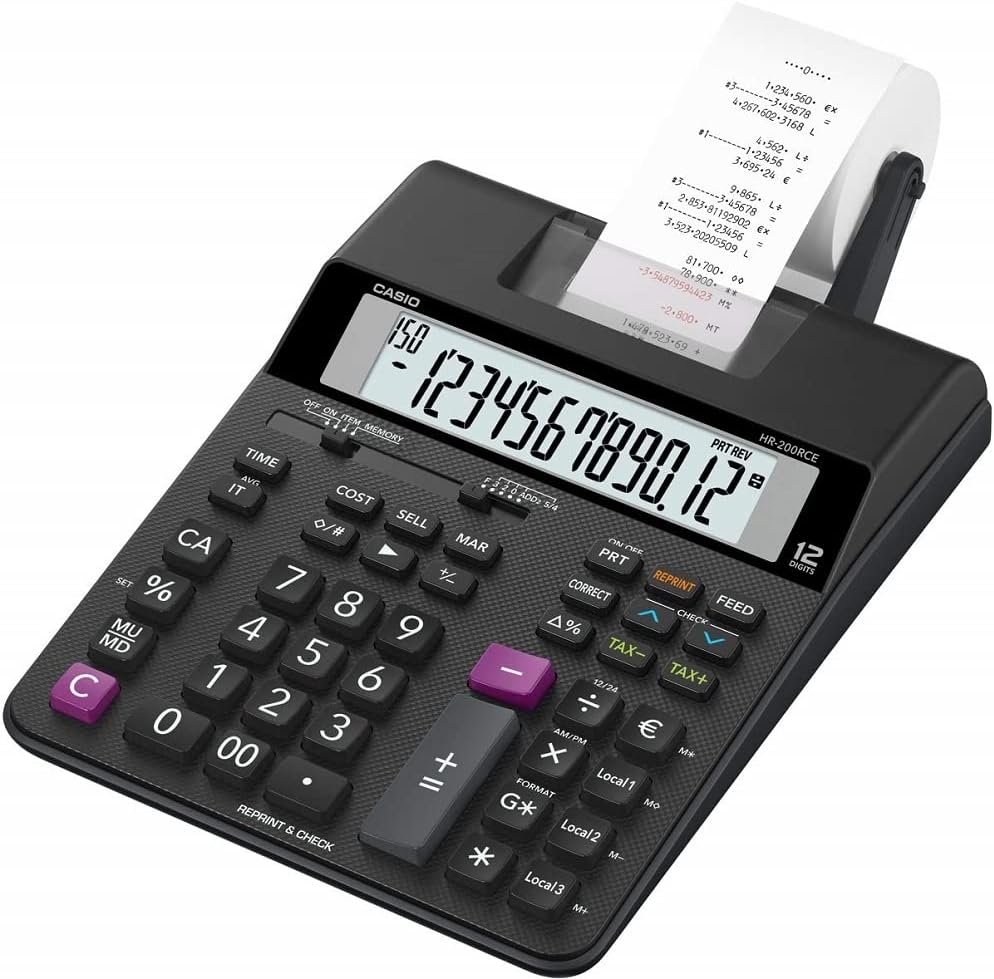
Imej: Bersudut view of the Casio HR-200RCE-W-EC calculator, highlighting the full keyboard layout.
Fungsi Khas
The HR-200RCE-W-EC includes several advanced functions for business and financial calculations:
- Tax Calculations (TAX+, TAX-): Use these keys to add or subtract a pre-set tax rate. Refer to the full manual for setting the tax rate.
- Cost, Sell, Margin (COST, SELL, MAR): These keys allow for quick calculation of cost, selling price, or profit margin when two of the three values are known.
- Currency Conversions (Local 1, Local 2, Local 3): Configure up to three local currency exchange rates for quick conversions.
- 2-Color Print (IR-40T): The calculator supports two-color printing (black and red) for clear differentiation of positive and negative values on the paper roll.
- Check & Correct (CHECK, CORRECT): Ciri ini membolehkan anda untuk semulaview and correct previous entries on the printout.

Imej: Jarak dekat view of the 'CHECK' and 'CORRECT' buttons on the Casio HR-200RCE-W-EC calculator.
Penyelenggaraan
Proper maintenance ensures the longevity and reliable operation of your calculator.
Pembersihan
- Lap bahagian luar kalkulator dengan kain lembut dan kering.
- Untuk kotoran degil, sedikit dampen kain dengan air dan detergen lembut, kemudian lap kering serta-merta.
- Jangan gunakan pembersih, pelarut yang kasar atau sembur terus ke atas kalkulator.
Ink Roller Replacement (IR-40T)
When printouts become faint or incomplete, it's time to replace the ink roller.
- Pastikan kalkulator dimatikan.
- Buka penutup pencetak.
- Carefully remove the old ink roller.
- Insert a new Casio IR-40T ink roller, ensuring it clicks into place.
- Tutup penutup pencetak.
Penggantian Gulungan Kertas
Replace the paper roll when it runs out, following the instructions in the "Paper Roll Installation" section under Setup.
Menyelesaikan masalah
If you encounter issues with your calculator, refer to the table below for common problems and their solutions.
| Masalah | Kemungkinan Punca | Penyelesaian |
|---|---|---|
| Tiada paparan atau paparan samar | Low or dead batteries; AC adapter not connected or faulty. | Replace batteries; Check AC adapter connection or try new adapter. |
| No printing or faint printing | Paper roll empty or incorrectly installed; Ink roller dry or incorrectly installed. | Install new paper roll correctly; Replace ink roller (IR-40T). |
| Incorrect calculation results | Incorrect data entry; Incorrect mode setting. | Re-enter calculation carefully; Check mode settings (e.g., decimal selector). |
| Calculator freezes or becomes unresponsive | Ralat sistem sementara. | Remove batteries for a few minutes, then reinsert. If using AC adapter, unplug and replug. |
Spesifikasi
| Ciri | Perincian |
|---|---|
| Model | HR-200RCE-W-EC |
| Paparan | 12-Digits LC-Display |
| Kelajuan Mencetak | 2.0 Lines/Sec |
| Warna Cetakan | 2-Colour Print (Black/Red) |
| Ink Roller | IR-40T |
| Saiz Kertas | 58 mm (Outer Roll “Roll 57mm”) |
| Sumber Kuasa | Batteries (4 x AA Included) or Optional AC Adapter (AD-A60024) |
| Komposisi Sel Bateri | Beralkali |
| Dimensi (L x W x H) | 31.3 x 19.5 x 6.5 cm |
| Berat badan | 670 Gram |
| Jenis Bahan | plastik |
| Ciri Khas | Simple algebraic logic, Two-tone print, Tax calculations, Cost Sell Margin, Currency Conversions |
Waranti dan Sokongan
Waranti Pengeluar
The Casio HR-200RCE-W-EC Printing Desktop Calculator comes with a Waranti pengilang selama 2 tahun dari tarikh pembelian. Waranti ini melindungi kecacatan pada bahan dan mutu kerja di bawah penggunaan biasa. Sila simpan bukti pembelian anda untuk tuntutan waranti.
Sokongan Pelanggan
For further assistance, technical support, or warranty inquiries, please visit the official Casio website or contact their customer service department. Refer to your product packaging or the Casio website for the most current contact information in your region.
Ask a question about this manual
Ask about setup, troubleshooting, compatibility, parts, safety, or missing instructions. Manuals+ will review the question and use this page’s manual context to help answer it.