
1. Pengenalan
Thank you for choosing the Taurus ORIÓN-300 Steam Iron. This manual provides essential information for the safe and efficient use, maintenance, and troubleshooting of your new appliance. Please read these instructions carefully before first use and keep them for future reference.

Figure 1: Taurus ORIÓN-300 Steam Iron. This image shows the overall design of the iron, highlighting its white and green color scheme and ergonomic handle.
2. Arahan Keselamatan Penting
Apabila menggunakan peralatan elektrik, langkah berjaga-jaga keselamatan asas hendaklah sentiasa diikuti untuk mengurangkan risiko kebakaran, kejutan elektrik dan kecederaan diri.
- Baca semua arahan sebelum menggunakan seterika.
- Gunakan seterika hanya untuk tujuan yang dimaksudkan.
- Untuk melindungi daripada risiko renjatan elektrik, jangan rendam seterika dalam air atau cecair lain.
- Always turn the iron to OFF before plugging or unplugging from the outlet. Never yank cord to disconnect from outlet; instead, grasp plug and pull to disconnect.
- Do not allow cord to touch hot surfaces. Let the iron cool completely before putting away. Loop cord loosely around the iron when storing.
- The iron should always be turned to OFF before filling or emptying water, and when not in use.
- Do not operate the iron with a damaged cord or if the iron has been dropped or damaged. To avoid the risk of electric shock, do not disassemble the iron. Contact qualified service personnel for examination and repair. Incorrect reassembly can cause a risk of electric shock when the iron is used.
- Pengawasan rapi diperlukan untuk sebarang perkakas yang digunakan oleh atau berhampiran kanak-kanak. Jangan biarkan seterika tanpa pengawasan semasa disambungkan atau di atas papan seterika.
- Luka bakar boleh berlaku akibat menyentuh bahagian logam panas, air panas, atau wap. Berhati-hatilah semasa menghidupkan besi wap terbalik - mungkin ada air panas di takungan.
- Use the iron on a stable surface.
3. Produk Lebihview
The Taurus ORIÓN-300 Steam Iron is designed for efficient and comfortable ironing. Familiarize yourself with its components:
- Non-stick Titanium Soleplate: Provides excellent glide and durability.
- Water Tank (200 ml capacity): For steam and spray functions.
- Dail Kawalan Suhu: Melaraskan tetapan haba untuk jenis fabrik yang berbeza.
- Steam Control Selector: Mengawal keluaran stim berterusan.
- Butang Sembur: Mengeluarkan kabus air yang halus.
- Self-Cleaning Button: Activates the self-cleaning function.
- Power Cord with 360° Swivel: Mencegah kekusutan semasa penggunaan.
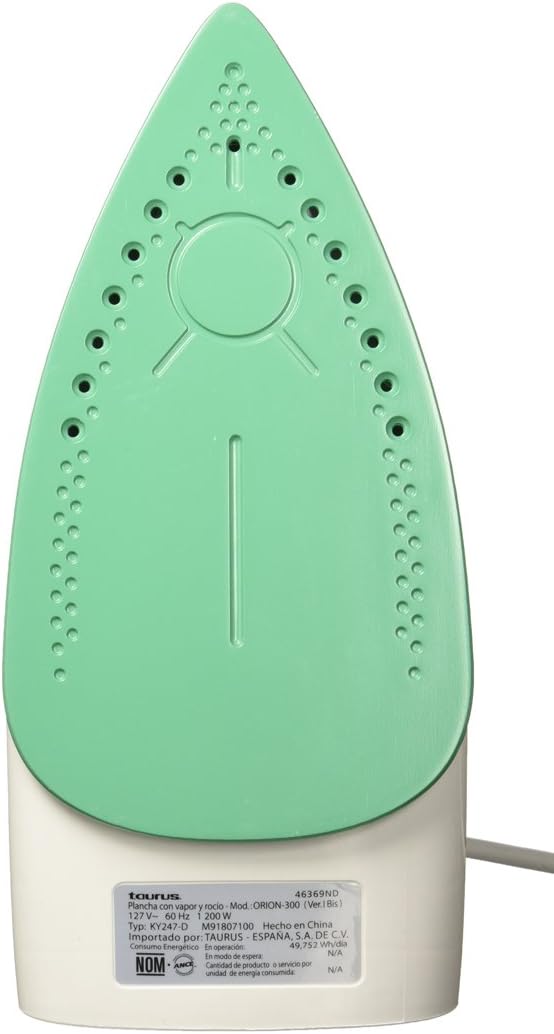
Figure 2: The titanium non-stick soleplate of the Taurus ORIÓN-300 iron, featuring steam vents for even steam distribution.
4. Persediaan
- Membongkar: Keluarkan seterika dari bungkusannya dengan berhati-hati. Keluarkan sebarang filem atau pelekat pelindung dari tapak tapak.
- Penggunaan Pertama: Before using for the first time, iron an old piece of fabric (e.g., an old towel) to remove any manufacturing residues from the soleplate. A slight odor or smoke may occur during the first few minutes of use; this is normal and will dissipate.
- Mengisi Tangki Air:
- Ensure the iron is unplugged from the power outlet and the temperature dial is set to OFF.
- Buka penutup pengisi air.
- Fill the water tank with clean tap water up to the MAX fill line. Do not overfill.
- Tutup penutup pengisi air dengan kemas.
- Nota: For areas with hard water, it is recommended to use a mixture of 50% tap water and 50% distilled water to prevent mineral buildup. Do not use perfumed water, water from tumble dryers, or chemically descaled water, as these can damage the iron.
5. Arahan Operasi
- Preparing for Ironing:
- Sort laundry according to fabric type (e.g., linen, cotton, wool, silk, synthetics).
- Check garment labels for ironing instructions.
- Letakkan seterika pada alas tumitnya pada permukaan yang stabil dan tahan panas.
- Plug the iron into a suitable power outlet (127V~ 60Hz).
- Menetapkan Suhu:
- Turn the temperature control dial to the desired setting based on the fabric type. Start with lower temperatures for delicate fabrics and increase for heavier ones.
- Lampu penunjuk akan menyala, menandakan seterika sedang panas. Ia akan dimatikan apabila suhu yang ditetapkan dicapai.
- Menyeterika Kering:
- Ensure the steam control selector is set to the "Dry Ironing" position (no steam).
- Wait for the indicator light to turn off, then begin ironing.
- Menyeterika wap:
- Isi tangki air seperti yang diterangkan dalam bahagian "Persediaan".
- Set the temperature control dial to a steam-suitable setting (usually between "••" and "•••" or "MAX" for cotton/linen). Steam will not be generated at low temperatures.
- Once the indicator light turns off, set the steam control selector to the desired steam level.
- Mulakan menyeterika. Seterika akan mengeluarkan wap secara berterusan.
- Fungsi semburan:
- Press the spray button to release a fine mist of water onto stubborn wrinkles. This can be used during both dry and steam ironing.
- Selepas Menyeterika:
- Turn the temperature control dial to the "OFF" position.
- Cabut plag seterika dari soket kuasa.
- Allow the iron to cool down completely on its heel rest before storing.
- Kosongkan baki air dari tangki untuk mengelakkan pengumpulan mineral.
6. Penyelenggaraan dan Pembersihan
Penyelenggaraan tetap memastikan prestasi optimum dan memanjangkan hayat seterika anda.
- Fungsi Pembersihan Diri:
- Perform self-cleaning every 2-4 weeks, or more often if you use steam frequently or live in a hard water area.
- Isikan tangki air ke garisan MAX.
- Plug in the iron and set the temperature to MAX. Set the steam control to "Dry Ironing".
- Setelah lampu penunjuk padam, cabut plag seterika.
- Hold the iron horizontally over a sink. Press and hold the self-cleaning button. Hot water and steam will be expelled from the soleplate, flushing out mineral deposits.
- Goncangkan seterika perlahan-lahan ke hadapan dan ke belakang sehingga tangki air kosong.
- Release the self-cleaning button.
- Plug the iron back in and let it heat up to dry the soleplate. Unplug and let it cool completely before storing.
- Membersihkan Tapak:
- Benarkan seterika sejuk sepenuhnya.
- Lap plat tapak dengan iklanamp cloth and a non-abrasive liquid cleaner, if necessary. Do not use abrasive scouring pads or metal cleaners, as these can damage the non-stick coating.
- Membersihkan Bahagian Luar:
- Lap bahagian luar seterika dengan lembut, damp kain. Keringkan dengan teliti.
- Storan:
- Ensure the iron is cool and empty of water.
- Simpan seterika tegak di atas penyangga tumitnya di tempat yang selamat dan kering.
- Do not wrap the cord tightly around the hot iron.
7. Penyelesaian masalah
| Masalah | Kemungkinan Punca | Penyelesaian |
|---|---|---|
| Besi tidak panas. | Not plugged in; power outlet faulty; temperature dial set to OFF. | Periksa sambungan kuasa; cuba kedai lain; putar dail suhu kepada tetapan yang dikehendaki. |
| Tiada wap atau wap yang tidak mencukupi. | Water tank empty; temperature too low for steam; steam control set to dry ironing; steam vents clogged. | Fill water tank; set temperature to steam-suitable range; set steam control to desired steam level; perform self-cleaning. |
| Air bocor dari tapak tapak. | Temperature too low for steam (water drips before turning to steam); water tank overfilled. | Increase temperature to steam-suitable setting; do not overfill water tank. |
| Tapak tapak kotor atau melekit. | Residue from fabrics or starch buildup. | Bersihkan tapak tapak seperti yang diterangkan dalam bahagian Penyelenggaraan. |
Jika masalah berterusan selepas mencuba penyelesaian ini, sila hubungi sokongan pelanggan.
8. Spesifikasi
- Jenama: Taurus
- Nama Model: ORIÓN-300
- Nombor Model: ORIÓN 300
- warna: White with Green
- Kuasa: 1200 W
- Voltage: 127 V~
- Kekerapan: 60 Hz
- Bahan Tapak: Non-stick Titanium
- Kapasiti Tangki Air: 200 ml
- Ciri Khas: Continuous Steam, Spray Function, Self-Cleaning, Temperature Control, 360° Swivel Cord
- Nombor Bahagian: 03110605
9. Waranti dan Sokongan
Waranti: Produk ini disertakan dengan a Waranti 2 tahun dari tarikh pembelian. Sila simpan bukti pembelian anda untuk tuntutan waranti.
Sokongan Pelanggan: For technical assistance, service, or warranty inquiries, please contact Taurus customer service. Refer to the contact information provided with your product packaging or visit the official Taurus webtapak untuk butiran sokongan.
Jangan cuba membaiki perkakas ini sendiri. Pembaikan tanpa kebenaran akan membatalkan jaminan.