
1. Pengenalan dan Lebihview
The Casio HR-8RCE Printing Calculator is a versatile 12-digit portable calculator designed for efficient financial and general calculations. It features a clear LC-Display and a fast, quiet printing mechanism, making it ideal for office, home office, or business use. Its comprehensive functions ensure accuracy and ease of use for various tasks, providing a printed record of all operations.
2. Ciri-ciri Utama
- 12-Digits LC-Display: Provides clear and easy-to-read numerical output.
- Pencetakan Cepat: Achieves a printing speed of 2.0 lines per second for quick record-keeping.
- Paper Roll Compatibility: Uses 58 mm paper rolls (Inner Roll “P-5825” or Outer Roll “Roll 57mm”).
- Simple Algebraic Logic: Ensures intuitive operation for various calculations.
- Cost, Sell, Margin Calculation: Dedicated functions for profit analysis.
- Pengiraan Cukai: Includes TAX+ and TAX- keys for easy tax computations.
- Penukaran Mata Wang: Supports two exchange rates for international transactions.
- Fungsi Semak & Betulkan: Allows recall and correction of up to the last 150 operations.
- Fungsi Selepas Cetakan: Option to print a calculation after all operations (max. 150 steps) are entered.
- Fungsi Cetak Semula: Option to print a calculation (max. 150 steps) as often as desired.
- Pemilih Perpuluhan: Adjustable decimal settings (0, 2, F).
- Rounding Selector: Options for rounding (F, 5/4).
- Fungsi Memori: Independent memory with M+, M-, and MRC keys.
- Double-Zero Key: For quick entry of large numbers.
- Kunci Ruang Belakang: Corrects entry errors digit by digit.
- Pilihan Kuasa: Operates on 4 x AA batteries (included) or an optional AC Adaptor (AD-A 60024).
3. Persediaan
3.1. Pemasangan Bateri
The Casio HR-8RCE calculator is powered by four (4) AA batteries, which are included. To install or replace batteries, locate the battery compartment cover on the back of the unit. Slide the cover off, insert the batteries according to the polarity indicators (+/-), and then replace the cover securely.
3.2. Pemasangan Gulungan Kertas
This calculator uses 58 mm wide paper rolls. To install a new paper roll:
- Buka penutup pencetak.
- Place the new paper roll into the compartment, ensuring the paper feeds from the bottom of the roll.
- Feed the leading edge of the paper into the printer slot until it emerges from the top.
- Close the printer cover, ensuring the paper is properly aligned.
3.3. Menghidupkan/Mematikan
Tekan ke ON button to turn the calculator on. To turn it off, press the DIMATIKAN button. The calculator may also have an auto-power-off feature to conserve battery life.
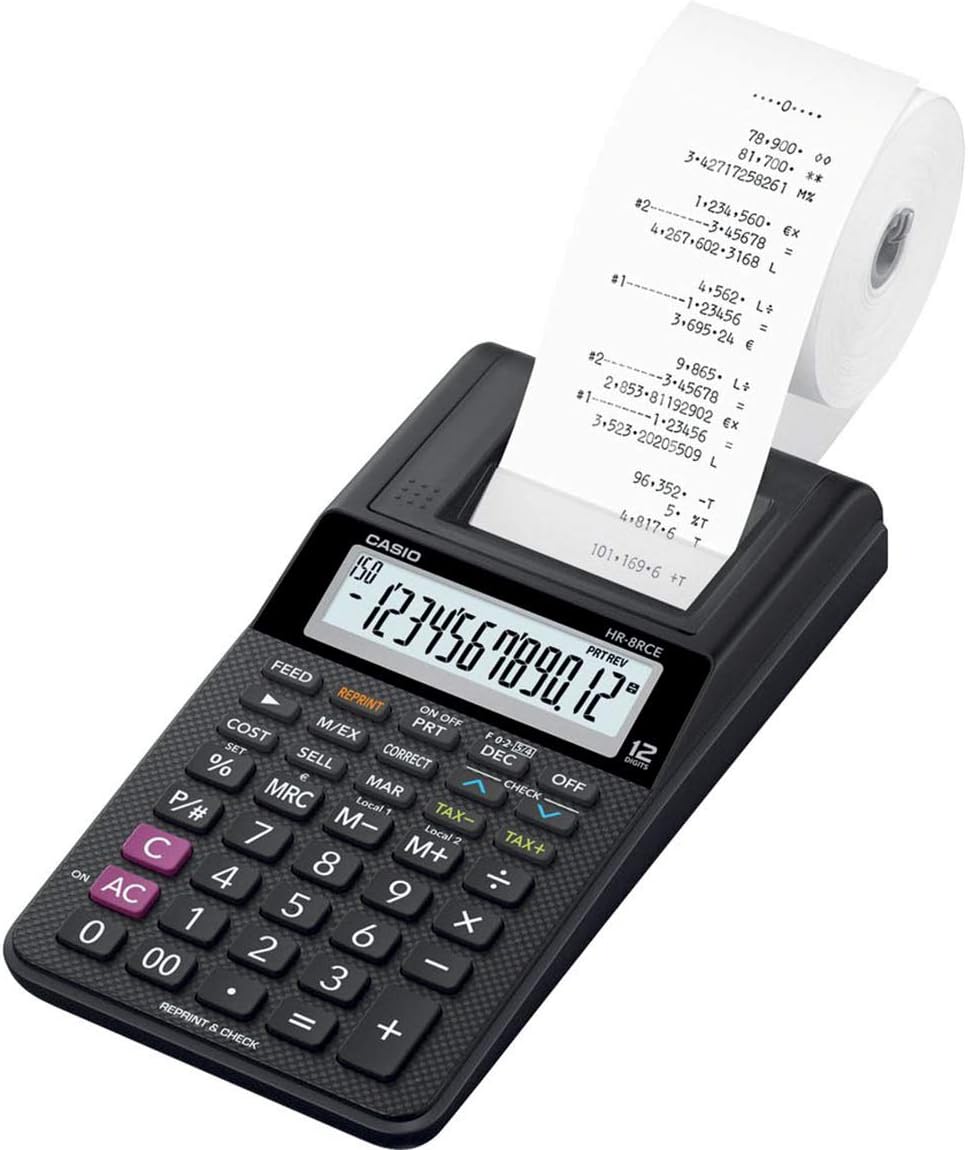
Bersudut view of the black Casio HR-8RCE Printing Calculator. The calculator features a 12-digit LCD display and a built-in thermal printer, from which a roll of paper with printed calculations extends upwards. The keypad includes numeric keys, arithmetic operators, and dedicated function keys for cost, sell, margin, tax, memory, and check/reprint functions.
4. Arahan Operasi
4.1. Basic Calculations
Perform standard arithmetic operations (+, -, ×, ÷) by entering numbers and pressing the corresponding operator keys. Press the = key to display the result.
4.2. Fungsi Khas
- Cost, Sell, Margin: Gunakan KOS, JUAL, dan MAR keys to calculate profit margins. Enter two values, then press the third key to find the missing value.
- Pengiraan Cukai: Set the tax rate using the appropriate procedure (refer to the full manual for detailed steps). Use CUKAI+ to add tax and CUKAI- untuk menolak cukai.
- Penukaran Mata Wang: Program two currency exchange rates. Use the currency conversion key to switch between currencies.
- Semak & Betulkan: Tekan ke SEMAK kunci untuk semulaview previous entries (up to 150 steps). Use the arrow keys to navigate and the BETUL key to modify an entry.
- Fungsi Selepas Cetakan: This feature allows you to perform a series of calculations and then print the entire sequence after all entries are made. This is useful for verifying long calculations.
- Fungsi Cetak Semula: After a calculation sequence has been printed, you can use the CETAKAN SEMULA key to print the same sequence again as many times as needed.
4.3. Decimal and Rounding Settings
The calculator offers flexible decimal point and rounding settings:
- Decimal Selector (F, 0, 2): Gunakan DIS slider or button to select floating decimal (F), 0 decimal places, or 2 decimal places.
- Rounding Selector (5/4): The 5/4 setting rounds up if the next digit is 5 or greater, and rounds down if it is 4 or less.
4.4. Fungsi Memori
The independent memory allows you to store and recall values:
- M+: Menambah nilai yang dipaparkan ke memori.
- M-: Menolak nilai yang dipaparkan daripada ingatan.
- BSMM: Press once to recall the memory content. Press twice to clear the memory.
This video demonstrates the key features and functionality of the Casio HR-8RCE Portable 12-Digit Printing Calculator, highlighting its printing capabilities and ease of use for various calculations.
5. Penyelenggaraan
5.1. Pembersihan
To clean the calculator, wipe it with a soft, dry cloth. Do not use abrasive cleaners, solvents, or excessive moisture, as these can damage the unit.
5.2. Paper Roll Replacement
Replace the paper roll when the print becomes faint or the roll is depleted. Always use 58 mm thermal paper rolls for optimal performance.
6. Penyelesaian masalah
If you encounter issues with your Casio HR-8RCE calculator, consider the following common solutions:
- Tiada Paparan/Tiada Kuasa: Check if the batteries are correctly installed and have sufficient charge. Replace batteries if necessary. Ensure the calculator is turned ON.
- Isu Percetakan: Verify that the paper roll is installed correctly and is not jammed. Ensure you are using the correct type of thermal paper.
- Pengiraan yang salah: Double-check your entries and ensure the correct function keys are being used. Reset the calculator if persistent errors occur (refer to the full manual for reset procedures).
7. Spesifikasi
| Ciri | Spesifikasi |
|---|---|
| Nombor Model | HR-8RCE |
| Paparan | 12-Digits LC-Display |
| Kelajuan Mencetak | 2.0 Lines/Sec. |
| Saiz Kertas | 58 mm |
| Sumber Kuasa | 4 x AA Batteries (included), AC Adaptor optional (AD-A 60024) |
| Dimensi Produk | 8.23 x 4.02 x 1.65 inci |
| Berat Barang | 12.1 auns |
| Pengeluar | Casio |
8. Waranti dan Sokongan
The Casio HR-8RCE Printing Calculator comes with a 2-Year Warranty. For detailed warranty information, technical support, or to purchase accessories, please visit the official Casio webtapak atau hubungi bahagian perkhidmatan pelanggan mereka. Simpan bukti pembelian anda untuk tuntutan waranti.