
1. Pengenalan
The Amkette Trubeats S50 is a versatile smart wireless Bluetooth speaker designed to enhance your audio experience. It features multiple connectivity options including Bluetooth, USB, Micro SD card, and AUX input, along with an integrated FM radio. The speaker also includes a digital clock with alarm functions and can be controlled via a dedicated smartphone application. Additionally, it can function as a power bank to charge your mobile devices.
2. Kandungan Pakej
Sila tandai kotak untuk item berikut:
- Amkette Trubeats S50 Smart Wireless Bluetooth Speaker
- Kabel Pengecas USB
- Kabel AUX
- Manual Pengguna (dokumen ini)
3. Produk Lebihview
Familiarize yourself with the various parts and controls of your Amkette Trubeats S50 speaker.
3.1 Depan View

Rajah 1: Depan view of the Amkette Trubeats S50 speaker, showing the speaker grille and LED display.
3.2 Top Control Panel

Figure 2: Labeled diagram of the Amkette Trubeats S50 speaker's top control buttons: Mode, Volume Down/Previous, Play/Pause/Answer Call, Volume Up/Next, Clock, and Microphone.
- Butang MOD: Press to switch between Bluetooth, FM, AUX, USB, and Micro SD modes.
- K-/ Button: Press to decrease volume; long press for previous track/station.
- Play/Pause/Answer Call Button: Press to play/pause audio; press to answer/end calls.
- +/N Button: Press to increase volume; long press for next track/station.
- Butang JAM: Press to set time and alarms.
- mikrofon: Untuk panggilan bebas tangan.
3.3 Rear Ports and Switch

Figure 3: Labeled diagram of the Amkette Trubeats S50 speaker's rear ports: AUX, Micro SD, USB Host, USB DC, and On/Off switch.
- Input AUX: Sambungkan peranti audio luaran menggunakan kabel AUX 3.5mm.
- Slot Kad Mikro SD: Masukkan kad Micro SD untuk main balik audio.
- Port Hos USB: Insert a USB drive for audio playback or use as a power bank.
- USB DC Input: Connect the USB charging cable to power the speaker.
- Suis ON / OFF: Power the speaker on or off.
4. Persediaan
4.1 Mengecas Speaker
- Sambungkan hujung kecil kabel pengecas USB ke USB DC Input port di bahagian belakang pembesar suara.
- Sambungkan hujung besar kabel pengecas USB kepada penyesuai kuasa USB (tidak disertakan) atau port USB komputer.
- Penunjuk LED akan menunjukkan status pengecasan. Pengecasan penuh biasanya mengambil masa kira-kira 4 jam.
Nota: The speaker does not have a visible battery level indicator. It is recommended to charge fully before first use and when the battery is low.
4.2 Menghidupkan/Mematikan
- Untuk menghidupkan, luncurkan Suis HIDUP/MATI on the rear of the speaker to the 'ON' position.
- Untuk mematikan kuasa, luncurkan Suis HIDUP/MATI to the 'OFF' position.
5. Arahan Operasi
5.1 Berpasangan Bluetooth

Figure 4: Speaker in Bluetooth pairing mode, indicated by 'BT' on the display.
- Power on the speaker. It will automatically enter Bluetooth pairing mode, indicated by 'BT' flashing on the LED display.
- Dayakan Bluetooth pada telefon pintar atau peranti anda yang lain.
- Cari untuk available devices and select "Amkette S50" from the list.
- Once paired, the speaker will emit a confirmation tone, and 'BT' will stop flashing.
- Anda kini boleh memainkan audio daripada peranti anda melalui pembesar suara.
5.2 Menggunakan Input AUX

Figure 5: Speaker connected to a smartphone via AUX cable for wired audio playback.
- Sambungkan satu hujung kabel AUX 3.5mm ke Input AUX port di bahagian belakang pembesar suara.
- Connect the other end of the AUX cable to the audio output jack of your external device (e.g., smartphone, MP3 player, laptop).
- Tekan ke Butang MOD repeatedly until the speaker enters AUX mode.
- Mainkan audio daripada peranti anda yang disambungkan.
5.3 Using USB/Micro SD Card
- Masukkan pemacu USB ke dalam Port Hos USB or a Micro SD card into the Slot Kad SD Mikro di bahagian belakang pembesar suara.
- Pastikan audio anda files (MP3 format recommended) are stored on the drive/card.
- Tekan ke Butang MOD repeatedly until the speaker enters USB or Micro SD mode. Playback will begin automatically.
- Gunakan K-/ dan +/N buttons for track navigation and volume control.
5.4 Operasi Radio FM

Figure 6: Speaker displaying FM frequency, with app control for station selection.
- Tekan ke Butang MOD repeatedly until the speaker enters FM radio mode.
- Imbasan Auto: In FM mode, long press the Main/Jeda button to initiate an automatic scan for available FM stations. The speaker will save detected stations.
- Penalaan Manual: Gunakan K-/ dan +/N butang untuk menavigasi stesen yang disimpan.
- For precise tuning and station management, use the Amkette Trubeats Smart Speaker App (see section 5.7).
5.5 Digital Clock and Alarm Setup

Figure 7: Speaker displaying the current time on its LED screen.
- Masa Tetapan: Tekan dan tahan butang Butang JAM. The hour display will flash. Use the K-/ dan +/N buttons to adjust the hour. Press the Butang JAM again to set minutes, and adjust with K-/ dan +/N. Tekan Butang JAM sekali lagi untuk mengesahkan.
- Menetapkan Penggera: Tekan sebentar Butang JAM to cycle through Alarm 1 and Alarm 2 settings. When an alarm time is displayed, long press the Butang JAM to enter alarm setting mode. Adjust hour and minute using K-/ dan +/N, confirming each with a short press of the Butang JAM. You can also set the alarm source (FM/SD Card/USB) via the app.
5.6 Menggunakan sebagai Power Bank
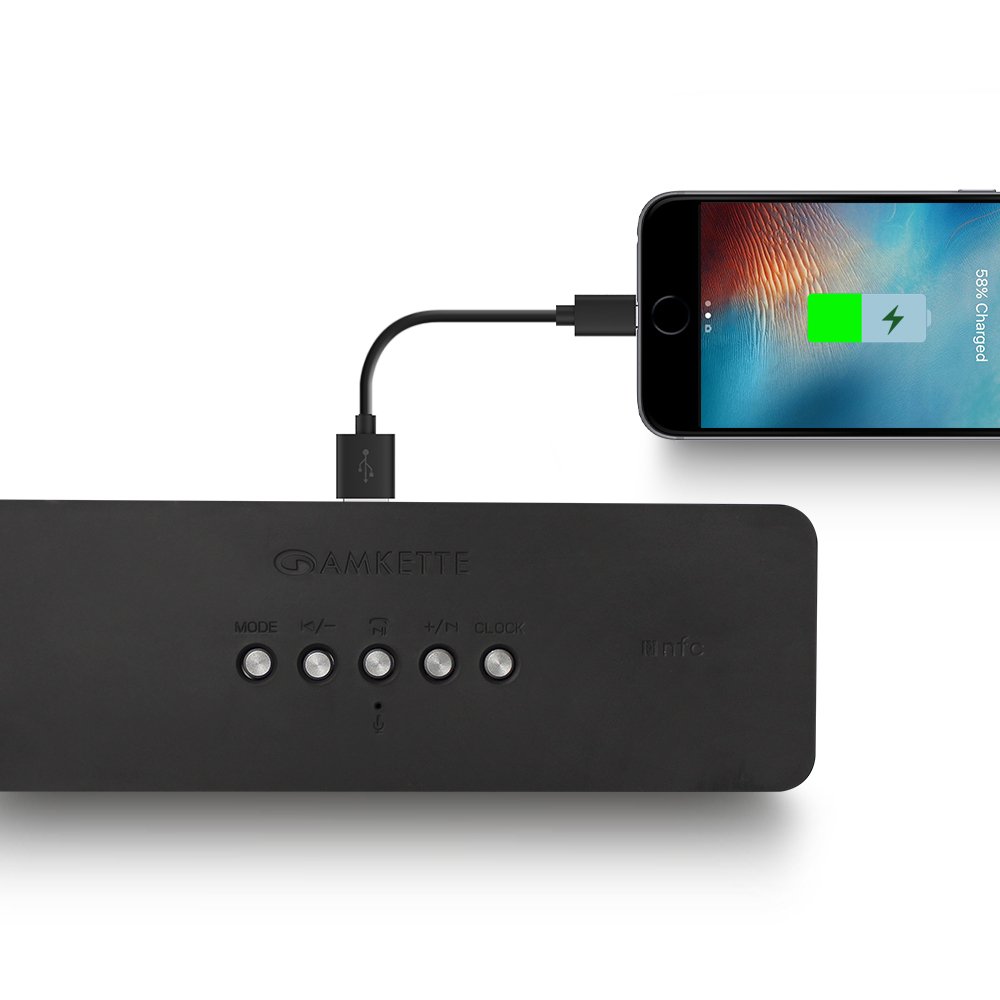
Figure 8: Speaker providing power to a smartphone through its USB Host port.
The Amkette Trubeats S50 can charge your smartphone or other USB-powered devices. Connect your device's charging cable to the Port Hos USB on the rear of the speaker. The speaker's internal battery will then supply power to your device.
5.7 App Control (Android Only)

Figure 9: Smartphone displaying the Amkette Trubeats Smart Speaker App interface.
For enhanced control, download the Amkette Trubeats Smart Speaker App from the Google Play Store (for Android phones). The app allows you to:
- Beralih antara mod audio yang berbeza.
- Control volume and track playback.
- Manage FM radio stations and perform precise tuning.
- Set and customize alarms, including alarm source.
Ensure your speaker is connected via Bluetooth to your smartphone for app functionality.
5.8 Pengendalian Panggilan
When connected via Bluetooth to a smartphone, the speaker can be used for hands-free calling:
- Jawab Panggilan: Tekan ke Play/Pause/Answer Call Button sekali.
- Tamatkan Panggilan: Tekan ke Play/Pause/Answer Call Button sekali semasa panggilan.
- Tolak Panggilan: Tekan lama Play/Pause/Answer Call Button.
6. Penyelenggaraan
- Keep the speaker away from extreme temperatures, direct sunlight, and moisture.
- Bersihkan pembesar suara dengan kain lembut dan kering. Jangan gunakan pembersih atau pelarut yang melelas.
- Elakkan daripada menjatuhkan pembesar suara atau terkena impak yang kuat.
- Apabila tidak digunakan untuk tempoh yang lama, simpan pembesar suara di tempat yang sejuk dan kering dan casnya secara berkala untuk mengekalkan kesihatan bateri.
7. Penyelesaian masalah
| Masalah | Kemungkinan Punca | Penyelesaian |
|---|---|---|
| Speaker tidak dihidupkan. | Bateri habis. | Cas pembesar suara sepenuhnya. |
| Tiada bunyi dari pembesar suara. | Kelantangan terlalu rendah; mod yang dipilih salah; peranti tidak disambungkan dengan betul. | Increase speaker and source device volume. Ensure correct mode (Bluetooth, AUX, etc.) is selected. Reconnect the device. |
| Gandingan Bluetooth gagal. | Pembesar suara tidak dalam mod berpasangan; peranti terlalu jauh; gangguan. | Ensure speaker is in pairing mode ('BT' flashing). Move device closer to speaker. Turn off other Bluetooth devices. |
| Penerimaan radio FM yang lemah. | Isyarat lemah; gangguan persekitaran. | Pindahkan pembesar suara ke kawasan yang mempunyai penerimaan yang lebih baik. Lakukan imbasan automatik sekali lagi. |
| Aplikasi tidak bersambung ke pembesar suara. | Bluetooth not connected; app issue. | Ensure speaker is paired via Bluetooth to your phone. Restart the app and try again. |
8. Spesifikasi
- model: S50
- Jenama: Amkette
- Jenis pembesar suara: Portable Bluetooth Speaker (Outdoor)
- Ketersambungan: Bluetooth, USB, Micro SD, AUX, FM Radio
- Teknologi Komunikasi Tanpa Wayar: Bluetooth
- Kaedah Kawalan: Buttons, App (Android)
- Mod Output Audio: Stereo
- Audio Wattage: 10 Watt
- Sumber Kuasa: Dikuasakan Bateri
- Hayat Bateri: Sehingga 12 jam (purata)
- Masa Pengecasan: Lebih kurang 4 jam
- Peranti Serasi: Laptop, Mobile, Tablet
- Dimensi (LxWxH): 26.7 x 10.9 x 7.9 cm
- Berat Barang: 703 Gram
- kalis air: ya
- Jenis Pemasangan: Pemasangan Atas Meja
9. Waranti dan Sokongan
The Amkette Trubeats S50 Smart Wireless Bluetooth Speaker comes with a Waranti 1 tahun dari tarikh pembelian. Waranti ini meliputi kecacatan pembuatan di bawah penggunaan biasa.
For warranty claims, technical assistance, or any other support inquiries, please contact Amkette customer support through their official webtapak atau maklumat hubungan yang diberikan bersama dokumentasi pembelian anda.
Sila simpan resit pembelian anda sebagai bukti pembelian untuk tujuan waranti.