
1. Pengenalan
The Grandstream GWN7610 is a high-performance 802.11ac Wi-Fi Access Point designed for various environments such as office buildings, multi-floor locations, branch offices, and commercial/retail settings. It offers high network throughput, extensive wireless coverage, robust security features, and integrated network management without requiring external controllers. This manual provides essential information for the proper installation, configuration, and operation of your GWN7610 Access Point.
2. Kandungan Pakej
Sahkan bahawa pakej anda mengandungi item berikut:
- Grandstream GWN7610 Access Point
- Mounting Equipment (bracket, screws)
- Panduan Pemasangan Ringkas (dokumen ini)
Note: A power adapter is not included. The device supports Power over Ethernet (PoE/PoE+).
3. Fizikal Overview
Familiarize yourself with the ports and indicators on your GWN7610 Access Point.

Rajah 3.1: Atas-bawah view of the GWN7610 Access Point, showing its circular design and ventilation.
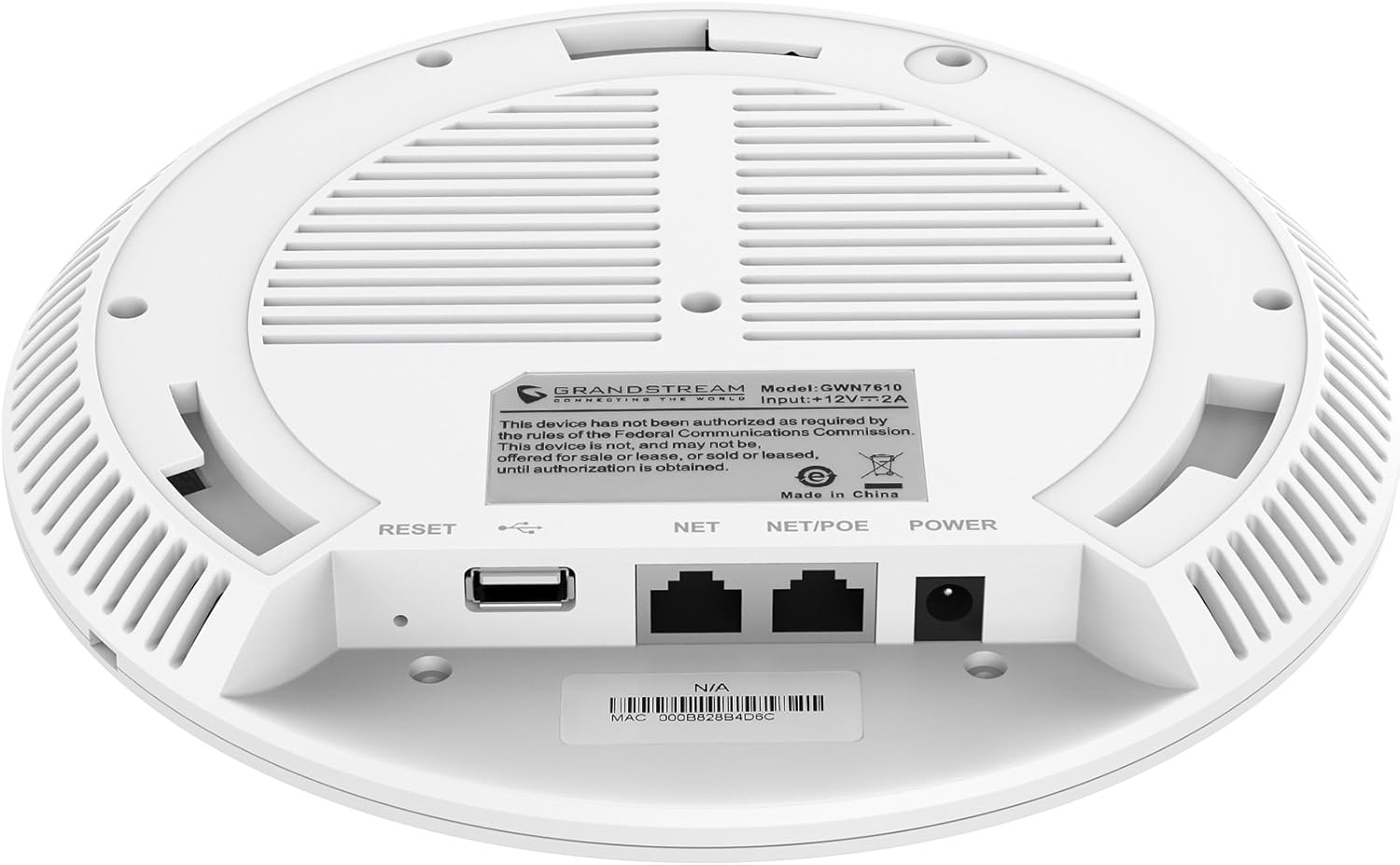
Rajah 3.2: Bawah view of the GWN7610 Access Point, highlighting the connectivity ports and regulatory information.
- Butang TETAP SEMULA: Used to reset the device to factory default settings. Press and hold for 10 seconds while the device is powered on.
- Port USB: For future applications such as location-based services and other IoT (Internet of Things) applications.
- NET/POE Port: Gigabit Ethernet port that supports Power over Ethernet (PoE/PoE+) for both data and power supply.
- Port KUASA: DC power input (12V===2A) if not using PoE.
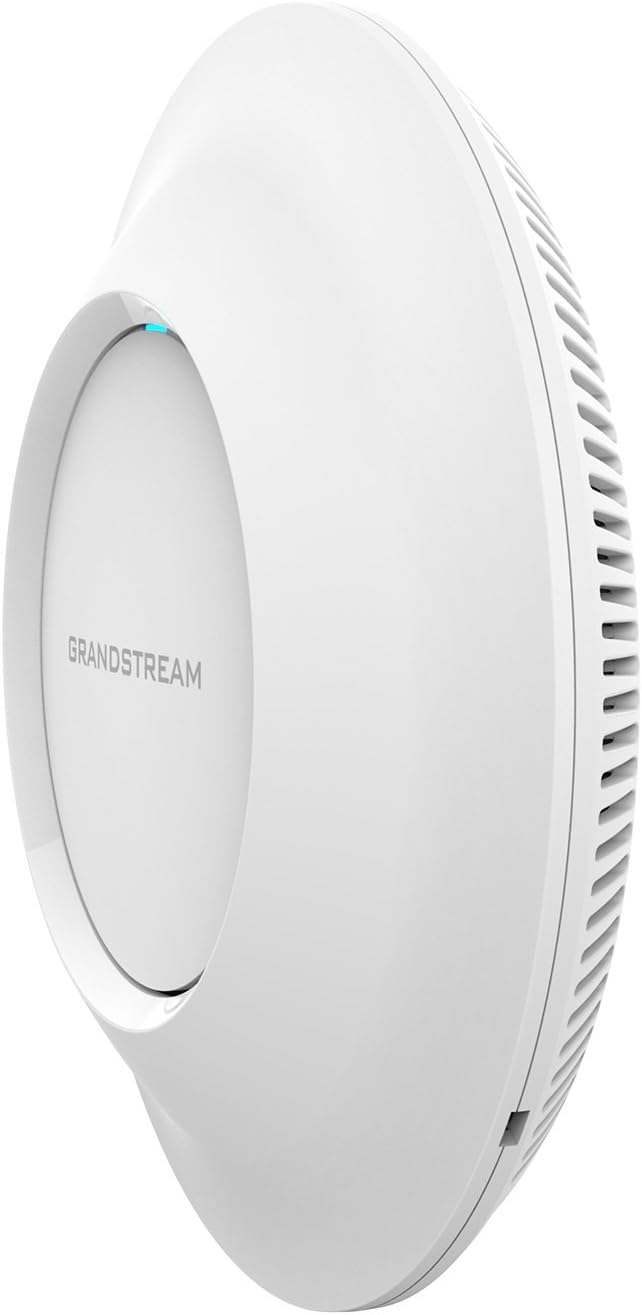
Rajah 3.3: Sisi view of the GWN7610 Access Point, illustrating its sleek profile.
4. Pemasangan dan Pemasangan
The GWN7610 can be mounted on a wall or ceiling. The included mounting equipment facilitates installation. For optimal wireless coverage, choose a central location free from obstructions and sources of interference. Ensure the device is positioned away from large metal objects, concrete walls, and other electronic devices that may cause signal degradation.
Refer to the specific instructions provided with the mounting kit for detailed steps on securing the access point.
5. Persediaan
The GWN7610 features embedded network management, allowing for easy setup and configuration without the need for external controllers. Follow these general steps for initial setup:
- Hidupkan kuasa: Connect the GWN7610 to a PoE/PoE+ enabled switch or injector using an Ethernet cable, or connect a 12V===2A DC power adapter to the POWER port.
- Sambungan Rangkaian: Connect the NET/POE port to your network infrastructure (router or switch).
- Mengakses ke Web Antara muka: Once powered on and connected, the GWN7610 will obtain an IP address via DHCP. You can discover the device's IP address using Grandstream's discovery tools or by checking your DHCP server's client list. Enter the IP address into a web browser to access the management interface.
- Konfigurasi Awal: Log in with the default credentials (usually found in the Quick Installation Guide or on the device label) and proceed with configuring your Wi-Fi networks (SSIDs), security settings, and other network parameters.
6. Arahan Operasi
The GWN7610 is designed for robust and efficient wireless operation. Key operational features include:
- Berbilang SSID: Supports up to 16 SSIDs per radio, allowing for flexible network segmentation (e.g., separate networks for employees, guests, IoT devices).
- Kapasiti Pelanggan: Capable of supporting over 250 concurrent Wi-Fi clients, making it suitable for high-density environments.
- Dual-Band MIMO: Utilizes dual-band 3x3:3 MIMO technology for enhanced performance and reliability across both 2.4GHz and 5GHz frequencies.
- Kapasiti Tinggi: Delivers a maximum network throughput of up to 1.75Gbps, ensuring fast data transfer rates.
- Liputan Lanjutan: Provides an expanded coverage range of up to 175 meters, minimizing dead zones.
- Integrated Controller: Manage multiple GWN7610 units from a single master access point, simplifying network administration.
7. Penyelenggaraan
Regular maintenance ensures optimal performance and longevity of your GWN7610 Access Point.
- Kemas kini Firmware: Periodically check the Grandstream website for the latest firmware versions. Firmware updates often include performance improvements, security patches, and new features. Follow the instructions provided by Grandstream for updating firmware. Note that some updates may require using a TFTP server.
- Pembersihan: Pastikan peranti bersih dan bebas daripada habuk. Gunakan kain lembut dan kering untuk membersihkan. Jangan gunakan pembersih cecair atau aerosol.
- Keadaan Persekitaran: Pastikan peranti beroperasi dalam julat suhu dan kelembapan yang ditetapkan untuk mengelakkan kerosakan.
8. Penyelesaian masalah
If you encounter issues with your GWN7610, consider the following troubleshooting steps:
- Tiada Kuasa: Verify that the device is properly connected to a PoE/PoE+ source or a compatible 12V===2A power adapter. Check the power indicator light.
- Tiada Kesambungan Rangkaian: Ensure the Ethernet cable is securely connected to the NET/POE port and your network switch/router. Check the status of your network infrastructure.
- Tidak Boleh Akses Web Antara muka: Confirm the device has an IP address and that your computer is on the same network segment. Try pinging the device's IP address. If the IP address is unknown, use Grandstream's discovery utility.
- Prestasi Wi-Fi yang lemah: Check for sources of interference (e.g., microwaves, cordless phones). Ensure the access point is optimally placed. Adjust Wi-Fi channel settings to avoid congestion.
- Peranti Tidak Responsif: Perform a soft reboot by disconnecting and reconnecting power. If the issue persists, perform a factory reset using the RESET button (refer to Section 3).
9. Spesifikasi
| Ciri | Spesifikasi |
|---|---|
| Jenis Wayarles | 802.11a/g/n/ac |
| Bilangan USB 2.0 Port | 1 |
| Jenama | Grandstream |
| Siri | Grandstream GWN7610 |
| Nombor Model Item | GWN7610 |
| Sistem Operasi | RouterOS |
| Berat Barang | 1.9 paun |
| Dimensi Produk (LxWxH) | 9 x 9 x 3 inci |
| warna | putih |
| Pengeluar | Grandstream |
10. Maklumat Keselamatan
Sila baca dan ikuti garis panduan keselamatan ini untuk mengelakkan kerosakan pada peranti atau kecederaan kepada diri anda:
- Jangan dedahkan peranti kepada air atau lembapan.
- Jangan buka atau cuba membaiki peranti. Rujuk semua servis kepada kakitangan yang berkelayakan.
- Use only the power sources specified (PoE/PoE+ or 12V===2A DC adapter).
- Pasang peranti di kawasan pengudaraan yang baik.
- Amaran Proposisi 65: Produk ini mungkin mengandungi bahan kimia yang diketahui oleh State of California yang menyebabkan barah dan cacat lahir atau bahaya pembiakan yang lain.
11. Pematuhan Peraturan
This device complies with relevant regulatory standards. Please note the following:
FCC Warning: This device has not been authorized as required by the rules of the Federal Communications Commission. This device is not, and may not be, offered for sale or lease, or sold or leased, until authorization is obtained.
Users are advised to ensure compliance with local regulations regarding wireless device operation.
12. Waranti dan Sokongan
Untuk maklumat jaminan dan sokongan teknikal, sila rujuk Grandstream rasmi website or contact your authorized reseller. Keep your purchase receipt for warranty claims.