
pengenalan
This manual provides comprehensive instructions for the setup, operation, and maintenance of your GPX Digital AM/FM Clock Radio, model C224B. Please read this manual thoroughly before using the device to ensure proper functionality and to maximize your user experience. Keep this manual for future reference.
Produk Selesaiview
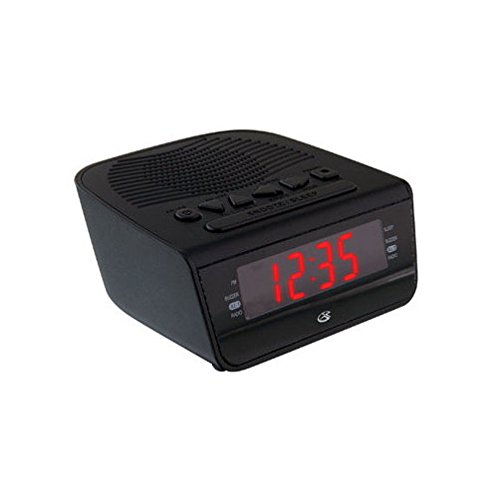
Rajah 1: Depan view of the GPX Digital AM/FM Clock Radio. This image shows the compact black unit with its digital display and control buttons.
The GPX Digital AM/FM Clock Radio (C224B) is designed for reliable timekeeping and audio entertainment. Key features include a clear multi-display clock, AM/FM radio tuner, dual alarm functionality, and a battery backup option to ensure continuous operation during power interruptions. Its compact and modern design makes it suitable for various indoor settings.
Persediaan
1. Membongkar
Carefully remove the clock radio from its packaging. Ensure all components are present: the clock radio unit and the power adapter.
2. Sambungan Kuasa
- Plug the power adapter into the DC input jack located on the back of the clock radio.
- Plug the other end of the power adapter into a standard wall outlet (AC 120V, 60Hz).
- The display will illuminate, indicating the unit is receiving power.
3. Pemasangan Sandaran Bateri (Pilihan)
Untuk kuasa sandaran semasatages, install batteries (not included).
- Cari petak bateri di bahagian bawah unit.
- Buka penutup petak bateri.
- Insert the required batteries (e.g., 2 x AAA, check unit for specific type) according to the polarity markings (+ and -).
- Tutup penutup petak bateri dengan selamat.
Nota: Batteries are for backup only and will not power the display or radio functions continuously. They preserve time and alarm settings during a power interruption.
Arahan Operasi
1. Menetapkan Masa
- Tekan dan tahan butang MASA DITETAPKAN butang sehingga paparan berkelip.
- Gunakan JAM dan MINIT butang untuk melaraskan masa.
- Tekan MASA DITETAPKAN sekali lagi untuk mengesahkan dan keluar dari mod tetapan masa.
2. Menetapkan Penggera (Penggera 1 dan Penggera 2)
This unit features dual alarms, allowing you to set two independent wake-up times.
- Tekan dan tahan butang PENGGERA 1 SET (atau PENGGERA 2 SET) button until the alarm time flashes.
- Gunakan JAM dan MINIT buttons to adjust the desired alarm time.
- Tekan PENGGERA 1 SET (atau PENGGERA 2 SET) again to confirm the time.
- Immediately after confirming the time, use the MODUL ALARM button to select the alarm source: PEMBUAT or RADIO.
- The alarm icon (e.g., AL1 or AL2) will appear on the display, indicating the alarm is active.
To turn off an alarm, press the corresponding PENGGERA 1 HIDUP/MATI (atau PENGGERA 2 HIDUP/MATI) button. The alarm icon will disappear.
3. Operasi Radio AM/FM
- Tekan ke RADIO HIDUP/MATI butang untuk menghidupkan radio.
- Tekan ke BAND butang untuk bertukar antara jalur AM dan FM.
- Gunakan TALA + or LAGU - butang untuk menala ke stesen yang dikehendaki secara manual.
- To automatically scan for the next available station, press and hold TALA + or LAGU - untuk beberapa saat.
- Laraskan kelantangan menggunakan JILID + or JILID - butang.
- Untuk mematikan radio, tekan butang RADIO HIDUP/MATI butang lagi.
4. Fungsi Tunda
Apabila penggera berbunyi, tekan butang MENGEJUTKAN butang untuk mematikan penggera buat sementara waktu selama lebih kurang 9 minit. Penggera akan berbunyi semula selepas tempoh tunda.
5. Fungsi Tidur
The sleep function allows the radio to play for a set duration before automatically turning off.
- Semasa radio dimainkan, tekan butang TIDUR butang berulang kali untuk mengitari masa tidur yang tersedia (cth, 90, 60, 30, 15 minit, MATI).
- Radio akan dimatikan secara automatik selepas masa yang dipilih.
Penyelenggaraan
1. Pembersihan
To clean the unit, wipe the exterior with a soft, slightly damp cloth. Do not use abrasive cleaners or solvents, as these may damage the finish. Ensure the unit is unplugged before cleaning.
2. Penggantian Bateri
If the battery backup function is not working, or if the unit loses time during a power outage, the backup batteries may need replacement. Follow the "Battery Backup Installation" steps in the Setup section to replace them.
Menyelesaikan masalah
| Masalah | Kemungkinan Punca | Penyelesaian |
|---|---|---|
| Unit tidak dihidupkan. | Penyesuai kuasa tidak disambungkan atau alur keluar rosak. | Pastikan penyesuai kuasa dipasang dengan kukuh pada unit dan soket dinding yang berfungsi. Cuba soket lain. |
| Penggera tidak berbunyi. | Alarm not set, alarm volume too low, or alarm turned off. | Verify alarm time and source (buzzer/radio) are set correctly. Ensure alarm is activated (icon visible). Increase radio volume if alarm source is radio. |
| Penerimaan radio yang lemah. | Isyarat atau gangguan yang lemah. | Adjust the position of the unit or the antenna (if external). Move away from other electronic devices that may cause interference. |
| Masa/tetapan hilang selepas kuasa outage. | Bateri sandaran mati atau tidak dipasang. | Install fresh backup batteries or replace existing ones. |
Spesifikasi
- model: C224B
- Sumber Kuasa: AC 120V, 60Hz (main); Battery Powered (backup)
- Jenis Paparan: Paparan Digital LED
- Pancaragam Radio: AM/FM
- Dimensi (Lebih kurang): 5.12" W x 5.12" H
- Berat (Lebih kurang): 3 paun
- warna: Hitam
- Bahan: plastik
Waranti dan Sokongan
For warranty information or technical support, please refer to the warranty card included with your product or visit the official GPX website. Do not attempt to repair this unit yourself, as this may void your warranty.
GPX Official Webtapak: www.gpx.com