
pengenalan
Thank you for choosing the auna Connect 90 Internet Radio. This manual provides essential information for the safe and efficient operation of your device. Please read it thoroughly before use and keep it for future reference. The auna Connect 90 offers versatile audio entertainment with Internet Radio, FM radio, and USB MP3 playback capabilities, all accessible via WiFi connectivity.
Arahan Keselamatan
- Baca semua arahan dengan teliti sebelum mengendalikan peranti.
- Jauhkan peranti daripada air, kelembapan dan kelembapan yang tinggi.
- Jangan dedahkan peranti kepada cahaya matahari langsung atau suhu yang melampau.
- Pastikan pengudaraan yang betul; jangan sekat sebarang bukaan pengudaraan.
- Gunakan hanya penyesuai kuasa yang disediakan.
- Jangan cuba membuka atau membaiki peranti sendiri. Rujuk semua servis kepada kakitangan yang berkelayakan.
- Jauhkan peranti daripada capaian kanak-kanak.
Kandungan Pakej
Sila pastikan semua item ada dan dalam keadaan baik:
- auna Connect 90 Internet Radio Unit
- Penyesuai Kuasa
- Alat Kawalan Jauh
- Manual Pengguna (dokumen ini)
Produk Selesaiview
Panel Hadapan dan Paparan
The front panel features the main display, control buttons, and the navigation dial for easy interaction.
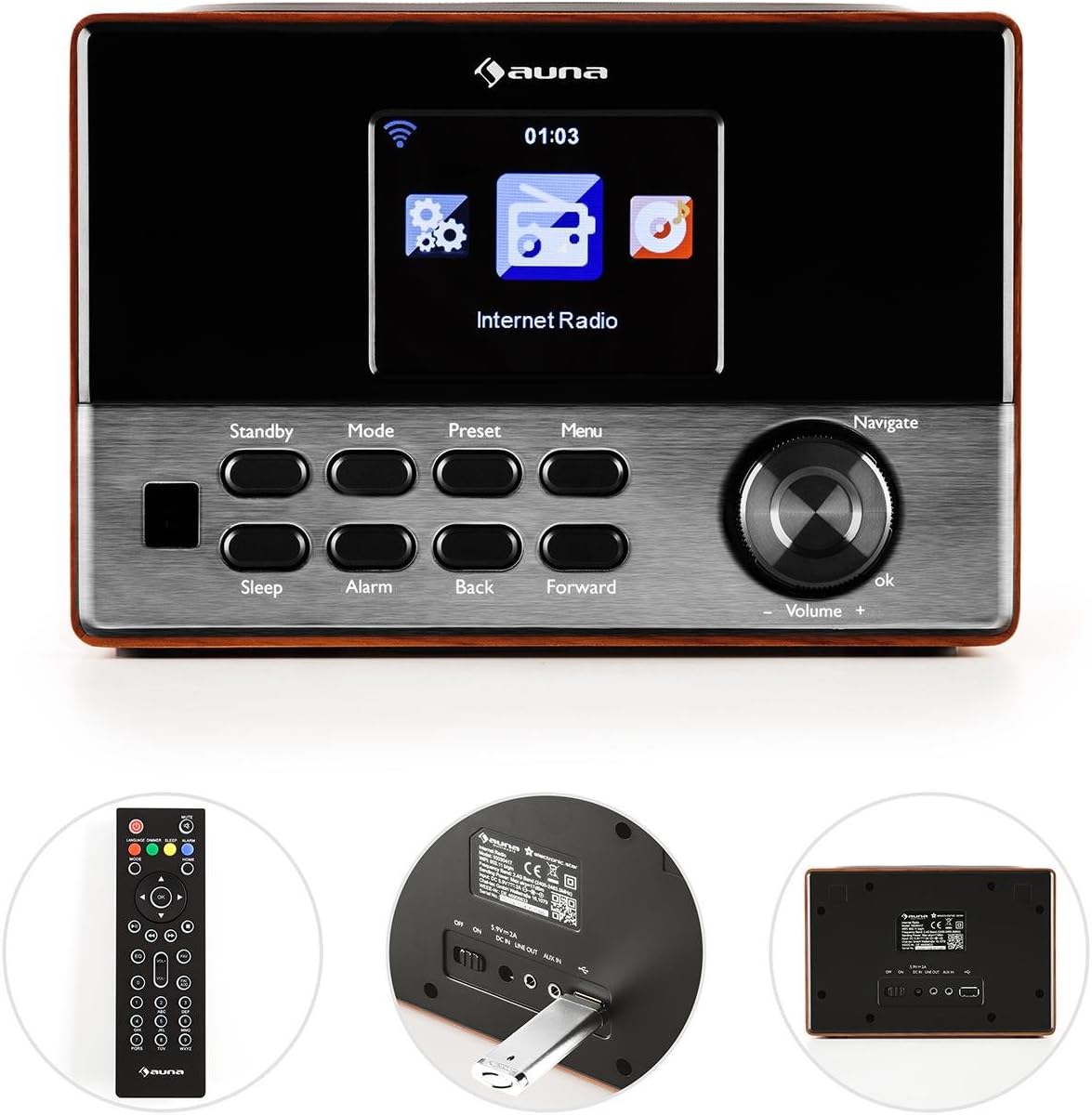
Imej: Depan view of the auna Connect 90, showing the color display, control buttons (Standby, Mode, Preset, Menu, Sleep, Alarm, Back, Forward), and the Navigate/Volume dial.
- paparan: Color screen showing time, station information, and menu options.
- Bersedia: Menghidupkan atau mematikan unit.
- Mod: Switches between Internet Radio, FM, and USB modes.
- Pratetap: Accesses saved radio station presets.
- Menu: Enters the main menu for settings and options.
- tidur: Sets a sleep timer.
- penggera: Mengkonfigurasi tetapan penggera.
- Back/Forward: Navigates through menus or tracks.
- Navigate/Volume Dial: Rotates to scroll through options or adjust volume; press to confirm (OK).
Panel Belakang dan Sambungan
The rear panel provides essential connection ports for power and external devices.
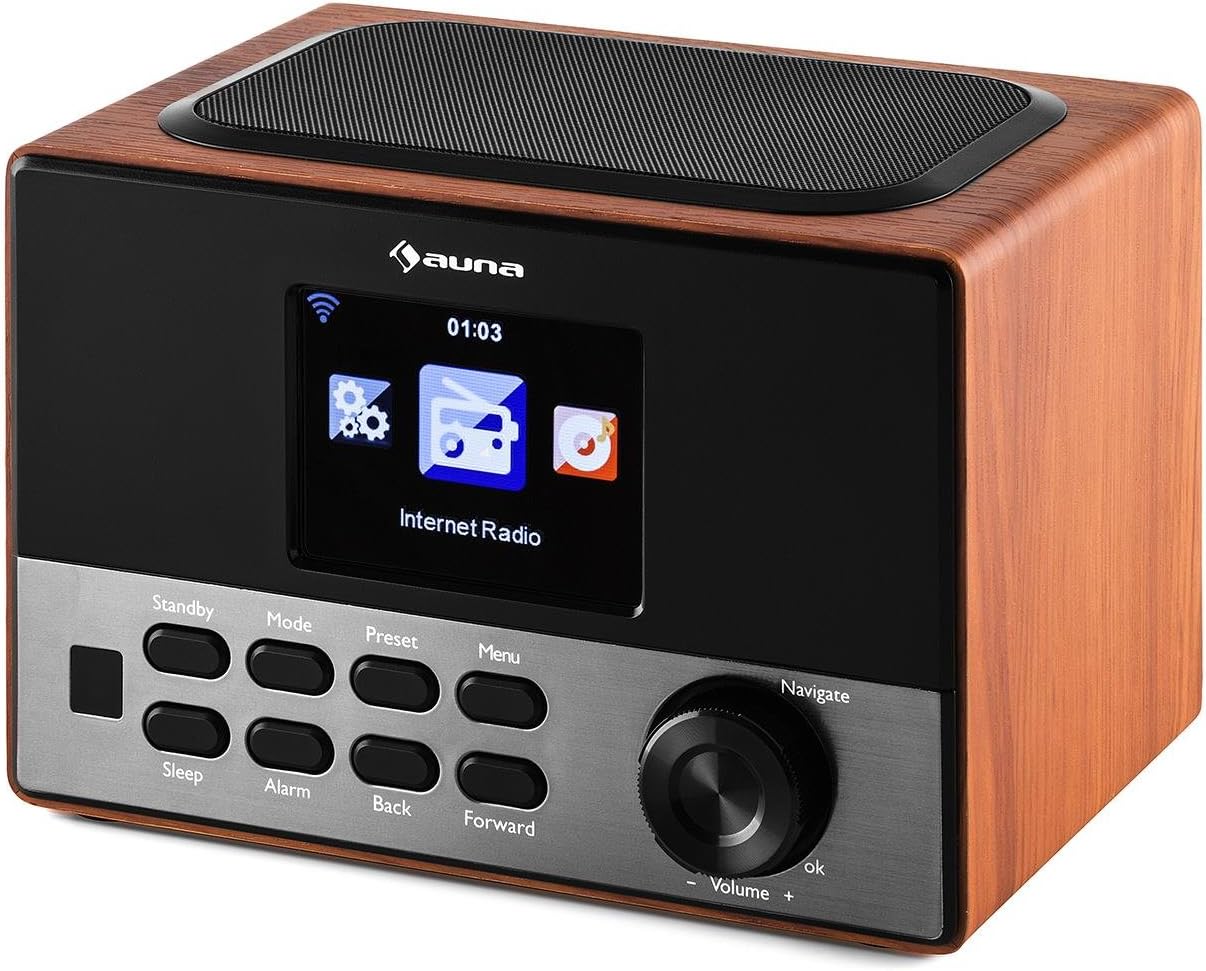
Imej: belakang view of the auna Connect 90, showing the power input, USB port, and Aux-out port.
- DC DALAM 5V: Input kuasa untuk penyesuai yang disertakan.
- USB: Port for connecting a USB drive for MP3 playback.
- AUX OUT: 3.5mm audio output for connecting to external speakers or headphones.
Persediaan
1. Sambungan Kuasa
- Sambungkan penyesuai kuasa ke DC DALAM 5V port di bahagian belakang radio.
- Palamkan penyesuai kuasa ke salur keluar dinding.
- The radio will power on to standby mode. Press the Bersedia butang untuk menghidupkannya.
2. Persediaan Awal dan Sambungan Rangkaian
Sebaik sahaja kuasa dihidupkan buat kali pertama, radio akan membimbing anda melalui wizard persediaan awal.
- Pemilihan Bahasa: Gunakan Navigasi dial to select your preferred language and press OK untuk mengesahkan.
- Ahli Sihir Rangkaian: The radio will prompt you to connect to a network. Select 'Yes' and press OK.
- Imbas untuk Rangkaian: The radio will scan for available WiFi networks. Select your network from the list.
- Masukkan Kata Laluan: Gunakan Navigasi dial to enter your WiFi password (WPA/WPA2). Rotate to select characters, press ke hadapan to move to the next character, and press OK untuk mengesahkan kata laluan.
- Sambungan: The radio will attempt to connect to your WiFi network. Once successful, it will display a confirmation message.
If the connection fails, double-check your password and try again. Ensure your WiFi router is within range.
Beroperasi
1. Menukar Mod
Tekan ke Mod butang berulang kali untuk mengitar melalui mod yang tersedia:
- Radio Internet: Access thousands of online radio stations.
- Radio FM: Tune into local FM broadcasts.
- USB: Mainkan MP3 files dari pemacu USB yang disambungkan.
2. Radio Internet
- Pilih Radio Internet mod.
- Gunakan Navigasi dial to browse categories (e.g., Location, Genre, Popular Stations).
- Tekan OK to select a category or station.
- Untuk menyimpan stesen sebagai pratetap, tekan dan tahan Pratetap button, then select a preset number and press OK.
- To recall a preset, press the Pratetap button briefly, then select the desired preset and press OK.
3. USB MP3 Playback
- Masukkan pemacu USB yang mengandungi MP3 files ke dalam USB port di panel belakang.
- Pilih USB mod menggunakan Mod butang.
- The radio will scan the USB drive. Use the Navigasi dial to browse folders and tracks.
- Tekan OK to play a selected track.
- guna belakang dan ke hadapan butang untuk melangkau trek.
4. Kawalan Kelantangan
Putar Navigasi/Kelantangan dial clockwise to increase volume and counter-clockwise to decrease volume.
5. Pemasa Penggera dan Tidur
- penggera: Tekan ke Penggera button to set up one or two alarms. Follow the on-screen prompts to set time, source (buzzer, internet radio), and frequency.
- tidur: Tekan ke tidur button repeatedly to set a sleep timer (e.g., 15, 30, 60 minutes). The radio will automatically turn off after the set time.
Penyelenggaraan
- Pembersihan: Gunakan kain lembut dan kering untuk membersihkan bahagian luar radio. Jangan gunakan pembersih cecair atau bahan kasar.
- Storan: If not in use for an extended period, unplug the power adapter and store the radio in a cool, dry place.
- Pengudaraan: Pastikan slot pengudaraan tidak tersumbat untuk mengelakkan terlalu panas.
Menyelesaikan masalah
| Masalah | Kemungkinan Punca | Penyelesaian |
|---|---|---|
| Tiada kuasa | Penyesuai kuasa tidak disambungkan; soket tidak berfungsi. | Semak sambungan kuasa; cuba outlet lain. |
| Tiada sambungan internet | Incorrect WiFi password; router out of range; router issue. | Re-enter WiFi password; move radio closer to router; restart router. |
| Kualiti bunyi kurang baik / Statik | Weak internet signal; FM interference. | Improve WiFi signal strength; adjust radio position for FM. |
| Main balik USB tidak berfungsi | Pemacu USB tidak diformat dengan betul; tidak disokong file format; drive faulty. | Ensure USB is FAT32 formatted; use MP3 files; try another USB drive. |
| Alat kawalan jauh tidak berfungsi | Bateri berkurangan; halangan. | Replace batteries; ensure clear line of sight to radio. |
Spesifikasi
- Jenama: auna
- model: KC6-Connect 90 WD
- Ketersambungan: WiFi, USB, 3.5mm Audio Out
- Teknologi Penala: FM (87.5-108 MHz)
- Sumber Kuasa: 5V DC (via power adapter)
- Peranti Serasi: Smartphone, Laptop, MP3 Player, Tablet (for audio output)
- Dimensi Produk: 13.5 x 18 x 12 cm
- Berat produk: 794 g
Waranti dan Sokongan
This product comes with a standard manufacturer's warranty. Please refer to the warranty card included with your purchase for specific terms and conditions. For technical support or service inquiries, please contact your retailer or the auna customer service department.